





Brettv
Members
-
Joined
-
Last visited
Everything posted by Brettv
-
Im getting this error too, i received an email from my server this morning, i cant even remember how i set this up error: error setting owner of /var/log/nginx/error.log to uid 0 and gid 0: Operation not permitted could it be something to do with the logs not being able to be cleared?
-
Hello It looks like there was an update 2 days ago? and since then beets is crashing Seems to have reintroduced an old problem with python? https://github.com/beetbox/beets/issues/3625 Or it could just be me... Ive tried uninstalling and reinstalling, but the problem persists. i see the below in my logs. Traceback (most recent call last): File "/usr/bin/beet", line 33, in <module> sys.exit(load_entry_point('beets==1.4.9', 'console_scripts', 'beet')()) File "/usr/lib/python3.8/site-packages/beets/ui/__init__.py", line 1266, in main _raw_main(args) File "/usr/lib/python3.8/site-packages/beets/ui/__init__.py", line 1249, in _raw_main subcommands, plugins, lib = _setup(options, lib) File "/usr/lib/python3.8/site-packages/beets/ui/__init__.py", line 1144, in _setup lib = _open_library(config) File "/usr/lib/python3.8/site-packages/beets/ui/__init__.py", line 1201, in _open_library get_path_formats(), File "/usr/lib/python3.8/site-packages/beets/ui/__init__.py", line 619, in get_path_formats path_formats.append((query, template(view.as_str()))) File "/usr/lib/python3.8/site-packages/beets/util/functemplate.py", line 571, in template return Template(fmt) File "/usr/lib/python3.8/site-packages/beets/util/functemplate.py", line 581, in __init__ self.compiled = self.translate() File "/usr/lib/python3.8/site-packages/beets/util/functemplate.py", line 614, in translate func = compile_func( File "/usr/lib/python3.8/site-packages/beets/util/functemplate.py", line 155, in compile_func prog = compile(mod, '<generated>', 'exec') ValueError: Name node can't be used with 'None' constant
-
i tried the latest version yesterday, and had the same issues. So sticking with 145 for now
-
anyone have an issue with 145 not saving preferences upon docker restart?
-
Yep fair call. Here is the relevant thread in the roon forums. Thanks for considering regardless https://community.roonlabs.com/t/docker-images-for-roon/13040/32
-
Hi everyone, I would like to request a docker container for Roon. I am currently using the public on by steefdebruijn but it would be nice to have a linuxserver.io version. More info on roon here - https://roonlabs.com/ Kind regards Brett
-
So i think i figured it out... You just put them on a new line... pretty simple hey.
-
Does anyone have any tips on the correct syntax in order to do that? I would google it, but i thought there might be something specific or something already tailored for unraid. ie the correct syntax for "if X is still running, wait until finished, then start Y"
-
Hi everyone, I am using this to run a number of scripts on my Backup unraid server to rsync content from my main server at array startup. Is there a way to have the scripts run in sequential order, rather than all at once? -Brett
-
Perfect! fixed for me thanks for all of your help and assistance in debugging and creating a great plugin.
-
Hi everyone Yes, my machine is called SERVO the output is -rwxrwxrwx 1 root root 2847 Jan 14 10:27 /boot/config/ssl/certs/SERVO_unraid_bundle.pem*
-
ok ive updated. This time I can access the WEB UI if i type my IP and the port 192.168.0.10:6237. But if i click the plugin webui link i get the same ssl error as before. (tried it in IE as well) unbalance.log
-
Interestingly that doesn't seem to work, nor does it when i type my IP. ie. 192.168.0.10:6237 Tried it in incognito mode / full refresh of cache etc.
-
USE_SSL="yes"
-
Its in uppercase....? NAME="SERVO"
-
This was after me stopping and starting it a few times In the certs folder i only have SERVO_unraid_bundle.pem unbalance.log
-
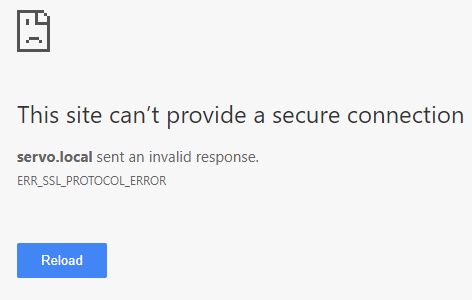
That's right, it is set as 'yes' Also correct, I am clicking on the Open Web UI link. The URL is - https://servo.local:6237/ Here is the screenshot
-
Hello I just installed the new version, and i cant access the web ui. I get - > ERR_SSL_PROTOCOL_ERROR I run unraid on port 447 regards Brett
-
This is great! I've always wondered if something like this existed, i kept thinking about setting up old Cisco routers to get better performance. but this makes more sense.
-
What about if they get hot? Mine slow down / throttle a lot if they get too hot (after transferring 10s GBs of data)
-
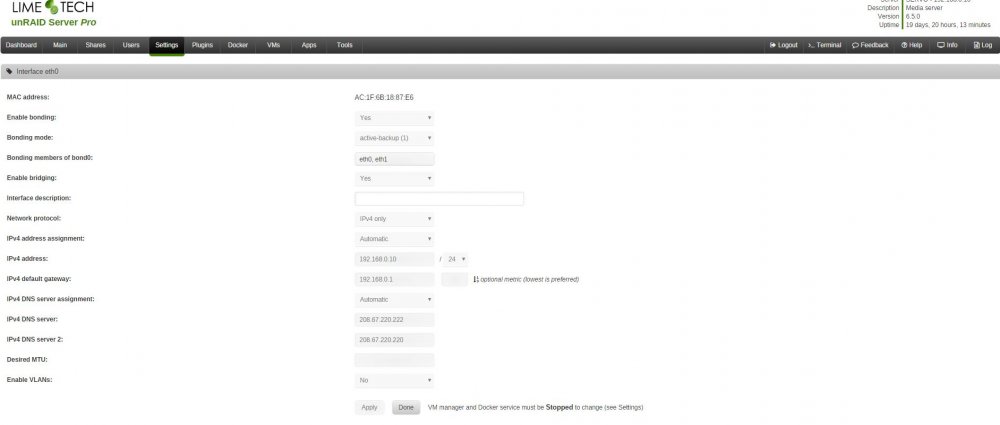
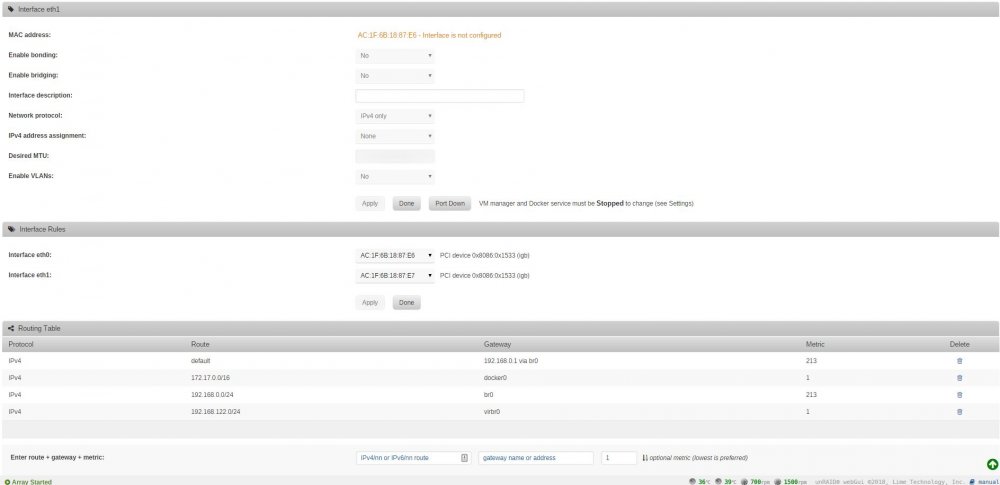
I went to set this up, but dont have Custom br0 in my network type on the docker image page. I have a supermicro board with bonding enabled. Here are screen shots of my settings. I also have 2 Ubuntu VMs running. Any suggestions on what i need to configure?
-
disregard, something to do with cookies, i cleared them and now its ok thanks! and sorry for the trouble, hate it when its something so simple
-
of course......... explorer works fine.......! any reason you could think of why it's cracking it with chrome?
-
Hi all, I am trying to get Duplicati working, however upon creation, when i go the the web ui the page just sits there spinning logs below https://pastebin.com/MmnC43Gv https://pastebin.com/dzVX6Ld3 https://pastebin.com/hudfi9EL
-
Just thought i would add in some more info, in case others have a case like mine I initially said my hosting / domain provider didnt have an API for DNS. That is because i didnt understand what cloudfare was. So, for anyone who isnt aware, you can signup for a free cloudfare account, change your nameservers to point to cloudfares, and then use the cloudfare API to auto generate certs with the dns challenge. This is what i have setup at the moment, and hope to do in the future once/if the docker is updated to use the dns api scripts.


