





aaronwt
Members
-
Joined
-
Last visited
Everything posted by aaronwt
-
I have three unRAID setups now with at least 49TB each.
-
Glad to see people are still using these. I got one years ago and I wish I had picked up a second one back in 2013. Then I could have replaced one of my unRAID setups using the oldest hardware. I also use four external enclosures with mine. And has been working great for many years.
-
Because I have content split up between them. Well the 53TB one is 90% full of BD ISOs. Then I have UHD MKVs, 3D BD ISOs, Anime, TV shows, PC backups etc on the other unRAIDs. Plus I put these together back in 2011/2012. So most of my drives are 2TB and 3TB drives. And more recently I've installed some 4TB drives to replace the 2TB drives. But even that took me three years. I bought a bunch of 4TB drives in 2015 and never got around to installing them all. I still have a couple more left to put in my unRAID 3. I would love to have one unRAID setup, with all internal drives of 10TB to 12TB in size. But that is cost prohibitive considering all the drives I currently have in use. In 2009 I started with a Windows Home Server using external port multiplier cases and around thirty drives. And when I switched to using unRAID I continued using external enclosures. 53TB unRAID2--45TB unRAID3--35TB unRAID1a
-
I use Spin up groups with all three of my unRAID setups. Since I mainly use external port multiplier housings for all my drives, they will all spin down in the enclosure. No need for the drive to be spinning unless I've reading from it or writing to it. Otherwise it's just producing needless heat and needlessly using power. I'm using fifty seven drives between my three unRAID setups. 53TB unRAID2--45TB unRAID3--35TB unRAID1a
-
I use 4GB in my unRAID 1a, 2GB in my unRAID 2, and 2GB ECC in my unRAID 3. I only use them for serving up movies, shows and other files on my network. So even 2GB is way more than enough for what I use my three unRAID setups for. 53TB unRAID2--45TB unRAID3--35TB unRAID1a
-
I've now precleared seven drives(six Seagate 3TB and one WD 3TB) with this Preclear Plugin with two unRAID setups. It worked great with all of them.
-
I've also installed this on my unRAID2 setup. I've finished pre-clearing three drives in both systems and everything seems to have worked great.
-
Thanks.. I just loaded this on my unRAID1a setup. It seems to be working fine so far. I picked up six of the Seagate 3TB drives for $75 each from Newegg last week. In the past I typically just loaded my drives without testing them and didn't have any problems. But it seems like the drives today are less reliable than in the past. So I wanted to start using the pre-clear script. And this plugin certainly makes things much easier. Thanks!
-
Not sure why you think that. 24TB isn't really all that much these days ... on 4 6TB drives. A small 2nd UnRAID server with that much (or more capacity); and it takes ~ 5 minutes of "your time" to backup your entire collection [Clearly the copy would take a few days cross the network, but that doesn't require any action on your part except to initiate the copy.] He's talking about backing up onto actual DVD's. Would take forever. Beyond that, its actually cheaper to back it up onto other hard drives. How could you even back up to DVDs? Even BDs only have a paltry 50GB of storage and are very slow. But DVDs are pathetic with only 8.5GB of storage and even slower. Even back in 2001/2002 that wouldn't have been enough for me to store my HD recordings. I recorded 40GB to 60GB every week back then.
-
Just use external enclosures. I am currently using four external enclosures with my N54L. Each enclosure has the capability to have four drives. And I can add a fifth enclosure to house more drives. I am currently using five drive in my Microserver and thirteen drives in the fours external enclosures. I have a Rosewill RC-218 port multiplier PCIe x4 in the Micro server that gives me four ports that can be used with enclosures that are port multiplier capable. I only wish I had jumped on the N54L deal last week that Newegg had for $200 for the 4GB version. With another $30 off by rebate. I would have liked to setup a fourth unRAID server and eventually have it replace my second one which uses more power than I would like.
-
Yes. Resulted in quite an increase in transfer speed, mainly when copying data to the microserver. Reading was fast enough without the "fix". So what are new speeds now? With my N54L even copying content to my parity drive is limited in speed. I think it's only around 50MB/s. Where can I find more info about this script?
-
There's a whole level of virtualization going on there with FUSE. What is the difference in CPU between the two machines? What are the bogomips on the machine(s) you are comparing. How much ram is in each machine? do you have the himem is dirtayable option set? My unRAID1 setup has a 2.4 Ghz(or 2.6Ghz I always forget) single core Athlon CPU, but with 4GB of memory. My unRAID2 setep has a dual core 2.8 Ghz Athlon but with 2GB of memory. Both machines have dual channel memory while I guess my N54L is only single channel since it's got only one 2GB stick. I had thought about getting another 2GB stick before I opened it up but I figured my other machine was perfectly fine with only 2GB of memory so I figured it wasn't needed.
-
I thought I was getting faster results to cache drive then that on my N40L but I'm at work currently and can't test for you. I will see when I get home tonight. Maybe someone else can confirm earlier. Writing to a user share which writes to the cache drive I get 50-60MB/s. Writing directly to the cache drive share and not through the user share file system I get 75-85MB/s. This was using Windows Explorer in a Windows 7 VM from one unRAID server to the N40L unRAID server. I copied a BluRay folder of a movie (34.8GB) - "2001 A Space Odyssey". The cache drive is a EADS 1.5TB green drive and the rest of the drives in the array are WD 2TB Reds. Thanks. My N54L finished the parity sync last night. Now when I write to a share that uses the cache I'm back to only 50MB/s write speeds. If I write directly to the cache drive is up to double that. Why is there such a disparity between the two? So it sounds like when I had all my drives in the array in external enclosures everything was fine. But I don't like those slow speeds to a share that uses the cache drive. Since my other unRAID setups can get much faster speeds in the same situation. I just don't understand why the N54L is so much slower.
-
OK, I forgot that I mostly had test data on my unRAID3 setup. I only had around 100GB of data I needed to keep, so I copied that to another location and started from scratch. I'm using a Seagate 2TB 7200 rpm drive for parity, three 5900 RPM Seagate drives for the array, and one Seagate 5900 rpm drive for the cache drive. All the drives that are in my N54L enclosure. I don't have any of my external enclosures turned on. So while it's doing the initial parity sync(I'm getting 107MB/s parity sync speeds) I'm able to copy files directly to the cache drive and I'm getting between 70MB/s and 110MB/s write rates and between 90MB/s and 110MB/s read rates. It is fluctuating alot between those speeds but it is much higher than before. I'll need to gradually add enclosures and drives to see where the copy speeds start to drop down. So my next step is to move the drive I was using as the cache drive before into a slot in the N54L to see what speeds I get. Then if that goes well, I'll need to add one enclosures after another, testing speeds after each one is added.
-
My BiOS is upgraded. I turned on the write cache when I had a parity and a couple of array drives inside the N54L. It made a big difference in the parity check then but I never tried it with a cache drive. Now that I have around eighteen array drives i am not going to get 100MB/s+ parity check speeds. So with the write cache on or off the speeds are the same. It's just more consistent with it off now. But with the cache drive I've tried an old 750GB WD green drive and a 1TB 7200 rpm Seagate drive. Both of these drives get much faster speeds from my first unRAID setup. The drives are fine. But for some reason my write speeds over the network aren't exceeding 50Mb/s to the cache drive. When I pick up a few more drives I'll stick some in the N54L to test it out with just a parity, cache and three array drives to see what speeds I get. But until I find some drives on sale for a great price I'll need to wait and just live with the speeds.
-
I tried turning the write cache off. When I initially turned it on I only had drives in the internal drive bay, but I was only looking at speeds during a parity check. Not transfer speeds since I was transferring without a cache drive. I wish I had checked out transfer speeds earlier with a cache drive. Anyway I turned off the write caching in the BIOS. The write speeds are still on 45MB/s to 50MB/s to the cache drive. But at least they don't fluctuate alot like they did with write caching on. These write speeds are slower than I would like. I would prefer to get at least 60MB/s write speeds for when I'm ripping BD titles. So I could rip two at a time. Otherwise with the speeds I'm getting I need to only rip one. The read speeds are 75MB/s to 85MB/s from the cache and array drives so I know the network connection is capable of faster speeds, I just don't understand why the write speeds are so slow over the newtork.
-
What speeds are people getting to the N54L when writing to a cache drive over the network? I recently setup a cache drive and I'm only getting around 45MB/s to 50MB/s write speeds. The read speeds are OK but it seems to be writing slower than I would expect. The same cache drive in my unRAID1 setup gets write speeds of 70MB/s to 75MB/s. So I'm curious if these speeds are normal. I've tried the cache drive in a drive bay inside the 54L and also in a couple of my external enclosures. It made no difference in the speeds. Is there a setting I need to change in the BiOS to increase the speeds or is this normal?
-
That was the idea I had a while back. BTW there is a particular syba card that allows 4 ports on a PCIe x1 slot. It has 2 eSATA ports and 2 internal SATA ports. It's no longer available on the regular market. I found 2 on the secondary market. It worked for me. It wouldn't be the best performer, but it sure would max out ports !!! As far as the opening, there's enough room in backup of the upper metal to drill and nibble space for eSATA ports. You would need to evacuate parts to insure no shavings fall on the motherboard, but it could give you 6 or 8 ports from the x4/x1 slot. A x1 card will not work well for multiple enclosures(and least not multiple bay. multiple enclosures) In my testing the most drives I will use on a x1 card is four(which for me is one enclosure with four drives in it) and with a x4 card I don't like to exceed 16 drives(four enclosures). Although I have 17 drives in my unRAID1 attached to a rosewill card. But it is noticeably slower during the parity check because of that. I've decided to just use a 4 bay enclosure with only two drives in it for the built in eSATA port. Then I will be moving my five bay enclosure from my unRAID1 and move that to my unRAID3 while moving a 4 bay enclosure to unRAID1. Then I need to drop the cache drive on unRAID1 and I won't have a cache drive on unRAID3 either. Then I should be able to get 1 parity drive and 23 arrays drives in the setup. Although I have found the N54 is is kind of picky with my RC218 and the eSATA port. I could not use five MediaSonic enclosures and I could not use five Sans Digital enclosures. I had to use a combination of both for it to boot and see all the drives. So I'm not sure what will happen when I move over the 5 bay Sans Digital enclosure. Although I had the same issue with my unRAID2 setup. I have no idea why, but I did not have the issue with my first unRAID build.
-
But during a parity check or drive rebuild, it will still be accessing all the drives at the same time. Accessing one drive at a time is no problem, like when writing data to the array. I tried staggering the drives in my first unRAID setup but the difference in my use was minimal. I ended up using a cache drive with that setup. With my second unRAid setup I put all the drives in order of each enclosure. I'm not using a cache drive in that setup and have been pleased with the speed results. While the driver attempts to read the drives, I think it has to read each drive sequentially. So by ordering the drives to access the channel once every round vs accessing the channel 4 times one behind the other may alleviate contention for the channel. There was someone who did this years ago when port multipliers were new and he said it gave him a slight increase in speed. YMMV. It may not be worth it considering how you have to arrange the drives. I know when I tested PMP support using 4 drives simultaneously, I got something like 15MB/s per drive. In comparison using the silicon image, 1 drive was 120MB/s 2 drives were 60MB/s, 3 drives were 40MB/s and 4 drives were 30MB/s. There is still the option of putting the 2 eSATA brackets ports on the back of the unit after it is nibbled out. You may be able to fit 4 there. I haven't measured it. That's what I did with my old chenbro chassis years back. I currently have five eSATA ports on the back. Getting four from my Rosewill RC218. Two external on the card and then I have two more from the two internal ports running to a two port bracket. Where would another eSATA port come from? Or would I need to create an opening to run the two internal ports from the Rosewill and then stick a card in the PCI express x1 slot?
-
But during a parity check or drive rebuild, it will still be accessing all the drives at the same time. Accessing one drive at a time is no problem, like when writing data to the array. I tried staggering the drives in my first unRAID setup but the difference in my use was minimal. I ended up using a cache drive with that setup. With my second unRAid setup I put all the drives in order of each enclosure. I'm not using a cache drive in that setup and have been pleased with the speed results.
-
I just started using my eSATA ports on my N54L. From my Rosewill RC218 it is fine since that uses FIS–based (frame information structure) switching. But from what I've read it seems that the built in eSATA port uses Command-based switching so it can only access one drive at a time, not concurrently like with FIS based switching. I was wondering why things were going so slow with the four bay enclosure I connected. With four drives on the eSATA port it really slows things down if all drives are going to be accessed concurrently like during a parity check in unRAID. With one drive of course it's fine, and two drives is not bad, but once you get to three drives it really slows things down. So if I decide to use the built in eSATA port in the future, I will limit it to two drives at the most. Then I will need to take a 5 Bay enclosure from my unRAID1 to use with my unRAID3 to connect to the RC-218. Then I should be able to hit the max of 23 drives in the array. I'll have to see though how much things slow down with two drives on the built in eSata port. When I was clearing one 2TB drive it was going at just under 3 minutes for each percent. When I tried two 2TB drives that increased to around 4.5 minutes for each percent. So I'm not sure what speeds I will get from a parity check.
-
Here are a couple of pics of it.
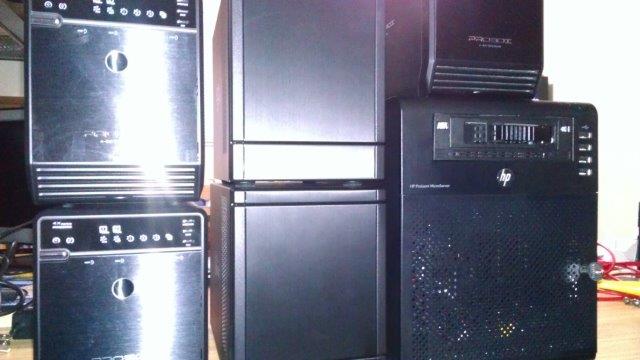
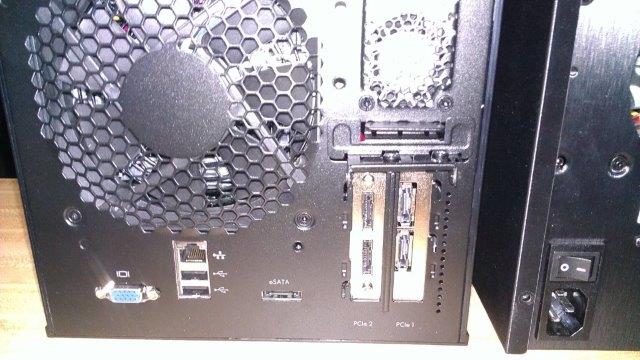
-
I'll need to take some tomorrow.
-
Yes I have all five of the enclosures, but I'm short several 2TB drives to fill all of them. When I tested the system to see if it would see all of the drives I used some old 1TB and 750GB drives.
-
I finally got my N54L setup completed today. I put in a Rosewill RC218 port multiplier card. So I tested it by connecting four, 4 bay enclosures to the Rosewill card and one, 4 bay, enclosure to the eSata port. All twenty external drives came up in unRAID. Plus I have a drive connected to the on board sata port. So this should work with up to twenty five drives connected to my N54L. Now I just need to get a pro license setup for my N54L and I can start off with five drives internally and fifteen drives in four of the external enclosures.

