





Everything posted by YellowCactus
-
There is only 1 person that I have met that uses Unraid and that is because I told him about it. Early this year he had a drive die and the contents were emulated. He did not think it was a big deal and had it emulated for 8 months (until a few weeks ago). His system consisted of several 3 TB drives and was planning on upgrading to single 14 TB parity and a single 14 TB array drive. His plan was to fix the bad drive AFTER he replaced/upgraded his parity to a 14TB. When I found out, we spent a few hours getting his array back online and also explained that replacing his parity drive while emulating a disk would of caused him to loose all of the contents on said disk. While emulating the contents of an array drive for 8 months is very impressive, he does not understand the severity of his situation and was extremely lucky. Maybe coming from some members here would help him understand just how lucky he was.
-
Wanted to add my experience here. I was not sure if --ignore-inode was going to work because of this statement the inode ids are generated on start/mount. I was not re-starting or re-mounting anything and backups were slow between runs. I believe this statement is true from the Restic documentation that using inodes on FUSE systems are simply unreliable: The option --ignore-inode exists to support FUSE-based filesystems and pCloud, which do not assign stable inodes to files. Here are my stats that prove, --ignore-inode is required for using restic for any Unraid file shares using the mount /mnt/user . I went from almost 2 hours to for subsequent backups from 178,000 files (~1TB), to 4 minutes Command: restic --verbose --tag vault --exclude-file $excludefile backup "/mnt/user/vault" Results restic thinks 90k files were changed, but running a restic diff proved that they were not. start backup on [/mnt/user/vault] scan finished in 82.535s: 178532 files, 973.427 GiB Files: 0 new, 90296 changed, 88236 unmodified Dirs: 0 new, 1530 changed, 9316 unmodified Data Blobs: 0 new Tree Blobs: 1504 new Added to the repository: 89.162 MiB (28.621 MiB stored) processed 178532 files, 973.427 GiB in 1:46:22 Command: restic --ignore-inode --verbose --tag vault --exclude-file $excludefile backup "/mnt/user/vault" Results start backup on [/mnt/user/vault] scan finished in 49.176s: 178533 files, 973.427 GiB Files: 1 new, 1 changed, 178531 unmodified Dirs: 0 new, 1533 changed, 9313 unmodified Data Blobs: 2 new Tree Blobs: 1507 new Added to the repository: 91.126 MiB (29.021 MiB stored) processed 178533 files, 973.427 GiB in 4:06
-
@mtongnz, how do you use code-server to edit/manage your docker compose files from the plugin? Since its all owned by root, when I pass /boot/config/plugins/compose.manager/projects to the container, it does not have permissions to see it. When I change PUID/PGID to 0, it works, but I'd like to find a better way.
-
Inateck KU5211E works with Unraid. As of this post I am on 6.12.8 and installed it yesterday. Passthru each port to VMs using USB Manager plugin. I purchased it directly from them https://www.inateck.com/products/pcie-to-usb-extension-card-with-3-usb-a-ports-and-2-usb-c-ports-ku5211e_red
-
By default there is a "Bridge" Network Type when creating a docker that will use the UnRaid's host IP address along with your port of the container. i.e. Unraid - 10.0.1.5 - br0 Container#1 - 10.0.1.5:6600 - bridge Container#2 - 10.0.1.5:6601 - bridge Most people and ports on here talk about adding a VLAN Network Type so that you can leverage a VLAN, for example, and set different IPs for each containers. i.e. Unraid - 10.0.1.5 - br0 Container#1 - 10.0.2.5:6600 - br0.2 Container#2 - 10.0.2.6:6600 - br0.2 I am trying to figure out how to create another "Bridge" Network Type but specific to a VLAN subnet. So I can use the same IP address but different ports for a set of containers. i.e. Unraid - 10.0.1.5 - br0 Container#1 - 10.0.2.5:6600 - bridge br0.2 Container#2 - 10.0.2.5:6601 - bridge br0.2
-
Just an update, there were no problems with the drive. Something odd must of happened that caused the error. But the drive was put back in with no issues. However, I did just upgrade to 2x Iron Wolf 8TB (CMR) drives so all of the WD 3TB & 4TB Reds (SMR) were removed.
-
I am in the process of upgrading my Parity and Array drives from 3TB & 4TB WD Red (SMR) to Iron Wolf 8TB CMR drives. After installing the 8TB and running parity checks and zeroing the array drives, I am getting hard drive temperature alerts between 45C and 49C for the Iron Wolfs which I never had with the WD drives. Most of my drives live in a Norco SS-500 cage. The other is a Rosewill RSV-SATA-Cage-34. I only have 2x 8TB Iron Wolf drives and 2x SSDs in the Norco bay. I began researching and scanned through a lot of the posts regarding the Norco SS-500 and mostly all of the information was regarding adding a quiet fan. My concern is not noise but cooling. I found a good blog post -- http://greenleaf-technology.com/new-norco-ss-500-5-in-3-drive-cage-review/ and the stock fan is a KENON Motors, DC Brushless, Model KMF08DHHD1B which I cannot find any specs on. Another commenter said their stock fan was a Delta Electronics, model AFB0812H. Which those specs are "12 volts, with an operating range of 7 V to 13.8 V, 3000 RPM, 35.31 CFM, maximum air pressure 4.04 mm of water. Noise rating of 31 db". With those specs not even the Noctua NF-A8 PWM has that high of cooling rating: mm --> 80x80x25 RPM --> 2200 dB(A) --> 17,7 m³/h --> 55,5 (32.67 CFM) mm H2O --> 2,37 I believe I have the latest Norco SS-500 with the plastic back housing. UPDATE: I took apart my Norco SS-500 and found that the fan had been previously replaced with a Noctua NF-R8 (specs below). I ordered a Bgears b-BlasterPWM 80mm which maxes at 98 CFM and 9.5mmH20 static pressure. I will be drilling a hole in the back of the SS-500 and controlling the fan from the motherboard. Noctua NF-R8 mm --> 80x80x25 RPM --> 1800 db(A) --> 17,1 m³/h --> 53,3 (31.37) mm H2O --> 1,41 plug --> 3-pin
-
Thanks for the feedback. I rebooted the server and ran a short and extended SMART on the drive. Each completed with out errors. I put the drive back in and running a Parity-Sync now. I will check the cables but I believe I have the Dell H310 with a SAS to SATA breakout cable so I cannot replace just one. Here's my diagnostics at the current moment. Can you tell me what you checked in there or how to learn how to read the diagnostics for failures like this? freddie-diagnostics-20230706-0716.zip
-
Hello, I only have 1 parity disk and I received an alert saying it is in an error state. I tried running a SMART check but it is not working. I am guessing its due to it being disabled. Attached is my diagnostics. could someone take a look and let me know what I should do to remedy this? Thank you! freddie-diagnostics-20230705-1421.zip
-
Hi @JorgeB, I appreciate the explanations! So far everything is working normally. I recreated all of my dockers using the Previous Apps feature and selecting all at once. I had a backup of libvirt,img file. I put in your recommendationsa and all is good. Syslog looks OK. A btrfs dev stats -c /mnt/cache renders no errors: [/dev/nvme1n1p1].write_io_errs 0 [/dev/nvme1n1p1].read_io_errs 0 [/dev/nvme1n1p1].flush_io_errs 0 [/dev/nvme1n1p1].corruption_errs 0 [/dev/nvme1n1p1].generation_errs 0 [/dev/nvme0n1p1].write_io_errs 0 [/dev/nvme0n1p1].read_io_errs 0 [/dev/nvme0n1p1].flush_io_errs 0 [/dev/nvme0n1p1].corruption_errs 0 [/dev/nvme0n1p1].generation_errs 0
-
Hi @JorgeB Thank you, before today I was aware of the utilities under "Cache Settings" to rebalance, scrub, etc. I will have to research a bit to see when to use them. All schedules for balance and scrub are disabled. Regarding System Share, I have updated the "Enable Copy-on-write" setting to AUTO, it was on "NO". What do you mean this cannot be corrected? Also, do you know what the recommendation is for "Use cache pool" for the System Share? Should it be "ONLY"? Under "Syslinux Configuration" this is my new setting. I believe I added "" for GPU passthrough some time ago. unRAID OS Label (Syslinux Configuration) kernel /bzimage append pcie_acs_override=multifunction initrd=/bzroot nvme_core.default_ps_max_latency_us=0 pcie_aspm=off Thank you I will be rebooting shortly (waiting for Parity-Check to finish)
-
I rebooted my server and when it came online, I lost my docker.img file and my /mnt/cache/system/libvirt/libvirt.img file. The system said that the Docker service could not start and the VMs service could not start. I zeroed the errors on the pool using btrfs dev stats -c /mnt/cache. When I deleted the docker.img file and recreated it the corruption_errs value started climbing from 0. After I recovered my libvirt.img file and started the VMs again the corruption_errs continues to climb. [/dev/nvme1n1p1].write_io_errs 0 [/dev/nvme1n1p1].read_io_errs 0 [/dev/nvme1n1p1].flush_io_errs 0 [/dev/nvme1n1p1].corruption_errs 0 [/dev/nvme1n1p1].generation_errs 0 [/dev/nvme0n1p1].write_io_errs 0 [/dev/nvme0n1p1].read_io_errs 0 [/dev/nvme0n1p1].flush_io_errs 0 [/dev/nvme0n1p1].corruption_errs 103148 [/dev/nvme0n1p1].generation_errs 0 unraid-diagnostics-20221121-2238.zip
-
Hello, I am having a CACHE POOL problem and the great Fix Common Problems plugin found an error that my /var/log/syslog was filling up. The 2 nvme drives are a few weeks old. When I went to replace my old cache pool (2 SSDs), the replace one at a time method did not work and I ended up wiping my cache pool and starting fresh. Now this error surfaced from what I can tell on 11/19/2022. I found this post but it does not show what to do if its not a cabling problem (no cables for NVMe). here's the results of btrfs scrub status /mnt/cache: UUID: 92b897fd-c2ab-43b4-8adc-7c53792bcd7a no stats available Total to scrub: 280.83GiB Rate: 0.00B/s Error summary: no errors found here's the results of btrfs dev stats -z /mnt/cache: [/dev/nvme1n1p1].write_io_errs 0 [/dev/nvme1n1p1].read_io_errs 0 [/dev/nvme1n1p1].flush_io_errs 0 [/dev/nvme1n1p1].corruption_errs 0 [/dev/nvme1n1p1].generation_errs 0 [/dev/nvme2n2p1].write_io_errs 35301385 [/dev/nvme2n2p1].read_io_errs 2140829 [/dev/nvme2n2p1].flush_io_errs 1644451 [/dev/nvme2n2p1].corruption_errs 0 [/dev/nvme2n2p1].generation_errs 0 Last few lines of syslog: Nov 21 21:20:16 freddie kernel: btrfs_dev_stat_print_on_error: 42 callbacks suppressed Nov 21 21:20:16 freddie kernel: BTRFS error (device nvme1n1p1): bdev /dev/nvme2n2p1 errs: wr 35250544, rd 2106592, flush 1643107, corrupt 0, gen 0 Nov 21 21:20:16 freddie kernel: BTRFS error (device nvme1n1p1): bdev /dev/nvme2n2p1 errs: wr 35250545, rd 2106592, flush 1643107, corrupt 0, gen 0 Nov 21 21:20:16 freddie kernel: BTRFS error (device nvme1n1p1): bdev /dev/nvme2n2p1 errs: wr 35250545, rd 2106593, flush 1643107, corrupt 0, gen 0 Nov 21 21:20:16 freddie kernel: BTRFS error (device nvme1n1p1): bdev /dev/nvme2n2p1 errs: wr 35250546, rd 2106593, flush 1643107, corrupt 0, gen 0 Nov 21 21:20:16 freddie kernel: BTRFS error (device nvme1n1p1): bdev /dev/nvme2n2p1 errs: wr 35250547, rd 2106593, flush 1643107, corrupt 0, gen 0 Nov 21 21:20:16 freddie kernel: BTRFS error (device nvme1n1p1): bdev /dev/nvme2n2p1 errs: wr 35250548, rd 2106593, flush 1643107, corrupt 0, gen 0 Nov 21 21:20:16 freddie kernel: BTRFS error (device nvme1n1p1): bdev /dev/nvme2n2p1 errs: wr 35250549, rd 2106593, flush 1643107, corrupt 0, gen 0 Nov 21 21:20:16 freddie kernel: BTRFS error (device nvme1n1p1): bdev /dev/nvme2n2p1 errs: wr 35250550, rd 2106593, flush 1643107, corrupt 0, gen 0 Nov 21 21:20:16 freddie kernel: BTRFS error (device nvme1n1p1): bdev /dev/nvme2n2p1 errs: wr 35250551, rd 2106593, flush 1643107, corrupt 0, gen 0 Nov 21 21:20:16 freddie kernel: BTRFS error (device nvme1n1p1): bdev /dev/nvme2n2p1 errs: wr 35250551, rd 2106594, flush 1643107, corrupt 0, gen 0 Nov 21 21:20:17 freddie kernel: BTRFS warning (device nvme1n1p1): lost page write due to IO error on /dev/nvme2n2p1 (-5) Nov 21 21:20:17 freddie kernel: BTRFS error (device nvme1n1p1): error writing primary super block to device 2 unraid-diagnostics-20221121-2118.zip
-
Thanks @DeadMode. I was just wondering if the "PRO" variant had this issue as well. I do not have the ability to hook it to a windows system, unless I buy an NVMe to USB adapter. In all my builds I always use Samsung, but is there a better NVMe to use for unRAID instead of dealing with overheat issues?
-
This is not a docker issue. I had the same issue. I have thousands of photos and video and wanted to use MySQL (MariaDB). I tried to install Digikam on my Windows VM and I get the same error. It looks to me like its a Digikam issue.
-
For anyone having this issue on the BRAVE browser, disabling the Brave Shield for the unraid server URL resolved the problem. Found this on reddit
-
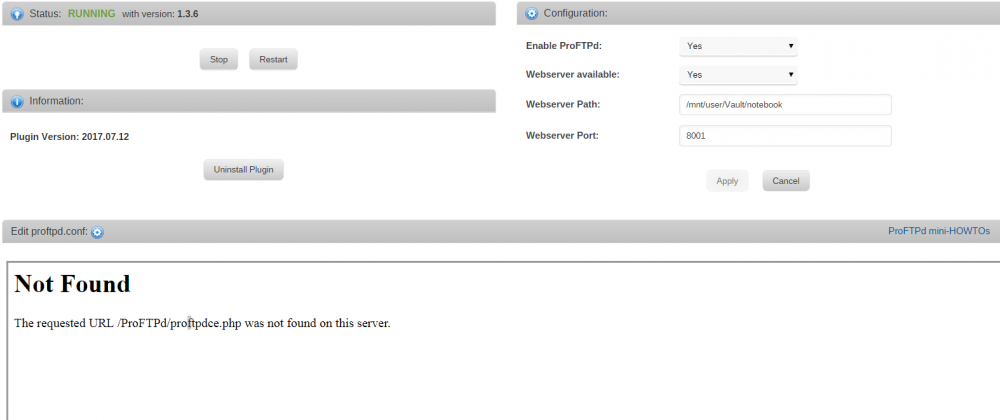
@SlrG Thank you for clarifying. I tried to search this topic for the keywords but couldn't find anything. I double checked and I am using version 2017.07.12. I just installed it yesterday. ConfEdit.php is being populated on the Apache webroot folder but it looks like there are still references to the old variables.
-
I am using the apache-php docker and getting errors when trying to edit the config file. It is looking for a proftpdce.php file that does not exist. This happens after selecting Check & Save.
-
Hi Squid, Today I actually got the notification for a successful CA Backup, however, when I tried to log in this morning the WEB UI was frozen. I couldn't SSH in and CA Backup was the only thing that runs each Monday morning. I have attached the log. What does CA Backup do after a successful run that would cause the system to freeze? backup_20170403.7z
-
Thanks for the input and taking a look. Hopefully some explanation surfaces in the near future. Aside from a full Ubuntu server, unRaid is the only solution that fits my needs. I'll see if it stops on Emby again next week and if so I may remove that docker. I'll see if I can get further logs and information on this, maybe through Fix Common Problems and/or the local monitor. I haven't had a monitor attached for any of these incidents. For me it needs to be plugged in when I start the server or it won't recognize it later. It's funny that you mention bringing it to church, I actually help out with the tech team at church and recently convinced the sound bar tech to go unRaid.
-
Here you go, I had to screenshot it from my phone.
-
Hi Squid - I edited my post and uploaded the appdata log above to keep it together. I checked out the log and it doesn't really correspond with the syslog. According to appdata log, it looks like it froze when backing up Emby. FYI - @Holbert, I started troubleshooting mode via fix common problems and couldn't get it to occur during a force backup. If these logs don't show enough data to warrant a cause then I will enable troubleshooting mode until it occurs again. @Squid, if you need troubleshooting logs from fix common problems to help find and fix this issue, let me know. Otherwise I may just remove Emby to see if it occurs again.
-
Hi Squid, It looks like the CA Backup plugin is causing my system to freeze because it does not finish and thus does not restart the docker applications and web ui. Attached is the syslog from this morning. My CA Backup runs every Monday morning at 3AM. You can review the successful run from last week 03/20 @ 3AM. This morning it stopped after "Mar 27 03:40:01 freddie root: mover finished" command. This is not the first occurrence, before when my system was an i3, I would not be able to log in after a CA Backup and copy the log. I would always have to power down the server manually and start it backup. This is the first time it froze with my new i5 but I was actually able to SSH in for the first time and grab the log. edit (update): The unraid will not response to any shutdown, reboot, or powerdown command from SSH. Each command is written in the log but the system still stays in the hanging state. edit (update2): Added community appdata backup log for Squid Thank you for your help. System i5-6600 Asus H170-Pro 3 Gaming 24 MB RAM unRaid 6.3.2 (i think this is the version, it is the newest) syslog_2017-03-27.txt syslog_2017-03-27-7_after startup.txt appdata_backup_20170327.zip


