





steve1977
Members
-
Joined
-
Last visited
Everything posted by steve1977
-
It stops with below screen. Any ideas?
-
Any more thoughts?
-
Thanks. There is progress 🙂 I can now start the VM. However, I cannot access the VM via splashtop after starting. I am running it headless, so no other way to check what's going on. Any idea how to troubleshoot?
-
Unfortunately still not 😞
-
Unfortunately, still gives me the same error (although what feels like after a much longer time).
-
Attaching diagnostic log tower-diagnostics-20230212-1355.zip
-
Nope, it does not show up. And when I restart the server, it still shows under historic with the black cross.No, cannot attach. They're part of the array and active. That's also why they have the "green light" you can see at the screenshot above. I think it may be because I did "new config". Maybe some order or so changed?I am still stuggling to get it running. Let me share what I did and the error message I am seeing: 1) I formatted the disk and set as "passed through" in unassigned devices 2) I bind the disk to vfio under system devices and restart Unraid 3) I add the disk under "other PCI devices" to the VM Cannot start the VM and see following error messasage: "Execution Error: internal error: process exited while connecting to monitor: 2023-02-[removed] qemu-system-x86_64: -device {"driver":"vfio-pci","host":"0000:06:00.0","id":"hostdev2","bus":"pci.6","addr":"0x0"}: vfio 0000:06:00.0: failed to add PCI capability 0x11[0x50]@0xb0: table & pba overlap, or they don't fit in BARs, or don't align" Any thoughts?I never disabled any of them. At least I didn't do manually. Maybe Unraid did? Also, they still have the "black cross" after shutting downa and rebooting Unraid.Yes. Plus another 4 that are at the bottom (didn't fit the screenshot). The issue is with these disks. DOn't think they should be "black tick", but shouldn't show up or also be deletable.I cut out the serial numbers, but below should help?
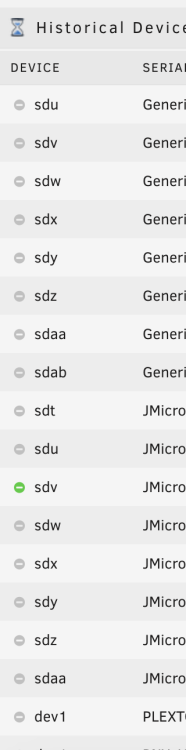
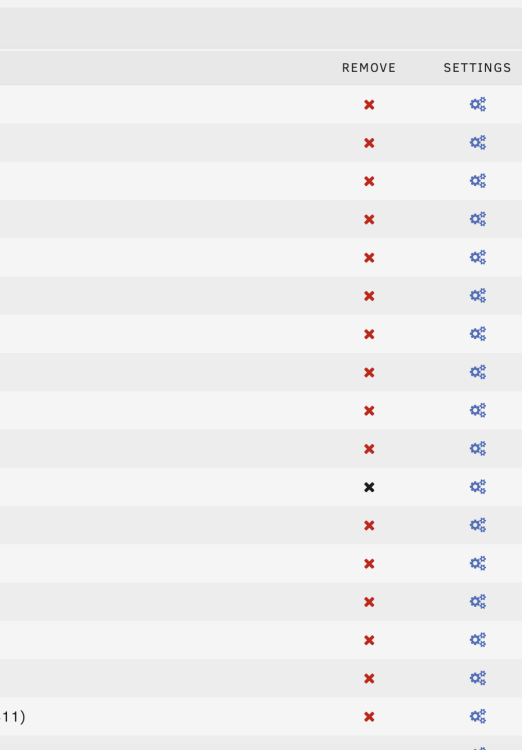 Here we go. To the right is a black cross, so I cannot remove it. This disk is part of the array though.
 It works after restarting the server.Thanks. And when you are at it, there is another thing to check out. You kindly included a feature that prevents to remove disabled disks from historic. However, now there are many disks now that are actually part of the array (active), but show up under historic disks (and cannot be deleted). Not sure why, but it could be because they were mapped under a different drive name before and now no longer show up.I have an unassigned device that used to be formatte as XFS. I an trying to format it as NTFS, but unsuccessfully. See below what I did: 1) Remove partition 2) Select Format and select NTFS. Confirm with "Yes" 3) FS now shows as "XFS" and it is not possible to mount the disk Happy to provide logs if helpful. Any thougths appreciated!Connecting 8 HDs in a USB enclosure. Has worked for many years, but now stopped working. Somehow, the disks no longer get detected. Anything you can see in the logs? Thanks for your help! tower-diagnostics-20230208-2350.zipGreat, thanks!Thanks a lot. Maybe a stupid question. Does the secondary disk that I'd like to passhtrough to a VM directly need to be formatted as NTFS or can be in XFS?Great, thanksThat doesn't read ideal. People delete "historical devices". And in this case, it seems to require to open the server case and unscrew a harddisk?Thanks, let me understand option 2 as this is what I was trying to do. "Pass the disk" means to enable to passthrough featiure in UD?Yes, I detached it. Seems I shouldn't have done this. How to re-attach a detached disk without historical devices?


