





steve1977
Members
-
Joined
-
Last visited
Everything posted by steve1977
-
It's probably indeed what went wrong. I had ran "new permissions" on my appdata folder, which was probably a mistake. Any idea how I can restore the respective docker permissions for each container? Will this give me my settings back?
-
If so, any idea how i can fix such permission issues? Or otherwise “safe” these containers.
-
I restarted. It seems that not only dockers have been impacted. See attached diagnostic log and dockers logs for the impacted ones: Roonserver /run.sh: line 39: /app/RoonServer/start.sh: Permission denied Mylar 3 Loads up, but all settings are gone Komga ERROR 1 --- [ main] o.s.boot.SpringApplication : Application run failed Plex Allows me to select user, but then displays "no content available" Any ideas? tower-diagnostics-20220405-2322.zip
-
Thanks. Unfortunately, my docker containers don't work. Getting error message "docker AppFolder /config is not writable" in some of the logs. Will send diagnostic log shortly.
-
Hooray!!! Thanks a lot. This indeed finally solved my issue 🙂 Thanks a lot for your help! Any idea why this wasn't set up properly and anything else I should check whether it is properly set up? Seems I can now do some cleanup that my default locations are set properly. I believe they typically point to user shares? What are the Unraid defaults for the following folders? Docker vdisk location Default appdata storage location Libvirt storage location Default VM storage path Default ISO storage path Any other docker or VM related default path? Where is the /user/system and /user/domains set and what is it for?
-
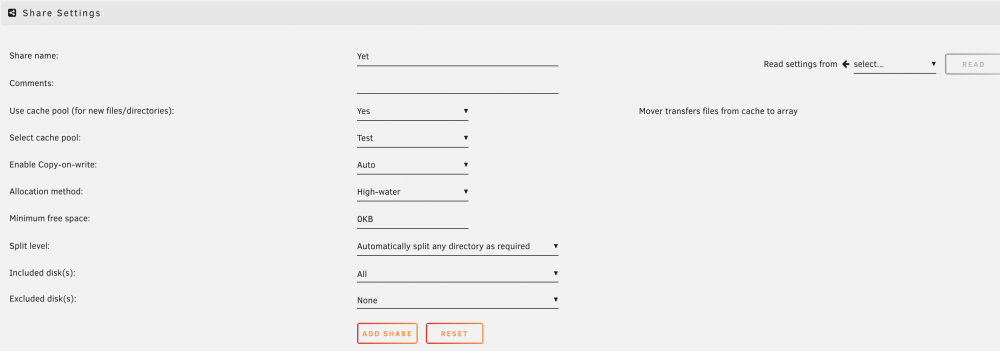
Thanks again @trurl, @JonathanMand @JorgeB. I am still struggling to get this working. Let me recap my issue and also provide more detailed diagnostic logs and screenshots of my issue. Issue: Folders on my pool device do not shop up as user shares. This leads to issues with some dockers. Screenshot 1: Pool device in main screen. Currently a USB disk (Test), but also tried with internal disks without success Screenshot 2: Folder called "Yet" on this pool device Screenshot 3: User shares with "Yet" not showing up Screenshot 4: Manually added a user share called "Yet", settings below Screenshot 5: Yet user share exists, but no files can be seen (although the device pool test has files in folder yet) tower-diagnostics-20220405-1653.zip




-
I gave this a try, but failed to get things running. I suspect that I don't have the port forwarding configured correctly or my ISP blocks the port forward. But that's just a suspicion. I have wireguard installed on my IOS device and it connects (based on the settings from the QR code). But despite connecting, I cannot access to anything from Unraid. I have followed the steps in this excellent how-to-guide: One thing, I noticed is that I cannot ping the IP of the "peer tunnel address". It says "no reply". Any idea whether this points to a specific issue that helps with troubleshooting?
-
It seems a recent update broke my plex container. See log below: Atempting to upgrade to: https://downloads.plex.tv/plex-media-server-new//debian/plexmediaserver__amd64.deb: 2022-02-28 17:48:07 ERROR 404: Not Found.
-
Any more ideas to help troubleshoot my issues. Happy to provide more info about my setup. Thanks!
-
So, you are saying that my permissions are actually correct? Any other idea what I can do that the folders of cache devices are included in user shares?
-
And here we go: root@Tower:~# ls -lah / total 16K drwxr-xr-x 20 root root 460 Feb 8 00:03 ./ drwxr-xr-x 20 root root 460 Feb 8 00:03 ../ -rw------- 1 root root 31 Feb 8 00:04 .bash_history -rw-rw-rw- 1 root root 215 Feb 5 07:12 .wget-hsts drwxr-xr-x 2 root root 3.7K Jan 22 2020 bin/ drwx------ 17 root root 8.0K Jan 1 1970 boot/ drwxr-xr-x 15 root root 4.6K Feb 7 23:52 dev/ drwxr-xr-x 53 root root 3.0K Feb 7 23:39 etc/ drwxr-xr-x 2 root root 40 Apr 8 2021 home/ drwxr-xr-x 3 root root 0 Feb 1 18:25 hugetlbfs/ lrwxrwxrwx 1 root root 10 Apr 8 2021 init -> /sbin/init* drwxr-xr-x 8 root root 160 Apr 8 2021 lib/ drwxr-xr-x 5 root root 3.5K Apr 8 2021 lib64/ drwxr-xr-x 21 root root 420 Feb 1 18:25 mnt/ drwx--x--x 3 root root 60 Feb 1 18:25 opt/ dr-xr-xr-x 733 root root 0 Feb 1 18:23 proc/ drwx--x--- 2 root root 120 Apr 8 2021 root/ drwxr-xr-x 11 root root 280 Feb 1 18:25 run/ drwxr-xr-x 2 root root 5.1K Feb 1 18:24 sbin/ dr-xr-xr-x 13 root root 0 Feb 1 18:23 sys/ drwxrwxrwt 13 root root 320 Feb 8 00:18 tmp/ drwxr-xr-x 15 root root 360 Feb 7 03:02 usr/ drwxr-xr-x 14 root root 320 Apr 8 2021 var/
-
Thanks! Wasn't a copy&paste from an earlier post, but below is from a "fresh" command line run of the command you suggested. Below is from the new command (with my username manually removed): root@Tower:~# ls -lah /mnt/test total 0 drwxrwxrwx 3 nobody users 17 Feb 1 18:35 ./ drwxr-xr-x 21 root root 420 Feb 1 18:25 ../ drwxrwxrwx 2 <myusername> users 54 Jan 22 07:19 Yet/
-
Thanks. Here we go: root@Tower:~# ls -lah /mnt total 8.0K drwxr-xr-x 21 root root 420 Feb 1 18:25 ./ drwxr-xr-x 20 root root 440 Feb 7 03:02 ../ drwxrwxrwx 4 nobody users 36 Feb 1 18:37 disk1/ drwxrwxrwx 3 nobody users 16 Feb 1 18:35 disk10/ drwxrwxrwx 3 nobody users 20 Feb 1 18:35 disk11/ drwxrwxrwx 3 nobody users 20 Feb 1 18:35 disk12/ drwxrwxrwx 3 nobody users 28 Feb 1 18:35 disk13/ drwxrwxrwx 3 nobody users 20 Feb 1 18:35 disk14/ drwxrwxrwx 4 nobody users 58 Feb 1 18:35 disk15/ drwxrwxrwx 16 nobody users 4.0K Feb 1 18:37 disk2/ drwxrwxrwx 3 nobody users 20 Feb 1 18:37 disk3/ drwxrwxrwx 6 nobody users 232 Feb 1 18:37 disk4/ drwxrwxrwx 7 nobody users 100 Feb 1 18:35 disk5/ drwxrwxrwx 3 nobody users 16 Feb 1 18:35 disk6/ drwxrwxrwx 3 nobody users 20 Feb 1 18:35 disk7/ drwxrwxrwx 3 nobody users 20 Feb 1 18:35 disk8/ drwxrwxrwx 3 nobody users 20 Feb 1 18:35 disk9/ drwxrwxrwt 7 nobody users 140 Feb 1 18:25 disks/ drwxrwxrwt 2 nobody users 40 Feb 1 18:24 remotes/ drwxrwxrwx 3 nobody users 17 Feb 1 18:35 test/ drwxrwxrwx 1 nobody users 36 Feb 1 18:37 user/
-
Does this help with troubleshooting and anything else I can help provide?
-
This forum is amazing. Above fix worked for me. Fantastic!!! There were a few more posts thereafter. Any of them confirmed to improve performance and is adviced beyond the two changes above?
-
Here we go (this is the manually created one): drwxrwxrwx 1 nobody users 6 Jan 21 23:11 Yet/ After deleting the manually created user share, "Yet/" does not show up in the list.
-
Yes, still not seeing it
-
Got it, done. I renamed the folder to 'yet". Still does not show up. Also added manually, still no luck.
-
I renamed the folder on my pool disk to "Yet". Still no luck. Btw, how can I delete the manually created user share?
-
Still looking for smart idea to understand what's wrong with my cache disk.
-
The docker seems to be working well. However, some weeks ago, the docker icon (the visual of Roon in the docker overview) disappeared. Doesn't impact functionality, but I like things to be nice & tidy. Any idea why it is gone and how to get it back?
-
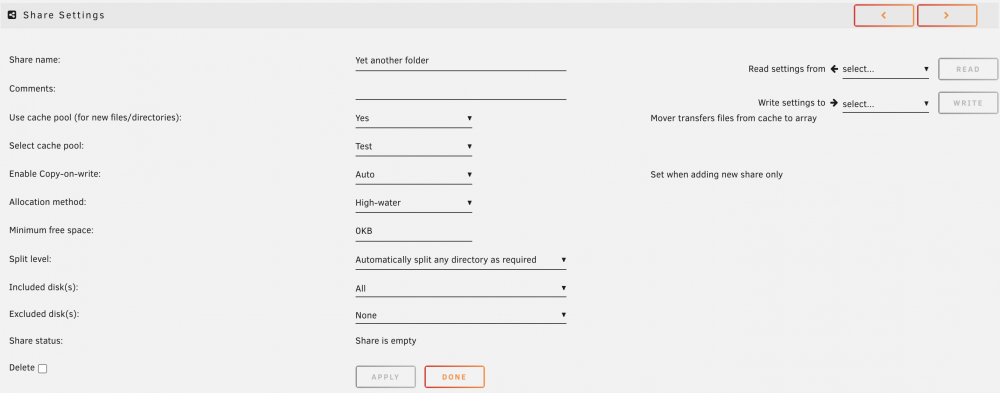
I am not sure I get it, I have now tried to add it manually by "add share". Still not showing the file.


-
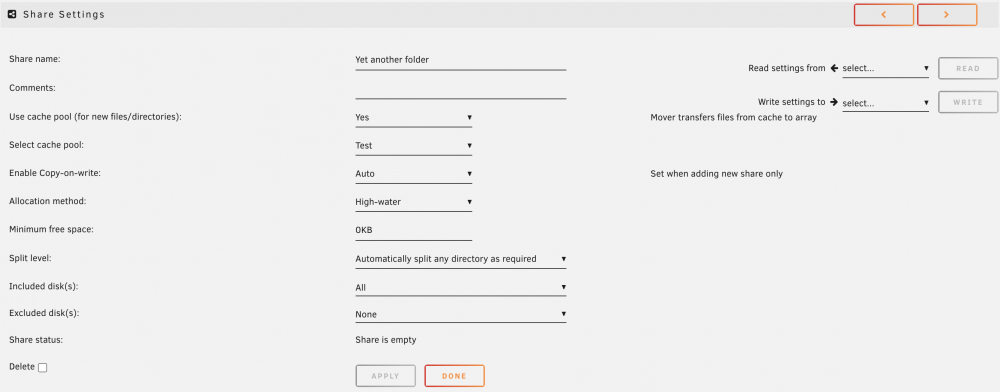
I had before, but let me do it again and post plenty of screenshots to visualize what I am doing. I thought that user shares are created automatically? At least that's how it works for all my folder on the array. I create a folder on any disk on the array and it turns into a user share. As you can see from my screenshots above, the folders on my pool device do not show up under user shares, What I have done now is to create a folder with the same name on the array (on disk 2). I then changed the user share setting to include the cache. When I access the folder on user share, the file in the folder on the pool device does not show up. See screenshots below:


-
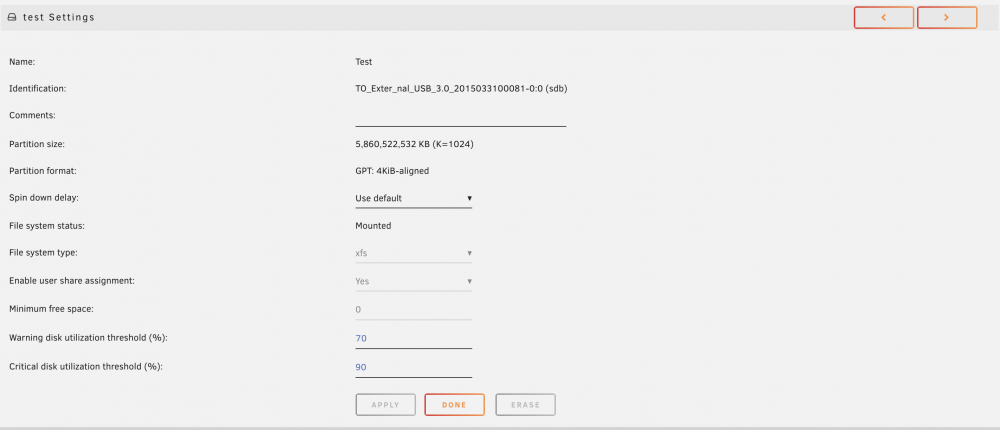
Agree. It should be simple. For example, I am still not sure whether I get the nomenclature right. I always thought "pool devices" and "UD" behave the same. Are "pool devices" even possible to be part of a user share. See below screenshots from my pool device and related info, Hope this creates some transparency. Attached also a new diagnostic log. tower-diagnostics-20220115-2012.zip




-
Still hoping for some advice here. Unraid runs so well, but it annoys me that I cannot use the folders on my cache disk as user shares. Would really love to fix this. Thanks!





