





steve1977
Members
-
Joined
-
Last visited
Everything posted by steve1977
-
And here we go with the log. I have passed through and then used historical devices to disable (to get it back). Thanks! tower-diagnostics-20230205-2034.zip
-
I could change my hardware setup that the nvme has a dedicated sata, so it would not be together with others. But I'd assume it may still be greyed out (e.g., I have my cache disk on a dedicated controller, but it is also greyed out). Do I need to passthrough the disk that it is not greyed out? Or unmount it?
-
Yes, it does show in historical devices and that's how I got it back. But obviously, that's a risky approach as I wouldn't know how to get it back if I were t delete the historical devices (which luckily I hadn't done yet).
-
Thanks. Unfortunately, it is greyed out. And even if it wasn't greyed out, it is in iommu group 17 together with other disks.
-
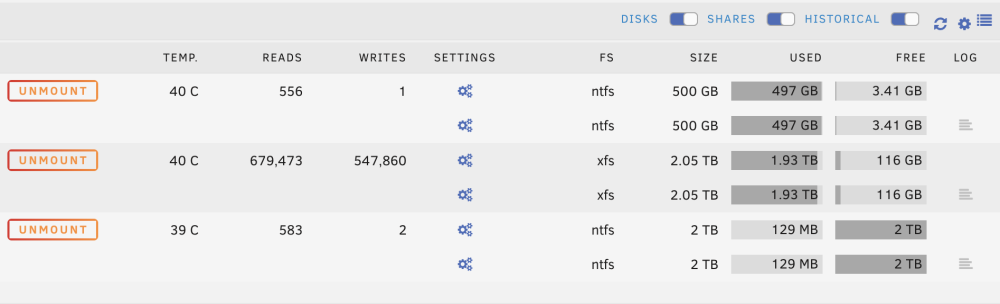
Here we go. I only screeshot the right side, not to post the device IDs. If I enable passthrough, the disk just drops from the view. I can also post this, but it is identical to below with one disk less.
-
Understand how to enable "passthrough". However, not clear to me to disable it again as the disk is no longer visible in the UI after enabling the passthrough.
-
Attaching log file tower-diagnostics-20230205-2007.zip
-
My VM is running out of space due to too many Steam games I would like to put the Steam games on a separate disk. Thinking to passthrough a NVME Disk to the VM and then move all Steam games to it. Is this possible and how to do it?
-
Thanks for sharing. Can you share what you have done from above to make it working? With amazing help by @ghost82, I followed all steps above. But the issue reamsins. Still no Fifa 23 in the VM for me.
-
I filed a bug report on github: https://github.com/Taxel/PlexTraktSync/issues/1394
-
Thanks. This indeed seems to have solved it. It now shows as "insecure" in my browser. Is this expected?
-
Tried from different devices and browsers.
-
Weird issue... I am running Unraid headless. I can tell that it is working as I can SSH into it. However, I cannot access the GUI. When entering the IP in my browser, it defers to a long https://[removed].unraid.net/ address and says "site cannot be reached". Any thoughts? Thanks!
-
Docker: Docker Service failed to start VM: Libvirt Service failed to start Not sure, but maybe my cache drive "died"? Any advice from the diagnostic log for me? Thanks!!! tower-diagnostics-20230109-1921.zip
-
Thanks. Unfortunately no luck. Still getting the error message "This software cannot be used at the same time as the game: Hypervisor".
-
Thanks. I had tried this before, but unfortunately unsuccessful. From what I have googled, the issue is that the Fifa anticheat is on "kernel level" and not on "os level". Whatever this means, but this may make it more difficult to hide that the game is run inside a VM?
-
Ok, I seem to have succeeded to enable it. So, first step is done... Unfortunately, I still cannot play Fifa 23 as it gives me a new error message (This software cannot be used at the same time as the game: Hypervisor). I disabled Hyper-V in docker settings and also disabled the "Virtualization Based Security". Still no luck. Haven't done anything in the bios yet. One post suggests to hide the virtualization (args: -cpu 'host,-hypevisor,kvm=off'), but no idea how to do. Link below and any thoughts appreciated!
-
Thanks. Getting closer, but it seems I may have bricked the VM now 😞 Is below instruction and both of these files emnroled to DB options? DB Options / Enroll Signature / Enroll Signature Using File: select the HD corresponding to vdisk.img, select MicWinProPCA2011_2011-10-19.crt, then “Commit Changes and Exit” DB Options / Enroll Signature / Enroll Signature Using File: select the HD corresponding to vdisk.img, select MicCorUEFCA2011_2011-06-27.crt, then “Commit Changes and Exit”
-
Thanks for your help. Tried both virtio and SATA without success. Some more info about my VM seetings below. I don't get a message that "ESC" gets me into bios. I still hammer ESC, but end up at Windows login screen 😞 i440fx-7.1 OVMF-TPM, enable USB boot: No Hyper-V: Yes USB controller: 2.0 (EHCI) Virtio drivers ISO: /mnt/user/isos/virtio-win-0.1.221-1.iso Primary vdisk: My vdisk, virtio, Bootorder 1 Secondary vdisk: File provided by you, tried both virtio and sata Network model: virtio-net
-
Thanks @ghost82. Sorry for late resonse and really appreciate your help. Finally having some time to keep trying this out. Unfortunately, I tried many things, but cannot get it to work. May benefit from some more step-by-step explanations. 1) I downloaded the file above (vdiskcert.zip). Unzipped the file and then have a file labeled "vdiskcert.img". 2) Added "vdiskcert.img" as "2nd vDisk Location" (set to manual). Kept default settings as "raw" and "virtio". 3) I am then starting the VM. Don't know then how to follow the instruction to "Unmount vdisk.img". And then I am stuck Thanks for your help!
-
Thanks for your help. Unfortunately, I still cannot get it to output any signal to the screen. I tried with and witout the Unraid flash disk. But without luck 😞 To avoid that the issue is with my TV, I instead used a Dell monitor, which I'd assume should be safe and works with several other devices. But yet again, no luck. No matter what I do, there is no output to the monitor. Any other ideas? I'd assume I may miss something very trivial?
-
I just set up a second Unraid server. I am running it headless. Need to access the Bios though to enable IOMMU groups (V-T setting?). Unfortunately, I have no clue how to attach an external screen to my Unraid server, which I'd assume I need to access the bios (cannot do headless)? I connected an HDMI cable to my TV, but don't get any screen. Tried both the iGPU as well as the Nvidia-GPU connection. Not sure, which one is the right one? Any practical advice how to connect my TV via HDMI to my Unraid server. I am sure I am missing something *very* basic here tower-diagnostics-20221221-1231.zip
-
I have attached a USB storage device to my newly setup server. Somehow, it does not show up under UD or otherwise. Any idea what I could be missing? I am attaching a diagnostic log for troubleshooting. Thanks in advance! tower-diagnostics-20221220-0852.zip
-
I just set up a second Unraid server. Great fun and it's largely working well. Unfortunately, I cannot pass-through my GPU though. I know from my first server that this can be a painful, time-consuming exercise. I am failing at the very initial step though. I can set up the Windows VM and run it via VNC. However, the toggle-down menu does not even show my GPU. It shows under tool-systemdevices though. Any idea what I am missing?
-
Thanks, I recreated them
