





steve1977
Members
-
Joined
-
Last visited
Everything posted by steve1977
-
I removed the pool device and added the disk as cache disk. Still facing issues. Maybe some bug? See below screenshot referring to the pool device although it was removed:

-
What's the difference between "cache" and "pool"? Why do both exist? You suggesting that I now eliminate the pool device and add the same disk as pool? I removed it because I thought UD is a better / cleaner solution. Also didn't like it being called "cache", which implied something that I was not using it for.
-
Thanks. I only have around 20 user shares (maybe even less). No idea why it shows 100+. I know the risk of showing both disk and user shares, so don’t copy among them. I like both as i do some manual clean-up copying things from one disk to another disk. I do this within a windows vm. The user share is needed for my radarr and plex dockers as library folders. User shares seem to work on all array disks, but not from the “pool device”. I’m still confused that i have a cache device with no disk allocated to it. And you can see from the screenshots above that cache is still somehow used by unraid. Any idea how to fix my unraid again? It’s now really broken as my dockers don’t work.
-
Actually not. It is still broken... No folder from the pool disk shows up under user shares. Upon restart, Unraid recreated an appdata folder on a different drive and that's why I thought it solved it. It seems there are a few issues now: * Folders on my pool disk do not show up under user share * After re-adding a docker, all settings have been lost Any thoughts. I am attaching yet another diagnostics log, just in case. tower-diagnostics-20211015-0916.zip
-
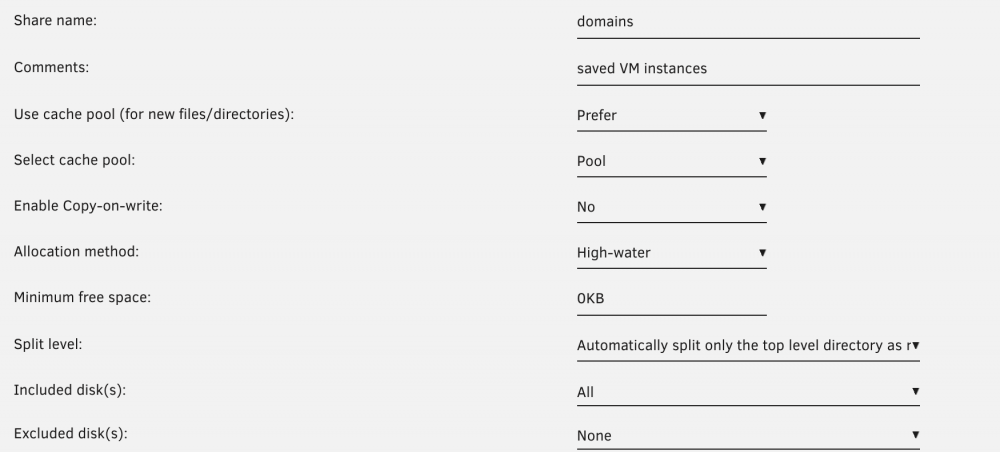
I restarted Unraid and now the appdata folder shows up in user shares. What is odd that "domains" still shows as "prefer:cache" instead of "prefer:pool" although I don't have a pool disk (it's unassigned).

-
Do you think me calling it "pool" broke it? The user share page looks good. All user shares are shown. But only those from disk shares and not the one from the pool device.
-
Also, I tried to re-add my dockers as you had suggested above. Unfortunately, all my settings have been lost. See updated diagnostic below. tower-diagnostics-20211015-0849.zip
-
And here we go with the diagnostic file. tower-diagnostics-20211015-0804.zip
-
Thanks. I think I am gradually getting there. I have now created a new pool (called Pool). I left "cache" unchanged and no disk assigned. I have manually called all appdata folders to the new pool disk. Also created a system folder and manually copied the docker.img file there. However, I cannot see the folders on the pool disk under my user shares. Neither in the Unraid GUI nor when using putty. Any thoughts?
-
I stopped the array. There is a section called "Pool Devices" and underneath it says "Device" and underneath "Cache". The identifcation and unassigned. I used the drop-down to select my UD. And then started the array. Also, what about my other questions? How do you suggest to set the location of docker vidsk and libvirt? /mnt/user/sytem? What is cache-prefer and how to set it?
-
Ok, I reversed the change I did and my dockers and VMs are back. So, that's good. Currently, most of my docker containers are on an UD. This is the disk that I wanted to change to pool. I just assigned it, so thought this was all what was needed. How do you suggest to set the location of docker vidsk and libvirt? /mnt/user/sytem? What is cache-prefer and how to set it? Do I have to reinstall all docker containers or can I move it? I am worried to lose data.
-
And here we go with the diagnostic. I made what seems the "obvious" changes. Both Dock and VM tabs are showing up. VM shows 2 of my 3 VMs (one disappeared). Docker does not show any docker container anymore. Any thoughts? tower-diagnostics-20211014-2218.zip
-
Yes, they point to the UD. What would be obvious? /mnt/user//VM/libvirt.img and the equivalent for docker?
-
Can send diagnostic shortly. Change is that I changed my "docker disk" from UD to Pool. So, not surprising that it no longer starts up docker and VM, but need to find the right setting and default to fix this.
-
I tried to make the switch, but now my docker and also my VM is no longer starting up. Says "failed to start". I believe the issue is that the docker vdisk and also libvirt used to be on "disks/samsung..." and are now on "disks/cache" or whatever the pool is labeled. What are the default locations for me to set the docker vidsk and libvirt and in what settings can I find this? Also on related note, I realized that there is a setting called "docker data-root", which is set to "btrfs vdisk". Shall I change this to XFS or would this corrupt the existing vdisk file? Thanks again for your help!
-
[fast pool] Got it. I can just mount my UD as a pool, right? Pool is basically what used to be called cache pre-6.9, right? Is the XFS format still an issue for the cache/pool drive? This would be drive that holds my docker container and also one of my VMs. [cache pool] I will separately look into this. Somehow thought this was a thing of the past, but let me look into it once I have my docker "issue" sorted out.
-
Thanks. Is there a setting to set default location to make sure that I don't again run into the same problem? I can make the manual change for all dockers. I believe the only one that caused trouble was the macinabox docker. I am not sure I am following (and also didn't figure it out from the link). What would be the advantage of having a dedicated pool vs. a NVME UD drive for dockers?
-
Sorry, would love to have it on the UD (Samsung disk, folder Docker). Thanks!
-
Here we go with diagnostic. I'd prefer not to have it on a usershare and - most importantly - not to clutter it over many different disks. tower-diagnostics-20211006-1646.zip
-
I must have somehow did a mistake to set up dockers to install appdata files on a user share instead of my diskshare. I now have an appdata folder on many of my drives, which obviously is not what it is meant to be. Any advice where the setting is and how to change this? Also any idea how I can fix this for existing dockers and how to consolidate the appdata again to my disk share? Thanks in advance!!!
-
Thanks for your replies. Will replace the drive. What concern do you have about the temperatures of the devices? Does it hurt to run them rather hot?
-
Disk 8 is seeing errors. Any insights whether the disk is failing or whether there could be some form of cable / connectivity / other error. I know that developers advice against using USB connected disks in the array, but it has been working for me for quite a while now... tower-diagnostics-20211003-0805.zip
-
Not supported? This would be a huge deal to have the latest Intel generation not working with Unraid... Was this the case for prior hybrid CPUs?
-
What does Intel's new hybrid CPU mean for us Unraiders? Could I use the "fast cores" for a gaming vm and the "slow cores" for Unraid OS? Is this intended use case?
-
This does read exciting, but indeed not clear what it actually brings us and what makes it exciting Do we still need to passthrough a vbios? If so, what’s different?


