moose
Members
-
Joined
-
Last visited
Everything posted by moose
-
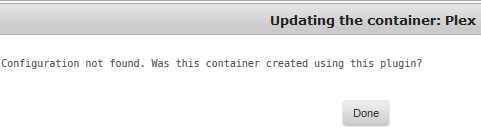
I renamed my plex container name from "plex" to "Plex" in the container configuration, now the configuration (conf file) is missing. I can't go back and rename the container from "Plex" to "plex", cannot perform any updates. I searched hte /mnt/cache/appdata/plex folder and its empty (no conf file). Is there anyway to get the conf file back or do I need to remove and reinstall plex? Or can I just reinstall without deleting plex and will it recreate a conf file and preserve the existing settings?

-
The original preclear_disk.sh has to be patched in order to work with unRAID 6.2 Just to be clear....by "patched" do we mean the following: Patched = download the original preclear script by Joe L (here) and place that preclear script in "/boot/config/plugins/preclear.disk/"? Here is the info on the patch for Joe L's original preclear script http://lime-technology.com/forum/index.php?topic=13054.msg464653#msg464653. According to gfjardim, his script is 6.2 compatible out of the box. No patch required. https://lime-technology.com/forum/index.php?topic=39985.msg504465#msg504465. Thank you. I tried several times but had trouble with gfjardim's script on v6.2.1. I installed, uninstalled, re-installed, etc, many times but had issues with my syslog filling up, webGUI becoming unresponsive and the zeroing (write cycle) was ~ 5MB/s. Then I had tried to run Joe L's original preclear script in v6.2 via telnet and couldn't the preclear script to run, but.... with the "sed..." command modification Joe L. lists at the 1st link you provided, it works via telnet, although the pre-read cycle does seem slow... It seems preclear isn't playing well with v6.2 for me... FYI - here is the syslog detail from the preclear operation....this keeps repeating over and over while preclear runs filling up the syslog. I ended up canceling the preclear I had running in telnet. Oct 13 22:41:08 Artoo-Detoo kernel: sd 1:0:11:0: [sdm] tag#0 CDB: opcode=0x88 88 00 00 00 00 00 7b 4b 04 d8 00 00 01 00 00 00 Oct 13 22:41:08 Artoo-Detoo kernel: mpt2sas_cm0: sas_address(0x4433221105000000), phy(5) Oct 13 22:41:08 Artoo-Detoo kernel: mpt2sas_cm0: enclosure_logical_id(0x500605b002b71570),slot(6) Oct 13 22:41:08 Artoo-Detoo kernel: mpt2sas_cm0: handle(0x0014), ioc_status(success)(0x0000), smid(11) Oct 13 22:41:08 Artoo-Detoo kernel: mpt2sas_cm0: request_len(131072), underflow(131072), resid(114688) Oct 13 22:41:08 Artoo-Detoo kernel: mpt2sas_cm0: tag(65535), transfer_count(16384), sc->result(0x00000000) Oct 13 22:41:08 Artoo-Detoo kernel: mpt2sas_cm0: scsi_status(check condition)(0x02), scsi_state(autosense valid )(0x01) Oct 13 22:41:08 Artoo-Detoo kernel: mpt2sas_cm0: [sense_key,asc,ascq]: [0x06,0x29,0x00], count(18) Oct 13 22:41:09 Artoo-Detoo kernel: mpt2sas_cm0: log_info(0x31120312): originator(PL), code(0x12), sub_code(0x0312) Oct 13 22:41:09 Artoo-Detoo kernel: mpt2sas_cm0: log_info(0x31120312): originator(PL), code(0x12), sub_code(0x0312) Oct 13 22:41:09 Artoo-Detoo kernel: sd 1:0:11:0: [sdm] tag#0 CDB: opcode=0x88 88 00 00 00 00 00 00 00 2f 00 00 00 01 00 00 00 Oct 13 22:41:09 Artoo-Detoo kernel: mpt2sas_cm0: sas_address(0x4433221105000000), phy(5) Oct 13 22:41:09 Artoo-Detoo kernel: mpt2sas_cm0: enclosure_logical_id(0x500605b002b71570),slot(6) Oct 13 22:41:09 Artoo-Detoo kernel: mpt2sas_cm0: handle(0x0014), ioc_status(success)(0x0000), smid(9) Oct 13 22:41:09 Artoo-Detoo kernel: mpt2sas_cm0: request_len(131072), underflow(131072), resid(131072) Oct 13 22:41:09 Artoo-Detoo kernel: mpt2sas_cm0: tag(65535), transfer_count(0), sc->result(0x00000000) Oct 13 22:41:09 Artoo-Detoo kernel: mpt2sas_cm0: scsi_status(check condition)(0x02), scsi_state(autosense valid )(0x01) Oct 13 22:41:09 Artoo-Detoo kernel: mpt2sas_cm0: [sense_key,asc,ascq]: [0x06,0x29,0x00], count(18) Oct 13 22:41:09 Artoo-Detoo kernel: mpt2sas_cm0: log_info(0x31120312): originator(PL), code(0x12), sub_code(0x0312) Oct 13 22:41:09 Artoo-Detoo kernel: mpt2sas_cm0: log_info(0x31120312): originator(PL), code(0x12), sub_code(0x0312) Oct 13 22:41:10 Artoo-Detoo kernel: sd 1:0:11:0: [sdm] tag#0 CDB: opcode=0x88 88 00 00 00 00 00 00 00 32 00 00 00 01 00 00 00 Oct 13 22:41:10 Artoo-Detoo kernel: mpt2sas_cm0: sas_address(0x4433221105000000), phy(5) Oct 13 22:41:10 Artoo-Detoo kernel: mpt2sas_cm0: enclosure_logical_id(0x500605b002b71570),slot(6) Oct 13 22:41:10 Artoo-Detoo kernel: mpt2sas_cm0: handle(0x0014), ioc_status(success)(0x0000), smid(9) Oct 13 22:41:10 Artoo-Detoo kernel: mpt2sas_cm0: request_len(131072), underflow(131072), resid(130560) Oct 13 22:41:10 Artoo-Detoo kernel: mpt2sas_cm0: tag(65535), transfer_count(512), sc->result(0x00000000) Oct 13 22:41:10 Artoo-Detoo kernel: mpt2sas_cm0: scsi_status(check condition)(0x02), scsi_state(autosense valid )(0x01) Oct 13 22:41:10 Artoo-Detoo kernel: mpt2sas_cm0: [sense_key,asc,ascq]: [0x06,0x29,0x00], count(18) Oct 13 22:41:10 Artoo-Detoo kernel: mpt2sas_cm0: log_info(0x31120312): originator(PL), code(0x12), sub_code(0x0312) Oct 13 22:41:10 Artoo-Detoo kernel: mpt2sas_cm0: log_info(0x31120312): originator(PL), code(0x12), sub_code(0x0312) Oct 13 22:41:11 Artoo-Detoo kernel: sd 1:0:11:0: [sdm] tag#0 CDB: opcode=0x88 88 00 00 00 00 00 00 00 42 00 00 00 01 00 00 00 Oct 13 22:41:11 Artoo-Detoo kernel: mpt2sas_cm0: sas_address(0x4433221105000000), phy(5) Oct 13 22:41:11 Artoo-Detoo kernel: mpt2sas_cm0: enclosure_logical_id(0x500605b002b71570),slot(6) Oct 13 22:41:11 Artoo-Detoo kernel: mpt2sas_cm0: handle(0x0014), ioc_status(success)(0x0000), smid(11) Oct 13 22:41:11 Artoo-Detoo kernel: mpt2sas_cm0: request_len(131072), underflow(131072), resid(130560) Oct 13 22:41:11 Artoo-Detoo kernel: mpt2sas_cm0: tag(65535), transfer_count(512), sc->result(0x00000000) Oct 13 22:41:11 Artoo-Detoo kernel: mpt2sas_cm0: scsi_status(check condition)(0x02), scsi_state(autosense valid )(0x01) Oct 13 22:41:11 Artoo-Detoo kernel: mpt2sas_cm0: [sense_key,asc,ascq]: [0x06,0x29,0x00], count(18) Oct 13 22:41:11 Artoo-Detoo kernel: mpt2sas_cm0: log_info(0x31120312): originator(PL), code(0x12), sub_code(0x0312) Oct 13 22:41:11 Artoo-Detoo kernel: mpt2sas_cm0: log_info(0x31120312): originator(PL), code(0x12), sub_code(0x0312) Oct 13 22:41:11 Artoo-Detoo kernel: sd 1:0:11:0: [sdm] tag#0 CDB: opcode=0x88 88 00 00 00 00 00 00 00 43 00 00 00 01 00 00 00 Oct 13 22:41:11 Artoo-Detoo kernel: mpt2sas_cm0: sas_address(0x4433221105000000), phy(5) Oct 13 22:41:11 Artoo-Detoo kernel: mpt2sas_cm0: enclosure_logical_id(0x500605b002b71570),slot(6) Oct 13 22:41:11 Artoo-Detoo kernel: mpt2sas_cm0: handle(0x0014), ioc_status(success)(0x0000), smid(11) Oct 13 22:41:11 Artoo-Detoo kernel: mpt2sas_cm0: request_len(131072), underflow(131072), resid(130560) Oct 13 22:41:11 Artoo-Detoo kernel: mpt2sas_cm0: tag(65535), transfer_count(512), sc->result(0x00000000) Oct 13 22:41:11 Artoo-Detoo kernel: mpt2sas_cm0: scsi_status(check condition)(0x02), scsi_state(autosense valid )(0x01) Oct 13 22:41:11 Artoo-Detoo kernel: mpt2sas_cm0: [sense_key,asc,ascq]: [0x06,0x29,0x00], count(18) Oct 13 22:41:11 Artoo-Detoo kernel: mpt2sas_cm0: log_info(0x31120312): originator(PL), code(0x12), sub_code(0x0312) Oct 13 22:41:11 Artoo-Detoo kernel: mpt2sas_cm0: log_info(0x31120312): originator(PL), code(0x12), sub_code(0x0312)
-
The original preclear_disk.sh has to be patched in order to work with unRAID 6.2 Just to be clear....by "patched" do we mean the following: Patched = download the original preclear script by Joe L (here) and place that preclear script in "/boot/config/plugins/preclear.disk/"?
-
I'm getting this error when trying to update this plugin for v6.1.8.

-
Worked. Although in my case, the plugin was actually there and on checking for updates, there was one. I updated (somewhat tentatively) but everything went smoothly. Current version is 2015.08.01c. This command worked for me too and I had the same results as Frank1940. Thanks bonienl! All is fixed now and I'm on 2015.08.01c
-
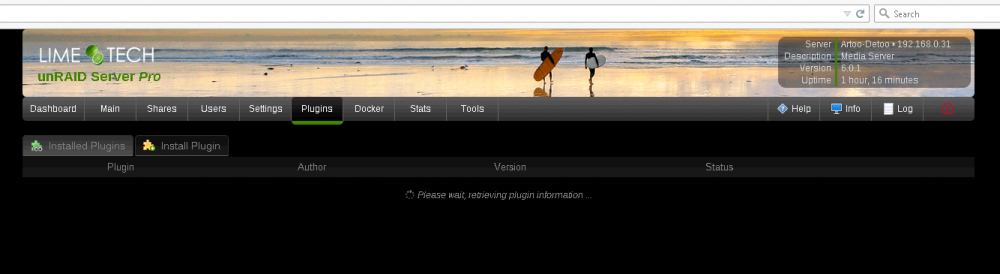
I'm also having the problem but cannot uninstall because I don't have access to the installed plugins. See screenshot. Any thoughts? Can you clear your browser cache (CTRL-F5) and reload the page ? I cleared the browser cache (CTRL-F5) and no change. I still have the "Please wait, retrieving plugin information ..." message.
-
I'm also having the problem but cannot uninstall because I don't have access to the installed plugins. See screenshot. Any thoughts?
-
Yes it's a BetaQuasi VMDK file, which was the reason the partition was ~ 100 MB and the reason that the upgrade script and v6 OS update don't work in this setup. BetaQuasi's VMDKs split the base unRAID files and config files between a virtual hard drive and USB device. I believe this was done for quicker booting. BetaQuasi VMDKs have been reliable and served well but since this architecture doesn't work with unRAID v6, I'll switch to PLOP and follow your suggestions. Thanks Ice_Black! Update: I kept the VMDK format given that a v6.01 VMDK was posted. Plop seems to have a much slower boot and the "USB reset" quirk vs VMDK for ESXi configurations (like mine). Limetech recommends bare metal only, so I may eventually migrate to bare metal, but I'll have to migrate/recreate all my ESXi VMs to KVM. (on the list to research) v6 is awesome! Good job to Limetech and the community! unRAID totally blows away the competition!!
-
Thanks Squid! I do run unRAID on a VMDK but have the key, config, etc on a USB flash drive that the VM uses. I think you nailed it and only the USB flash was upgraded. I'm checking now to see if this resolves it. Edit: This does appear what happened, the USB flash was upgraded but not the VMDK file. But I'm having a space problem with the VMDK. The VMDK is provisioned with 8GB space as think lazy zeroed, but only showing 93MB of disk space capacity. Not enough space to copy over unRAID 6.01...but really wondering what happened to the VMDK to lose all the space. Seeing if there is a way to reclaim the space or I might create a new VMDK file.
-
I'm using method #1 and it seems the upgrade download and install completed successfully but each time I reboot unRAID I still boot into v5.06. (I rebooted multiple times.) The telnet output of the upgrade process is attached. I'm running in a VM on ESXi but that doesn't matter, correct? Edit: also attached syslog.txt upgrade_v5.06tov6.01_telnet_output.txt syslog.txt
-
When booting, enter The BIOS and select the UEFI shell as a boot device. From there, you can flash the M1015. Ogi See here for more detail on using UEFI shell to overcome the "ERROR: Failed to initialize PAL. Exiting program" message.