





John_M
Members
-
Joined
-
Last visited
Everything posted by John_M
-
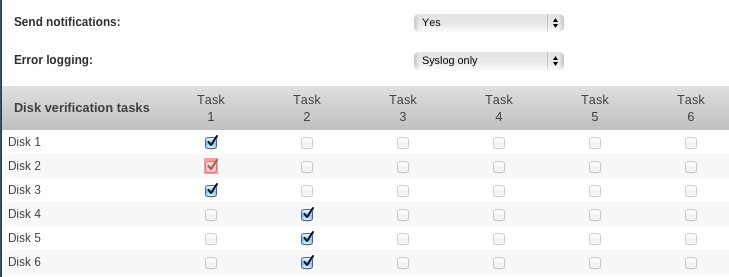
A pink (red) box means that a background verification process is running for that particular disk. As long as the background verification isn't finished no changes to that disk can be made. See also HELP Ah, OK. Thanks. Maybe I ought to have just left it to do its thing. I do use the Help system and some plugins make better use of it than others, but in this instance I didn't see the reference to the red box - I was simply looking in the wrong place (by the table itself, not higher up the page).
-
I've just updated to 2016.02.20b and reapplied my settings but I'm now seeing a pink checkbox: EDIT: I tried clicking the Default button, then re-selecting and reapplying my options, but no change. UPDATE: I uninstalled the plugin and re-installed it. The pink box has gone away.
-
Mine shows Sao Miguel too, specifically the town of Ponta Delgada, presumably some default. I don't know how it's meant to work out the true location anyway. There's a lot of information displayed and it's all superficially very pretty but the graphs tend to use subtle shades of a few colours each so are difficult to interpret. Also, it doesn't seem very customisable. I was hoping to be able to monitor my DSL router, which has SNMP enabled, in order to keep an eye on SNR margin and sync speed but so far have only been able to monitor traffic.
-
Those two DNS servers are on the WAN (Internet) side of your router and won't resolve the names of your LAN hosts.
-
I've just installed this plugin and it has replaced my Perl 5.22.0 installation from the NerdPack plugin with version 5.18.1, which doesn't seem right. Surely it should check first? How do I make things right again, please? Edit: I see that the NerdPack Settings page has spotted the change and is offering me version 5.22.0. Is it OK to update it or will it break SNMP?
-
The first error in each case says that the document is empty so I take that to mean that the download was corrupted, possibly zero length. I had a similar experience with the recent unRAID OS update to 6.1.7. In the end I had to update it manually.
-
The Dynamix webGui update (2016.01.22) seemed to break a few plugins (see here) but for the most part they were fixed by reinstalling.
-
Yes, I remember the discussion about the desire not to keep spinning up a disk that's being kept as a spare. I've never needed to use the script facility though and simply didn't make the connection between using a "dummy" one simply to get the spin status/temperature display, given that I never had any intention of using the disks (other than pre-clearing them) outside of the array. Of course, now I have four disks pre-clearing it's too late to assign scripts to them and I don't really want to abort and start over. EDIT: Ignore all that, I've just updated to 2016.01.31 and I have spin status and temperatures for all four pre-clearing disks. Impressive work, Dan. Thanks.
-
Ah! That's a subtlety that had eluded me. Thank you. I'll use it next time.
-
I've just set some disks pre-clearing and one thing I notice is that the disk temperatures are no longer displayed in Unassigned Devices, though they were a week or so ago. Looking back through this thread, I think it happened around this update because I see that the pre-clearing disks are shown with grey balls, when formerly they would have been green. Well, the disks in question are certainly not mounted so I suppose that explains it. It was a nice feature though and it made it easy to keep an eye on the temperatures. Since Unassigned Devices is well aware of disks in the process of pre-clearing and makes a nice display of them it would be really useful if the temperature display could be restored.
-
I don't often run multiple cycles either but I think the pre-read phase is skipped on the second and subsequent passes because it serves no purpose, all the necessary information being gleaned on the first cycle.
-
Isn't it true that one reason for executing fstrim on an SSD is because before a block can be rewritten after the data is no longer required it has to be first erased, a process that is comparatively slow? If that's the case and you write to your cache sufficiently frequently to warrant a daily trim, wouldn't it be better to schedule the trim for after the mover has done its job, when there's the maximum number of blocks that need trimming?
-
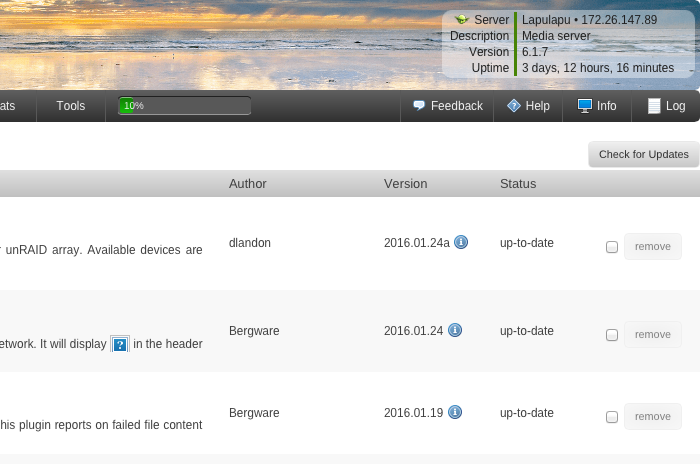
It seems that the location of the little icon has changed. Previously it was /usr/local/emhttp/plugins/dynamix/icons/localmaster.png but now it's /usr/local/emhttp/plugins/dynamix.local.master/icons/localmaster.png and the change is causing a 404 File not found error on the Installed plugins tab of the Plugins page, though it is being displayed correctly to the left of Server in the top right corner.
-
Same here. It works properly now that I've enabled it again though.
-
For me it broke two other plugins but both were fixed by uninstalling them and then reinstalling. They were the Dynamix SSD Trim plugin, which disappeared from the Settings - Scheduler page, and the Dynamix Local Master plugin, which added the following error message to the syslog every minute: Jan 23 20:08:01 Lapulapu crond[1493]: exit status 127 from user root /usr/local/emhttp/plugins/dynamix/scripts/localmaster &> /dev/null Jan 23 20:09:01 Lapulapu crond[1493]: exit status 127 from user root /usr/local/emhttp/plugins/dynamix/scripts/localmaster &> /dev/null Jan 23 20:10:01 Lapulapu crond[1493]: exit status 127 from user root /usr/local/emhttp/plugins/dynamix/scripts/localmaster &> /dev/null Thanks for the headsup. Don't have an SSD but had to re-install Local Master. It looks as though the issue is cron related. My Dynamix File Integrity plugin didn't run its automatic check this morning. I've just reset the schedule for two minutes into the future and waited but it still didn't run. Another re-install needed, I suppose.
-
For me it broke two other plugins but both were fixed by uninstalling them and then reinstalling. They were the Dynamix SSD Trim plugin, which disappeared from the Settings - Scheduler page, and the Dynamix Local Master plugin, which added the following error message to the syslog every minute: Jan 23 20:08:01 Lapulapu crond[1493]: exit status 127 from user root /usr/local/emhttp/plugins/dynamix/scripts/localmaster &> /dev/null Jan 23 20:09:01 Lapulapu crond[1493]: exit status 127 from user root /usr/local/emhttp/plugins/dynamix/scripts/localmaster &> /dev/null Jan 23 20:10:01 Lapulapu crond[1493]: exit status 127 from user root /usr/local/emhttp/plugins/dynamix/scripts/localmaster &> /dev/null
-
Thanks for restoring the hosts lookup feature, Dan. Confirming that it does indeed work again and that I've removed the nmap package per your instructions above. I only have simple switches in my network, having never felt the need for anything more complicated… yet
-
+1
-
It seems as though Neo_x had a bad USB flash drive and kizer had a bad PSU. Several people have had success with this plugin, myself included, and one of my servers is also an HP Microserver Gen8 - I see no reason to blame it for either of these incidents. Read operations don't wear flash memory anyway.
-
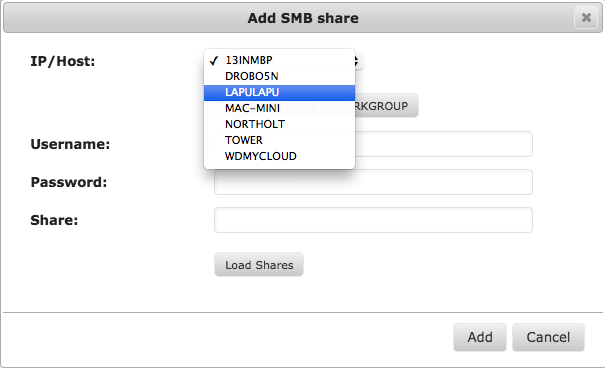
I don't understand what you are asking. /boot/config/plugins/unassigned.devices/packages/nmap-6.40-x86_64-1.txz I don't understand the need for nmap for this package, sorry. Could you explain what it's used for? I don't understand either. I can't imagine why it is there. I took over the work that gfjardim started and didn't pay any attention to what packages were installed because I have been concerned with getting the plugin working. I will look into that, but I am thinking it has no business being there. This I somewhat remember from gfjardim's release notes it for detecting NFS or SMB servers I think. Correct. It is supposed to find SMB hosts. It is not working, is overkill, and I have read some information on the net that there may be security issues with nmap. I am removing the package. The only downside is that you have to type in the host name or IP address. Not a big deal and because it only found the host name you were on (i.e. Tower was the only host name found), it wasn't working anyway. and not worth the time to troubleshoot. It works nicely for me, finding all the SMB servers on my network. But if it's a security risk, it's no biggie to lose it.
-
I'm getting a false positive from the mover. It indicates as a Minor Issue and I'm guessing it's triggered by the question mark in the folder name. Jan 20 18:52:36 Lapulapu logger: ./Public/Shared Videos/EyeTV Archive/Manchester's Serial Killer?.eyetv/000000001c4ef6f8.mpg Jan 20 18:52:36 Lapulapu logger: >f+++++++++ Public/Shared Videos/EyeTV Archive/Manchester's Serial Killer?.eyetv/000000001c4ef6f8.mpg Jan 20 18:52:36 Lapulapu logger: ./Public/Shared Videos/EyeTV Archive/Manchester's Serial Killer?.eyetv
-
1. The .AppleDB folder only appears in the root, as far as I've been able to discover. 2. .DS_Store files can appear in any (and potentially in every) folder. 3. An Icon\r file will appear in any folder to which the user has given a custom icon, otherwise they display as the default blue folder icon. 4. These are the only ones I've found. There are others documented here but some are very much pre OS X legacy items. 5. Only in as much as they can be disabled (see 6.) 6. Yes, there is. OS X can be configured not to write any of the dot-files to network storage but then you lose functionality. For example, one of the things stored in the .DS_Store file within a particular folder is information about the current view of that folder within the Finder - scroll position, icon size, icon position, etc. so that when you open the Finder window (equivalent to the Windows Explorer) you're presented with the same view as you had when you last closed it. Edit: Ah! I'll give the updated version a try. Thank you.
-
Yes, thank you. I have verification scheduled but I stumbled upon the phenomenon I described while I was investigating the appearance of disks.export.<date>.bad.hash files as mentioned above and experienced by karateo. The cause of my *.bad.hash files is the presence of Mac OS X related .AppleDB folders and .DS_Store files whose contents change without updating the timestamp. Is there a way to exclude them from the hashing process short of telling my Macs not to write them to network volumes? I also have a problem with Mac OS X folder icons, which are stored in files with the name "Icon\r" - yes, that's a five character file name ending in a carriage return (ASCII 0x0D) character! Volume icons are not a problem because they are stored in .VolumeIcon.icns files, which is a manageable name and the contents are static. Reference: http://superuser.com/questions/298785/icon-file-on-os-x-desktop Edit: I thought the Excluded Folders option might help me exclude the .AppleDB folders, which are present only in the root of each of my shares. I'd be looking to exclude /mnt/user/Public/.AppleDB and /mnt/user/Private/.AppleDB but the button just reads "None" and I can do nothing with it. The .DS_Store files are more problematic because every folder could potentially contain one.
-
That works if disk3 contains one or more files. If it's completely empty then it doesn't update the exported hash file. In fact, it doesn't work if it contains just a single zero-length file (touch /mnt/disk3/test) either - there needs to be some actual content.
-
In the File Integrity Control page, if I select a disk (say, disk3) and then Build, Export, Check all it good. If I move some files from disk3 to another disk, or if I simply delete them and then I Check disk3 again I get bunker warnings in my syslog that the files are missing, which is true. How then do I update the exported checksum file to remove the entries for the missing files? Re-running Build, Export only seems to add entries for new files - it doesn't delete entries for missing files. I moved over 10,000 from disk3 to disk8 and now I get over 10,000 missing file warnings each time I run a manual check on disk3. Do I really have to delete the disk3.export.hash file manually (followed by Build, Export to re-create it), or am I missing something? The Remove button removes the checksums stored in the extended attributes, not the exported hash files, according to the Help.

