





John_M
Members
-
Joined
-
Last visited
Everything posted by John_M
-
Retaining is entirely for your convenience. If you retain nothing you're presented with a blank sheet and you have to assign everything from scratch. If you retain everything you're presented with a sheet that's filled in exactly the same way as it was previously. Either way you can make changes but one may involve a little more clicking. You certainly need to make sure you assign the same disk to the Parity slot; the rest is up to you.
-
You need to stop all dockers and the docker service so that the image is unmounted before moving the docker.img file. Similarly, VMs and the VM service need to be stopped. It's safe to move appdata once dockers are stopped. It doesn't matter whether you copy or move, either manually or with the Mover, though gridrunner makes a valid point about keeping the old files on the old cache disk as a backup.
-
Do you mean like this?
-
Tools -> Diagnostics and post the zip file.
-
I don't think anyone mentioned the CPU. Did they?
-
Is it universally supported? What about non-Intel chipsets?
-
According to your pushover notifications disk1 has only 17.8 GB of files to verify, so 4 minutes 24 seconds seems reasonable; similarly disk4 has only 22 MB of files to verify, which takes 2 seconds. So it looks as though many of your files are being missed or excluded from being hashed in the first place. Have a look at the exported hash files to see what's happening.
-
Do you mean that you physically move the drive without shutting down the server?
-
done A warning that if you install atop (and run it just once) it starts to write a lot of data regularly to /var/log/atop. In my case that's 28 MB in six days, which is way too much. I've removed it and will only re-install it if I need it.
-
I should think it's a feature of your Adaptec controller. Have you tried a search for that particular model? I found this: https://lime-technology.com/forum/index.php?topic=40684.0. It's a different model but the same symptoms.
-
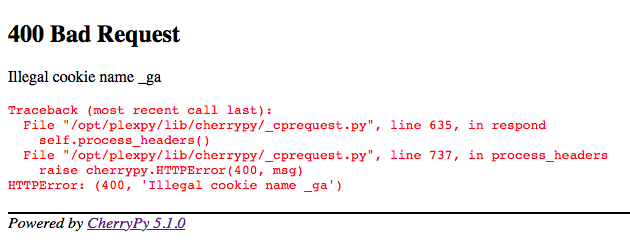
It was working nicely but I got this when I opened the Web page: I deleted the appdata and the container and reinstalled. Log attached - seems normal. I still get the 400 error. EDIT: I tried a different browser and I got the Welcome page of the Setup Wizard. So I went back to Safari and deleted the cookies it was storing from my server and it too came good. Plexpy_Log.txt
-
Mine seems to miss the regular backups made by the Community Apps appdata Backup plugin. A limitation of inotify, perhaps? The icons not updating might be a browser cache issue - try clearing it.
-
It is automatic, but I think some files slip through unnoticed. Hence my comment here. If you do a manual build after getting the notification that should bring things up to date, at least until you write more files.
-
How is it formatted?
-
That doesn't necessarily follow. For a file system to be mountable it has to be supported. This plugin loads support for some file systems but, it seems, not VMFS.
-
There seems to be a conflict between the version of perl used by this plugin and the version used by others, including Nerd Tools (perl-5.22.0-x86_64-2 vs perl-5.22.2-x86_64-1). Any chance of an update, please? EDIT: Nerd Tools was recently updated with perl-5.24.0-x86_64-1.txz so the version used by the plugin is a bit more out of date.
-
I don't have email notifications enabled so I'm wondering if it's related to the problem dlandon mentioned above. EDIT: I've just noticed that there's a new (2016.11.28) version. I'll update and see if it goes away. It won't Just change any setting on the plugin settings to fix. That worked for me. Thanks.
-
I've been getting this message in my syslog at midnight since the 2016.11.27 update: I don't have email notifications enabled so I'm wondering if it's related to the problem dlandon mentioned above. EDIT: I've just noticed that there's a new (2016.11.28) version. I'll update and see if it goes away.
-
Aren't both of those options redundant? I would hope that 4k alignment is the default and surely gfjardim's script doesn't need a fast switch, since it's faster by design.
-
At the very bottom of the Main page of the GUI (or, if you have the Page View: Tabbed option enabled, of the Array Operations tab) click the Move Now button.
-
I wrote the instructions on the basis that they use only functions already built into unRAID. They are easy for a beginner to follow and nothing needs to be downloaded or installed. I've tested the procedure and it does work but it isn't necessarily the fastest method. There are several ways to achieve a goal and they all have pros and cons. The OP wanted to physically replace his cache disk. It's safer to power down and I'm still not convinced that unRAID completely supports hot-swapping. Some people have reported success, others failure. So my general advice would be to power down. If advanced users find they don't need this step then so much the better but there's nothing to be gained by confusing beginners.
-
Since your power supply has a single 12 volt rail there's no balancing to be done. All the yellow 12 volt wires meet at the same point inside the supply. The only (minor) consideration is to make sure you don't draw more current down that single 12 volt wire than it's rated for. With what you're proposing to do it won't happen but you don't want to be connecting splitters to splitters to splitters, for example.
-
Using a network share (even Apple's own Time Capsule) as a Time Machine destination is never as reliable as directly connecting the disk to the Mac. The difference is that in order to implement Time Machine across a network a sparse bundle disk image has to be created on the destination, whereas a directly connected hard disk can be formatted appropriately. Sparse bundle disk images consist of many many small files and they have proven to be rather fragile in practice. What I do is directly connect an external USB-connected disk to each of my Macs and let Time Machine write to it directly. It's simple and reliable.
-
A few thoughts: Ignoring unRAID for a moment, how much RAM does the BIOS see? Have your tried removing one pair of DIMMs, then the other pair? Is the RAM you're using on the qualified list for that motherboard? Are you trying to overclock? If it's an old gaming computer, you may have some BIOS settings that are undesirable for a server. Have you run memtest?
-
What SAS/SATA card are you using? Do you see the correct amount of memory if you remove it? There's a strange problem that can cause half your memory to be ignored if you have all four slots filled. The remedy is to mask off two pins on the PCIe connector. See here: https://lime-technology.com/forum/index.php?topic=12767.msg159603#msg159603


