





John_M
Members
-
Joined
-
Last visited
Everything posted by John_M
-
For single drives, certainly. Also for up to four drives, in my experience. Parity check speeds are slightly compromised but still very acceptable IMO. I found a good quality case with a port multiplier that passes all the SMART information and a fast compatible eSATA card. The only thing I wouldn't recommend is using it for a parity disk.
-
I think eSATA is worth considering as an option. It works well for me. The only thing I don't like is the cable and its connectors but if you make sure it's protected it isn't a problem.
-
I use NFS but I set it up using an earlier version of unRAID. I have entries in both of those files. Are you remembering to click the Apply button? Post your diagnostics.
-
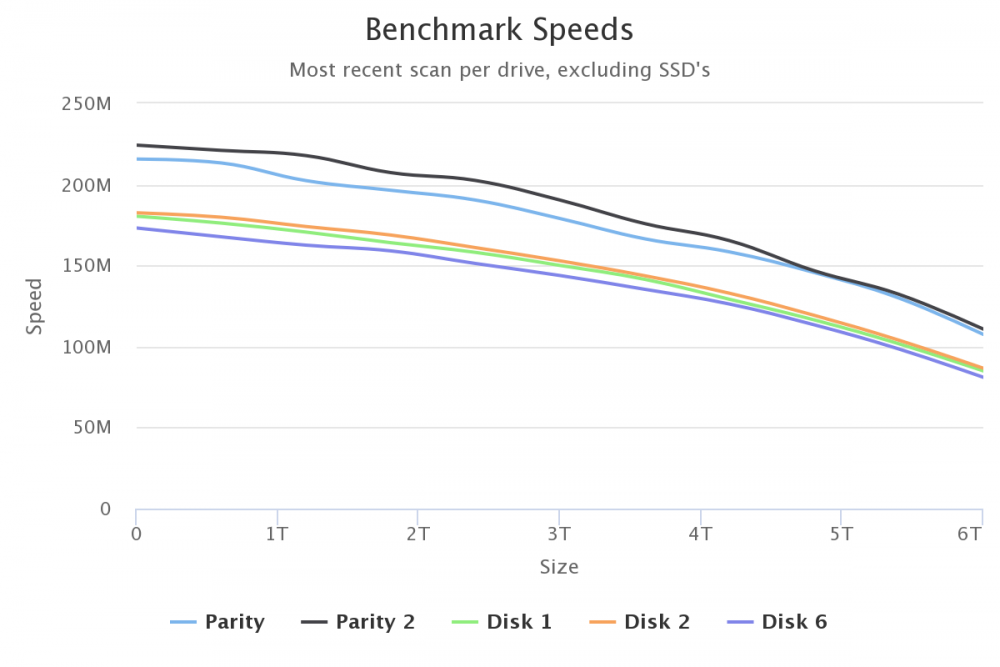
Nice utility. It worked fine on two servers and found all the drives. On the third I have an external box of four drives which uses a single eSATA connection and a port multiplier. It only finds one of these four drives (the one on port ata7.03, Disk 6) but your old script finds them all (the others are Disks 3, 4 and 5 on ports ata7.00, ata7.01 and ata7.02). Information about my hardware here. Diagnostics: northolt-diagnostics-20180416-1301.zip I'm happy to provide any other information you might need.
-
A file with an illegal character in its name, perhaps?
-
That's normal. I just checked and I've got even more. You probably have one of your mappings misconfigured.
-
The plugin obviously continues logging while not being viewed because you can recall the data with Last day, Last week, etc. So I guess what you're asking for is for it to display the last 30 minutes of data when you choose Real time -> 30 min. Perhaps once samples have scrolled off the left end of the graphs some of them are discarded. The historical views don't have such high resolution (along the time axis) as the real time views.
-
It's all explained if you turn on Help. First exclude the files ending with .nfo by going to Settings -> File Integrity Settings and typing *.nfo in the Excluded Folders and Files -> Custom Files box. You can have a comma-separated list, such as *.tmp,*.nfo,*.temp. Click Apply. Then go to Tools -> File Integrity and select the affected disk(s). Then click the Clear button. If you export your checksums then click Export to update the export file.
-
What did you decide was the best starting sector to use, if not 64?
-
I seem to have unwittingly offended a number of you with my stupid suggestion. I don't really understand why but I sincerely apologise. I will make no further contributions to this particular thread.
-
Thank you. I appreciate your answer. As I said, I don't have the skill so I didn't know how difficult it would be. I have the patched version of Joe's script. The same patch also works on Brian's modified script. I've used both in the past.
-
Sadly, I don't have that skill. If I did have the skill, it would hopefully come with the sense to avoid this plugin like you and Squid and everyone else. Instead I would try to write the simple disk test plugin that I suggested earlier.
-
I do and I will, Dan. But I'm not asking for myself.
-
What I find very strange is that if you look back at postings to this board the wisest of advice to anyone asking has always been to test your disks before adding them to your array. I've had discussions with people who insist on a minimum of three pre-clear passes to get them away from the beginning of the "bath-tub" curve. So, while I understand that emotions are running high, why is it such an outrageous suggestion that a simple plugin to check disks before committing them to the array might be useful to many users?
-
Actually, yes. I do. Since you asked, I have an old PC dedicated to the task.
-
Except that by the time the disk has been cleared it has already been inserted into the array. A SMART self-test is then too late. What I want is something that does a read test before adding it to the existing array.
-
We all know that the SMART self-tests are read only. Please read what I wrote, not what you think I wrote.
-
Well, I wasn't suggesting that anyone take on the preclear plugin. I was suggesting something much simpler. I'm happy to use badblocks from the command line and the extended SMART self-test but that's not so straightforward for the new user to get his head round.
-
Does anyone fancy writing a simple disk testing plugin then? Something that runs, say, badblocks for a number of cycles and produces a pass/fail report at the end. Something that everyone can easily use and understand. Ideally something that gives confidence to newbies while also providing useful information to seasoned users, because there are numerous references to the good practice of testing disks (with preclear) throughout this board.
-
I can confirm that it worked for me too. The Fix Common Problems plugin complained about it but I told it to ignore the warning.
-
OK. That's good. I'll give it a try myself as I have some disks to prepare. There is, of course, the unresolved issue of the rc.diskinfo daemon but I think it is now ignored by the current version of Unassigned Devices anyway.
-
Since the only change they made was to replace case $gcc_version in '7.2.0') with case $gcc_version in '7.3.0') won't that result in the wrong version of tmux being installed?
-
My problem with this method is that if the disk fails the read test (the non-correcting parity check) it is already incorporated into the array and removing it again is not a trivial task. I want a method that at least writes every byte and reads every byte before introducing the disk into the array. The destructive write mode of badblocks is something I've used before and found effective.
-
That's what I wanted to hear. Thanks.
-
The new method of specifying the optical drive troubles me somewhat. I currently have --device /dev/sr0 --device /dev/sg16 and it works fine. However, while /dev/sr0 is a safe bet because the device it refers to is always going to be an optical drive, the /dev/sg* devices are general purpose. If I unplug my USB 3 connected BD drive and add a new hard disk to my array the latter might well be designated /dev/sg16 and when I re-connect my optical drive it might well be designated /dev/sg17. In this case I realise that I'll have to change the setting for the container to continue to work. The thing is, if I forget and leave it set to /dev/sg16 is there any risk of corrupting the contents of the new array disk when I launch the container? I suspect the answer is no but I'd like to have it confirmed that there is some kind of sanity check.



