





John_M
Members
-
Joined
-
Last visited
Everything posted by John_M
-
Yes. The dashes mean neither read nor write access. However, most of those files have zero length so only the names were copied and not the content. That isn't what mover does. If it can't move a file it leaves it where it is. There must have been some problem with the move - either it was interrupted or the destination was full. Did you confirm that the old cache drive was actually empty of files before you removed it?
-
FWIW, all the LS.IO containers that I use run as nobody.
-
The procedure is correct but that^^ isn't. If you set appdata (and others) not to use cache then the mover will ignore its files. The correct way to do it is to change from Use cache:Prefer to Use cache:Yes. Then the mover will move the appdata files to the array (preserving the permissions). I don't use either LetsEncrypt or Next Cloud but as they are both security-related it's possible that they run as a specific user rather than nobody. Maybe ask in their support threads?
-
I just had a look at my own appdata and, while the majority of files are owned by nobody:users with mode 644, 664 or 666 and the majority of directories are owned by nobody:users with mode 755, 775 or 777, it's by no means universal. Ownerships and permissions are dependent on the docker containers themselves and are subject to the whims of their authors. Often you can configure what user a container runs as and usually the default is nobody but it can be changed and it isn't universal. That's why there's a docker-safe version of New Permissions that leaves them unchanged. Depending on how you backed up your SSD you might find that some of your appdata files are now owned by root. Maybe if you make a list of your dockers and their authors people can help you fill in the blanks.
-
I was curious about this so I thought I'd put it to the test. I used a real bare metal Windows 7 PC and downloaded the latest Unraid USB Flash Creator for Windows, version 1.5, built on October 25, 2018. I downloaded the installer zip for Unraid 6.6.5 and used the Local Zip option in the Creator tool and I can confirm that, while it works every time with the 8 GB, 16 GB and 32 GB Verbatim Nano USB devices that I normally use, it will not work with 8 GB or 16 GB SanDisk Cruzer Fit devices - I tried two of each. I tried two front panel USB 2 sockets and two rear panel USB 2 sockets and every time the Verbatim devices were successfully written but the SanDisk devices failed at the "Syncing file system" message. I then used the manual method on all four SanDisk devices, formatting them FAT32 and naming them UNRAID, dragging the files directly out of the zip and dropping them into the root of the flash, and running the make_bootable.bat file as Administrator. Created this way, all four work perfectly. So, while the old manual method works there is a problem with the Creator tool.
-
nano and vi
-
FWIW, your Mac can't natively read any of the file systems that unRAID array disks use anyway.
-
I tried restricting the disease being researched, first to Alzheimer's then to Cancer, in the hope that one or other of them had a higher proportion of core_a4 WUs to offer but over a couple of weeks it didn't work any better than when Any disease was selected. If there isn't going to be an update I'll probably retire from the project - it just doesn't seem fair to request work units and then discard them.
-
Can you mount them manually? You can refer to them as /dev/sdb and /dev/sdc if it's just a temporary measure to copy off your data, or by their /dev/disk/by-id names, maybe in a little script, to save typing, if you want to mount them regularly. Just open a terminal session and use the mount command. You'll have to create their mount points manually first. Something like # Create mount points and mount mkdir /mnt/disks/HP1 mount /dev/sdb /mnt/disks/HP1 # Alternatively, # mount /dev/disk/by-id/LOGICAL_VOLUME_5001438010F32760_3600508b1001c3ef5300bf0e49df986fa /mnt/disks/HP1 mkdir /mnt/disks/HP2 mount /dev/sdc /mnt/disks/HP2 # Alternatively, # mount /dev/disk/by-id/LOGICAL_VOLUME_5001438010F32760_3600508b1001c3d2b732d4816c14b3a1e /mnt/disks/HP2 ... # Unmount and delete mount points umount /mnt/disks/HP1 rmdir /mnt/disks/HP1 umount /mnt/disks/HP2 rmdir /mnt/disks/HP2 You might need to add a mount option or two.
-
Today's update stopped the error messages. Thank you, Dan.
-
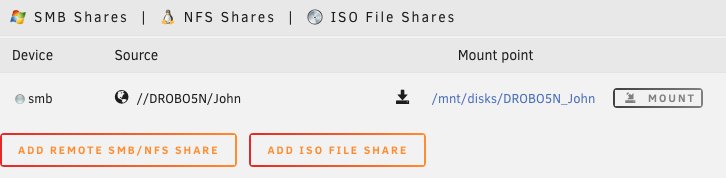
I've recently started seeing an error message appear in my syslog whenever I refresh the Main page of the GUI (I use non-tabbed mode so the UD section gets refreshed every time I select Main): Nov 20 04:12:45 Mandaue unassigned.devices: Error: Cannot get IP address for 'DROBO5N' from nmblookup. It's telling the truth because the DROBO5N file server is currently powered down: The fact that it's unavailable is nicely indicated by the grey ball so the entry in the syslog is unnecessary. I'm wondering if it's caused by a remnant of debugging code that you added to investigate @fibreiv's recent problem. Diagnostics: mandaue-diagnostics-20181120-0435.zip
-
They could in fact be different but so long that they are getting truncated somewhere.
-
Agreed. It shouldn't, but it seems it is. Perhaps it's faulty.
-
The default network settings specify a bond (bond0), whose list of members includes all your ethernet ports, even if your server only has a single NIC. It is of type 1 (active backup). The IP address, whether applied statically or received from an DHCP server, is applied to the bond. The result is a fail-safe one. You can plug your network cable into any available port and it will work. You can, of course, change the configuration from this default behaviour - and that's when a lot of people's problems begin. If you get into a mess you can delete these two files in the config folder on the boot flash device network.cfg network-rules.cfg (this is created when you re-order eth0, eth1, etc.) and reboot to restore the default settings.
-
Settings -> Network Settings Then scroll to near the bottom where you'll find Network Rules. Set your preferred interface as eth0 by selecting it's MAC address. The web GUI runs on eth0. I don't see your Intel gigabit NIC in the screen grab but it's only a partial list anyway. I'm not aware of a gigabit NIC by Intel that isn't supported. Certainly the Pro/1000 series is. But then you mention IBM? Maybe there's something about an IBM branded Intel NIC that makes it not be recognised. Post your diagnostics (Tools -> Diagnostics). Stubbing involves tells the Linux kernel to ignore a particular PCI ID in order to reserve it for use by a VM. For more information see Spaceinvader One's Youtube channel. This has nothing to do with your immediate problem. Basically, any Intel gigabit NIC should work well. A cheap Realtek card will get you out of a fix but they are not a good choice because the drivers, being reverse engineered, are of lower quality.
-
That's a nasty way of disabling the mover.
-
You need to remove the -p 80 from the emhttp line. It used to accept a port number but it's now done differently. Make sure you don't remove the ampersand (&) though. You must have added the last line, concerning the mover, for your own reasons. If you no longer need it you can remove it too.
-
It's difficult to tell you what you need to remove if you don't tell us what yours contains! The stock /boot/config/go file looks like this: #!/bin/bash # Start the Management Utility /usr/local/sbin/emhttp &
-
Your syslog is in fact full of OOMs. So try @Frank1940's advice. If that doesn't free up enough RAM you could try running as a plain old NAS without any docker containers running until you can add some more.
-
Yes, you're running out of memory: Nov 7 21:56:39 Tower kernel: Plex Media Scan invoked oom-killer: gfp_mask=0x6200ca(GFP_HIGHUSER_MOVABLE), nodemask=(null), order=0, oom_score_adj=0 One thing you might want to read is this:
-
Do the diagnostics you posted cover one of the problem periods? You could try running without any containers for a while as a test.
-
kswapd0 is the process that manages virtual memory (swap space). Since most Unraid users don't have swap space configured I would expect the process to be pretty idle. loop2 refers to the mounting of a disk image. In my case it's the docker.img mounted via loop2 on /var/lib/docker so it probably is in your case too. More worrying than CPU usage spikes up to 100% is your load average (the top line of top) which, unless you have a lot of processor cores (I mean Threadripper or dual Xeons), is excessive and has been for some time. I have a feeling that the problem might be associated with loop2, which is waiting for disk I/O and also has a very low nice value. That might point to corruption of your docker.img. You also have "only" 4 GB RAM and a few docker containers running so you'll be getting quite low on memory. Your diagnostics zip would reveal more.
-
Running UnRAID 6.6.3 with everything up to date, I notice that the libzip2 package is showing as not downloaded but installed, while toggled off - see the screen grab. Everything else shows up correctly as either uninstalled or up-to-date. Does that mean it is now included in the base distro (I don't see it mentioned in the release notes for Unraid 6.6.x) and, if so, ought it to be removed from NerdPack? Or have I got something strange going on (something left over from a previous configuration change, perhaps) and maybe I should toggle it on and save then toggle off again and save? I only use NerdTools to install a handful of packages and this isn't one of them.

-
As perhaps one of the most vocal critics of the dark theme I appreciate your making the effort to produce a light theme. I find it much easier to read. Thank you.
-
I believe the client needs updating because it isn't able to process core_a7 work units: 01:24:13:WU00:FS00:Starting 01:24:13:WU00:FS00:Running FahCore: /opt/fah/usr/bin/FAHCoreWrapper /config/cores/cores.foldingathome.org/Linux/AMD64/AVX/Core_a7.fah/FahCore_a7 -dir 00 -suffix 01 -version 704 -lifeline 19 -checkpoint 15 -np 16 01:24:13:WU00:FS00:Started FahCore on PID 54 01:24:13:WU00:FS00:Core PID:58 01:24:13:WU00:FS00:FahCore 0xa7 started [93m01:24:14:WARNING:WU00:FS00:FahCore returned: FAILED_2 (1 = 0x1)[0m while the older core_a4 WUs are getting fewer and further between but when they do arrive they work fine: 01:27:55:WU01:FS00:0xa4:Completed 2500 out of 250000 steps (1%) 01:28:23:WU01:FS00:0xa4:Completed 5000 out of 250000 steps (2%) 01:28:54:WU01:FS00:0xa4:Completed 7500 out of 250000 steps (3%)



