





John_M
Members
-
Joined
-
Last visited
Everything posted by John_M
-
The simple two and four port SATA controllers built around the Marvell 9230 or 9235 (or the 9220 or 9225) chip do indeed use the standard AHCI driver module. I had previously attributed my not having any problems with mine to that fact. The mvsas driver module is used by the eight-port SAS controllers that used to be popular amongst Unraid users - I have two that I can no longer use. So, to reiterate, Marvell makes both SATA and SAS controllers, based on different chips. The SATA controllers use the standard AHCI module and I've never had a problem with mine. The SAS controllers use the mvsas module and have been problematic for a few years. I haven't upgraded my server that uses the 9235 and it works fine with Unraid 6.6.7. I guess I'm going to have to bite the bullet and upgrade it to 6.7.0 to see if it's adversely affected. If it is, then our finding will agree. If it isn't then there's something else going on with your server.
-
If you want an 8-port card that fits in a long PCIe slot (x8) then there are several LSI-based cards to choose from. Used Dell Perc H310 cards pulled from servers are readily available on ebay and they represent good value for money, though they are usually set up in RAID mode and you need to cross-flash them with IT mode firmware. If you just want a 2-port card that fits in a short PCIe slot (x1) then look for one with an ASMedia chip, such as the ASM1061 or ASM1062. If you want a 4-port card with a PCIe x2 interface then you might well be out of luck. I haven't been able to find one other than those based on the Marvell 9230 or 9235.
-
I take it that you're being ironic, hence the italics, because there are already accompanying text descriptors. The text is there to help but you shouldn't need to read it. It's another visual clue, like colour and shape, but it's a final confirmation or a last resort in case the other two clues fail. If you need to take the time to read the text then the design of the icon has failed. It should be instantly and clearly recognisable. If you need to read the text in order to recognise the icon then there's no need for the icon, so you might as well take away the GUI and revert to pages of text with hyperlinks in them.
-
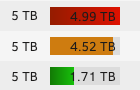
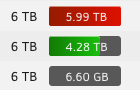
I notice that with the "white" theme the numbers on the disk usage bars are now quite difficult to read, especially on a red bar. EDIT: For comparison, here's how it looks under 6.6.7:
-
That's interesting. One of my servers has a SATA controller based on the similar Marvell 88SE9235 and it has never been any trouble. I had put that down to the fact that it uses the standard AHCI module rather than a driver specific to the chip but presumably the 9230 also uses the standard AHCI driver. The only difference I can see between the two chips is that the 9230 has hardware RAID capability while my 9235 doesn't. I think I would struggle to find a suitable replacement if I suddenly become unable to use my controller. The 923x has a x2 PCIe interface and provides four 6 Gb/s SATA ports. My particular card has two internal SATA ports and two eSATA ports and I don't know of any alternative that provides the same functionality. That said, I don't have IOMMU enabled on that server though I think I'll leave it on version 6.6.7 for a while longer until I've got time to experiment with it properly.
-
The thing about the indicators is that they were originally coloured balls of identical shape. Changing the shape of the red ball to a red cross was a positive move in that it made the shape distinctive while keeping the colour. That added information and helped everyone by increasing the number of visual cues. Changing application and configuration icons from coloured ones to monochrome ones has taken away information because they are now distinguishable only by their shape. Also, the new icons are less obvious in their meaning, being more simplistic and somewhat cryptic. I rather liked the skeuomorphic can of sardines VM Manager icon and it was very easy to spot on the Settings page but I'm sure I'll get used to the split-in-two monitor icon.
-
I agree and I mentioned the fact during the rc phase but it seems our preference for function over style puts us in a minority.
-
It's great to hear that this container has been forked and updated. I'd like to re-join the project using the new docker. Can I use my old appdata and pick up where I left off or do I have to start from scratch? EDIT: I tried it anyway and you can indeed use the old appdata. It preserves your user name and team. There's also no problem with the new work units but I'm still seeing the "Loading..." problem in the GUI that I mentioned here:
-
It looks like a feature of the cards (both the RTX 2080 and the Vega 56). It can't be an Unraid problem because, as you said, when stubbed Unraid isn't even aware of the card's presence so it just sits there uninitialised. It won't be until your Windows VM is started and a driver loaded that there's any means of controlling it. It looks like it might be something that can only be fixed by a firmware update. I suppose they are not intended to sit there powered but uninitialised. How does it behave if you reboot your server into the BIOS screen so that the card is actually producing a video output? It might be that the only work around is to start your VM in order to load the driver in order to control its power usage.
-
Well, the plugin is just the interface with the GUI. It needs kernel module drivers to access the physical sensors. Most systems will detect sensors in the CPU and on the motherboard and load a separate driver for each. You can have the plugin installed and zero, one or more modules loaded, which will give you different options for what the plugin displays. In your case the coretemp module allows the CPU temperature sensor to be read, while the nct7904 module allows sensors in the SuperI/O chip to be read. The latter is where you'll get fan speeds and voltages from if you run sensors from the command prompt. Try just loading the coretemp module and don't bother with the SuperI/O chip and see if the error messages stop being generated. I think the reference to IPMI is a red herring - it's related to the fact that IPMI provides a way of remotely reading the sensors too.
-
Try booting in safe mode - the problem should go away. It's caused by a kernel module you have loaded to monitor temperatures. If you have several loaded try removing them one at a time. You might have to settle for monitoring the CPU temperature instead of the motherboard. If you google the error message you'll find several links which may help.
-
When you were playing around with the partition table, is there a chance that previously it had a GPT partitioning scheme and you changed it to MBR? I have a Microserver Gen 8 running Unraid and it has always worked fine booting from an 8 GB flash with one partition occupying all the available space and plugged into the internal USB 2.0 socket. It's a while since I set it up but it was very easy, starting with a brand new server. The only BIOS changes I had to make were to put the built-in RAID controller into AHCI JBOD mode and to enable disk write caching. Beyond that it just worked. What BIOS version are you running?
-
It's all about the number of physical DRAM chips that are hanging across the bus because consumer motherboards use unbuffered DIMMs. The more there are, the more difficult it is to drive them at high clock speeds. Johnnie's table is correct for first generation Ryzen, such as your 1800X. For second gen. everything moves up a step, so the left hand column would read 2933, 2667, 2400, 2133. For third gen. it's rumoured that everything moves up another step but as the speed of the Infinity Fabric will be decoupled from the RAM clock, slower memory will supposedly have less of an impact on overall performance. Presumably Intel processors have their own limitations when it comes to driving heavily loaded memory buses at high speed though overall performance is less dependent on memory speed.
-
Have you run MemTest for 24 hours or so?
-
Yes. I've installed version 2019.02.06a and I can stop and start the array without breaking Netatalk. I haven't tried pre-clearing a disk yet. Thank you for that.
-
I had an issue with the Netatalk service not starting on Unraid 6.7.0-rc2 (and therefore no access to shares using AFP), which was resolved by removing this plugin. I had checked for updates and was on the most recent.
-
Syslog shows the messages on startup and at array start and I can't connect from macOS using AFP. It looks like a missing symlink or an incorrect reference to libcrypto.so.1 (which doesn't exist) instead of libcrypto.so.1.1. The SNMP plugin is also affected but it has other issues too. mandaue-diagnostics-20190206-1459.zip
-
Assuming you mean parity checks, this would be a concern. Perhaps you have some bad cables or bad controllers causing CRC errors. Your diagnostics would reveal any problems like that.
-
It's detecting it correctly, as 8 TB. It's it "memory" of the disk that's wrong. It's expecting to see a 4 TB disk, so probably a corrupt file on the flash.
-
It looks as though your boot flash might be corrupted. You can check it in a PC. You could start a new thread in General Support and post diagnostics.
-
I've had problems using the Creator tool* with certain USB flash devices (notably the popular Sandisk Cruzer Fit) but I've never had a problem with the manual method: https://wiki.unraid.net/UnRAID_6/Getting_Started#Manual_Method_.28Legacy.29 *Did you try running it as Administrator? I don't understand your second paragraph at all, I'm afraid.
-
Tctl is used by the motherboard to control the cpu fan. Here's the best explanation I can find:
-
This is your problem. cron is broken. Upgrade to 6.6.5.
-
The k10temp module only reads the processor's onboard sensor. Hence Tdie. Tctl is the same as Tdie but with an offset of +27 degrees C for some processors. If you want to read motherboard temperature and fan speed sensors you need a module for your particular Super I/O chip.
-
Had you actually created keys and certificates with LetsEncrypt? The only instance where these files could legitimately be zero length is as placeholders, before the keys have been generated. Maybe they are meant to have no access permissions by default for security purposes. Storing private keys in appdata and readable and writable by the nobody user is not very secure, is it? That would be a question for the relevant support thread.


