cammelspit
Members
-
Joined
-
Last visited
-
I don't have any issue or anything, just wanted to drop by and give a heart felt thanks! This is EXACTLY the kind of thing that keeps me using unraid over rolling my own server setup. The community here over the years has just NOT STOPPED surprising me in what they keep putting out there. This is perfect for a few of my personal use cases and I am having a blast fiddling around with a shiny new thing. 👍
-
Thanks for the heads up on Q25, I reviewed Q24 half a dozen times, lol. it seems to be working now, appreciate it.
-
Doing some more digging here and I have found something. I decided to use nmap and see what I could find while waiting for a reply here. Here are my results. cammelspit@daddy-archlinux ~ ❯❯❯ nmap -p 3333 10.10.10.99 No Starting Nmap 7.95 ( https://nmap.org ) at 2024-11-05 07:29 MST Nmap scan report for 10.10.10.99 Host is up (0.00010s latency). PORT STATE SERVICE 3333/tcp filtered dec-notes Nmap done: 1 IP address (1 host up) scanned in 0.21 seconds cammelspit@daddy-archlinux ~ ❯❯❯ nmap -p 3344 10.10.10.99 No Starting Nmap 7.95 ( https://nmap.org ) at 2024-11-05 07:30 MST Nmap scan report for 10.10.10.99 Host is up (0.00010s latency). PORT STATE SERVICE 3344/tcp closed bnt-manager Nmap done: 1 IP address (1 host up) scanned in 0.01 seconds cammelspit@daddy-archlinux ~ ❯❯❯ nmap -p 80 10.10.10.99 No Starting Nmap 7.95 ( https://nmap.org ) at 2024-11-05 07:31 MST Nmap scan report for 10.10.10.99 Host is up (0.00011s latency). PORT STATE SERVICE 80/tcp open http Nmap done: 1 IP address (1 host up) scanned in 0.01 seconds Ok, so as you can see, port 80, the unraid UI is open, no issues there, port 3344 is closed, that makes some sense as I havent mapped that port in privoxyvpn but it is used by the bitmagnet container, port 3333 is the webui port of the bitmagnet container I am trying to access and it says filtered, meaning I believe that the privoxy container is seeing the incoming request for 3333 and rejecting it instead of forwarding it? I dunno, I am just not versed enough in these things to say for sure but because it is niether open nor closed, that implies something is actively blocking it. Thankfullt all containers I wish to use are Binhex ones for this so i am hoping someone can help out.
-
Hey, so i am having an issue here, I have a few containers that I need to route through the VPN because they don't have any other way of doing it, however, I can't seem to get access to the WebUI working at all. I passed the webui port of the child container through the privoxy container and it just doesn't work anymore. I haven't done this in a long time for sure but I have done it in the past. I have been searching tirelessly for days trying to find a solution and it just isn't working. I have the Binhex sab and qbittorrent containers too and I also tried using those as the VPN containers and nothing still. I can log into a console for the child container(s) curl ifconfig.io and it is indeed getting internet access and it is indeed using the VPN IP for it, just no WebUI. Any assistance would be greatly appreciated.
-
Interesting, it hasn't changed from a config I was using for like 8 months, I'll give that a try.
-
On my phone right now since my main PC is actually a VM running under unraid so I'm put our pretty hard on this. I am currently using 7.0 beta2 but it's been working great since that released. Turns out I had a power outage that was long enought my battery backup died last night so it ungracefully shut off my server/PC. After powering on the system it crashed every time it tries to start the VM, I went into safe mode, disabled that, rebooted without VM manager enabled and all worked except now I get an error trying to boot my Arch VM. Pic below... I assume maybe the qemu executable became corrupted with the power off? Maybe? Before I rebuild my USB I would like to have some input from the community. Thanks in advance for any assistance!
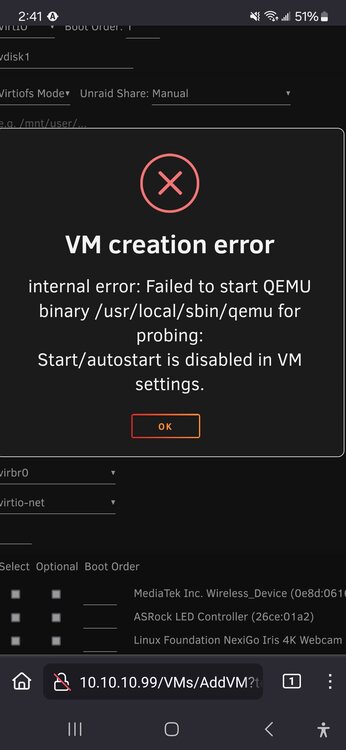
-
AUTOMATIC1111-Stable-Diffusion-Web-UI AMD support?
-
Turns out that in my playing musical drives swapping out my cache drive for a new 2TB NVME There were some straggling files left on the array causing some sort of conflict. I had to manually go drive by drive and delete them from the terminal but once that was done, everything just started working again, of course after an hour of pulling containers... lol
-
Like, TF? It was working last night AFTER I rebuil;t my docker image because of migrating to a new cache drive, any ideas? I have done as much troubleshooting as I know how. docker run -d --name='ApacheGuacamole' --net='bridge' -e TZ="America/Phoenix" -e HOST_OS="Unraid" -e HOST_HOSTNAME="connollyserver" -e HOST_CONTAINERNAME="ApacheGuacamole" -e 'OPT_MYSQL'='Y' -e 'OPT_MYSQL_EXTENSION'='N' -e 'OPT_SQLSERVER'='N' -e 'OPT_OPENID'='N' -e 'OPT_LDAP'='N' -e 'OPT_DUO'='N' -e 'OPT_CAS'='N' -e 'OPT_TOTP'='N' -e 'OPT_QUICKCONNECT'='N' -e 'OPT_HEADER'='N' -e 'OPT_SAML'='N' -e 'PUID'='99' -e 'PGID'='100' -l net.unraid.docker.managed=dockerman -l net.unraid.docker.webui='http://[IP]:[PORT:8080]/' -l net.unraid.docker.icon='https://i.imgur.com/eflpez4.png' -p '9191:8080/tcp' -v '/mnt/user/appdata/ApacheGuacamole':'/config':'rw' 'jasonbean/guacamole' docker: Error response from daemon: stat /var/lib/docker/btrfs/subvolumes/e499e32a88f1309b0f964636b3148cafc1456117276aa0039b70dbac85c65e45: no such file or directory. See 'docker run --help'. The command failed.
-
Any updates on this? Just started happening to me last night. Now I can't shutdown my vm ever without getting error 127. I'm running an Arch VM and not Windows but same symptoms.
-
I would love to have access to CurlFtpFS on my server. I have some specific use cases thay would be so much easier this way. I didnt see any mention of a specific place to make requests. 😉 https://slackware.pkgs.org/current/slackel-x86_64/curlftpfs-0.9.2-x86_64-1dj.txz.html
-
2024-02-11T20:23:17.994657Z ERROR conduit: The database couldn't be loaded or created error=RocksDbError { source: Error { message: "IO error: While open a file for appending: /var/lib/matrix-conduit/LOG: Permission denied" } } Any ideas? I see the uid and gid is 1000 but I guess thats normal. I can't imagine why it doesn't have access to a directory it made for itself so I'm a little stumped.
-
cammelspit changed their profile photo
-
Found an alternate way. You can trigger the standard installation wizard by deleting the database PHP file inside the appdata directory. Once you do this you then navigate to /install.php manually. It will then trigger the standard spotweb installation process. When you do this, you don't have to worry about what's hard coded into the template and can instead just use whatever. Alternatively, you can just use a standard SQL database if you happen to already be running a container for a different reason. If anyone does attempt this, remember, you can't turn off the container when you delete the file and you have to leave it running. It will then fail to rewrite that file, but that's okay because you can then just copy what the install script spits out at you and manually add that to that same file and you should be good to go. This is going to be useful to probably about five of us but I figured I'd post my solution anyway.
-
Howdy, what string would i use if i choose a postgrsql DB? I see in the template its set to mysql DB type and i just dont kmow how to find what to pu there.
-
Thanks Squid! Fixed it right up. No idea why I keep forgetting with Linux it's usually a permissions thing. LOL I appreciate ya brother!