John_M
Members
-
Joined
-
Last visited
Everything posted by John_M
-
Yes, it is. I upgraded one server directly from 6.3.5 to 6.4.1 and had to add the same line to my go file to stop the error messages in my syslog.
-
The plugin needs to be updated for compatibility with unRAID 6.4.x (see some of the other posts on this page).
-
Thanks for the explanation, Dan.
-
Until some other process needs the memory. I don't think it's possible to be more specific than that. If you have plenty of memory and not much demand for it and a relatively small number of files the chances are the directory information will stay cached for a long time. If you have some process that needs a lot of memory running, say, once a day then the cache may end up being purged every day so that the memory can be re-allocated by the kernel.
-
Could someone explain what rc.diskinfo does, please? I understand it's installed by the Preclear plugin and, presumably, it provides information about disks but there seems to be an incompatibility with some functions of Unassigned Devices. I must say, the name seems a little odd for a daemon, though - I would have expected it to be called something like diskinfod as I thought the rc prefix meant "run commands", in the sense of start-up scripts.
-
On page 69: this reply. Tip: You can search within the current topic using the search box at the top right corner of the page.
-
You can use rsync without having to mount the shares from one server on another, then you won't have the problem of them being re-shared anyway. I use something like this, running it on the backup server, where tower is the name of the main server and MyShare is the name of the share: rsync -aAXPvi --del -e ssh root@tower:/mnt/user/MyShare/ /mnt/user/MyShare/ You might not need all the options but they work for me. The important ones are -a and -e.
-
No, I'm referring to the console output that you pasted into your post: ############################################################################################################################ # SMART overall-health self-assessment test result: PASSED # ############################################################################################################################ Segmentation fault root@Tower:/usr/local/emhttp#
-
It segfaulted. That shouldn't happen. I suggest a reboot, at least, but grab diagnostics first.
-
I've never had a problem with the plugin but I think the reason for that might be the fact that while my Plex database has a lot of files it doesn't have literally millions. I don't have Generate video thumbnail previews enabled in the Plex Settings -> Server -> Library page, though I do have Generate chapter thumbnails enabled as a scheduled task. I recommend that anyone not needing the video preview thumbnails make sure they are switched off.
-
Excellent! Thanks, Dan. I've just updated.
-
The recent update to UD (2017.11.02) causes error messages to be added to the syslog when SMB/NFS servers that it knows about happen to be offline: Nov 5 00:55:47 Lapulapu unassigned.devices: Error: SMB/NFS server 'Drobo5N' appears to be off-line. Be sure the server responds to a 'ping' so Unassigned Devices can verify the server is on-line. I know you've been working on improving the detection of online/offline status along with which versions of SMB are supported by servers but I preferred it when offline servers didn't cause these error messages. I know the server in question is offline and UD indicates that status quite adequately by means of a grey ball, so I know not to try to mount it before I've brought it online. The thing is, the error message is added every time I refresh the Main page (I don't use tabbed view).

-
@Matt173 (b1) is as described above by @bonienl (b2) It sounds like you're using hdparm -S## to set a spin-down timer. Have you tried hdparm -y to spin down immediately instead? (b3) I don't see that behaviour. Clicking the VMs tab doesn't spin up unassigned disks. (b4) Yes, ZFS formatted disks can't be mounted using this plugin. Take a look at @trurl's suggestion of passing through the disk controller to your VM. That's your best chance of achieving what you want, I think.
-
That sounds normal to me. Since you've pre-cleared the disk it is no longer formatted and therefore can't be mounted so your available options are to format it with UD, or pre-clear it again, or you could stop the array, assign the disk to the cache slot, then restart the array and format the new cache disk. I think you want this last option.
-
And also with -rc10b. I've added chmod 755 /usr/local/emhttp/plugins/snmp to my go file to get rid of the error messages.
-
Try 192.168.1.138:/mnt/user/r5000 or 192.168.1.138:/c/mnt/user/r5000 in the first instance. If neither helps the documentation for your NFS server might shed some light.
-
You have to specify the complete path to the exported share, not just the share name - at least that's the case with Unix-like operating systems. I don't know how a Windows NFS server converts between Widows and Unix paths though. Your Ubuntu mount command is looking for a share called /r5000 - i.e. in the "root" of the Windows file system, wherever that is. Your UD mount command is looking for it at //c/r5000. Neither is correct.
-
The SATA link is being reset. That has nothing to do with the script. It's your cable or the eSATA dock that's the problem. EDIT: Are you using a port multiplier on that SATA port too? It shouldn't be a problem but it makes troubleshooting a bit more complicated.
-
Could your mount error be related to the fact that you're trying to force the root username? Try creating and connecting as a non-privileged user.
-
FWIW, it's exactly the same after upgrading to unRAID 6.4.0-rc9f.
-
Apologies if this has already been answered. I'm catching up on this thread. I've got five more pages to go. I've used WD Elements drives in the past and once you take them out of their shells the 5.25-inch ones work fine as SATA disks. However, the USB to SATA bridge card they use employs encryption so whatever you write to the disk with it in place is completely scrambled when you bypass the card and access the disk via SATA. If you plan to keep the disk in its shell than you have no problem, though there is little air flow and during a prolonged pre-clearing session it will get quite warm. WD seems to be the only company that uses encrypting bridge cards. I've used Seagate and Toshiba external drives via USB and had no problems when accessing them via SATA but they do all get warmer than I would like when kept in their shells. I hope this helps but it's probably weeks too late
-
Sorry, mate. But thank you.
-
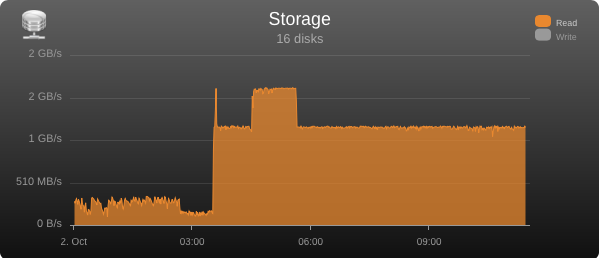
That fixed it. Thanks. I've spotted something odd about the Storage graph now. It's just a slight problem with the way the y-axis is labelled. See here: I switched off the Write graph to remove the big spike caused by trim. Notice that there are two 2 GB/s labels on the y-axis. My thought is that the lower one ought to read 1.5 GB/s but it's actually being rounded up to 2.
-
Or you can click the Log button at the top right of any page of the GUI to pop-up a window showing the last few lines of the log. It's a core unRIAD feature that works independently of this plugin and I find it very useful.
-
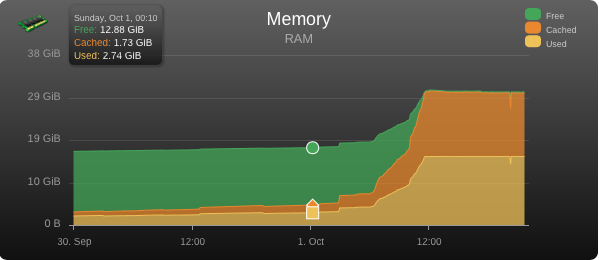
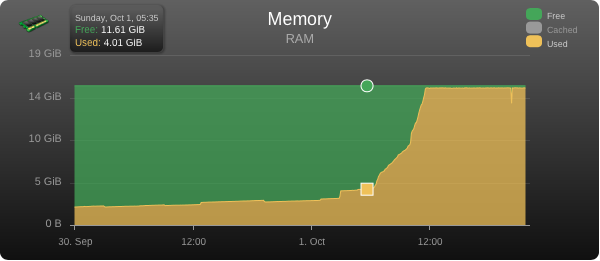
I like the fixed CPU scaling option - I never understood why in automatic mode it displayed up to 150%, which can never be reached. However, I'm seeing the RAM size miscalculation with version 2017.10.01a too with both unRAID 6.3.5 and 6.4.0-rc9f: I actually have 16 GB of RAM. It looks as though the Used value needs to have the Cached value subtracted from it. If I switch off the Cached plot the graph shows the total as constant at 16 GB that I expect: