





mattekure
Members
-
Joined
-
Last visited
Everything posted by mattekure
-
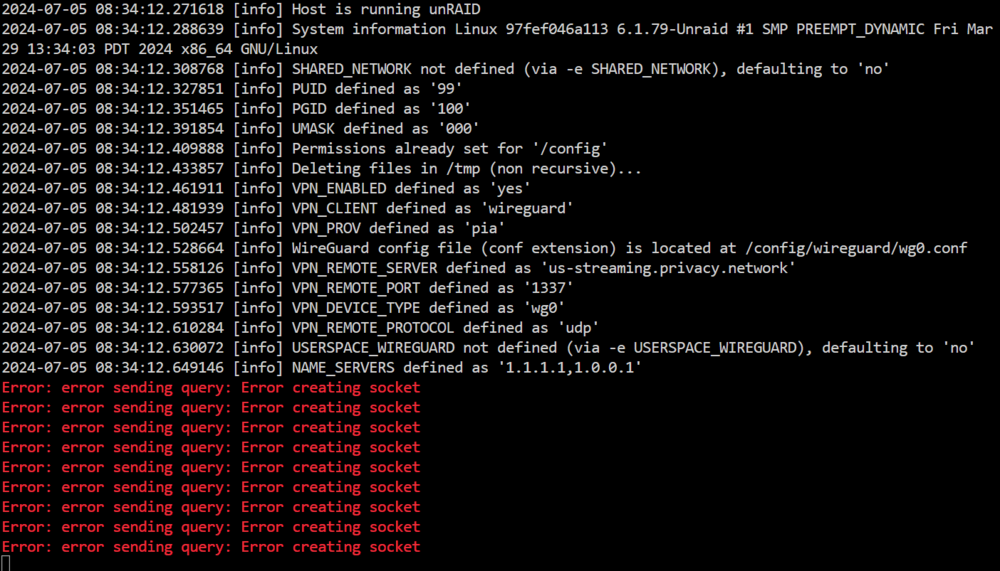
Started getting this overnight. I have tried changing pia endpoints.
-
Yeah, makes perfect sense. the only container I currently use with port forwarding is your binhex-qbittorrentvpn.
-
excellent, thanks. I wasnt using port forwarding, so it didnt make sense that it stopped working all of a sudden. appreciate the quick response.
-
Has something changed so that privoxy now requires that a port forwarding endpoint be selected? I am using PIA, using wireguard. Yesterday my privoxy stopped working and the only indication was in the logs where it said my selected endpoint did not support port forwarding. When I changed to an endpoint that supports port forwarding it worked again.
-
Recently started showing this error in the syslog. Jan 11 14:02:16 Tower root: MeTube: Could not download icon https://raw.githubusercontent.com/alexta69/metube/master/favicon/android-chrome-384x384.png the icon assets appear to have moved to https://github.com/alexta69/metube/tree/master/ui/src/assets/icons
-
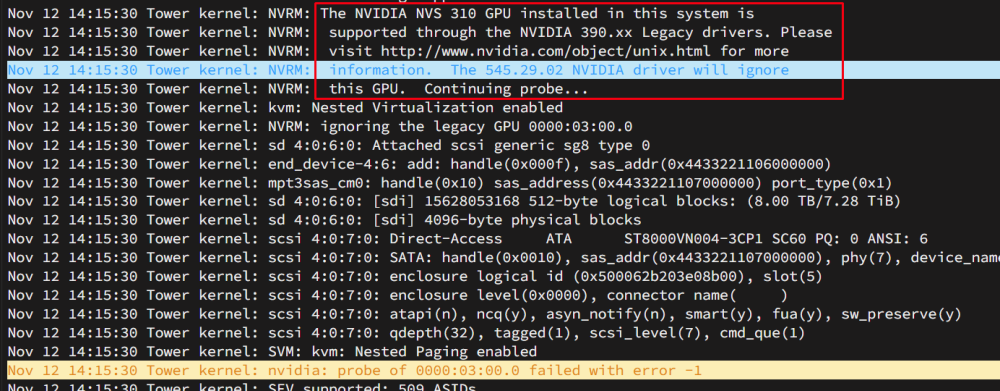
hmm, maybe the NVS 310 is not supported at all.
-
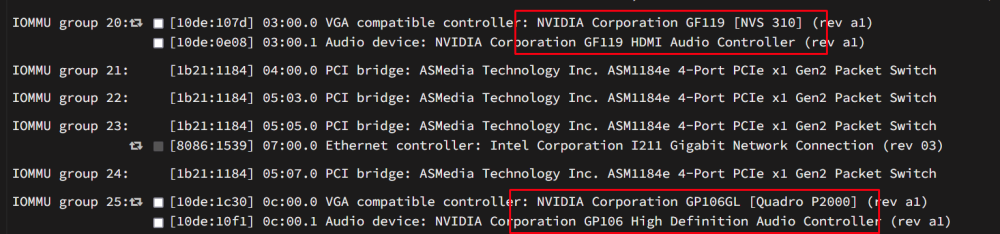
I have an odd situation I cant figure out. My server has 2 GPUs installed which Unraid does recognize as being installed. I have a NVIDIA NVS 310 and a NVIDIA Quadro P2000. I want to use the NVS 310 for the rare instances when I need to pull up the Display and have been using the P2000 for transcoding. But I cannot get any display output when hooked to a monitor. I have tried multiple cables with a monitor I know works as I use it for other things. I dont even get any output during the POST boot. It doesnt matter which port I plug it into, I cant seem to get any display output. Anyone have any ideas? Diags attached in case its relevant. tower-diagnostics-20231112-1418.zip
-
I think I found the solution here: https://docs.unraid.net/unraid-os/manual/storage-management/#rebuilding-a-drive-onto-itself I have begun the rebuild of one of the drives onto itself. once its done I'll do the other.
-
I made a stupid mistake trying to adjust something inside my case and did not turn the power off first. So a couple of drives got accidentally unplugged while running. Now 2 drives show as disabled and being emulated. I have tried swapping cables around (after shutting down properly) and the same 2 drives continue to show as disabled. it does appear to be getting power and connecting as I do see it reporting temp information and can click the spin up/down. any help would be greatly appreciated. diags attached tower-diagnostics-20230926-2005.zip
-
yeah. I have no idea why the second time worked when the first didnt.
-
Posting a follow-up. I reinitiated the "Copy Parity Information" operation and let it run to conclusion a second time. This time it gave me the option to start the array and begin rebuilding.
-
I am currently doing the parity swap procedure as described here https://docs.unraid.net/legacy/FAQ/parity-swap-procedure/ All of the steps have gone fine until the end of step 14. I ran the Copy function to copy the parity data from the old parity drive to the new parity drive which ran overnight. But when it finished this morning, instead of showing a Start/Data Rebuild option, it showed the Copy function again. I have attached diagnostics, but I'm not sure what to do. Running 6.12.4 Dockers and VM all turned off before beginning Parity swap procedure. tower-diagnostics-20230924-0802.zip
-
Got an error about files changing in binhex-krusader. [02.01.2023 06:00:01] Backup of appData starting. This may take awhile [02.01.2023 06:00:01] Not stopping Avidemux: Not started! [ / Exited (0) 6 days ago] [02.01.2023 06:00:01] Stopping binhex-krusader... done! (took 1 seconds) [02.01.2023 06:00:02] Stopping binhex-privoxyvpn... done! (took 3 seconds) [02.01.2023 06:00:05] Stopping binhex-prowlarr... done! (took 1 seconds) [02.01.2023 06:00:06] Stopping binhex-qbittorrentvpn... done! (took 2 seconds) [02.01.2023 06:00:08] Stopping binhex-readarr... done! (took 1 seconds) [02.01.2023 06:00:09] Stopping binhex-sabnzbdvpn... done! (took 2 seconds) [02.01.2023 06:00:11] Stopping bitwarden... done! (took 0 seconds) [02.01.2023 06:00:11] Stopping bookstack... done! (took 5 seconds) [02.01.2023 06:00:16] Stopping Cloudflare-DDNS... done! (took 3 seconds) [02.01.2023 06:00:19] Not stopping Crafty-4: Not started! [ / Created] [02.01.2023 06:00:19] Stopping CrashPlanPRO... done! (took 8 seconds) [02.01.2023 06:00:27] Stopping FileBrowser... done! (took 0 seconds) [02.01.2023 06:00:27] Not stopping Foundry: Not started! [ / Created] [02.01.2023 06:00:27] Not stopping HandBrake: Not started! [ / Exited (0) 6 days ago] [02.01.2023 06:00:27] Not stopping JDownloader2: Not started! [ / Exited (0) 6 days ago] [02.01.2023 06:00:27] Not stopping MakeMKV: Not started! [ / Exited (0) 6 days ago] [02.01.2023 06:00:27] Stopping mariadb... done! (took 4 seconds) [02.01.2023 06:00:31] Not stopping MediaInfo: Not started! [ / Exited (0) 6 days ago] [02.01.2023 06:00:31] Not stopping MKVCleaver: Not started! [ / Exited (0) 6 days ago] [02.01.2023 06:00:31] Not stopping MKVToolNix: Not started! [ / Exited (0) 6 days ago] [02.01.2023 06:00:31] Not stopping OpenSpeedTest: Not started! [ / Created] [02.01.2023 06:00:31] Stopping overseerr... done! (took 5 seconds) [02.01.2023 06:00:36] Stopping phpmyadmin... done! (took 4 seconds) [02.01.2023 06:00:40] Stopping plex... done! (took 6 seconds) [02.01.2023 06:00:46] Not stopping psitransfer: Not started! [ / Exited (0) 6 days ago] [02.01.2023 06:00:46] Stopping radarr... done! (took 4 seconds) [02.01.2023 06:00:50] Stopping sonarr... done! (took 5 seconds) [02.01.2023 06:00:55] Stopping swag... done! (took 4 seconds) [02.01.2023 06:00:59] Stopping tautulli... done! (took 5 seconds) [02.01.2023 06:01:04] Stopping tdarr... done! (took 4 seconds) [02.01.2023 06:01:08] Backing up libvirt.img to /mnt/user/backups/CommunityApplications/libvirt/ [02.01.2023 06:01:08] Using Command: /usr/bin/rsync -avXHq --delete --log-file="/var/lib/docker/unraid/ca.backup2.datastore/appdata_backup.log" "/mnt/user/system/libvirt/libvirt.img" "/mnt/user/backups/CommunityApplications/libvirt/" > /dev/null 2>&1 2023/01/02 06:01:08 [1795] building file list 2023/01/02 06:01:11 [1795] >f..tp..... libvirt.img 2023/01/02 06:01:11 [1795] sent 1,074,004,075 bytes received 35 bytes 306,858,317.14 bytes/sec 2023/01/02 06:01:11 [1795] total size is 1,073,741,824 speedup is 1.00 [02.01.2023 06:01:11] Backing Up appData from /mnt/cache/appdata/ to /mnt/user/backups/CommunityApplications/appdata/[email protected] [02.01.2023 06:01:11] Separate archives enabled! [02.01.2023 06:01:11] Ignoring: . [02.01.2023 06:01:11] Ignoring: .. [02.01.2023 06:01:11] Ignoring: .Recycle.Bin [02.01.2023 06:01:11] Backing Up: Avidemux [02.01.2023 06:01:11] Verifying Backup Avidemux [02.01.2023 06:01:11] Backing Up: binhex-krusader /usr/bin/tar: binhex-krusader/home/.icons/BLACK-Ice-Numix-FLAT/16/categories: file changed as we read it /usr/bin/tar: binhex-krusader/home/.icons/BLACK-Ice-Numix-FLAT/16: file changed as we read it [02.01.2023 06:01:14] tar creation/extraction failed! [02.01.2023 06:01:14] Backing Up: binhex-privoxyvpn [02.01.2023 06:01:14] Verifying Backup binhex-privoxyvpn [02.01.2023 06:01:14] Backing Up: binhex-prowlarr [02.01.2023 06:01:23] Verifying Backup binhex-prowlarr [02.01.2023 06:01:25] Backing Up: binhex-qbittorrentvpn /usr/bin/tar: binhex-qbittorrentvpn/qBittorrent/config/ipc-socket: socket ignored [02.01.2023 06:01:26] Verifying Backup binhex-qbittorrentvpn [02.01.2023 06:01:26] Backing Up: binhex-readarr [02.01.2023 06:01:28] Verifying Backup binhex-readarr [02.01.2023 06:01:29] Backing Up: binhex-sabnzbdvpn [02.01.2023 06:01:29] Verifying Backup binhex-sabnzbdvpn [02.01.2023 06:01:29] Backing Up: bitwarden [02.01.2023 06:01:29] Verifying Backup bitwarden [02.01.2023 06:01:29] Backing Up: bookstack [02.01.2023 06:01:35] Verifying Backup bookstack [02.01.2023 06:01:36] Backing Up: crafty-4 [02.01.2023 06:04:52] Verifying Backup crafty-4 [02.01.2023 06:05:32] Backing Up: CrashPlanPRO [02.01.2023 06:06:57] Verifying Backup CrashPlanPRO [02.01.2023 06:07:13] Backing Up: filebrowser [02.01.2023 06:07:13] Verifying Backup filebrowser [02.01.2023 06:07:13] Backing Up: Foundry [02.01.2023 06:07:30] Verifying Backup Foundry [02.01.2023 06:07:33] Backing Up: HandBrake [02.01.2023 06:07:33] Verifying Backup HandBrake [02.01.2023 06:07:33] Backing Up: JDownloader2 [02.01.2023 06:07:36] Verifying Backup JDownloader2 [02.01.2023 06:07:37] Backing Up: MakeMKV [02.01.2023 06:07:37] Verifying Backup MakeMKV [02.01.2023 06:07:37] Backing Up: mariadb [02.01.2023 06:07:39] Verifying Backup mariadb [02.01.2023 06:07:39] Backing Up: MediaInfo [02.01.2023 06:07:39] Verifying Backup MediaInfo [02.01.2023 06:07:39] Backing Up: MKVCleaver [02.01.2023 06:07:39] Verifying Backup MKVCleaver [02.01.2023 06:07:39] Backing Up: MKVToolNix [02.01.2023 06:07:40] Verifying Backup MKVToolNix [02.01.2023 06:07:40] Backing Up: overseerr [02.01.2023 06:07:40] Verifying Backup overseerr [02.01.2023 06:07:40] Backing Up: phpmyadmin [02.01.2023 06:07:40] Verifying Backup phpmyadmin [02.01.2023 06:07:40] Backing Up: plex [02.01.2023 06:15:40] Verifying Backup plex [02.01.2023 06:17:51] Backing Up: psitransfer [02.01.2023 06:17:51] Verifying Backup psitransfer [02.01.2023 06:17:51] Backing Up: radarr [02.01.2023 06:18:40] Verifying Backup radarr [02.01.2023 06:18:50] Backing Up: sonarr [02.01.2023 06:18:58] Verifying Backup sonarr [02.01.2023 06:19:00] Backing Up: swag [02.01.2023 06:19:04] Verifying Backup swag [02.01.2023 06:19:04] Backing Up: tautulli [02.01.2023 06:19:30] Verifying Backup tautulli [02.01.2023 06:19:37] Backing Up: tdarr [02.01.2023 06:19:57] Verifying Backup tdarr [02.01.2023 06:20:02] Backing Up: tdarr-db [02.01.2023 06:20:09] Verifying Backup tdarr-db [02.01.2023 06:20:12] done [02.01.2023 06:20:12] Searching for updates to docker applications [02.01.2023 06:20:20] Starting Cloudflare-DDNS... (try #1) done! [02.01.2023 06:20:22] Starting binhex-krusader... (try #1) done! [02.01.2023 06:20:24] Starting CrashPlanPRO... (try #1) done! [02.01.2023 06:20:27] Starting swag... (try #1) done! [02.01.2023 06:20:30] Starting plex... (try #1) done! [02.01.2023 06:20:33] Starting bitwarden... (try #1) done! [02.01.2023 06:20:35] Starting mariadb... (try #1) done! [02.01.2023 06:20:38] Starting bookstack... (try #1) done! [02.01.2023 06:20:40] Starting FileBrowser... (try #1) done! [02.01.2023 06:20:43] Starting binhex-privoxyvpn... (try #1) done! [02.01.2023 06:20:46] Starting binhex-qbittorrentvpn... (try #1) done! [02.01.2023 06:20:48] Starting binhex-sabnzbdvpn... (try #1) done! [02.01.2023 06:20:50] Starting sonarr... (try #1) done! [02.01.2023 06:20:53] Starting radarr... (try #1) done! [02.01.2023 06:20:55] Starting binhex-readarr... (try #1) done! [02.01.2023 06:20:58] Starting binhex-prowlarr... (try #1) done! [02.01.2023 06:21:01] Starting phpmyadmin... (try #1) done! [02.01.2023 06:21:03] Starting tautulli... (try #1) done! [02.01.2023 06:21:06] Starting overseerr... (try #1) done! [02.01.2023 06:21:08] Starting tdarr... (try #1) done! [02.01.2023 06:21:11] A error occurred somewhere. Not deleting old backup sets of appdata [02.01.2023 06:21:11] Backup / Restore Completed
-
Thanks for the ideas. I'll keep poking at it. As you mentioned, I have a very simple setup with only one LAN card/cable. I am not aware of any special settings in my switch, other than having a static IP for my Unraid server.
-
I recently updated to 6.11.3 and have begun noticing the logs filling up with these messages. There doesnt seem to be any error associated with it, but I dont know whats going on. Diags attached. Any help is appreciated. Nov 14 12:09:45 Tower kernel: br0: received packet on eth0 with own address as source address (addr:70:85:c2:d8:8f:b9, vlan:0) Nov 14 12:09:45 Tower kernel: br0: received packet on eth0 with own address as source address (addr:70:85:c2:d8:8f:b9, vlan:0) Nov 14 12:09:45 Tower kernel: br0: received packet on eth0 with own address as source address (addr:70:85:c2:d8:8f:b9, vlan:0) Nov 14 12:09:45 Tower kernel: br0: received packet on eth0 with own address as source address (addr:70:85:c2:d8:8f:b9, vlan:0) Nov 14 12:09:45 Tower kernel: br0: received packet on eth0 with own address as source address (addr:70:85:c2:d8:8f:b9, vlan:0) Nov 14 12:09:45 Tower kernel: br0: received packet on eth0 with own address as source address (addr:70:85:c2:d8:8f:b9, vlan:0) Nov 14 12:09:45 Tower kernel: br0: received packet on eth0 with own address as source address (addr:70:85:c2:d8:8f:b9, vlan:0) Nov 14 12:09:45 Tower kernel: br0: received packet on eth0 with own address as source address (addr:70:85:c2:d8:8f:b9, vlan:0) Nov 14 12:09:45 Tower kernel: br0: received packet on eth0 with own address as source address (addr:70:85:c2:d8:8f:b9, vlan:0) Nov 14 12:09:45 Tower kernel: br0: received packet on eth0 with own address as source address (addr:70:85:c2:d8:8f:b9, vlan:0) Nov 14 12:09:53 Tower kernel: net_ratelimit: 32742 callbacks suppressed tower-diagnostics-20221114-1224.zip
-
Nevermind. In the Brave browser, I was able to fix this by turning off the "Brave Shields" for the servers URL. Once I turned it off and reloaded, the consoles worked perfectly.
-
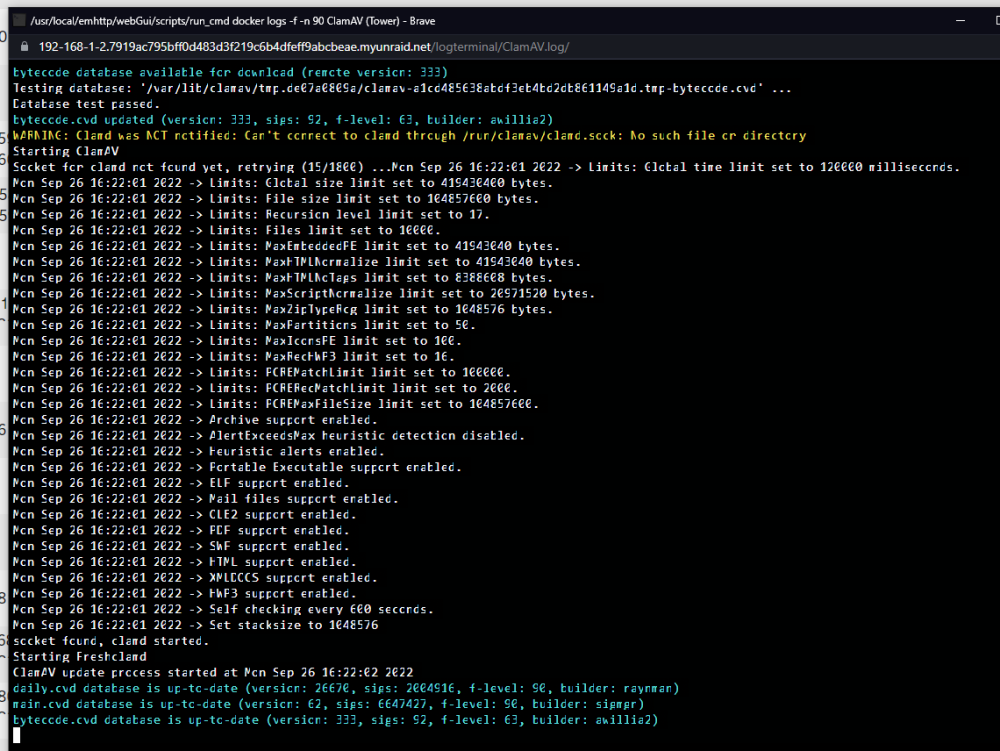
Weird, it appears to be related to my browser. checking it in Chrome and it looks fine. It was messing up using the Brave browser. What font is it using and is there any way to change its settings?
-
I just updated to 6.11.0 and now the logs window font is oddly compressed. Its affecting all docker logs. Is there some setting to adjust the font size/spacing for the logs window? tower-diagnostics-20220926-1627.zip
-
thanks so much, that worked perfectly.
-
Anyone else have any ideas? I'm stumped
-
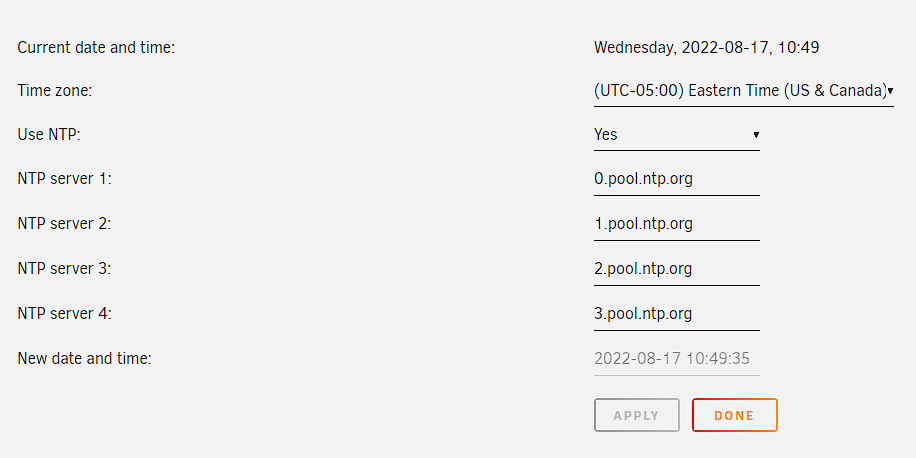
Yes, the time and date all look correct.
-
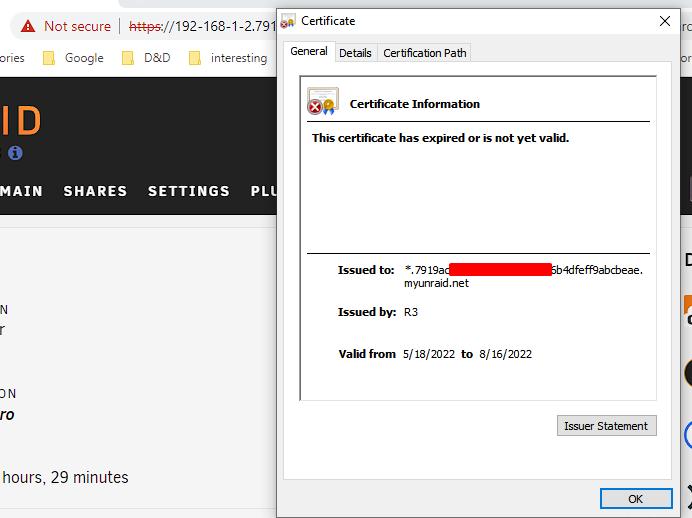
Beginning yesterday, every time I go to the Unraid GUI I get the error that the certificate is not valid/expired. But inside Management access it says certificate expires in Oct. I have tried clearing cache and using another browser and get the same error. tower-diagnostics-20220817-0713.zip

-
FYI, default username/pw are detailed in the getting started doc. https://wiki.craftycontrol.com/en/4/docs/Getting Started#logging-in Logging In Once you reach the Crafty webpage you will be greeted with a login screen. The default credentials in config.json are: Username: admin Password: crafty We highly recommend changing this immediately after logging in.
-
ok. I've done that and restarted the docker. I'll monitor it and see if it pops up again.
-
Since upgrading to 6.10, I've noticed frequent random errors in the log. I have no idea what might be causing these, the system ran fine for over a year under 6.9.2. Last night it crashed to the point of requiring a hard reboot. I could not ssh in. I have attached diagnostics. May 23 12:53:21 Tower kernel: ------------[ cut here ]------------ May 23 12:53:21 Tower kernel: WARNING: CPU: 19 PID: 0 at net/netfilter/nf_conntrack_core.c:1192 __nf_conntrack_confirm+0xb8/0x254 [nf_conntrack] May 23 12:53:21 Tower kernel: Modules linked in: input_leds led_class xt_connmark xt_mark xt_comment iptable_raw nvidia_uvm(PO) veth xt_CHECKSUM ipt_REJECT nf_reject_ipv4 ip6table_mangle ip6table_nat iptable_mangle macvlan xt_nat xt_tcpudp xt_conntrack nf_conntrack_netlink nfnetlink xt_addrtype br_netfilter xfs md_mod nvidia_modeset(PO) nvidia(PO) drm backlight nct6775 hwmon_vid efivarfs iptable_nat xt_MASQUERADE nf_nat nf_conntrack nf_defrag_ipv6 nf_defrag_ipv4 wireguard curve25519_x86_64 libcurve25519_generic libchacha20poly1305 chacha_x86_64 poly1305_x86_64 ip6_udp_tunnel udp_tunnel libblake2s blake2s_x86_64 libblake2s_generic libchacha ip6table_filter ip6_tables iptable_filter ip_tables x_tables edac_mce_amd crct10dif_pclmul crc32_pclmul crc32c_intel ghash_clmulni_intel aesni_intel crypto_simd cryptd wmi_bmof mxm_wmi mpt3sas igb rapl i2c_piix4 i2c_algo_bit ahci raid_class k10temp i2c_core scsi_transport_sas libahci wmi button acpi_cpufreq [last unloaded: ccp] May 23 12:53:21 Tower kernel: CPU: 19 PID: 0 Comm: swapper/19 Tainted: P O 5.15.40-Unraid #1 May 23 12:53:21 Tower kernel: Hardware name: To Be Filled By O.E.M. To Be Filled By O.E.M./X570 Taichi, BIOS P4.40 06/23/2021 May 23 12:53:21 Tower kernel: RIP: 0010:__nf_conntrack_confirm+0xb8/0x254 [nf_conntrack] May 23 12:53:21 Tower kernel: Code: 89 c6 48 89 44 24 18 e8 53 e4 ff ff 44 89 f2 44 89 ef 89 c6 89 c5 e8 2c e8 ff ff 84 c0 75 9f 49 8b 87 80 00 00 00 a8 08 74 19 <0f> 0b 89 ee 44 89 ef 45 31 e4 e8 dc df ff ff e8 ae e4 ff ff e9 71 May 23 12:53:21 Tower kernel: RSP: 0018:ffffc9000058c878 EFLAGS: 00010202 May 23 12:53:21 Tower kernel: RAX: 0000000000000188 RBX: ffffffff828e3500 RCX: 4c6f57b7dba5feee May 23 12:53:21 Tower kernel: RDX: 0000000000000000 RSI: 00000000000001b4 RDI: ffffffffa0442910 May 23 12:53:21 Tower kernel: RBP: 00000000000295b4 R08: 13a07e8279bd786b R09: da3c3c485d577177 May 23 12:53:21 Tower kernel: R10: b8bbed1e1e242eab R11: d92e2be3294076ec R12: 0000000000028cc7 May 23 12:53:21 Tower kernel: R13: 0000000000028cc7 R14: 0000000000000000 R15: ffff88846356b900 May 23 12:53:21 Tower kernel: FS: 0000000000000000(0000) GS:ffff888ffecc0000(0000) knlGS:0000000000000000 May 23 12:53:21 Tower kernel: CS: 0010 DS: 0000 ES: 0000 CR0: 0000000080050033 May 23 12:53:21 Tower kernel: CR2: 000014fefd43ad14 CR3: 0000000635e00000 CR4: 0000000000350ee0 May 23 12:53:21 Tower kernel: Call Trace: May 23 12:53:21 Tower kernel: <IRQ> May 23 12:53:21 Tower kernel: nf_conntrack_confirm+0x2f/0x36 [nf_conntrack] May 23 12:53:21 Tower kernel: nf_hook_slow+0x3e/0x93 May 23 12:53:21 Tower kernel: ? ip_protocol_deliver_rcu+0x135/0x135 tower-diagnostics-20220523-1332.zip




