






SpaceInvaderOne
Community Developer
-
Joined
Everything posted by SpaceInvaderOne
-
I would use deluge-VPN and use as Jonathanm says, for VPN provider use PIA (https://www.privateinternetaccess.com/) . This will work fine for what you want to do.
-
thanks 1812
-
oopps no my bad. I left out the :1100 in error should be append vfio-pci.ids=1b73:1100 vfio_iommu_type1.allow_unsafe_interrupts=1 iommu=pt pcie_acs_override=downstream initrd=/bzroot
-
You should be able to navigate to the directory cd /mnt/disks/google Then ls you should see something like this
-
Hi, Guys. This is a short Video about how to resize a Vdisk in unRAID. I am sure most people know how to expand a Vdisk but this guide will also show you how to shrink a vdisk should you need to. I hope you find it interesting How to Resize Vdisks. Expand or shrink a Vdisk in unRAID
-
Try this append vfio-pci.ids=1b73 vfio_iommu_type1.allow_unsafe_interrupts=1 iommu=pt pcie_acs_override=downstream initrd=/bzroot
-
Hi Guys. I have made a video about setting up and configuring Duplicati on unRAID for cloud and network backups.
-
Thanks for the info Tom. Would be nice to see Gnome tracker in unRAID in the future.
-
Cool how did you get on. Did you pass any hardware?
-
Check my post here where i passed through some old pci hardware and ran quake
-
Do we have support for spotlight searching turned on for AFP? I know from version 3.1.0 Netatalk includes support for Spotlight. But i don't seem to be able to get any of my mounted drives to work using mdutil
-
I made a video about setting up radarr if anyone finds it useful.
-
Hi I have made a video guide about how to setup radaar It shows how to prepare your existing movie catalogue to be compatible with Radarr. How to install the container then finally how to configure and use Radarr. Hope you find it useful!
-
Hi Guys. I thought it would be fun to setup a windows 98 VM but do it with some native hardware from the 90s passed through to make it authentic! In this video, you will see how to setup windows 98 as a KVM/qemu VM in unRAID. You will see how to run it with or without passed through hardware. Tomorrow i will upload the windows 95 guide as well. Guide How to Setup a windows 98 VM
-
Hi Peter, yes use the host passthrough and define the topology. You only need to define the cpu as penryn the one time as qemu arg value Also by having the topology defined osx will show cpu type. Mine reports as 4 core xeon this way. below is my xml i am using for 10.12.4 at the moment <domain type='kvm' xmlns:qemu='http://libvirt.org/schemas/domain/qemu/1.0'> <name>02 - Sierra OVMF gtx 750TI </name> <uuid>c1cb8851-ba5f-fa47-6008-eb1dfed7bd36</uuid> <metadata> <vmtemplate xmlns="unraid" name="Linux" icon="OSX-10.12.png" os="linux"/> </metadata> <memory unit='KiB'>8388608</memory> <currentMemory unit='KiB'>8388608</currentMemory> <memoryBacking> <nosharepages/> </memoryBacking> <vcpu placement='static'>8</vcpu> <cputune> <vcpupin vcpu='0' cpuset='2'/> <vcpupin vcpu='1' cpuset='3'/> <vcpupin vcpu='2' cpuset='4'/> <vcpupin vcpu='3' cpuset='5'/> <vcpupin vcpu='4' cpuset='16'/> <vcpupin vcpu='5' cpuset='17'/> <vcpupin vcpu='6' cpuset='18'/> <vcpupin vcpu='7' cpuset='19'/> </cputune> <os> <type arch='x86_64' machine='pc-i440fx-2.7'>hvm</type> <loader readonly='yes' type='pflash'>/usr/share/qemu/ovmf-x64/OVMF_CODE-pure-efi.fd</loader> <nvram>/etc/libvirt/qemu/nvram/24630ea4-0562-4009-b4bc-dcb2daeca6f7_VARS-pure-efi.fd</nvram> </os> <features> <acpi/> <apic/> </features> <cpu mode='host-passthrough'> <topology sockets='1' cores='4' threads='2'/> </cpu> <clock offset='utc'> <timer name='rtc' tickpolicy='catchup'/> <timer name='pit' tickpolicy='delay'/> <timer name='hpet' present='no'/> </clock> <on_poweroff>destroy</on_poweroff> <on_reboot>restart</on_reboot> <on_crash>restart</on_crash> <devices> <emulator>/usr/local/sbin/qemu</emulator> <disk type='file' device='disk'> <driver name='qemu' type='raw' cache='writeback'/> <source file='/mnt/cache/virtual systems/osx/sierra.img'/> <target dev='hdc' bus='sata'/> <boot order='1'/> <address type='drive' controller='0' bus='0' target='0' unit='2'/> </disk> <controller type='usb' index='0' model='ich9-ehci1'> <address type='pci' domain='0x0000' bus='0x00' slot='0x07' function='0x7'/> </controller> <controller type='usb' index='0' model='ich9-uhci1'> <master startport='0'/> <address type='pci' domain='0x0000' bus='0x00' slot='0x07' function='0x0' multifunction='on'/> </controller> <controller type='usb' index='0' model='ich9-uhci2'> <master startport='2'/> <address type='pci' domain='0x0000' bus='0x00' slot='0x07' function='0x1'/> </controller> <controller type='usb' index='0' model='ich9-uhci3'> <master startport='4'/> <address type='pci' domain='0x0000' bus='0x00' slot='0x07' function='0x2'/> </controller> <controller type='sata' index='0'> <address type='pci' domain='0x0000' bus='0x00' slot='0x1f' function='0x2'/> </controller> <controller type='pci' index='0' model='pcie-root'/> <controller type='pci' index='1' model='dmi-to-pci-bridge'> <model name='i82801b11-bridge'/> <address type='pci' domain='0x0000' bus='0x00' slot='0x1e' function='0x0'/> </controller> <controller type='pci' index='2' model='pci-bridge'> <model name='pci-bridge'/> <target chassisNr='2'/> <address type='pci' domain='0x0000' bus='0x01' slot='0x00' function='0x0'/> </controller> <controller type='pci' index='3' model='pci-bridge'> <model name='pci-bridge'/> <target chassisNr='3'/> <address type='pci' domain='0x0000' bus='0x01' slot='0x01' function='0x0'/> </controller> <controller type='virtio-serial' index='0'> <address type='pci' domain='0x0000' bus='0x02' slot='0x02' function='0x0'/> </controller> <interface type='bridge'> <mac address='52:54:00:51:66:48'/> <source bridge='br0'/> <model type='rtl8139'/> <address type='pci' domain='0x0000' bus='0x03' slot='0x03' function='0x0'/> </interface> <serial type='pty'> <target port='0'/> </serial> <console type='pty'> <target type='serial' port='0'/> </console> <channel type='unix'> <target type='virtio' name='org.qemu.guest_agent.0'/> <address type='virtio-serial' controller='0' bus='0' port='1'/> </channel> <input type='mouse' bus='ps2'/> <input type='keyboard' bus='ps2'/> <hostdev mode='subsystem' type='pci' managed='yes' xvga='yes'> <driver name='vfio'/> <source> <address domain='0x0000' bus='0x02' slot='0x00' function='0x0'/> </source> <address type='pci' domain='0x0000' bus='0x02' slot='0x03' function='0x0'/> </hostdev> <hostdev mode='subsystem' type='pci' managed='yes'> <driver name='vfio'/> <source> <address domain='0x0000' bus='0x02' slot='0x00' function='0x1'/> </source> <address type='pci' domain='0x0000' bus='0x02' slot='0x04' function='0x0'/> </hostdev> <hostdev mode='subsystem' type='pci' managed='yes'> <driver name='vfio'/> <source> <address domain='0x0000' bus='0x03' slot='0x00' function='0x0'/> </source> <address type='pci' domain='0x0000' bus='0x02' slot='0x05' function='0x0'/> </hostdev> <memballoon model='none'/> </devices> <seclabel type='none' model='none'/> <seclabel type='dynamic' model='dac' relabel='yes'/> <qemu:commandline> <qemu:arg value='-device'/> <qemu:arg value='usb-kbd'/> <qemu:arg value='-device'/> <qemu:arg value='usb-mouse'/> <qemu:arg value='-smbios'/> <qemu:arg value='type=2'/> <qemu:arg value='-cpu'/> <qemu:arg value='Penryn,vendor=GenuineIntel'/> </qemu:commandline> </domain>
-
Also make sure the bus type is set for sata <target dev='hdc' bus='sata'/>
-
Hi Darren, Yes, you are getting this error due to the card not being isolated. You will need to enable acs override patch. To do this please goto settings, then VM settings, toggle to advanced view at the top right. Then enable acs override. You will then need to restart the server for this to take effect. Then check your iommu groups and hopefully, the USB controller will be in its own lovely iommu group !!
-
Also, you are using 2 different ways of "stubbing the devices" The new way is using vfio-pci and the older way using pci-stub Just use vfio-pci For more than one device separate with a comma ie append vfio-pci.ids=1b73:1100,8086:15a1 initrd=/bzroot
-
Hi edited the xml for you. Please use the below. <domain type='kvm' xmlns:qemu='http://libvirt.org/schemas/domain/qemu/1.0'> <name>New Sierra</name> <uuid>0bb835f2-80b6-8130-4e3e-4731b8ff862d</uuid> <metadata> <vmtemplate xmlns="unraid" name="Linux" icon="linux.png" os="linux"/> </metadata> <memory unit='KiB'>4194304</memory> <currentMemory unit='KiB'>4194304</currentMemory> <memoryBacking> <nosharepages/> </memoryBacking> <vcpu placement='static'>4</vcpu> <cputune> <vcpupin vcpu='0' cpuset='4'/> <vcpupin vcpu='1' cpuset='5'/> <vcpupin vcpu='2' cpuset='6'/> <vcpupin vcpu='3' cpuset='7'/> </cputune> <os> <type arch='x86_64' machine='pc-q35-2.7'>hvm</type> <loader readonly='yes' type='pflash'>/usr/share/qemu/ovmf-x64/OVMF_CODE-pure-efi.fd</loader> <nvram>/etc/libvirt/qemu/nvram/0bb835f2-80b6-8130-4e3e-4731b8ff862d_VARS-pure-efi.fd</nvram> </os> <features> <acpi/> <apic/> </features> <cpu mode='host-passthrough'> <topology sockets='1' cores='2' threads='2'/> </cpu> <clock offset='utc'> <timer name='rtc' tickpolicy='catchup'/> <timer name='pit' tickpolicy='delay'/> <timer name='hpet' present='no'/> </clock> <on_poweroff>destroy</on_poweroff> <on_reboot>restart</on_reboot> <on_crash>restart</on_crash> <devices> <emulator>/usr/local/sbin/qemu</emulator> <disk type='file' device='disk'> <driver name='qemu' type='raw' cache='writeback'/> <source file='/mnt/user/domains/OSX Sierra.img'/> <target dev='hdc' bus='virtio'/> <boot order='1'/> <address type='pci' domain='0x0000' bus='0x02' slot='0x03' function='0x0'/> </disk> <controller type='usb' index='0' model='ich9-ehci1'> <address type='pci' domain='0x0000' bus='0x00' slot='0x07' function='0x7'/> </controller> <controller type='usb' index='0' model='ich9-uhci1'> <master startport='0'/> <address type='pci' domain='0x0000' bus='0x00' slot='0x07' function='0x0' multifunction='on'/> </controller> <controller type='usb' index='0' model='ich9-uhci2'> <master startport='2'/> <address type='pci' domain='0x0000' bus='0x00' slot='0x07' function='0x1'/> </controller> <controller type='usb' index='0' model='ich9-uhci3'> <master startport='4'/> <address type='pci' domain='0x0000' bus='0x00' slot='0x07' function='0x2'/> </controller> <controller type='sata' index='0'> <address type='pci' domain='0x0000' bus='0x00' slot='0x1f' function='0x2'/> </controller> <controller type='pci' index='0' model='pcie-root'/> <controller type='pci' index='1' model='dmi-to-pci-bridge'> <model name='i82801b11-bridge'/> <address type='pci' domain='0x0000' bus='0x00' slot='0x1e' function='0x0'/> </controller> <controller type='pci' index='2' model='pci-bridge'> <model name='pci-bridge'/> <target chassisNr='2'/> <address type='pci' domain='0x0000' bus='0x01' slot='0x00' function='0x0'/> </controller> <controller type='virtio-serial' index='0'> <address type='pci' domain='0x0000' bus='0x02' slot='0x02' function='0x0'/> </controller> <controller type='pci' index='3' model='pci-bridge'> <model name='pci-bridge'/> <target chassisNr='3'/> <address type='pci' domain='0x0000' bus='0x01' slot='0x01' function='0x0'/> </controller> <interface type='bridge'> <mac address='52:54:00:51:66:48'/> <source bridge='br0'/> <model type='e1000-82545em'/> <address type='pci' domain='0x0000' bus='0x03' slot='0x03' function='0x0'/> </interface> <input type='mouse' bus='ps2'/> <input type='keyboard' bus='ps2'/> <graphics type='vnc' port='-1' autoport='yes' websocket='-1' listen='0.0.0.0' keymap='en-us'> <listen type='address' address='0.0.0.0'/> </graphics> <video> <model type='qxl' ram='65536' vram='65536' vgamem='16384' heads='1' primary='yes'/> <address type='pci' domain='0x0000' bus='0x00' slot='0x01' function='0x0'/> </video> <memballoon model='none'/> </devices> <seclabel type='none' model='none'/> <qemu:commandline> <qemu:arg value='-device'/> <qemu:arg value='usb-kbd'/> <qemu:arg value='-device'/> <qemu:arg value='usb-mouse'/> <qemu:arg value='-device'/> <qemu:arg value='isa-applesmc,osk=xxxxxxxxxxxxxxxxxxxxxxxxxxxxxxxx'/> <qemu:arg value='-smbios'/> <qemu:arg value='type=2'/> <qemu:arg value='-cpu'/> <qemu:arg value='Penryn,vendor=GenuineIntel'/> </qemu:commandline> </domain>
-
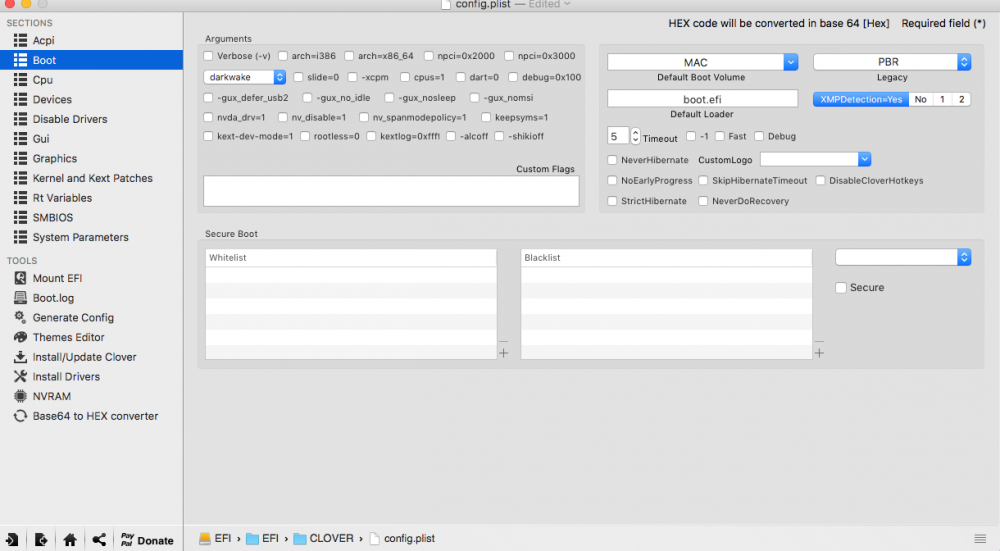
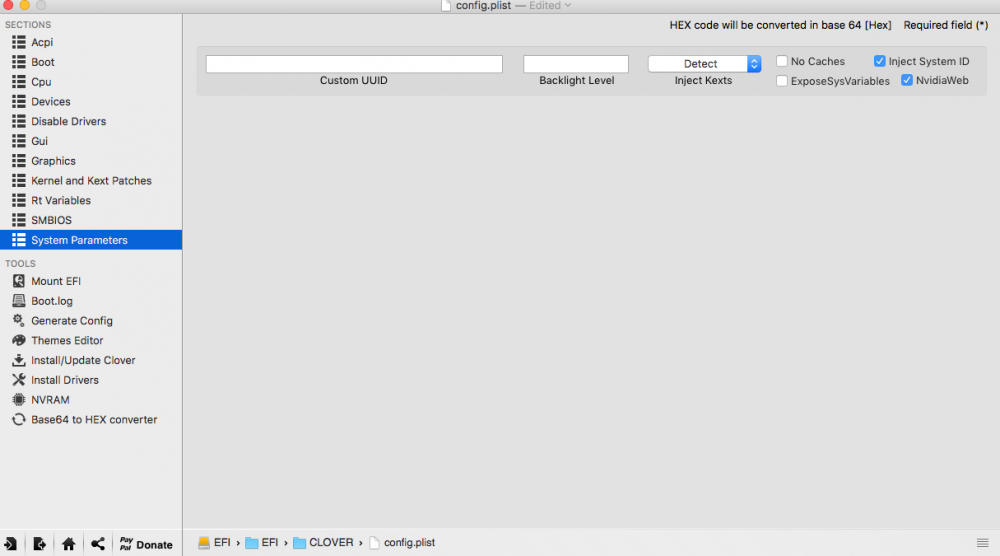
Hi th reason you were getting too fast speeds in osx using the standard clover is because it isnt patched for qemu cpu. Although some people seem to be okay others are not. The file i put in the description of the video was dreadkopps patched version which fixes the speed. the 10 series not working. To be honest i havent used my 10 series in osx yet (but will do soon) Things to check. Make sure you are using these web drivers with 10 series support. the earlier ones are only for the earlier cards http://www.nvidia.com/download/driverResults.aspx/117854/en-us You cant turn on and off the drivers in osx from the nvidia panel. We use the clover panel for this make sure you have clover set like this note below nvda_drv=1 is not checked. Also i see your graphics card is not in its own iommu group. try enabling Enable PCIe ACS Override in settings ,vm settings (you will need to toggle to advanced view there) Make sure you reboot server afterwards
-
Seems like you may have other devices in the iommu group which the usb controller is in. please post your iommu groups and system devices
-
@Thingi um its a shame the soundflower tip doesnt work. Exactly what is the sound weirdness you are getting. Also did you ever try some different vbioses passed through to see if you can change the default sound out port? Nice looking build by the way! I would like to liquid cool my 750ti but the Arctic Accelero Hybrid III-140 here is more than i paid for my 750!
-
That greats @hernandito Just be careful if you upgrade to osx 10.12.4. There are a few steps that you must do for that upgrade to be successful. See my guide a few posts up if you decide to upgrade.
-
Thanks, @Squid I was was so excited I found I hit the donate button and just bought you a beer!!
-
Hi @Squid I was wondering if in a future release of user scripts that you would consider making an edit script button to edit existing scripts. I find it a pain to have to open the flash then edit the script from there. Especially with my rare disease of "extremus-lazy-itus"





