





gxs
Members
-
Joined
-
Last visited
Everything posted by gxs
-
Hey Could you take a look at Pritunl when you find the time? I have tried installing it and it keeps throwing all kinds of errors about ports being in use although I tried the docker in br0 as well as other modes and ports are 100% not in use.
-
It would probably be better if both options were shown. It's a little confusing now (it's simple once you know how to set it but it took me 15 minutes of searching and one forum post to find this awesome function).
-
Yeah just wanted to type that I can't see the option. I guess it's a little buggy. It works now that I have set the text color as ffffff and aplied the settings.
-
Oh. I have seen that option but I was under the assumption that you can actually change the background and not just text. Thanks anyway
-
webgui: Added customizable header background color Hey I don't see that option anywhere under Settings (or under display settings). Could anyone point me to it?
-
Hey I have a question. I have just removed a docker that was linked to another docker (they shared one common folder). Now the script lists the other dockers folder. How can I exclude it. I did restart the docker in the hopes that it would leave it alone but it doesn't do that. Cheers
-
Ok. Thanks. I'll just leave it be then because it's not really needed for the moment as long as the certificates are working. Thanks for the help CHBMB
-
The issue is that port 80 doesn't work (port 444 works after the 5th install). Unless it's supposed to not work and reject incoming connections? Brought to you by linuxserver.ioWe gratefully accept donations at:https://www.linuxserver.io/donations/-------------------------------------GID/UID-------------------------------------User uid: 99User gid: 100-------------------------------------[cont-init.d] 10-adduser: exited 0.[cont-init.d] 20-config: executing...[cont-init.d] 20-config: exited 0.[cont-init.d] 30-keygen: executing...using keys found in /config/keys[cont-init.d] 30-keygen: exited 0.[cont-init.d] 50-config: executing...Variables set:PUID=99PGID=100TZ=Europe/BudapestURL=pivk.netSUBDOMAINS=wwwEXTRA_DOMAINS=ONLY_SUBDOMAINS=falseDHLEVEL=2048VALIDATION=httpDNSPLUGIN=EMAIL=blaz.pivk@gmail.comSTAGING=Backwards compatibility check. . .No compatibility action needed2048 bit DH parameters presentSUBDOMAINS entered, processingSub-domains processed are: -d www.pivk.netE-mail address entered: [email protected] validation is selectedCertificate exists; parameters unchanged; attempting renewal<-------------------------------------------------><------------------------------------------------->cronjob running on Wed Mar 7 22:52:32 CET 2018Running certbot renewSaving debug log to /var/log/letsencrypt/letsencrypt.log-------------------------------------------------------------------------------Processing /etc/letsencrypt/renewal/pivk.net.conf-------------------------------------------------------------------------------Cert not yet due for renewal-------------------------------------------------------------------------------The following certs are not due for renewal yet:/etc/letsencrypt/live/pivk.net/fullchain.pem (skipped)No renewals were attempted.No hooks were run.-------------------------------------------------------------------------------[cont-init.d] 50-config: exited 0.[cont-init.d] done.[services.d] starting services[services.d] done.Server ready
-
root@localhost:# /usr/local/emhttp/plugins/dynamix.docker.manager/scripts/docker run -d --name='letsencrypt' --net='bridge' --privileged=true -e TZ="Europe/Budapest" -e HOST_OS="unRAID" -e 'EMAIL'='[email protected]' -e 'URL'='pivk.net' -e 'SUBDOMAINS'='www' -e 'ONLY_SUBDOMAINS'='false' -e 'DHLEVEL'='2048' -e 'VALIDATION'='http' -e 'DNSPLUGIN'='' -e 'PUID'='99' -e 'PGID'='100' -p '81:80/tcp' -p '444:443/tcp' -v '/mnt/user/appdata/letsencrypt':'/config':'rw' 'linuxserver/letsencrypt' dfb7b4b86d1ea7865c87a4f835aab9b6dfdc8d5537b8b549957560cab5389351 And no my ISP is not blocking any ports and it wouldn't explain why I can't even access it locally. LE says that the server is ready.
-
I have also wiped the whole docker, template and all the remains from my server and installed everything from scratch. The odd thing is that I did see some ACME website on port 81 but it defaulted to refused to connect message after another refresh. Now it seems that port 444 works and port 81 doesn't. Which is odd to say the least. Ok I can officially say that port 444 now works and port forwards just fine: Welcome to our server The website is currently being setup under this address. For help and support, please contact: [email protected] Port 81/80 rejects the connection but since I'm only after the certificates there probably isn't any point in me fixing things.
-
No. I have installed it today for the first time.
-
I have installed this docker three times now. Today. How out of date can it be? To clarify... From the CA Apps plugin.
-
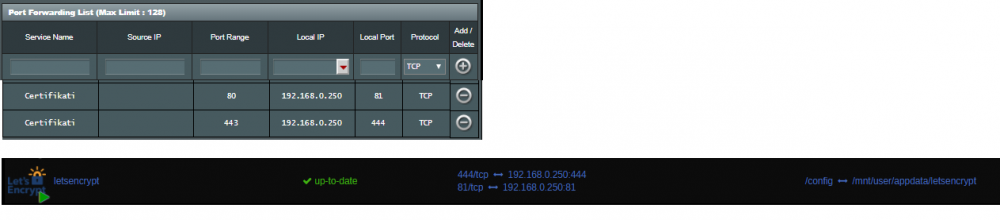
Hey guys. Same problems here. The script just can't connect to my server. Which is not odd since I can't connect to it not even from my local pc. My ports on the router are open to 81 and 444 and docker is set to look at 81 and 444. My logs say: Failed authorization procedure. www.xxx.net (http-01): urn:acme:error:connection :: The server could not connect to the client to verify the domain :: Fetching http://www.xxx.net/.well-known/acme-challenge/qT7E563QM0hW3TPVVk2THilZL7JlbrexLVzrKaMUTkM: Connection refused, xxx.net (http-01): urn:acme:error:connection :: The server could not connect to the client to verify the domain :: Fetching http://xxx.net/.well-known/acme-challenge/kmRr9YCRmX035P6QuVoqYoESOP45fAptrLyBn8m1uWU: Connection refused Browsing to http://192.168.0.250:81 or 444 doesn't do anything and throws out: 192.168.0.250 refused to connect. Search Google for 192 168 250 444 ERR_CONNECTION_REFUSED
-
I can't enter the web interface screen. Port 8280 (webui port) only forwards me to https://myserver/admin/install/server. The problem is that this then shows my unraid interface. Adding the port like https://myserver:8280/admin/install/server or even changing it to http doesn't do anything. Is there anything I'm missing?
-
You clearly never met my father. I'll just use the file protection and avoid the dummy shares until I figure out how to hide them from him. Hey even I triggered an alert today when I wasn't careful. Thanks again for the great plugin.
-
Great Plugin and I'm using it as we speak because my father always says yes to every banner/popup/sales person that shows up. But I do have a question... The files are not a problem because there are not so many in his shared folder. But using dummy shares creates a whole lot of those folders that are nice to click on and trigger an alarm (my father likes to click on stuff). Is there a way to hide the share from users but still have it public? Cheers Blaz
