






xthursdayx
Community Developer
-
Joined
-
Last visited
Everything posted by xthursdayx
-
I'm not sure to tell you the truth. I don't really know anything about Synology. I assume that it is not running unRAID though, correct? If not, I would open an issue on Github page for the docker image rather than here, since this forum is specifically for users running unRAID. Have you been able to run other docker containers that use Guacamole?
-
Great! I’m glad to hear it!
-
@sebstrgg Just to update this, I've heard from someone else who was having the same problem you were that the problem has been fixed.
-
For anyone else interested in Matrix, I've gotten this ansible stack running in an Ubuntu Server VM and it seems to be working: https://github.com/spantaleev/matrix-docker-ansible-deploy
-
@sebstrgg would you mind trying it again now with the updated image? Sorry to keep asking you to try it out, but unfortunately I am unable to reproduce this issue on either my workstation or server. Thanks.
-
Crap, okay. I'll keep working on it and report back.
-
Cool, thanks for the guidance. I've updated the template in my Github repo. Do I need to do anything else to update the listing in CA?
-
Right, I always mistakenly assume that everyone uses cache drives. Which would be a better solution, updating the template so that recipes and database referent /mnt/user/appdata/... or just leaving host directory location empty in the template so that people can just choose whatever they want?
-
It looks like this issue is related to running Node in Docker with the version of NPM that was being installed in this container. With NPM:6 in Docker, UID/GID lookup works on some hosts and not on others. I believe that this has been resolved in later versions of NPM. See: https://github.com/npm/uid-number/issues/7 I have updated the version of NPM used in the container and have also changed the way S6 initializes the application to ensure that it is running with the correct UID/GID. @sebstrgg please remove the container + image and appdata folder and try creating/running it again (without adding the PUID/PGID variables) and report back. I think it will work now (hopefully...). Thanks.
-
@tacomaster27 apologies that it took me a while to get back to this; work has been busy. I believe that both of your issues should now be resolved in the most recent version of this docker image. I fixed the first issue by updating the unRAID template and changing the WebUI location. In terms of the second issue, I found out that this was being caused because most docker containers start with the ENV variable LANG=C set, which is a problem for UTF-8 characters. I've updated the container with LANG=C.UTF-8. Please delete your gPodder folder, container and image and then install the newest version with the updated template from CA. Let me know if you're still having issues with podcasts that have non-ASCII characters.
-
Okay, thanks for the detailed information. This seems to align with the issue reported on Github. I will look into this in more detail and report back.
-
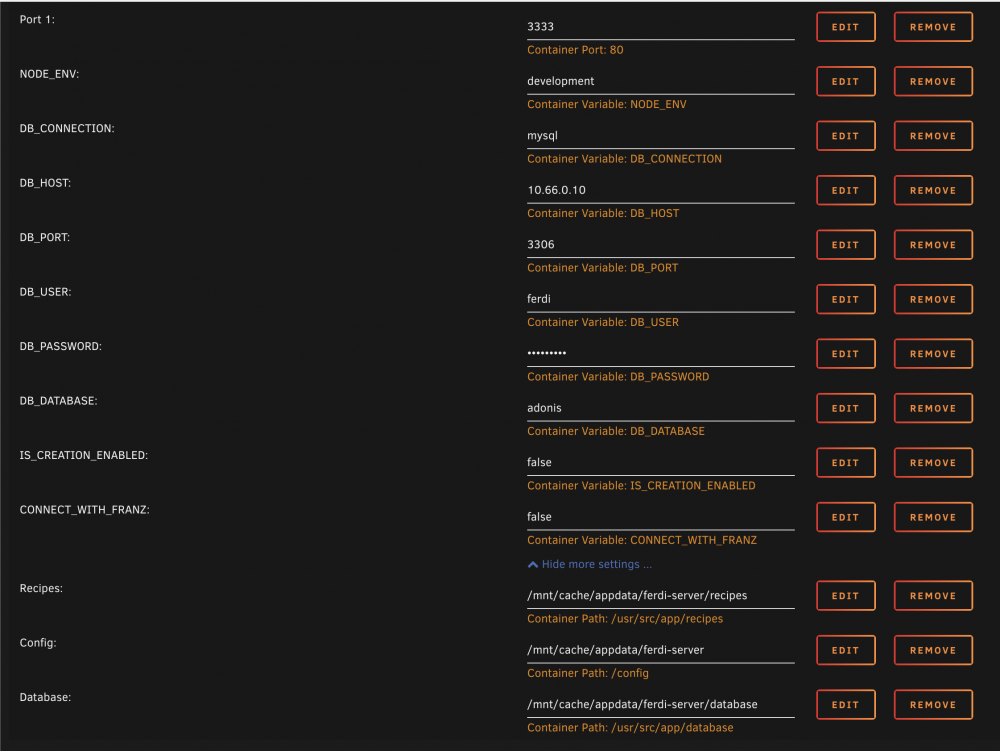
Hi Sebastian. Please see this conversation: https://github.com/xthursdayx/ferdi-server-docker/issues/4 Are you using the default template from my unRAID templates repo? If so, you shouldn't have to add the PUID/PGID variables for it to work. This is what my template looks like: Can you try deleting your appdata folder and the container/image and then reinstall with these variables (set to correct settings for your server) and report back?
-
Yes, absolutely. Just edit your container in unRAID Docker and change the ENV setting IS_CREATION_ENABLED to false and then apply.
-
Thanks for the feedback @tacomaster27 . Let me see if I can address your issues. The exact thing happens to me as well, this seems to be an issue with how the base image handles the gPodder login. Since it has been easy to work around this (by just clicking "home") I haven't worried about it too much, however, I'll look into it some more to see if I can figure out what is causing the problem. This too appears to be an issue with the GUI base image/Guacamole, specifically how it is encoding non-ASCII characters. I will discuss with maintainers of the base image to see if this can be fixed. I'll report back as soon as I know more about if/when this can be resolved. Thanks for your patience.
-
** Container Depreciated and Archived ** Please switch to Ferdium-server: Application Name: Ferdi-server Application Site: https://github.com/getferdi/server Docker Hub: https://hub.docker.com/r/getferdi/ferdi-server Github: https://github.com/getferdi/server Ferdi is a hard-fork of Franz, a messaging app for WhatsApp, Slack, Telegram, HipChat, Hangouts and many more. Ferdi-server is an unofficial replacement of the Franz server for use with the Ferdi Client. This is a docker image of Ferdi-server running on Alpine Linux and Node.js (v10.16.3). Configuration After the first run, Ferdi-server's configuration is saved inside the `config.txt` file inside your persistent data directory (`/config` in the container). <port>:3333 - Will map the container's port 3333 to a port on the host, default is 3333. NODE_ENV- for specifying Node environment, production or development, default is development currently this should not be changed. APP_URL - for specifying the URL, local or external, of the Ferdi-server, including http or https as necessary. DB_CONNECTION - for specifying the database being used, default is sqlite. DB_HOST - for specifying the database host, default is 127.0.0.1 DB_PORT - for specifying the database port, default is 3306 DB_USER - for specifying the database user, default is root DB_PASSWORD - for specifying the database password, default is password DB_DATABASE - for specifying the database name to be used, default is ferdi DB_SSL - true only if your database is postgres and it is hosted online, on platforms like GCP, AWS, etc MAIL_CONNECTION - for specifying the mail sender to be used, default is smtp SMPT_HOST - for specifying the mail host to be used, default is 127.0.0.1 SMTP_PORT - for specifying the mail port to be used, default is 2525 MAIL_SSL - for specifying SMTP mail security, default is false MAIL_USERNAME - or specifying your mail username to be used, default is username MAIL_PASSWORD - for specifying your mail password to be used, default is password MAIL_SENDER - for specifying the mail sender address to be used, default is [email protected] IS_CREATION_ENABLED - for specifying whether to enable the creation of custom recipes, default is true IS_DASHBOARD_ENABLED - for specifying whether to enable the Ferdi-server dashboard, default is true IS_REGISTRATION_ENABLED - for specifying whether to allow user registration, default is true CONNECT_WITH_FRANZ - for specifying whether to enable connections to the Franz server, default is true DATA_DIR=/data - for specifying the SQLite database folder, default is /data <path to data on host>:/data - this will store Ferdi-server's data (its database, among other things) on the docker host for persistence. <path to recipes on host>:/app/recipes - this will store Ferdi-server's recipes on the docker host for persistence By enabling the `CONNECT_WITH_FRANZ` option, Ferdi-server can: - Show the full Franz recipe library instead of only custom recipes - Import Franz accounts NGINX Config Block To access Ferdi-server from outside of your home network on a subdomain use this server block: # Ferdi-server server { listen 443 ssl http2; server_name ferdi.my.website; # all ssl related config moved to ssl.conf include /config/nginx/ssl.conf; location / { proxy_pass http://<SERVERIP>:3333; proxy_set_header X-Real-IP $remote_addr; proxy_set_header X-Forwarded-For $proxy_add_x_forwarded_for; proxy_set_header Host $host; proxy_set_header X-Forwarded-Proto $scheme; } } Importing your Franz account Ferdi-server allows you to import your full Franz account, including all its settings. To import your Franz account, open `http://[YOUR FERDI-SERVER]/import` in your browser and login using your Franz account details. Ferdi-server will create a new user with the same credentials and copy your Franz settings, services, and workspaces. ** UPDATE 2021-11-17 ** The new version of the Ferdi-server docker image has been pushed to Docker Hub. Existing users, please note: The latest updates to Ferdi-server and the Ferdi-server Docker image introduce changes to the default SQLite database name and location, as well as the internal container port. The new container port is 3333. If you would like to keep your existing SQLite database, you will need to add the DATA_DIR variable and change it to /app/database, to match your existing data volume. You will also need to change the DB_DATABASE variable to development to match your existing database. Please see the parameters in the Migration section below. Migrating from an existing Ferdi-server: If you are an existing Ferdi-server user using the built-in `SQlite` database, you should include the following variables: | -p 3333:3333 | existing Ferdi-server users will need to update their container port mappings from 80:3333 to `3333:3333` | | -e DB_PASSWORD=development | existing Ferdi-server users who use the built-in sqlite database should use the database name development | | -e DATA_DIR=/app/database | existing Ferdi-server users who use the built-in sqlite database should add this environmental variable to ensure data persistence | | -v <path to data on host>=/app/databases | existing Ferdi-server users who use the built-in sqlite database should use the volume name /app/database | If you are an existing Ferdi-server user who uses an external database or different variables for the built-in `SQlite` database, you should update your parameters accordingly. For example, if you are using an external MariaDB or MySql database your unique parameters might look like this: | -e DB_CONNECTION=mysql | for specifying the database being used | | -e DB_HOST=192.168.10.1 | for specifying the database host machine IP | | -e DB_PORT=3306 | for specifying the database port | | -e DB_USER=ferdi | for specifying the database user | | -e DB_PASSWORD=ferdipw | for specifying the database password | | -e DB_DATABASE=adonis | for specifying the database to be used | | -v <path to database>:/app/database | this will strore Ferdi-server's database on the docker host for persistence | | -v <path to recipes>:/app/recipes | this will strore Ferdi-server's recipes on the docker host for persistence | **In either case, please be sure to pass the correct variables to the new Ferdi-server container in order maintain access to your existing database.** For more information please check out the Docker README.md on Github: https://github.com/getferdi/server/tree/master/docker If you appreciate my work please consider buying me a coffee, cheers! 😁
-
Application Name: gPodder Application Site: https://gpodder.github.io/ Docker Hub: https://hub.docker.com/r/xthursdayx/gpodder-docker Github: https://github.com/xthursdayx/gpodder-docker Docker image of the gPodder podcast client with a built-in browser-based GUI. gPodder is a simple, open source podcast client written in Python using GTK+. In development since 2005 with a proven, mature codebase. Setup Instructions: - Map "/config" to your choice of folder location. That is where all of your configuration and database files will reside, so you won't lose data when you update, reinstall, etc. - Map "/downloads" to your chosen downloads folder location. This is the directory gPodder will download your podcasts to. - Replace <port> with your choice of ports. - Replace PASSWORD with the a password for the WebUI (optional) - Ctrl-Alt-Shft will bring up the menu that allows changing input options, as well as controlling the clipboard. To access the GUI, point your web browser to http://SERVERIP:3000 (replace SERVERIP with the correct value). Attention Existing gPodder Docker users This image has been rebased and the config directory structure has changed slightly. If you have settings and/or subscription data you'd like to preserve, please be sure to copy the contents of /config/gPodder to /config after pulling the latest image and then restart your container. If you appreciate my work please consider buying me a coffee, cheers! 😁 You can get support for my Unraid Docker Templates and Docker Images here.
-
Thanks, I was search in the wrong locations.
-
Hey, I created a docker image of the gPodder podcatcher and have a repository of unRAID templates. I was wondering if there is a way to submit it for inclusion in Community Applications, since I think other folks might find it useful. Cheers.
-
I know that this is a very old post, but I was wondering if anyone knows if this will work for the PIKE 2308 with the LSI SAS2308 chipset. I believe that its firmware is equivalent to LSI SAS 9205-8e or LSI 9207 HBA, but I'm not positive about that.
-
Hey Dextrose, I know this is a super old post, but I'm trying to do this exact thing. Any advice or guidance? I've flashed a Dell PERC H310 before, but that's about the extent of my knowledge.
-
Same result... ErrorWarningSystemArrayLogin [s6-init] making user provided files available at /var/run/s6/etc...exited 0. [s6-init] ensuring user provided files have correct perms...exited 0. [fix-attrs.d] applying ownership & permissions fixes... [fix-attrs.d] done. [cont-init.d] executing container initialization scripts... [cont-init.d] 10-adduser: executing... ------------------------------------- _ () | | ___ _ __ | | / __| | | / \ | | \__ \ | | | () | |_| |___/ |_| \__/ Brought to you by linuxserver.io We gratefully accept donations at: https://www.linuxserver.io/donate/ ------------------------------------- GID/UID ------------------------------------- User uid: 99 User gid: 100 ------------------------------------- [cont-init.d] 10-adduser: exited 0. [cont-init.d] 11-moduser: executing... [cont-init.d] 11-moduser: exited 0. [cont-init.d] 12-prep_xrdp: executing... [cont-init.d] 12-prep_xrdp: exited 0. [cont-init.d] 13-update_app_name: executing... [cont-init.d] 13-update_app_name: exited 0. [cont-init.d] 14-configure_openbox: executing... [cont-init.d] 14-configure_openbox: exited 0. [cont-init.d] 30-update_webapp_context: executing... [cont-init.d] 30-update_webapp_context: exited 0. [cont-init.d] 35-update_guac_creds: executing... [cont-init.d] 35-update_guac_creds: exited 0. [cont-init.d] 50-config: executing... [cont-init.d] 50-config: exited 0. [cont-init.d] 99-custom-scripts: executing... [custom-init] no custom files found exiting... [cont-init.d] 99-custom-scripts: exited 0. [cont-init.d] done. [services.d] starting services [services.d] done. Unable to find an X display. Ensure you have permission to connect to the display. guacd[410]: INFO: Guacamole proxy daemon (guacd) version 0.9.14 started guacd[410]: INFO: Listening on host 127.0.0.1, port 4822 X.Org X Server 1.19.6 Release Date: 2017-12-20 X Protocol Version 11, Revision 0 Build Operating System: Linux 4.4.0-148-generic x86_64 Ubuntu Current Operating System: Linux 0d383648e74d 4.19.56-Unraid #1 SMP Tue Jun 25 10:19:34 PDT 2019 x86_64 Kernel command line: BOOT_IMAGE=/bzimage initrd=/bzroot Build Date: 03 June 2019 08:10:35AM xorg-server 2:1.19.6-1ubuntu4.3 (For technical support please see http://www.ubuntu.com/support) Current version of pixman: 0.34.0 Before reporting problems, check http://wiki.x.org to make sure that you have the latest version. Markers: (--) probed, (**) from config file, (==) default setting, (++) from command line, (!!) notice, (II) informational, (WW) warning, (EE) error, (NI) not implemented, (??) unknown. (==) Log file: "/var/log/Xorg.pid-402.log", Time: Sun Jul 14 19:20:59 2019 (++) Using config file: "/etc/X11/xrdp/xorg.conf" (==) Using system config directory "/usr/share/X11/xorg.conf.d" xorgxrdpSetup: xrdpdevSetup: rdpmousePlug: rdpkeybPlug: rdpIdentify: rdpDriverFunc: op 10 : rdpPreInit: rdpScreenInit: virtualX 800 virtualY 600 rgbBits 8 depth 24 rdpScreenInit: pfbMemory bytes 1920000 rdpScreenInit: pfbMemory 0x146bf7b05010 rdpSimdInit: assigning yuv functions rdpSimdInit: cpuid ax 1 cx 0 return ax 0x000406d8 bx 0x0e100800 cx 0x43d8e3bf dx 0xbfebfbff rdpSimdInit: sse2 amd64 yuv functions assigned rdpXvInit: depth 24 rdpClientConInit: kill disconnected [0] timeout [0] sec rdpScreenInit: out guacd[410]: INFO: Guacamole connection closed during handshake rdpmousePreInit: drv 0x560ea9bfae10 info 0x560ea9d76450, flags 0x0 rdpmouseControl: what 0 rdpmouseDeviceInit: rdpmouseCtrl: rdpRegisterInputCallback: type 1 proc 0x146bf7edec60 rdpmouseControl: what 1 rdpmouseDeviceOn: rdpkeybPreInit: drv 0x560ea9bf9a20 info 0x560ea9ee7070, flags 0x0 rdpkeybControl: what 0 rdpkeybDeviceInit: rdpkeybChangeKeyboardControl: rdpkeybChangeKeyboardControl: autoRepeat on rdpRegisterInputCallback: type 0 proc 0x146bf7cdb530 rdpkeybControl: what 1 rdpkeybDeviceOn: rdpSaveScreen: rdpDeferredRandR: rdpResizeSession: width 1024 height 768 calling RRScreenSizeSet rdpRRScreenSetSize: width 1024 height 768 mmWidth 271 mmHeight 203 rdpRRGetInfo: screen resized to 1024x768 RRScreenSizeSet ok 1 rdpInDeferredUpdateCallback: rdpkeybChangeKeyboardControl: rdpkeybChangeKeyboardControl: autoRepeat off Warning: Cannot convert string "-*-helvetica-bold-r-normal--*-120-*-*-*-*-iso8859-1" to type FontStruct Warning: Cannot convert string "-*-courier-medium-r-normal--*-120-*-*-*-*-iso8859-1" to type FontStruct rdpRRGetInfo: Obt-Message: Xinerama extension is not present on the server Openbox-Message: Unable to find a valid menu file "/var/lib/openbox/debian-menu.xml" ERROR: openbox-xdg-autostart requires PyXDG to be installed s6-svwait: fatal: timed out
-
Just did and had the same response: ErrorWarningSystemArrayLogin [s6-init] making user provided files available at /var/run/s6/etc...exited 0. [s6-init] ensuring user provided files have correct perms...exited 0. [fix-attrs.d] applying ownership & permissions fixes... [fix-attrs.d] done. [cont-init.d] executing container initialization scripts... [cont-init.d] 10-adduser: executing... ------------------------------------- _ () | | ___ _ __ | | / __| | | / \ | | \__ \ | | | () | |_| |___/ |_| \__/ Brought to you by linuxserver.io We gratefully accept donations at: https://www.linuxserver.io/donate/ ------------------------------------- GID/UID ------------------------------------- User uid: 99 User gid: 100 ------------------------------------- [cont-init.d] 10-adduser: exited 0. [cont-init.d] 11-moduser: executing... [cont-init.d] 11-moduser: exited 0. [cont-init.d] 12-prep_xrdp: executing... [cont-init.d] 12-prep_xrdp: exited 0. [cont-init.d] 13-update_app_name: executing... [cont-init.d] 13-update_app_name: exited 0. [cont-init.d] 14-configure_openbox: executing... [cont-init.d] 14-configure_openbox: exited 0. [cont-init.d] 30-update_webapp_context: executing... [cont-init.d] 30-update_webapp_context: exited 0. [cont-init.d] 35-update_guac_creds: executing... [cont-init.d] 35-update_guac_creds: exited 0. [cont-init.d] 50-config: executing... [cont-init.d] 50-config: exited 0. [cont-init.d] 99-custom-scripts: executing... [custom-init] no custom files found exiting... [cont-init.d] 99-custom-scripts: exited 0. [cont-init.d] done. [services.d] starting services [services.d] done. Unable to find an X display. Ensure you have permission to connect to the display. Unable to find an X display. Ensure you have permission to connect to the display. Unable to find an X display. Ensure you have permission to connect to the display. X.Org X Server 1.19.6 Release Date: 2017-12-20 X Protocol Version 11, Revision 0 Build Operating System: Linux 4.4.0-148-generic x86_64 Ubuntu Current Operating System: Linux f9c52acf4ca0 4.19.56-Unraid #1 SMP Tue Jun 25 10:19:34 PDT 2019 x86_64 Kernel command line: BOOT_IMAGE=/bzimage initrd=/bzroot Build Date: 03 June 2019 08:10:35AM xorg-server 2:1.19.6-1ubuntu4.3 (For technical support please see http://www.ubuntu.com/support) Current version of pixman: 0.34.0 Before reporting problems, check http://wiki.x.org to make sure that you have the latest version. Markers: (--) probed, (**) from config file, (==) default setting, (++) from command line, (!!) notice, (II) informational, (WW) warning, (EE) error, (NI) not implemented, (??) unknown. (==) Log file: "/var/log/Xorg.pid-404.log", Time: Sun Jul 14 17:16:34 2019 guacd[410]: INFO: Guacamole proxy daemon (guacd) version 0.9.14 started guacd[410]: INFO: Listening on host 127.0.0.1, port 4822 (++) Using config file: "/etc/X11/xrdp/xorg.conf" (==) Using system config directory "/usr/share/X11/xorg.conf.d" xorgxrdpSetup: guacd[410]: INFO: Guacamole connection closed during handshake xrdpdevSetup: rdpmousePlug: rdpkeybPlug: rdpIdentify: rdpDriverFunc: op 10 : rdpPreInit: rdpScreenInit: virtualX 800 virtualY 600 rgbBits 8 depth 24 rdpScreenInit: pfbMemory bytes 1920000 rdpScreenInit: pfbMemory 0x14f602442010 rdpSimdInit: assigning yuv functions rdpSimdInit: cpuid ax 1 cx 0 return ax 0x000406d8 bx 0x0e100800 cx 0x43d8e3bf dx 0xbfebfbff rdpSimdInit: sse2 amd64 yuv functions assigned rdpXvInit: depth 24 rdpClientConInit: kill disconnected [0] timeout [0] sec rdpScreenInit: out rdpmousePreInit: drv 0x5581ab517e10 info 0x5581ab693450, flags 0x0 rdpmouseControl: what 0 rdpmouseDeviceInit: rdpmouseCtrl: rdpRegisterInputCallback: type 1 proc 0x14f60281bc60 rdpmouseControl: what 1 rdpmouseDeviceOn: rdpkeybPreInit: drv 0x5581ab516a20 info 0x5581ab804070, flags 0x0 rdpkeybControl: what 0 rdpkeybDeviceInit: rdpkeybChangeKeyboardControl: rdpkeybChangeKeyboardControl: autoRepeat on rdpRegisterInputCallback: type 0 proc 0x14f602618530 rdpkeybControl: what 1 rdpkeybDeviceOn: rdpSaveScreen: rdpDeferredRandR: rdpResizeSession: width 1024 height 768 calling RRScreenSizeSet rdpRRScreenSetSize: width 1024 height 768 mmWidth 271 mmHeight 203 rdpRRGetInfo: screen resized to 1024x768 RRScreenSizeSet ok 1 rdpInDeferredUpdateCallback: rdpkeybChangeKeyboardControl: rdpkeybChangeKeyboardControl: autoRepeat off Warning: Cannot convert string "-*-helvetica-bold-r-normal--*-120-*-*-*-*-iso8859-1" to type FontStruct Warning: Cannot convert string "-*-courier-medium-r-normal--*-120-*-*-*-*-iso8859-1" to type FontStruct rdpRRGetInfo: Obt-Message: Xinerama extension is not present on the server Openbox-Message: Unable to find a valid menu file "/var/lib/openbox/debian-menu.xml" s6-svwait: fatal: timed out s6-svwait: fatal: timed out s6-svwait: fatal: timed out ERROR: openbox-xdg-autostart requires PyXDG to be installed s6-svwait: fatal: timed out
-
I installed this docker through Community Applications, so didn't use my own docker run command, but the one that CA generated was: docker run -d --name='calibre' --net='bridge' -e TZ="America/New_York" -e HOST_OS="Unraid" -e 'GUAC_USER'='' -e 'GUAC_PASS'='' -e 'PUID'='99' -e 'PGID'='100' -p '8787:8080/tcp' -p '8788:8081/tcp' -v '/mnt/user/Media/Books/Library/':'/books':'rw' -v '/mnt/user/Downloads/Books/':'/import':'rw' -v '/mnt/cache/appdata/calibre':'/config':'rw' 'linuxserver/calibre'
-
Anyone know what could be causing the problem I mentioned above? Thanks.
-
I installed this container using the recommended settings, but I'm having trouble getting it to load. This is my log in unRAID: ErrorWarningSystemArrayLogin [s6-init] making user provided files available at /var/run/s6/etc...exited 0. [s6-init] ensuring user provided files have correct perms...exited 0. [fix-attrs.d] applying ownership & permissions fixes... [fix-attrs.d] done. [cont-init.d] executing container initialization scripts... [cont-init.d] 10-adduser: executing... ------------------------------------- _ () | | ___ _ __ | | / __| | | / \ | | \__ \ | | | () | |_| |___/ |_| \__/ Brought to you by linuxserver.io We gratefully accept donations at: https://www.linuxserver.io/donate/ ------------------------------------- GID/UID ------------------------------------- User uid: 99 User gid: 100 ------------------------------------- [cont-init.d] 10-adduser: exited 0. [cont-init.d] 11-moduser: executing... [cont-init.d] 11-moduser: exited 0. [cont-init.d] 12-prep_xrdp: executing... [cont-init.d] 12-prep_xrdp: exited 0. [cont-init.d] 13-update_app_name: executing... [cont-init.d] 13-update_app_name: exited 0. [cont-init.d] 14-configure_openbox: executing... [cont-init.d] 14-configure_openbox: exited 0. [cont-init.d] 30-update_webapp_context: executing... [cont-init.d] 30-update_webapp_context: exited 0. [cont-init.d] 35-update_guac_creds: executing... [cont-init.d] 35-update_guac_creds: exited 0. [cont-init.d] 50-config: executing... [cont-init.d] 50-config: exited 0. [cont-init.d] 99-custom-scripts: executing... [custom-init] no custom files found exiting... [cont-init.d] 99-custom-scripts: exited 0. [cont-init.d] done. [services.d] starting services [services.d] done. Unable to find an X display. Ensure you have permission to connect to the display. Unable to find an X display. Ensure you have permission to connect to the display. Unable to find an X display. Ensure you have permission to connect to the display. Unable to find an X display. Ensure you have permission to connect to the display. guacd[399]: INFO: Guacamole proxy daemon (guacd) version 0.9.14 started guacd[399]: INFO: Listening on host 127.0.0.1, port 4822 X.Org X Server 1.19.6 Release Date: 2017-12-20 X Protocol Version 11, Revision 0 Build Operating System: Linux 4.4.0-138-generic x86_64 Ubuntu Current Operating System: Linux d6347f2f1113 4.19.48-Unraid #1 SMP Wed Jun 5 09:16:04 PDT 2019 x86_64 Kernel command line: BOOT_IMAGE=/bzimage initrd=/bzroot Build Date: 25 October 2018 04:11:27PM xorg-server 2:1.19.6-1ubuntu4.2 (For technical support please see http://www.ubuntu.com/support) Current version of pixman: 0.34.0 Before reporting problems, check http://wiki.x.org to make sure that you have the latest version. Markers: (--) probed, (**) from config file, (==) default setting, (++) from command line, (!!) notice, (II) informational, (WW) warning, (EE) error, (NI) not implemented, (??) unknown. (==) Log file: "/var/log/Xorg.pid-400.log", Time: Tue Jun 18 16:19:15 2019 (++) Using config file: "/etc/X11/xrdp/xorg.conf" (==) Using system config directory "/usr/share/X11/xorg.conf.d" xorgxrdpSetup: xrdpdevSetup: rdpmousePlug: rdpkeybPlug: rdpIdentify: rdpDriverFunc: op 10 : rdpPreInit: rdpScreenInit: virtualX 800 virtualY 600 rgbBits 8 depth 24 rdpScreenInit: pfbMemory bytes 1920000 rdpScreenInit: pfbMemory 0x14afe13be010 rdpSimdInit: assigning yuv functions rdpSimdInit: cpuid ax 1 cx 0 return ax 0x000406d8 bx 0x0a100800 cx 0x43d8e3bf dx 0xbfebfbff rdpSimdInit: sse2 amd64 yuv functions assigned rdpXvInit: depth 24 rdpClientConInit: kill disconnected [0] timeout [0] sec rdpScreenInit: out rdpmousePreInit: drv 0x564dcdb22e10 info 0x564dcdc9e460, flags 0x0 rdpmouseControl: what 0 rdpmouseDeviceInit: rdpmouseCtrl: rdpRegisterInputCallback: type 1 proc 0x14afe1797c60 rdpmouseControl: what 1 rdpmouseDeviceOn: rdpkeybPreInit: drv 0x564dcdb21a20 info 0x564dcde0f080, flags 0x0 rdpkeybControl: what 0 rdpkeybDeviceInit: rdpkeybChangeKeyboardControl: rdpkeybChangeKeyboardControl: autoRepeat on rdpRegisterInputCallback: type 0 proc 0x14afe1594530 rdpkeybControl: what 1 rdpkeybDeviceOn: rdpSaveScreen: rdpDeferredRandR: rdpResizeSession: width 1024 height 768 calling RRScreenSizeSet rdpRRScreenSetSize: width 1024 height 768 mmWidth 271 mmHeight 203 rdpRRGetInfo: screen resized to 1024x768 RRScreenSizeSet ok 1 rdpInDeferredUpdateCallback: rdpkeybChangeKeyboardControl: rdpkeybChangeKeyboardControl: autoRepeat off Warning: Cannot convert string "-*-helvetica-bold-r-normal--*-120-*-*-*-*-iso8859-1" to type FontStruct Warning: Cannot convert string "-*-courier-medium-r-normal--*-120-*-*-*-*-iso8859-1" to type FontStruct s6-svwait: fatal: timed out s6-svwait: fatal: timed out rdpRRGetInfo: Obt-Message: Xinerama extension is not present on the server Openbox-Message: Unable to find a valid menu file "/var/lib/openbox/debian-menu.xml" ERROR: openbox-xdg-autostart requires PyXDG to be installed s6-svwait: fatal: timed out s6-svwait: fatal: timed out s6-svwait: fatal: timed out Any ideas?


