





Karyudo
Members
-
Joined
-
Last visited
Everything posted by Karyudo
-
Is there a good guide to setting up rtorrentVPN someplace? I did what I've done to set up Transmission, qbittorrent, and delugeVPN, and nothing is working right. Somehow I was able to download a torrent from one of my private trackers, but then it won't seed ("Connection refused") and then everything I've tried to fix that has somehow screwed things up further, such that rtorrent isn't communicating with rutorrent, and sometimes the web interface doesn't even connect. And of course I haven't even tried turning on the VPN portion yet....
-
tl;dr: Success! The video clip was very helpful—thanks for taking the time to make it. [Also: nice way to confirm my suspicions that the previous "there is no reason to alter anything inside the container" poster didn't really know how to solve the problem, either. ] To summarize the steps covered by the video clip that I duplicated in my own installation: 1. Remove Key 3. 2. Add another Port: Name: WebUI Container Port: 8086 (or whatever port the user chooses) Host Port: 8086 (same as above) 3. Add another Variable: Name: WEBUI_PORT Key: WEBUI_PORT Value: 8086 (or whatever the choice was in Step 2) Turns out I had added both a Variable and a Port at one point or another—but never at the same time (and I still may not have done either addition correctly).
-
tl;dr: Fail. Delete the container, image, and appdata: check. In template, set Host Port 3 to 8086 (I even changed this from 8085, to make sure I wasn't accidentally picking up any remnants of sins of the past): check. WebGUI is at 192.168.1.201:8086... fail: I still get "This site can’t be reached." root@localhost:# /usr/local/emhttp/plugins/dynamix.docker.manager/scripts/docker run -d --name='qbittorrent' --net='bridge' -e TZ="America/Los_Angeles" -e HOST_OS="Unraid" -e 'PUID'='99' -e 'PGID'='100' -p '6881:6881/tcp' -p '6881:6881/udp' -p '8086:8080/tcp' -v '/mnt/disks/DB6/unRAID_UD_downloads/qbittorrent/':'/downloads':'rw' -v '/mnt/user/appdata/qbittorrent':'/config':'rw' 'linuxserver/qbittorrent' 56855b8f2aa27525bcf010fe64f8b93bdf82127932c9dd8e8bed2b960da707db I also tried this with --net='proxynet', which is how SABnzbd is set up (that's the Docker already using 8080, btw)... also fail. Just for fun, I stopped SABnzbd, and used port 8080 for qbittorrent. Got the same error when starting the web GUI. BUT! Then I actually typed in 'http://192.168.1.201:8080' and THAT WORKED. (What?! WHY???) Edited the Docker back to 8086, tried the same "trick" and... fail. I. don't. get it.
-
No, of course not, because that's not a step I've seen shown explicitly in any previous guide or discussion of this problem. I've tried it now, though, and it fails (probably because of some earlier poorly-described step that I did wrong): root@localhost:# /usr/local/emhttp/plugins/dynamix.docker.manager/scripts/docker run -d --name='qbittorrent' --net='bridge' -e TZ="America/Los_Angeles" -e HOST_OS="Unraid" -e 'PUID'='99' -e 'PGID'='100' -p '6881:6881/tcp' -p '6881:6881/udp' -p '8085:8080/tcp' -p '8085:8085/tcp' -v '/mnt/disks/DB6/unRAID_UD_downloads/qbittorrent/':'/downloads':'rw' -v '/mnt/user/appdata/qbittorrent':'/config':'rw' 'linuxserver/qbittorrent' cd5d04a2420ae4a68c26b83d50fd9d3ac39b23caa82c879cc5144fb1fc6597c5 /usr/bin/docker: Error response from daemon: driver failed programming external connectivity on endpoint qbittorrent (ef12dd65bbde9e5a1dc61f1c98602c7d09dfaad4685f0410fc90fe25158f0bce): Bind for 0.0.0.0:8085 failed: port is already allocated. I don't suppose there's a comprehensive 'how-to' document somewhere, is there? The readme is a decent starting point, but to the casual user of Dockers (which I thought was the point of Docker) it's sort of like Einstein writing, "And because matter and energy are interchangeable, you can just calculate the rest yourself," without ever making the E=mc² part explicit. And without you, as the reader, knowing up front that 'c' is the speed of light....
-
OK, now I've found /config/qBittorrent/qBittorrent.conf and checked it with Krusader: both entries (WebUI\Address=* and WebUI\ServerDomains=*) already existed. As did WebUI\Port=8085 (the port I want to use).
-
Yeah, I did. I sort of understand it, and I thought I was doing the right thing to update the WEBUI_PORT variable in the Docker (even using Advanced View), but no luck. I have not "check[ed] the file /config/qBittorrent/qBittorrent.conf," because I have no idea how to do that—and I'd assume that's not needed because it's all taken care of by the Docker, which already has a Web UI line in the Advanced View where I can enter the port.
-
That isn't a very helpful answer, because I have already proven that no, I can't. I would be happy to correct this lack of ability on my part, by following explicit instructions on how to do it (that I hope you can link to). But as it stands, I've tried a whole bunch of things, and I still can't get this Docker up and running with a web UI using my preferred port. I thought Docker was supposed to be nice and straightforward, insulating the user from all the back-end fiddling and CLI junk that's normally required (especially with Linux stuff)? I have never had as much trouble with any of the maybe 20 Dockers I have running as I'm having with this one.
-
Is there a version of a qbittorrent Docker that can be set up to work on a port other than 8080? This linuxserver one can't be.
-
Cool—thanks. I'll give that a shot.
-
How can I set Krusader to use ISO 8601 dates (i.e. YYYY-MM-DD) instead of whatever legacy format it's using now?
-
How can I migrate my settings from v1 to v2? When I look at v1, all I get is the Miscellaneous section, and all I can do is three different kinds of delete. That can't be right. I don't see any settings beyond that, so not only can't I see a way to migrate, I also can't take a screenshot of my existing settings so I can recreate them. Any ideas?
-
** One thing that comes to mind that changed while Docker was off: I had to upgrade my unRAID license from Plus to Pro, because I ended up adding a thirteenth drive. Fix Common Problems is complaining that I've now got two license keys on the system. (That's not *my* fault—Limetech did that!) Is that a possible reason for the Plex weirdness (especially why it doesn't recognize the server as being the same as it was before)? Is there a way to fix this (even if it requires screwing around with backup config files or something)? [Also just noticed my title has changed: "Advanced Member." Ha! Not even a little....]
-
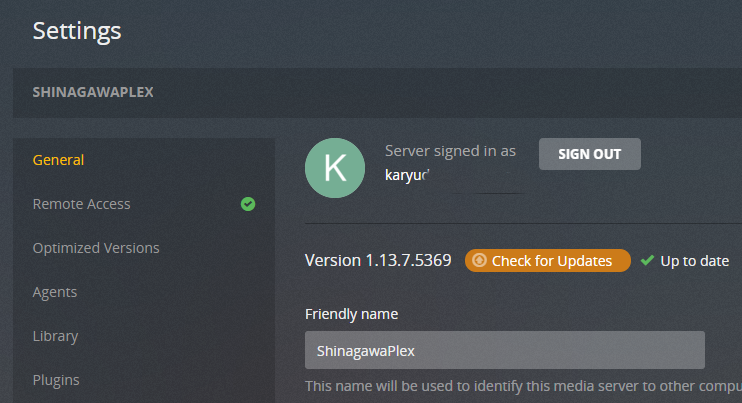
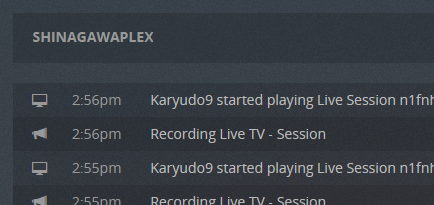
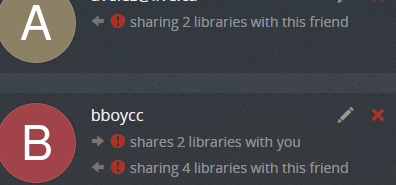
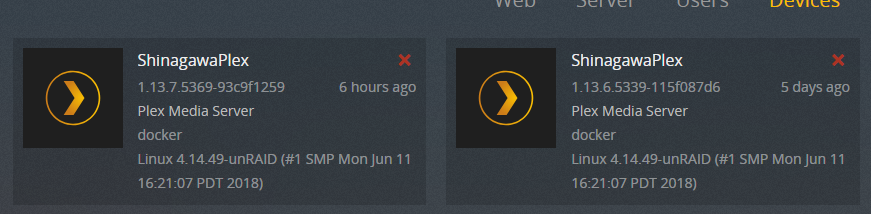
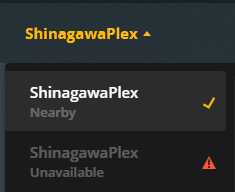
tl;dr After disabling and re-enabling Docker, Plex installation (server name, TV/DVR page) has changed. Want to restore from backup (I think). I've been running Plex for at least a year with no problems. I don't think I've ever had a problem (especially recently) with the Docker not being available. I did recently have a problem with my unRAID system, however, and disabled Docker for a few days while I got that under control. When I re-enabled Docker, the Plex page that came up was the configuration page as if I had a new server: Plex server name was defaulted to the unRAID server name. I didn't proceed, but instead cut the URL back to <local IP>:32400. Libraries and users are all there. Even On Deck and Continue Watching items are fine. But Plex can't find the original server, only the "new" one. I also can't change anything under TV/DVR, which works, but doesn't look like it's even enabled. I'm sure Plex showed me the HDHomeRun details as recently as earlier today (i.e. after re-enabling Docker). But now that's gone. Also, Sync (which I never use, but still...) says I need a PlexPass, which I have. I don't get what the hell happened. All I did was disable Docker, and then re-enable a few days later. It didn't fail catastrophically, yet it's obviously not working right. How can I fix this so that everything works again (preferably without having to individually re-share specific libraries with several dozen users)?? Buncha screen caps attached (including Plex Docker run command). And sorry for the novel-length post.
.png.952c3d8d359e573294fc78b8b2b0cb8c.png)
.png.2e03c4d3b7ff4ba3c2db17bb98c74333.png)

-
"RobJ's instructions" would be post #299 in this thread? https://lime-technology.com/forum/index.php?topic=37490.msg449941#msg449941 See, that's something that should be in a manual/wiki/FAQ....
-
Whoa. 420 posts on how to convert one's server to XFS? That's what I want to do, of course, but I don't suppose there's now a well-defined, "best practices" way to go about it that somebody can point to? I checked the wiki and FAQ, and didn't see anything. Most active forums (not just this one) badly need an editor for their first posts, to keep the best information up to date and at the front. It's a bit nuts to think a casual user is going to read through hundreds of posts, made over a period of years, to try and sift out information that should be a few paragraphs in a manual, FAQ, or wiki someplace.
-
OK: 72 hours later, first preclear done. Now, is there a guide for how to interpret the report the preclear script provides? If I've got a few "near_thresh" values, but there are no SMART attributes that are FAILING_NOW, and there are 0 sectors that have been or have ever been pending re-allocation, am I good to go? (Also, as a recent new user somewhat confounded by the setup steps needed to start his initial run of the preclear script, I agree that having the plugin install the script, and having the 'disk.cfg' check and solution—i.e. "fastest way to create a 'disk.cfg' file is to click 'New Config'"—would be very helpful!)
-
Thanks for the redux on what I accidentally ended up doing right, Walter! And for the link to the faster version. Just as a data point, I've finished the Pre-Read stage: about 19.5 hours for 8TB, at about 120 MB/s. Now at Zeroing at 7% complete at 182 MB/s (so far; I'm sure that will drop). I suppose I should have hooked up the two other 8TB drives I want to use before I started pre-clearing the first one, so I could do them all at the same time. Oh, well. I'll get this one done, then hook up the other two, and do those two together. Actually, I guess this way is more scientific: I'll get to see what the difference is between solo and multiple pre-clears, on my own system.
-
OK, here's what I've done, and where I'm at (spoiler alert: I think I've just about solved my problems): - put unRAID 6.1.8 on an approved USB stick (32 GB SanDisk UltraFit USB 3.0) - installed a Seagate 8TB shingled drive - fired up unRAID for the first time - identified 8TB drive as Drive 1, chose btrfs as file system (but did not format) - per Joe L.'s preclear plugin post, put preclear plugin in root (I still don't know how to do this without pulling the USB drive and moving it to a Windows machine) - per gfjardim's instructions in the first post, put script where it belongs (figured out how to do this with the Install Plugin dialog) - tried to preclear; got a "no unassigned disks" message - re-read instructions; saw that Joe L.'s plugin ALSO has to go in the gfjardim plugin directory - went to preclear plugin, saw that version info was now green and 1.15, but still got "no unassigned disks" message - somewhere in here, noticed that the info for the preclear plugin ("This plugin is a parser for Joe L. excelent Preclear Disk Script") has a spelling mistake - thinking maybe I hadn't gone far enough to "activate" the disk to allow the preclear plugin to see it (grabbing at straws), started the array and formatted the disk - when that last step didn't work, asked how to reverse the process - got a very quick answer (thanks, jonathanm) did the "New Config" thing - went to preclear plugin, and now it looks like the drive is ID'ed and ready to preclear I guess my only question now, before I hit 'Start Preclear', is whether I've got the most up-to-date version of all the parts required for preclearing. I'm assuming that if the first post of this thread was last updated just last month, that version 1.15 of Joe L.'s 'preclear_disk.sh' is current? If not, what's the latest? Can I install it without sneakernetting my USB stick over to my Windows PC yet again? If so, how? I certainly appreciate the super-fast response time on this forum -- you're definitely confirming that unRAID is a better choice than the one-man support system I've been enduring with DriveBender on my existing WHS 2011 installation!
-
I don't want to be convinced preclearing disks is a waste of time. I want some clear instructions on how to preclear disks. Why would you post in a preclearing thread, trying to convince me that preclearing is a waste of time? I see the point of your argument, but I've waited weeks to buy hardware and get ready to migrate to unRAID, so I don't care if it takes another week or so to preclear drives. Now, because the initial instructions sucked, it seems I've formatted the drive I want to preclear. How do I remove the drive from the array, "unformat" it, and start a preclear on it?
-
My conclusion isn't that it's a waste of time -- yet! The whole reason I'm fighting to get set up so I can do preclears on all my brand-new drives is exactly because I agree that it's a very good idea to deal with as many problems as possible before putting any data on them. But the longer I stumble around trying to follow a thin trail of breadcrumbs to try to get the damn thing working, the closer I am to rage-quitting in frustration!
-
Boy, this preclear stuff is sure user-unfriendly to those of us who are trying to build their first unRAID system from scratch. All the so-called "help" I've seen assumes you're already an expert unRAID user. There's nothing for the complete n00b who wants to start off on the right foot. I've followed the first post as best I can, done everything right, and still I don't see what's shown in the first two seconds of the demo video in post #1! I'm about to convince myself preclear is a big fat waste of time, anyway. Otherwise, it would be included in the guides and in the unRAID distro from the start, wouldn't it?
.png.952c3d8d359e573294fc78b8b2b0cb8c.png)
.png.2e03c4d3b7ff4ba3c2db17bb98c74333.png)
