





Bitbass
Members
-
Joined
-
Last visited
Everything posted by Bitbass
-
I'd like to use something like this to drive PWM pins on an ESP32 (or Arduino) for analog gauges. Has anyone done something similar, or gotten an ESP32 to work?
-
Unifi-poller quit working for me after updates this weekend. Looking above, there may be a significant delay for the version in the repository. I am using it in Docker and doing the Prometheus exporter. The logs suggest it's touching the Unifi controller, just that the Prometheus export is empty.
-
Reboot appears to have done the trick. Thanks! Any indication what's causing the crashes? Is it the macvlan? I changed it to ipvlan and I'll see if I run into issues.
-
Upgraded to 6.12.1 about a week ago. Hard crash after about a day. Did an automatic parity check and everything was fine. Saw the 6.12.2 release and upgraded to that. Again, a hard crash after a day or so. I don't know if it'll show up in the diagnostics, but I was getting the maclan warning. After rebooting this morning (and the parity check starting again), Docker failed to start. I tried modifying Docker to iplan but it's still failing to start. Parity check will run for another 24 hours, so I'm not sure I can interrupt that, but any help in getting me in the right direction would be appreciated.
-
I never figured out how to edit the defaults, but it appears this particular app does not allow for modifying the defaults anyway. You have to set the changes with URL switches. In my case, it's an image rendering size: &kiosk&height=1080&width=1920 As long as you specify this it allows you to override the defaults in the config file.
-
Figured it out. The config.json may not be editable. You have to specify the size with URL switches: &kiosk&height=1080&width=1920 I'm using the &kiosk to remove extraneous dashboard content for displaying on a TV. The height and width parameters can be set to whatever you need for the display.
-
If I put the file in the appdata location before mapping it using this: I don't see any change in the docker console when doing a cat on the file. It doesn't pick up the changed file in appdata. Just overrides it with the container version.

-
When I do this it creates the config.json as a folder in appdata, instead of a file.

-
Just found that there was an update to the container. Still can't figure out how to edit the config.json.
-
This one boots but doesn't link up the config file: This one also boots but doesn't link up the config file: Same for this one: I'm not sure what I was doing earlier that was causing it to not boot but it seems to be starting every time now. However, I haven't found the magic combo that allows me to edit the file. Placeholder file in appdata or not, the container file never changes.



-
Ok, I think I understand now that I have to create the entire folder structure in the appdata folder or else it thinks it's missing. I can't find a way to make the single json editable, without recreating that entire structure, and I'm not sure what the best way is to recreate that in appdata.
-
Ah! Didn't know that. I'll give it a try.
-
It's not mapped to appdata by default and if I add the path myself it fails with the error and won't start. It's possible I'm doing it wrong.
-
sudo not available inside the container.
-
I've searched and haven't found an answer to this, so I'm probably asking the wrong question. However, I have a container I just added that has a config.json file in it that I need to edit. The json is owned by root and is not writeable from the container's cli. I'm unable to chmod to make it writeable. I'm also unable to map the path. Every time I try I get a failure to start because it can't find an app.js file or something similar. I'm sure this is just my lack of familiarity with the inner workings of Docker, so please be gentle.
-
I have this working but I'm unable to edit the config.json. The rendered image is coming back at the 1000x500 resolution specified in the json, which is one thing I need to change. It might be my limited knowledge of Docker. I can't edit the file directly in the Unraid container cli (root permissions) and I can't map the path to appdata or it will fail to start.
-
Next attempt this morning and everything went as expected. 256GB available on the cache and all the containers started. Only thing I can figure is that the first attempt didn't like that linux was already on the new SSD and the first format was wonky. Regardless, it appears to be good to go now. I'll respond here if that changes. Thanks!
-
Ok, I'll try it out over the next couple of days. I'm guessing this isn't normal?
-
Both are 256GB NVMe's. The original is in an m.2 slot on the MoBo and the new one is in a PCI-e adapter. Different brands, but same size.
-
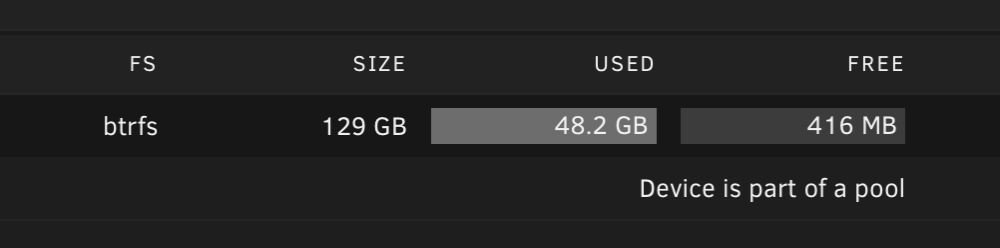
I'll add that I not only waited for the rebalance to stop, I also rebooted in the hopes that would show something different. With this amount of space I can't start all of my Docker containers. I've removed the new drive and it's rebalancing/removing right now. All of the containers have started and it's showing 256GB available in the cache.
-
I've been operating with a 256GB NVMe for my cache drive for a while now. I had a second and thought it would be good to get some redundancy. This is what I'm seeing. 129GB size with only 49GB usable and now none free. I wasn't expecting to see 256GB, but 49GB usable doesn't seem right. That's not feasible for me if that's what I'm supposed to be seeing.
-
Well, I found some examples of the run-time flags that are the defaults and just loaded them all into the Post Arguments, adding the tsdb time flag. Looks like it's working. I guess "time" will tell. In the meantime, I found some comments from Jeff Geerling concerning this and there's an open issue for it with Prometheus. Maybe they'll change it for the better in a future release.
-
Finding more info. Looks like I should add it to the Post Arguments, but then I'll need to figure out why it "loses" the flag for the config file location. I checked and it is still listed in More Settings, but seems to be ignored when the Post Argument is in there.
-
Adding it to Post Parameters causes it to fail to start. The only error I get is that it looks like it can't find the config.yaml file.
-
Trying to figure out how to adjust the Prometheus retention period with --storage.tsdb.retention.time=30d. Can't figure out where to apply it where it'll be successful. I tried it in the Repository field and the Extra Parameters. Both cause a failure to build.

