





cheesemarathon
Members
-
Joined
-
Last visited
Everything posted by cheesemarathon
-
Thanks @goinsnoopin! Fixed now!
-
That's ok. Alot of devs on the forums here produce their own images. I have a couple on here. VNCbrowser just happens to not be one of them. Thanks for the issue, I'll keep an eye on it.
-
Hi @bwelsher! I'm afraid that persistence of settings is not an option with the current build of the docker image. I'm also not the author of the image. I just created the template for use with unRAID. If you require persistent settings, I suggest that you open an issue with the author of the image here. Let me know if you do open an issue so I can keep an eye on it.
-
@-Daedalus You definitely need to set LANCACHE_IP to 192.168.1.110 I would also remove all the "true" values you entered to disable some of the caching services for now to make sure they are not causing issues. You can set them back to what you like once it is all working. DO NOT remove the "true" value for USE_GENERIC_CACHE. That will break it ? Make sure to set your DNS settings on your gaming machine to 192.168.1.110. Also make sure that that is the only IP you set. Try that and see how it go's. If that doesn't work let me know and post the output log from the container (best to use paste bin if it's long).
-
Hey @-Daedalus Sorry it's taken me ages to reply. It looks like you have checked all the obvious stuff so ill get @mlebjerg to chime in here as well. When you say you run bootstrap.sh, is that when you start the container or are you manually running bootstrap.sh. Bootstrap.sh runs when the container starts so there is no need to manually run it. Running it again would probably create a similar output to above. If that's not the case, can we see a screenshot of your config for SteamCache? Also I'd suggest stopping all your VM's and restarting SteamCache, just in case there was something running your unaware of.
-
Hi @humanjhawkins Im glad your interested! I hope my answers help Yes, the cache will be persistent across docker stops, provided the cache is mounted outside of the container and remounted in the same location. If you set the container up in unRAID, this is taken care for you. As far as I am aware, this value can be set as large as you like. Do note though that CACHE_DISK_SIZE will still limit what is cached. I'm not sure if it will just stop caching when the max size is reached or if it starts to delete old files. So make sure that you set CACHE_DISK_SIZE appropriately. It is certainly possible to copy between instances of steamcache. As for copying from a different caching service, I do not know. I would give it a try and see if it serves up your cached data. I hope that helps. Have a look over at the github pages for the steamcache project as the info there applies here too. I didn't create steamcache you see. I just maintain it here for unRAID. mlebjerg did however combine all the required docker containers into one image for easier deployment.
-
@Shamalamadindong I have just pushed a new update to the oauth2 image, so check for updates for you containers and you should be able to install it. This will grab the two default templates and save them to your oauth2 app data folder in a folder call templates. These will not be used by default. To enable them, edit the oauth2_proxy.cfg file and uncomment line 24: # custom_templates_dir = "/etc/oauth2/templates/" Restart the container and it will then use the html templates. One for the sign in page and one for the error page. The templates are exactly the same as the default login pages but can be modified to look however you want. I'll try to create some different themed pages when I have some more time. Any suggestions?
-
Ah awesome! I didn't realise that was possible! I'll take a look when I have a few mins and see what I can do!
-
I would love to, but I'm not sure what you mean. Would you mind explaining what you mean by templates?
-
Thanks very much
-
Yes, the 3 apps still work and ill still support those already using them but new users should use the new container. Are you able to remove my 3 apps from CA so there are no new users. Thanks
-
@thatnovaguy@nuhll@burningstarIV@Oxide @ColeBrodine @josywong @Chezro @Lepidopterist @TechDaddy @2fat2fly Hi Everyone As known users of SteamCache, I just wanted to let you know about the new version of steamcache! @mlebjerg managed to combine all three docker images into a single image! This means the setup is much easier. There is no need to change the ports that unRAID uses and there are no conflicts with running VM's. The applications is called SteamCacheBundle and should be up on Community Applications shortly. New install instructions can be found here. I hope you all get on with the new version. The old version will still work, so you don't have to migrate but the setup is so much easier!
-
Thanks for getting back to me! However, I finally sorted it out. I only had the following headers in my config as those were the only ones you mentioned. But with just those two it failed to proxy correctly. proxy_set_header X-Forwarded-Proto https; proxy_set_header X-Forwarded-Ssl on; If I instead included the proxy.conf file in my config it worked.
-
@thomast_88 you said you were running gitlab behind an Nginx reverse proxy? Can you post your config for that as I am having trouble getting a proxy to work? Did you need to make any changes to the gitlab.rb file? I have seen @opticon post but I get a redirect to the IP of the unraid machine with that method!
-
Glad you got it sorted! Sorry that I took ages to reply. I've been rather busy these last few days.
-
Did Steam say servers unreachable? If that's the case then I'm out of ideas. I suggest that we remove all three containers along with the images and delete all app data folders that were created for them. I then recommend you reinstall with EXACTLY the same config as me. I'll post screen grabs below. Hopefully, that will get it working. The only thing you may need to change are the two IP addresses. 192.168.1.41 is the IP of my unRAID server. 192.168.1.51 is the IP I assigned to the cache DNS container. Then you can tweak the config to how you want and you will soon realise if you make any breaking changes. Cache Container: SNI Proxy Cache DNS unRAID UI Ports Windows DNS Settings
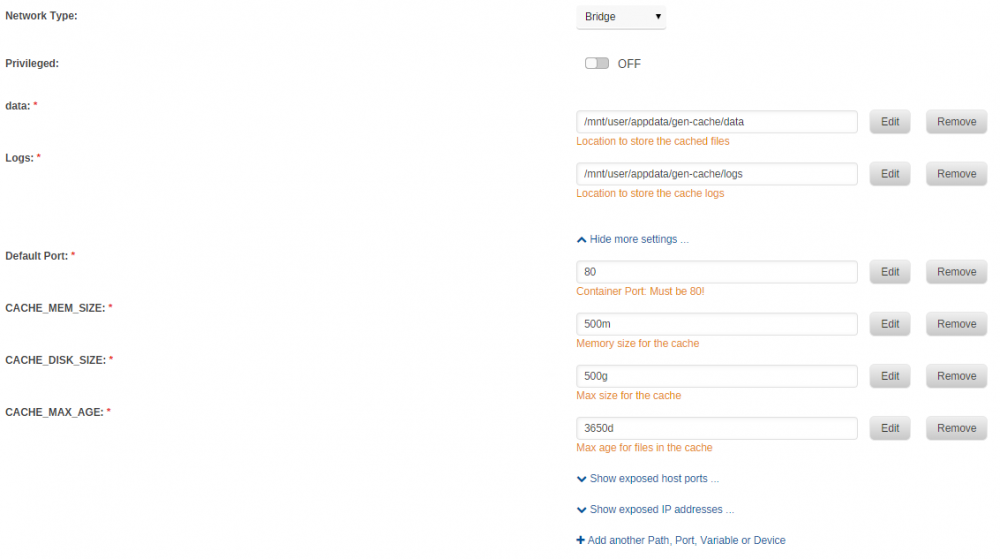

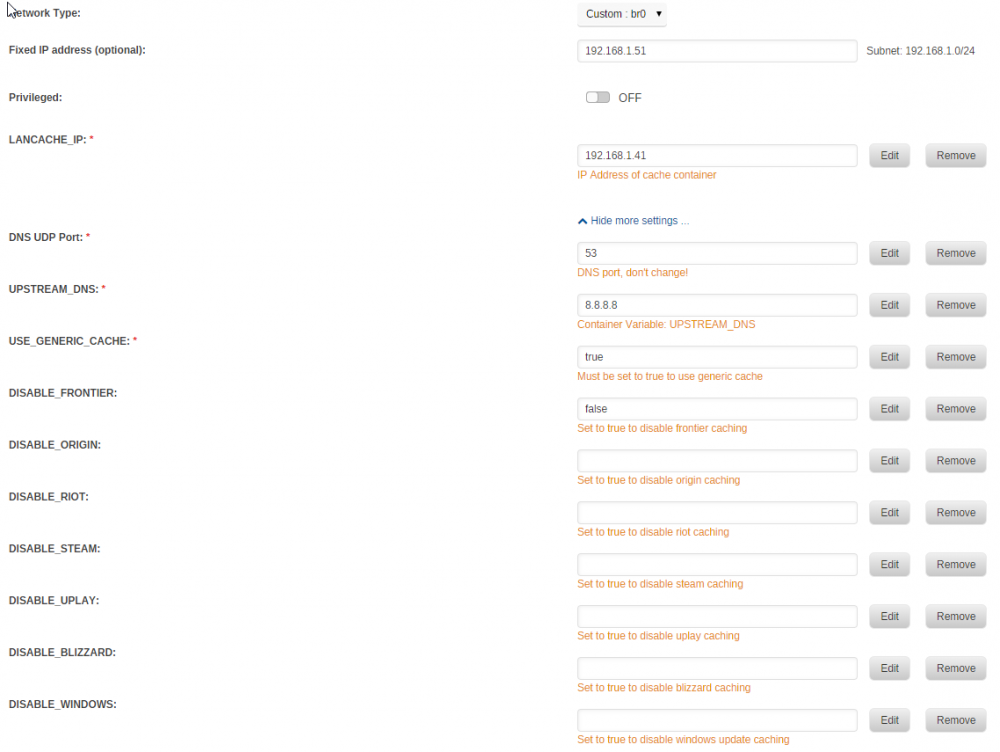

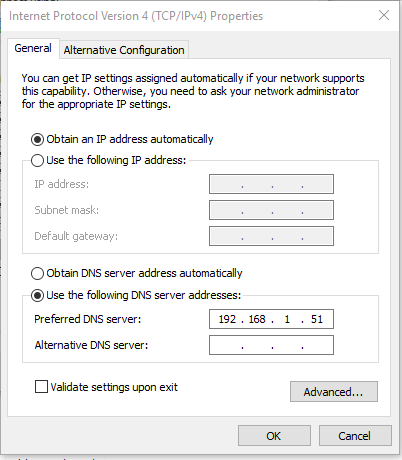
-
Not a problem :-) Let me know how you get on
-
Yup that's fixed things for me! Thanks for the help :-)
-
@binhex ok just ran nmap on another machine: Starting Nmap 7.40 ( https://nmap.org ) at 2018-04-25 15:29 BST Nmap scan report for 192.168.1.41 Host is up (0.00056s latency). PORT STATE SERVICE 8118/tcp closed privoxy Nmap done: 1 IP address (1 host up) scanned in 0.41 seconds And if i run the same command on my unRAID server: Starting Nmap 7.12 ( https://nmap.org ) at 2018-04-25 15:25 BST Nmap scan report for Derek (192.168.1.41) Host is up. PORT STATE SERVICE 8118/tcp filtered privoxy Nmap done: 1 IP address (1 host up) scanned in 2.06 seconds So it looks like something on my unRAID server is closing the port?
-
No VLAN's. No pfsense. I am running windows firewall, however, I can't see any rules that would block port 8118 or my testing application. However, to double check I have just disabled the firewall and my AV and ran the test again. It failed.
-
The static IP is setup on my DDWRT router so no conflict will occur. Yes i can ping 192.168.1.41 from the machine i did the test on
-
192.168.1.41 is correct. It was the IP originally given by DHCP so I just set it to that for its static IP.
-
I hope that is all you need to see @binhex ?

-
I hope someone can help. I have been having issues with Privoxy not working. I have had it setup in Jackett working fine before but it has now stopped working. I have not changed any of the configs and there don't appear to be any errors in the logs. I also used a proxy testing tool on my windows machine to test Privoxy and it fails. I know the VPN is up and working for rtorrent as I have tested it with an IP testing torrent. Any ideas whats going on? rtorrent logs: https://pastebin.com/J7cXpqr8 proxy test logs: https://pastebin.com/AJi2uugh
-
Hi @burningstarIV I just wanted to see if you had made any progress with steamcache? Did you get it working? Let me know if you're still having issues.




