





darrenyorston
Members
-
Joined
-
Last visited
Everything posted by darrenyorston
-
Trouble is unless you keep watvching the docker containers who dont know that it is no longer working. I dont run the client unless I want to view the camera feeds. Most of the time I just record to a file server. With the docker container crashing its only when I check on the footage that I notice it has not been recording. This can be days.
-
I have tried to set the version in xeoma.conf to 17.11.24, the same as my client application however the container will still not remain active. The log is reporting: *** Killing all processes...*** Running /etc/my_init.d/00_regen_ssh_host_keys.sh...*** Running /etc/my_init.d/30_default_config_file.sh...[May 14 03:03:27 PM] Processing config file*** Running /etc/my_init.d/40_install_xeoma.py...Traceback (most recent call last):File "/etc/my_init.d/40_install_xeoma.py", line 198, in <module>version_number, download_url, alternate_download_url = resolve_download_info()File "/etc/my_init.d/40_install_xeoma.py", line 100, in resolve_download_infoversion_number, download_url = version, VERSION_DOWNLOAD_URL.format(version_number)UnboundLocalError: local variable 'version_number' referenced before assignment*** /etc/my_init.d/40_install_xeoma.py failed with status 1
-
My Xeoma container has started crashing again and won't remain online. It had been doign this however with recent updates it began working fine. I am presuming that something has changed again causing the container to fail.
-
I didnt get a container update. Also what would I edit in the xeoma.conf? The version? To make it the same as the client? I tried that and it the container keeps stopping with seconds of starting.
-
Yes. I was using 17.11.24. I only went to the 18.4.5 beta because of this message that I needed the 18.2.2 client.
-
Hello. I have started having a problem with Xeoma again. Previous I had the issue with the container stopping all the time due to the failed download as reported by ksignorini on March 23. I was able to resolve the issue however now every time the Xeoma client starts it says the server is the wrong version. At the moment Xeoma keeps asking for version 18.2.2. I have updated to the 18.4.5 beta however it keeps saying that to connect to the server I need version 18.2.2 I cant seem to find the 18.2.2 client version on Xeoma's website.
-
That worked. Much appreciated.
-
I cant seem to get it to work. The Xeoma folder on appdata remains read only regardless of what I do. It says the permissions have been changed by each time I try to copy the tgz file to my SMB appadata share it says permission denied.
-
32GB. Currently building a 256GB unit as 32GB isnt enough to run my system.
-
How were you able to copy the file across? I keep receiving a message that the downloads folder is read only. I have tried changing it but it seems to remain read only all the time.
-
Hi there. Two days ago I started getting an error with Xeoma. It has been working fine but now the container keeps stopping. I tried downloading the file as mentioend by Microryan however I am unable to copy the file to the downloads folder. It reports that access top target is denied. The log file shows the following error: *** Killing all processes...*** Running /etc/my_init.d/00_regen_ssh_host_keys.sh...*** Running /etc/my_init.d/30_default_config_file.sh...[Mar 27 12:07:19 PM] Processing config file*** Running /etc/my_init.d/40_install_xeoma.sh...curl: no URL specified!curl: try 'curl --help' or 'curl --manual' for more information[Mar 27 12:07:21 PM] Using Xeoma version (the latest stable version)[Mar 27 12:07:21 PM] Downloaded file /config/downloads/xeoma_from_url.tgz already exists. Skipping download[Mar 27 12:07:21 PM] Installing Xeoma from /config/downloads/xeoma_from_url.tgzgzip: stdin: unexpected end of filetar: Child returned status 1tar: Error is not recoverable: exiting now*** /etc/my_init.d/40_install_xeoma.sh failed with status 2
-
Yes. I am/was utilising jlesage/crashplan. It works fine.
-
I followed the instructions at the start of the thread to copy my app data folder to the Pro. I also upgraded my CrashPlan account to Pro and confirmed I can log in via the webpage. I installed the Pro container but am unable to log in. I am inserting the correct password however I keep receiving the message "Unable to sign in". I have confirmed via the Code42 webpage my account is correct. Even if I change pwd I still receive the same message.
-
The issue of my deluge container becoming unresponsive every view days has ceased after the recent container update.
-
I can SSH into unraid fine. The content in NAME_SERVER are the default when the template downloaded, I didnt change anything. They remain: 8.8.8.8,37.235.1.174,8.8.4.4,37.235.1.177
-
No. Whenever the webUI reports the container is down I have just been restarting the container. After a reboot it works fine. After a few days though the webUI becomes unavailable again.
-
When I attempt to open the webUI I receive the following error. It is only happening with this container. The log file is attached. To gain access to the webUI I have to restart the container. container log.txt

-
I seem to regular encounter an issue with my container crashing. My web browser reports the ip address/port cannot be reached. It works fine once I restart the container though. When it's down though sab won't work. Is there a way to tell deluge to regularly reboot? It seems to happen if the container runs for more than 2-3 days.
-
I have the same issue. I have not been able to find a setting to alter the content server's IP address. My network range 10.1.2.X so a content server of 172.17.0.8 clearly won't work. I am presuming its a Docker issue as I can access a Calibre content server running on one of my local machines.
-
So should I just ignore this warning?
-
Here is the file which was downloaded. tower-diagnostics-20171031-0642.zip
-
Fix Common Problems is reporting a Machine Check Events error with the following fix Your server has detected hardware errors. You should install mcelog via the NerdPack plugin, post your diagnostics and ask for assistance on the unRaid forums. The output of mcelog (if installed) has been logged I turned on the mcelog in Nerdpack but where do I find the diagnostics file to post?
-
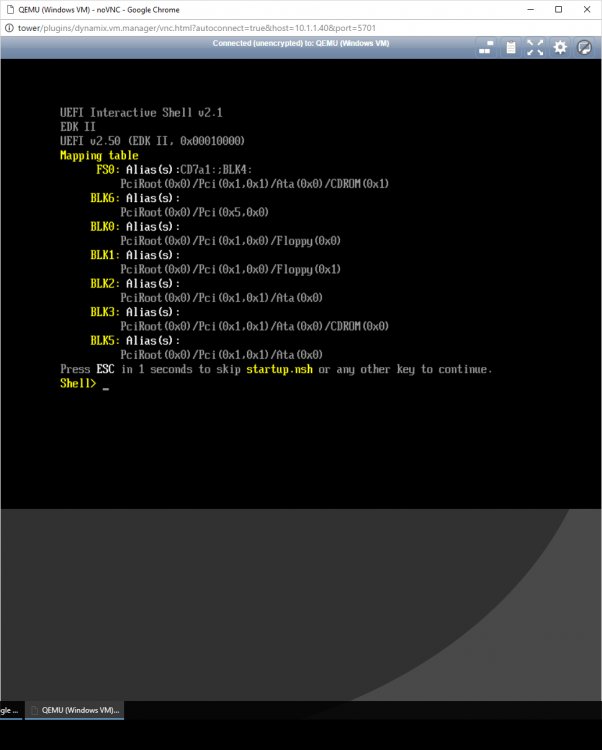
I am thinking there is something wrong with the card. I deleted my VM and tried to reinstall a new one and I keep getting the message in the attached image. If I remove the USB card from the "Other PCI Devices" VMs will install.
-
Still doing it the same as listed previously. I can't change the slot unfortunately. The Supermicro board only has two slots and the other one is occupied by my 4 port NIC. It would be a bitch to change over as the 4 port NIC is passed through to my PFSense VM. Im thinking of deleting the VM and making it anew. Maybe something is wrong with it.
-
Yes the card works when not passed through to a VM. I think I may have solved the problem. Seems the power cable might have had a problem. I have changed out to a different Molex cable and now the ports are active. Maybe a bad connection though, the same connectors run my hot swap-able drive bays fine. Now I am getting "DRIVER_IRQL_NOT_LESS_OR_EQUAL" on astkmd.sys

