1812
Members
-
Joined
-
Last visited
Everything posted by 1812
-
I have a gigabit connection but it looked like it was only downloading about 40mbps (per unRaid dashboard). Additionally a quick speedtest from fast.com after the vm was created, I was only showing 30-60mbps download, so possibly an issue with using vmxnet3 as the starting virtual Nic. As a test, I tried switching that for e1000-82545em in the vm but kept getting spinning beach balls, the vm wouldn't appear on the network for apple screen sharing, and I couldn't even load network settings in the vm (had to force shutdown.) There is a thread on here about the e1000-82545em causing issues with the apple store. The suggested fix is to use e1000e but when I booted with that, it didn't find it in the network control panel. Booting with 2 virtual nics, first as vmxnet and the other the e1000-82545em resulted in network control panel showing a cable unplugged for the e1000-82545em but network utilities refused to open. Safari also refused to launch and the vm hung while shutting down. Returning this to a single vmxnet 3 resolved the issues, but slow speed tests still continued. For disk type I used qcow2 and apfs.
-
Just to report I was successful in creating a Catalina vm on the first attempt, though Mac screen sharing seems buggy (may be an issue between high Sierra and Catalina), not a big deal. Nicely done @SpaceInvaderOne!
-
fair enough! ----edit @Leoyzen Looking back through, I realize I misunderstood what you were doing. And this morning I had a little time and used spaceinvader's macinabox to quickly setup a Catalina vm. I was able to confirm your ascertain that topology no longer changes core utilization in macOS as all cores ran at 100% regardless of configuration or lacktherof. Weirdly, I got my best score (by 10%) giving a topology using hyperthreads on a processor that had none (E3-1220 v5). But regardless, you are correct and I've updated my original thread reflecting the change in macOS. Thanks for all your input and work!
-
If this is what XML you're running all the time and only changing topology in clover/with bootloading software/etc, then you most likely won't see difference since you don't change how the cpu threads are presented as a vm, only modifying their presentation in the boot loader , and this is not what I tested. Catalina and updated QEMU may be different (I haven't setup a Catalina VM yet), and apple may have caught up to windows finally on how they handle hyper-threaded cpus, but your testing still does not demonstrate that, if I'm understanding your testing and setup.. Test with xml variants like I tested and let me know. I have no problem eating crow if things have changed, but it has to be an actual apples to apples comparison.
-
leaving out topology may actually yield better results than bare metal if apple is throttling hyper threaded cores. you're welcome to retest and post your findings. until then, its the only definitive proof of performance and topology settings using KVM on unRaid again, you're welcome to test and post your findings. I don't have time to do it for a month or so. but as a software engineer, you would know that if an OS throttles a hyper threaded core, it will reduce performance. And if a hypervisor lets it run to max by presenting it as a different topology, there is an increase in performance. I like all the tweaks you've discovered, but sometimes trial and error are the best course with the less traveled territory of OSX virtual machines. I wouldn't get hung up on the "right thing" because it may not be "right" for virtualization.
-
you get better performance in osx without setting a topology, or at least that was true when I last tested. it may not look as nice to see "core solo" or whatever, but you're using each vcpu to its full potential.
-
close, the changes go in-between the append initrd=/bzroot and not on a new append line. If that doesn't work, you might also consider adding the other iLo component 103c:3381 which would go after the device id you have with a coma separating them and now space. Unraid doesn't really have any interaction with iLo, but we're trying anything at the moment!
-
shot in the dark here, but if Unraid accessing the video controller is causing the issue (as connected to the bios problems) then possibly try isolating it from Unraid via vfio to start (the same method you'd use for isolating for passthrough)
-
I checked and nothing else is occupying the slot assignment. edit looks like the original post was edited for clarification
-
when attempting to change to this, I get: VM creation error internal error: Cannot parse <address> 'slot' attribute
-
After shutting down a vm from within the vm's operating system, the vm will not restart and instead gives the following error: Hook script execution failed: internal error: Child process (LC_ALL=C PATH=/bin:/sbin:/usr/bin:/usr/sbin HOME=/ /etc/libvirt/hooks/qemu 'JR Desktop' prepare begin -) unexpected exit status 127: php: error while loading shared libraries: libicui18n.so.65: cannot open shared object file: No such file or directory This occurs with both vm's on the server. When attempting to download diagnostics from the webGUI, the following screen appears: no diagnostics are then downloaded and the screen sits indefinitely. pressing the log tab shows and when entering "diagnostics" into a terminal window the following error occurs Last login: Fri Oct 18 12:42:20 -0400 2019 on /dev/pts/1. root@Twins:~# diagnostics /usr/bin/php: error while loading shared libraries: libicui18n.so.65: cannot open shared object file: No such file or directory root@Twins:~# I was able to download the syslog from the webgui: twins-syslog-20191018-1655.zip Rebooting the server allows vm's to start and also allows access to diagnostics. Here are diagnostics after reboot (not that they are helpful but rather to show that they are available): twins-diagnostics-20191018-1708.zip
-
USB card isolated from Unraid at boot which is passed to the vm. I fiddled with trying to isolate and use ports on different motherboards, but they always seemed finicky and didn't always work reliably (though others have had great success I believe), or required more than what I wanted to deal with. And it was 10x easier to buy a 20 dollar card and pass it through.
-
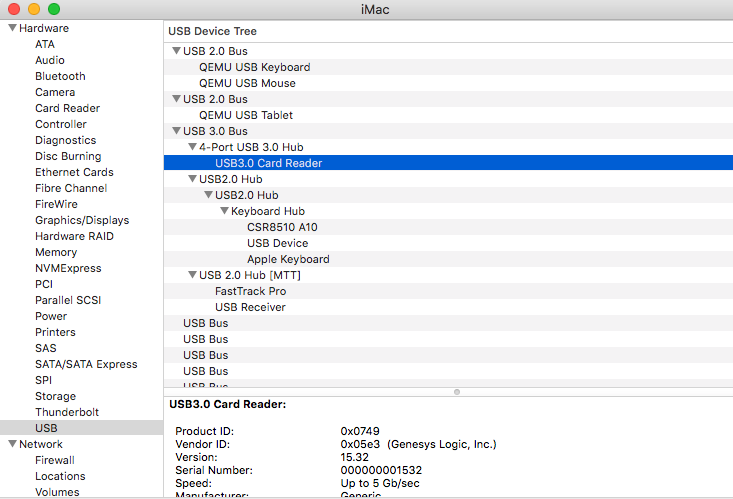
need more info, where does it appear under the usb tree? can you post a screenshot similar to this: do you have any other usb 3 devices you can try and see how they are listed? What are you using as your usb 3 device? what hubs are present if any? some hubs have 2.0 and 3.0 ports.
-
look in about this Mac>system report and see what it "sees" it as
-
any listed compatible HBA should work. I've never used that one but I believe a few folks on here do. I use h220 because it was what came with my first HP server years ago, and they are pretty cheap and keep it in the family. Avoid Marvell, and make sure the card length will fit in your server before ordering.
-
well that's a new one for me... Doing some research, it appears there are issues with the Marvel disk controller in the box. The original fix a few years ago was disabling virtualization all together which is not what you want. try changing iommu=pt to amd_iommu=pt, reboot. If that does not "fix" the reset/lockup issue, you'll have to do research on how to use the Marvell 88SE9230 in Unraid. Simplest might be get a host bus adapter for the disks and disable the onboard controller, or someone might have figured out another workaround. more info here:
-
get rid of iommu=pt from your syslinux . while it shouldn't cause any problems, we want to rule things out. do that, reboot, test for lockup. if it still happens, change acs override to: "pcie_acs_override=downstream,mutlifunction" reboot, retest. as it currently stands the usb card is still not in an isolated group. If doing the steps above don't isolate it, then leave configuration on the last one listed above and try another slot if one is available.
-
Legacy should be fine, but I've had some machines act more normally using one vs the other with no real reasoning why. yeah, not a biggie and not needed in my past HP: proliant/workstation/server experience. glad to try and help. this was all new to me once!
-
this is a shot in the dark, but are you using legacy or UEFI boot for Unraid? whichever you're doing, consider trying to change to the other. looking back at your diagnostics again I see you've tried iommo=on iommu=pt the first one is incorrectly written and won't do anything anyways. But I've never had to use that on any proliant server or workstation, only a combination of allowing interrupts and/or some variation of acs override. One of the first issues we need to address is that your iommu groupings are not separated enough to isolate just the usb card. /sys/kernel/iommu_groups/2/devices/0000:00:03.0 /sys/kernel/iommu_groups/2/devices/0000:00:03.1 /sys/kernel/iommu_groups/2/devices/0000:03:00.0 which is 00:03.0 Host bridge [0600]: Advanced Micro Devices, Inc. [AMD] Family 15h (Models 60h-6fh) Host Bridge [1022:157b] 00:03.1 PCI bridge [0604]: Advanced Micro Devices, Inc. [AMD] Family 15h (Models 60h-6fh) Processor Root Port [1022:157c] 03:00.0 USB controller [0c03]: Fresco Logic FL1100 USB 3.0 Host Controller [1b73:1100] (rev 10) Subsystem: Fresco Logic FL1100 USB 3.0 Host Controller [1b73:1100] While the common knowledge is that you must pass through all the devices in an iommu group, I feel like I have had times where I've been able to pass through just a single item in a group when the other item was a bridge. I'm not sure why I think I remember doing that once but regardless, if you are able to do this, and then trying to restart or shut down a vm in this situation could be the cause. please do the following: make sure your syslog server is exporting/writing to your flash drive (it shows it is unable to communicate to a network device) modify your syslinux.cfg to vfio-pci.ids=1b73:1100 pcie_acs_override=multifunction reboot click on the info tab and verify the following: HVM: Enabled IOMMU: Enabled if they are not, then you need to go into your bios and make sure all virtualization settings are on. If they are both enabled, then: download a copy of diagnostics.zip file (this is a pre-vm look to make sure everything is configured correctly) go to the vm icon, open the logs window (which will show you what is going on with the vm) start the vm with the usb card assigned to it once the vm is up, ensure it is working properly with the usb card shut down the vm restart the vm if the vm starts with usb, then congratulations! if the vm doesn't start but tells you another error but the server continues to work, download new diagnostics zip after that occurs and upload only that and not the pre-vm start diags if the vm doesn't start and the server locks up, copy the text from the open vm logs window into a text file if an error shows on the screen before lockup, notate that as well reboot the server access the flash drive where the syslog server writes and gather that text file upload the pre-vm boot diagnostics folder, the text copy of the vm log, and the syslog server
-
in your syslinux.cfg add the following between append initrd=/bzroot vfio-pci.ids=1b73:1100 then reboot. also, I think you have a disk issue, your syslog is spammed with this: Sep 29 04:40:25 UNRAIDSERVER ntfs-3g[5114]: ntfs_attr_pread_i: ntfs_pread failed: Input/output error Sep 29 04:40:25 UNRAIDSERVER ntfs-3g[5114]: Failed to read index block: Input/output error Sep 29 04:40:25 UNRAIDSERVER kernel: Buffer I/O error on dev sdg2, logical block 36, async page read Sep 29 04:40:35 UNRAIDSERVER ntfs-3g[5114]: ntfs_attr_pread_i: ntfs_pread failed: Input/output error Sep 29 04:40:35 UNRAIDSERVER ntfs-3g[5114]: Failed to read index block: Input/output error Sep 29 04:40:35 UNRAIDSERVER kernel: Buffer I/O error on dev sdg2, logical block 36, async page read Sep 29 04:40:45 UNRAIDSERVER ntfs-3g[5114]: ntfs_attr_pread_i: ntfs_pread failed: Input/output error Sep 29 04:40:45 UNRAIDSERVER ntfs-3g[5114]: Failed to read index block: Input/output error Sep 29 04:40:45 UNRAIDSERVER kernel: Buffer I/O error on dev sdg2, logical block 36, async page read Sep 29 04:40:55 UNRAIDSERVER ntfs-3g[5114]: ntfs_attr_pread_i: ntfs_pread failed: Input/output error Sep 29 04:40:55 UNRAIDSERVER ntfs-3g[5114]: Failed to read index block: Input/output error Sep 29 04:40:55 UNRAIDSERVER kernel: Buffer I/O error on dev sdg2, logical block 36, async page read Sep 29 04:41:05 UNRAIDSERVER ntfs-3g[5114]: ntfs_attr_pread_i: ntfs_pread failed: Input/output error Sep 29 04:41:05 UNRAIDSERVER ntfs-3g[5114]: Failed to read index block: Input/output error Sep 29 04:41:05 UNRAIDSERVER kernel: Buffer I/O error on dev sdg2, logical block 36, async page read
-
post your full diagnostics zip
-
there are more hp tips/tricks in my sig
-
exactly. I have a main server and a backup server, each running a firewall vm. easy to change over if the main goes down. I had issues getting sophos auto-failover working when I messed with it a few months ago but hopefully I'll get it setup soon and have automatic backup going, whether that way or in tandem with a mini pc.
-
I use to think that way, until I didn't.
-
Have run pfsense a bunch, also opnsense for a bit. ive been on Sophos utm 9 for about 6 months or so and really like it. Going to setup failover on a small fanless pc in a month or two that will take over automatically if the virtualized firewall goes down