






H2OKing
Members
-
Joined
-
Last visited
Everything posted by H2OKing
-
wow there pushing them out fast 5.6.15 now
-
any plan for 5.6.14?
-
Disregard for some reason wants to work now. I did find something. I guess there is a limit on how many certificates are handed out. I nuke the docket too many times and won’t work with a sub. How it reads I have to wait 1 week and try again
-
Question. When going to a sub-domain ex: sub.domain.com Should it auto load take you to https://sub.domain.com If so mine is not putting in https:// Sent from my iPhone using Tapatalk
-
@chbmb On my config, does it look like I have PlexPy setup right? For some reason it's not passing. Plex and SabNZB works Sent from my iPhone using Tapatalk
-
It's really an OCD thing. I was trying to get rid of the self a signed Certs so that error goes away when you first sign in. I do have their cloud system enabled two axis from the wan side. Was trying to do something like this But I do see your point Sent from my iPhone using Tapatalk
-
how did you get unifi to pass? i've tried with no luck? same with plexpy upstream backend { server 10.1.40.6:19999; keepalive 64; } server { listen 443 ssl default_server; listen 80 default_server; root /config/www; index index.html index.htm index.php; server_name _; ssl_certificate /config/keys/letsencrypt/fullchain.pem; ssl_certificate_key /config/keys/letsencrypt/privkey.pem; ssl_dhparam /config/nginx/dhparams.pem; ssl_ciphers 'ECDHE-RSA-AES128-GCM-SHA256:ECDHE-ECDSA-AES128-GCM-SHA256:ECDHE-RSA-AES256-GCM-SHA384:ECDHE-ECDSA-AES256-GCM-SHA384:DHE-RSA-AES128-GCM-SHA256:DHE-DSS-AES128-GCM-SHA256:kEDH+AESGCM:ECDHE-RSA-AES128-SHA256:ECDHE-ECDSA-AES128-SHA256:ECDHE-RSA-AES128-SHA:ECDHE-ECDSA-AES128-SHA:ECDHE-RSA-AES256-SHA384:ECDHE-ECDSA-AES256-SHA384:ECDHE-RSA-AES256-SHA:ECDHE-ECDSA-AES256-SHA:DHE-RSA-AES128-SHA256:DHE-RSA-AES128-SHA:DHE-DSS-AES128-SHA256:DHE-RSA-AES256-SHA256:DHE-DSS-AES256-SHA:DHE-RSA-AES256-SHA:AES128-GCM-SHA256:AES256-GCM-SHA384:AES128-SHA256:AES256-SHA256:AES128-SHA:AES256-SHA:AES:CAMELLIA:DES-CBC3-SHA:!aNULL:!eNULL:!EXPORT:!DES:!RC4:!MD5:!PSK:!aECDH:!EDH-DSS-DES-CBC3-SHA:!EDH-RSA-DES-CBC3-SHA:!KRB5-DES-CBC3-SHA'; ssl_prefer_server_ciphers on; client_max_body_size 0; location = / { return 301 /plex; } location /sonarr { include /config/nginx/proxy.conf; proxy_pass http://10.1.40.6:8989/sonarr; } location /unifi { include /config/nginx/proxy.conf; proxy_pass http://10.1.40.6:8443; } location /sabnzb { include /config/nginx/proxy.conf; proxy_pass http://10.1.40.6:8082/sabnzb; } location /downloads { include /config/nginx/proxy.conf; proxy_pass http://10.1.40.6:8112/; proxy_set_header X-Deluge-Base "/downloads/"; } #PLEX location /web { # serve the CSS code proxy_pass http://10.1.40.6:32400; } # Main /plex rewrite location /plex { # proxy request to plex server proxy_pass http://10.1.40.6:32400/web; } location /plexpy { include /config/nginx/proxy.conf; proxy_pass https://10.1.40.6:8181; } location ~ /netdata/(?<ndpath>.*) { proxy_set_header X-Forwarded-Host $host; proxy_set_header X-Forwarded-Server $host; proxy_set_header X-Forwarded-For $proxy_add_x_forwarded_for; proxy_pass http://backend/$ndpath$is_args$args; proxy_http_version 1.1; proxy_pass_request_headers on; proxy_set_header Connection "keep-alive"; proxy_store off; } }
-
I keep getting this "Error: layers from manifest don't match image configuration"
-
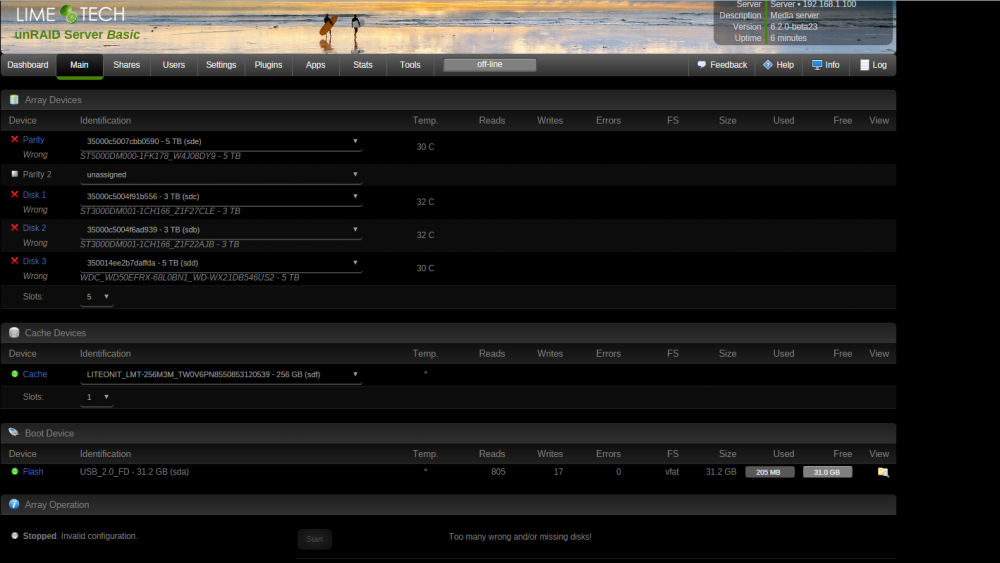
I'll have to look into how to get you the diagnostic file. I've never done it before. It started working right when I re-seated the card and plug drives into it. I think it is passing through right. Disk cleaner is reading the drives like they should. I read some where about putting them back in the right order. And do a new config will fix them. I just wanted to make sure this is right so I don't lose anything.
-
okay got it working, now ran into another problem. It changed the name of the drives in UNRAID but in the HBA on boot it shows the normal names 2 other photos of the monitor https://1drv.ms/i/s!Agd-2lo2dsNmwFQIgM26ECpPsrtt https://1drv.ms/i/s!Agd-2lo2dsNmwFUp97xdeIY-X0cI Even the MB BIOS is reading the HDD right https://1drv.ms/i/s!Agd-2lo2dsNmwFfhANyLXDXv9TEx
-
That depends on how the card is sold. In any case, it should have IT firmware flashed for unRAID. You might also want to skip flashing the BIOS for faster boot times. Next open point is driver support in unRAID itself, but you should see pretty soon how things go. Keep us updated please! Got the card. It said IT at the of the FW Version. With the card in with no drives hook up UNRAID boots but I can't Connect to the web GUI
-
i'm on 5.0.7 and the docker keeps telling me there is an update?
-
So I just made a mistake... I am new to teamspeak and spent 5 hours give or take setting up... I seen the docker had an update and deleted everything I had setup. My question is, what is the proper way to update the docker and is there a way to back settings up?
-
I have a LSI 9300-8i on the way. Will this work out of the box or do I need to flash it
-
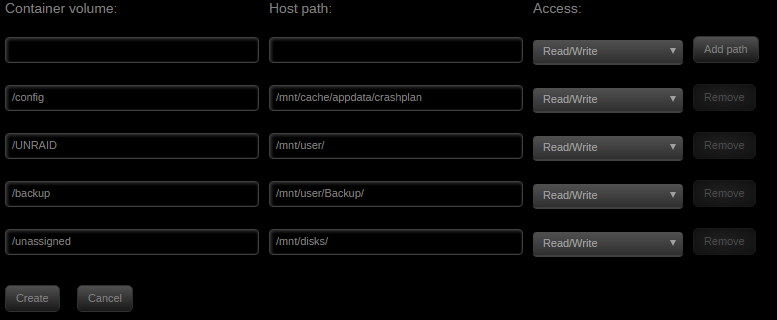
This is my first time setting this up and want to get it right the first time. Is this the right way to setup? Attached photo [/img]
-
Thank you so much for this docker. Are you going to have 5.x when it comes out? I've been playing with the beta on win10 and it's really nice.


