






H2OKing
Members
-
Joined
-
Last visited
Everything posted by H2OKing
-
@roppy84 Post your docker template dockers>plex>edit Sent from my iPhone using Tapatalk Pro
-
So you tried host and still can’t get to the GUI? They probably set it up this way so it works right out of the box. Here looks like a list of ports Sent from my iPhone using Tapatalk Pro
-
It’s because the template is setup for host so no port needs map. If it gets changed to a different network then the port needs map so it is pass. Sent from my iPhone using Tapatalk Pro
-
Turn proxy off on radarr and see if it fixes the issue. If it does it’s the proxy that’s the issue. Sent from my iPhone using Tapatalk Pro
-
Are you using a proxy? Sent from my iPhone using Tapatalk Pro
-
Change plex back to host In the proxy config change proxy pass upstream:32400 To ip:32400 Sent from my iPhone using Tapatalk Pro
-
First time installing it. Adding the m fix it Sent from my iPhone using Tapatalk Pro
-
just tried for the first time also and same issue
-
how do I setup a password? I tired editing the settings.js removing the // and putting my password in. but when I try logging in it doesn't take tried making admin node with no luck $ npm install -g --unsafe-perm node-red-admin npm WARN deprecated [email protected]: bcrypt < v2.0.0 is susceptible to bcrypt wrap-around bug. Upgrade to bcrypt >= v2.0.0 for improved support for newer bcrypt hashes npm WARN deprecated [email protected]: Use uuid module instead npm WARN deprecated [email protected]: The major version is no longer supported. Please update to 4.x or newer npm WARN checkPermissions Missing write access to /usr/local/lib/node_modules npm ERR! path /usr/local/lib/node_modules npm ERR! code EACCES npm ERR! errno -13 npm ERR! syscall access npm ERR! Error: EACCES: permission denied, access '/usr/local/lib/node_modules' npm ERR! { Error: EACCES: permission denied, access '/usr/local/lib/node_modules' npm ERR! stack: 'Error: EACCES: permission denied, access \'/usr/local/lib/node_modules\'', npm ERR! errno: -13, npm ERR! code: 'EACCES', npm ERR! syscall: 'access', npm ERR! path: '/usr/local/lib/node_modules' } npm ERR! npm ERR! The operation was rejected by your operating system. npm ERR! It is likely you do not have the permissions to access this file as the current user npm ERR! npm ERR! If you believe this might be a permissions issue, please double-check the npm ERR! permissions of the file and its containing directories, or try running npm ERR! the command again as root/Administrator (though this is not recommended). npm ERR! A complete log of this run can be found in: npm ERR! /usr/src/node-red/.npm/_logs/2018-10-01T02_24_50_639Z-debug.log
-
This should be posted in LE Topic. What do you have as your network for plex docker? Host? Post your plex LE config Leave plex in host and in the plex LE proxy config change proxy pass from upstream to the ip of plex:32400
-
I take it you are trying to proxy? Probably should use the help topic. But I’ll I’ll give it a go. Post your proxy config for plex. I bet you didn’t put the ip of the server in. Sent from my iPhone using Tapatalk Pro
-
What is the issue this is causing? I tried looking and couldn’t find Sent from my iPhone using Tapatalk Pro
-
I installed binhex to test and came with 1.13.5.5332 and it works. I rolled back linux docker to 1.13.5.5332 and doesn't work. im going to try and nuke linux config and try from new linux pulled 1.13.8.5395 with a new config. my media is loading but was able to play a truehd now.
-
im having issue transcode also.
-
is there an issue with mounted drives for upload? I try sending files to my google:secure folder and sends a few files then getting errors found this in the logs WriteFileHandle.Write: can't seek in file without --vfs-cache-mode >= writes
-
just that proxy net and have reboot with no issues for months then reboot a few days ago and started having this issue and found this topic.
-
root@KING-UNRAID:~# docker network list NETWORK ID NAME DRIVER SCOPE 9494a8ea6aac br0 macvlan local 2b4bf512628e bridge bridge local e8e134764a20 host host local 27a6395f1007 none null local 0dd83d63baea proxynet bridge local
-
king-unraid-diagnostics-20180918-1703.zip
-
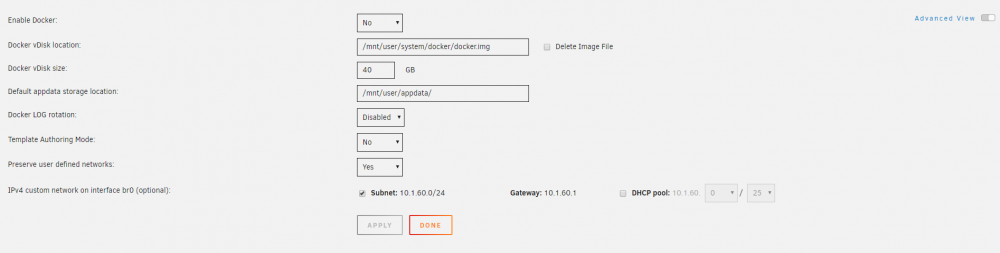
I rebuilt my flash drive with unraid flash tool. But get the same issue when I reboot I lose br0 and I also upgraded to 6.6.0-rc4 to see if that would fix it...
-
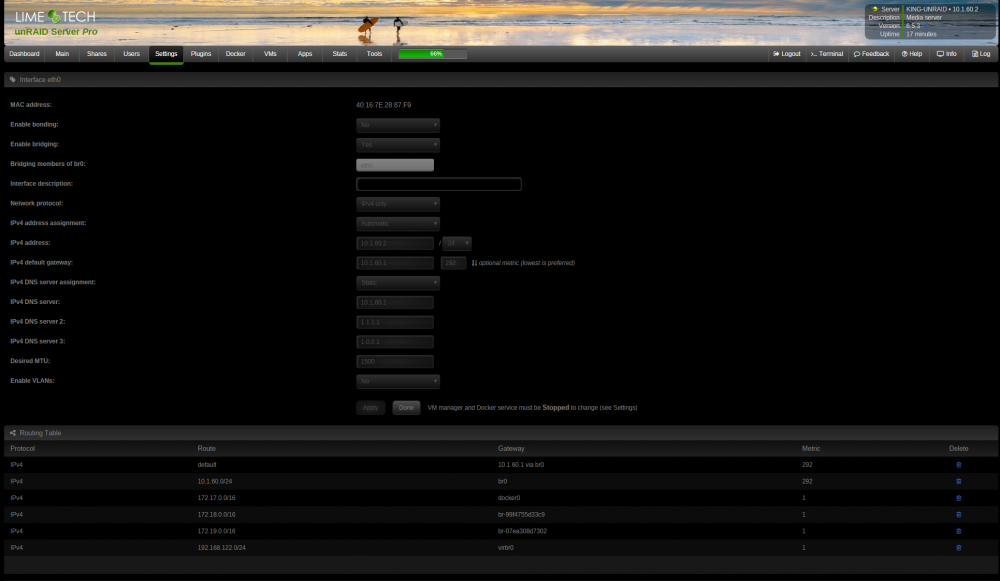
I have no idea why this issue just start for me. i'm on 6.5.3 and after every reboot i now have to do this. rm /var/lib/docker/network/files/local-kv.db /etc/rc.d/rc.docker restart I have also tried a new docker img with no fix after reboot
-
Got him up and running. ISP blocks port 80 Sent from my iPhone using Tapatalk Pro
-
Yes I have radarr.domain.com and so on. On unifi I have ddns for domain.com Then my sub.domain.com cname to domain.com Sent from my iPhone using Tapatalk Pro
-
You have to wait a week for that rate limit to clear. What I have is a domain bought from doamins.google.com $10/year Then have ddns setup with unifi to update it. Then I have on LE DNS verification setup that uses api from google Sent from my iPhone using Tapatalk Pro
-
Did you also try the bridge zero and giving the docker a lan ip? Also with this way you can use port 80-80 and 443-443 Sent from my iPhone using Tapatalk Pro
-
Wait why are you not psssing the ports right? The docker should from docker 443 to network 444 and 80>81 On the port forwarding it should be from port 444>443 and 81>80 UnRAID uses 443 and 80 I’m pretty sure my docker shows my unRAID ip on the lan side Sent from my iPhone using Tapatalk Pro Do your other dockers show that same ip like your LE docker? The fast and easy way to fix this is to change the network to br0 and give the docker an ip on your lan Change to the right ports. Port forward to the new lan ip. Go to the proxy config and change upstream:port to serverip:port


