






ezhik
Members
-
Joined
Everything posted by ezhik
-
You rawk! Could you also please validate whether or not this bug is related to settings not being saved on reboot? Meaning, if I change FTP Server from Enabled to Disabled, upon reboot it goes back to Enabled.
-
Isn't this thread as a whole a feature request? Without this command we do not have proper support of the controller. I'd argue the necessity of creating a separate thread for this specific command. I say this should stay here and be included as part of THIS feature request.I also can't seem to change 'Global SMART Settings' to set custom 'Default SMART controller type. It ALWAYS resets to automatic... By the way, I am running 6.5.3That does not work. What does work is: smartctl -A -d cciss,1 /dev/sdX or smartctl --attributes --device=cciss,1 /dev/sdX -- ~# smartctl --attributes --device=cciss,1 /dev/sdb smartctl 6.6 2017-11-05 r4594 [x86_64-linux-4.14.49-unRAID] (local build) Copyright (C) 2002-17, Bruce Allen, Christian Franke, www.smartmontools.org === START OF READ SMART DATA SECTION === SMART Attributes Data Structure revision number: 16 Vendor Specific SMART Attributes with Thresholds: ID# ATTRIBUTE_NAME FLAG VALUE WORST THRESH TYPE UPDATED WHEN_FAILED RAW_VALUE 1 Raw_Read_Error_Rate 0x000b 100 100 016 Pre-fail Always - 0 2 Throughput_Performance 0x0005 138 138 054 Pre-fail Offline - 76 3 Spin_Up_Time 0x0007 121 121 024 Pre-fail Always - 631 (Average 646) 4 Start_Stop_Count 0x0012 100 100 000 Old_age Always - 398 5 Reallocated_Sector_Ct 0x0033 100 100 005 Pre-fail Always - 0 7 Seek_Error_Rate 0x000b 100 100 067 Pre-fail Always - 0 8 Seek_Time_Performance 0x0005 140 140 020 Pre-fail Offline - 26 9 Power_On_Hours 0x0012 096 096 000 Old_age Always - 30160 10 Spin_Retry_Count 0x0013 100 100 060 Pre-fail Always - 0 12 Power_Cycle_Count 0x0032 100 100 000 Old_age Always - 394 192 Power-Off_Retract_Count 0x0032 100 100 000 Old_age Always - 805 193 Load_Cycle_Count 0x0012 100 100 000 Old_age Always - 805 194 Temperature_Celsius 0x0002 176 176 000 Old_age Always - 34 (Min/Max 15/54) 196 Reallocated_Event_Count 0x0032 100 100 000 Old_age Always - 0 197 Current_Pending_Sector 0x0022 100 100 000 Old_age Always - 0 198 Offline_Uncorrectable 0x0008 100 100 000 Old_age Offline - 0 199 UDMA_CRC_Error_Count 0x000a 200 200 000 Old_age Always - 0Hey @limetech, Any update on this? Cheers.Reviving an old thread as we seem to have made some progress @RaEyE I just booted unraid 6.5.3 with 2 x H240's that have the following connected to it: 8 x HGST Ultrastar 4TB 2 x Micron 1TB SSDs Tested copying the files from and to the array (using samba shares), running md5's for confirmation of the data integrity. Success! The only thing that is not working - is the temperature reporting. Attaching screenshot with parity check running as a confirmation. @limetech @RobJ can we fix the temperature reporting?
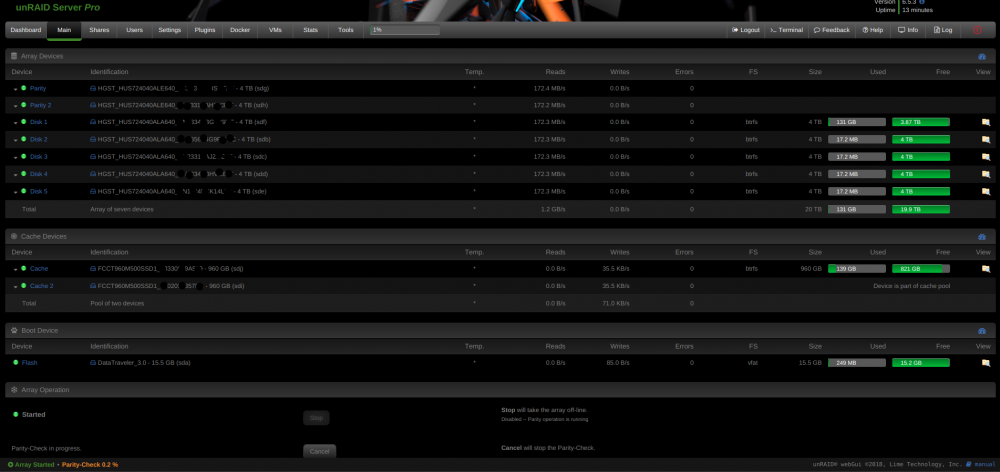 binhex-plexpass would not start: chown: cannot access '/opt/plexmediaserver/': No such file or directory Edit: This has been fixed.Solid BOSS. I like when my RAID status is is green@bonienl, the annoying part is shrinking and stretching. If you have 1920px size, it gets shrinked when accessed on older macbooks that have resolution of 1280x800 for example. Doesn't look good. Same thing if the resolution is 1440p or 4K - it gets stretched.@limetech Can we get a feature to not stretch or shrink the banner if it is over/under the size of the screen? For example, for all those users that still have 1270 pixels banners, can we have an option to: position: stretch, center if centered, color to fill the sides (let users pick the color, for example I filled mine with black sides). Cheers.Agreed. Good to know I am not the only one.Or maybe I just never noticed...Didn't have this in 6.3.5. It was nicely scaled.Did anything change regarding banner size in 6.4.0? Shouldn't it be 1270x90? My 'Dark' theme seems to be over stretched @ 1920x1080 resolution. This goes for the top banner and the alignment of the drive usage and other properties in the Main page. Anybody else noticed anything off about this?I created a separate thread:The trick for me was to reflash the SBR at the end, that gets both ports going. Try that. I tested this on a11 and a21. cheers.Attached are files to flash to P20 FW LSI 9211-8i. Enjoy. PS. I decided to create a separate thread for this due to repetitive questions on the same subject. Based on your version A11 or A21, choose the appropriate files. Create a bootable USB with Rufus and FreeDOS: https://rufus.akeo.ie/ Backup Links: < link is dead > -- Boot into FreeDOS: 1) MegaCli.exe -AdpAllInfo -aAll |find /i "sas address" > sas_addr.txt 2) MegaRec.exe -readsbr 0 orig.sbr 3) MegaRec.exe -cleanflash 0 4) MegaRec.exe -writesbr 0 sbr-a21.bin or MegaRec.exe -writesbr 0 sbr-a11.bin 5) MegaRec.exe -cleanflash 0 Boot into EFI: mount fs0 fs0: or mount fs# (# is the number for your USB) sas2hax -o -f 2118it.bin -noreset reboot into EFI sas2hax -o -f 2118it.bin -b mptsas2.rom sas2hax -o -sasadd <sas address from sas_addr.txt> Boot into FreeDOS: MegaRec.exe -writesbr 0 sbr-a21.bin or MegaRec.exe -writesbr 0 sbr-a11.bin ** DONE ** --- D2607.7zAlright let me shed some light on how flashing of Fujitsu D2607 is actually done to be successful. I've flashed about 20 of them by now. -- Boot into FreeDOS: Get your current SAS Addres: 1) MegaCli.exe -AdpAllInfo -aAll |find /i "sas address" > sas_addr.txt Write down your SAS Address: type sas_addr.txt Read your current SBR: 2) MegaRec.exe -readsbr 0 orig.sbr Cleanflash (yes, do this first or it might fail) 3) MegaRec.exe -cleanflash 0 Flash based on a11 or a21 model: 4) MegaRec.exe -writesbr 0 sbr-a21.bin or MegaRec.exe -writesbr 0 sbr-a11.bin Cleanflash again (yes, do this second time because you flashed another SBR): 5) MegaRec.exe -cleanflash 0 Boot into EFI shell and navigate to the USB, your device might be fs0, fs1, fs2, fsN (where N is the number): fs0: Flash the 9211 Firmware: sas2hax -o -f 2118it.bin Note: Ignore the warning about failed to reset adapter after flashing, this is expected. reboot into EFI: Flash 9211 Firmware and BIOS: sas2hax -o -f 2118it.bin -b mptsas2.rom Add your SAS Address that you got sas2hax -o -sasadd <sas address from sas_addr.txt> Boot into FreeDOS: You need to reflash the SBR for both ports to work: MegaRec.exe -writesbr 0 sbr-a21.bin or MegaRec.exe -writesbr 0 sbr-a11.bin ** DONE ** --So I just re-tested this with two H240s populated in both PCIe ports and getting controller lockup detected error. I think this is related to IOMMU/VT-d: https://bugs.launchpad.net/ubuntu/+source/debian-installer/+bug/907377Anyways, easy fix should be to also have Drone Factory folder scanning every 60 minutes. Too bad.This seems to be container specific.Those are configured exactly as you've screenshotted. Completed Download Handling is enabled to grab downloaded items. Remove is NOT enabled.Nothing. Neither in Sonarr nor in NZBGet, nothing related to moving items to historical automatically.


