






ezhik
Members
-
Joined
Everything posted by ezhik
-
.0 to .0 release, brave man - I like your style!
-
Upgraded 4 servers. 4/4 upgraded successfully. 6.10.3 -> 6.11.0 One of the servers has Quadro P2000 with 515.76 Driver - SUCCESS! Thanks!
-
I would also mention below multi-page discussion on RFD if you are curious to see what many Canadian users have to say about unRAID : https://forums.redflagdeals.com/unraid-unraid-sale-30-off-2548456/
-
I am not sure if you are being serious or you are trolling us. This community is pretty large in fact you have a lot of technical folks who are willing to give away their knowledge helping the community members even if the questions are very trivial and can be easily searched via "Search" button on the forum. Lots of constructive responses in this thread specifically and if you noticed that people got defensive, this community is based on creating solutions especially for newer problems that might rise. We have high regards for the development team that tries to strike the balance of convenience, functionality and security ensuring newer joiners have a good experience adapting and adopting this solution for their homes. I will also re-post my comments regarding a recent sale on "PRO" upgrades:
-
Upgraded two systems, no issues. To those who are running nvidia cards and the nvidia plugin, it was a smooth sail to upgrade. MUCH better than earlier versions. Cheers.
-
This is a MASSIVE release, THANK YOU!
-
Can you check this: grep "[0-9]" /sys/devices/system/edac/mc/mc*/csrow*/ch*_ce_count Should return something like this:

-
Samsung bar plus (32GB) CA ---- https://www.amazon.ca/Samsung-BAR-Plus-32GB-MUF-32BE4/dp/B07BPKKYHY/
-
It was 666 replies, sorry had to bump it up by one to avoid chaos. Go on.
-
Is this happening when you are doing a parity check? If so, when such high activity task kicks in, the PSU is undergoing an immense load since ALL of the drives are spun up and are performing a set of validation tasks. As such, I'd recommend calculating, approximately, how much power do you consume at least on drives and looking at the power supply thereafter. For example, I have 16 x 1TB Seagate Drives: Power consumption per drive in my case: 1.8A x 12V = 21.6W Total HDDs: 21.6W x 16 ~= 350W So if you have a decent CPU and maybe a video card in the mix, then you'll need a powerful PSU to handle that. Remember, the PSUs can only sustain 80% efficiency for a prolonged duration of time.
-
Only thing I'll mention is the TRIM support. Please refer to:
-
Now we are talking! Top notch man!
-
Looks good! I am not a fan of Intel stock CPU coolers, those are pretty bad :-/
-
That's clean. respect.
-
When it comes to software development, ideally the structure would be: 6.9.1 6 - Major 9 - Minor 1 - Patch -- With unRAID we have seen that Minor releases are treated as major and contain a lot of new features.
-
Right, the OP did. Apologies there, got mixed up.
-
The good old base64.
-
Betas are not releases though, they are considered pre-release and are mainly used for testing purposes. When you say release, you mean the stable version and that takes on average 12+ months. Mind you, major releases require major resources
-
6.10 would be considered a major release, I wouldn't count it being until year end at the earliest.
-
Hey Team, Recently had to go through an exercise of downsizing the cache array on an encrypted array (and encrypted cache array). Only way to do so was via: 1. Tools -> New Config -> Preserve current assignments [Array slots]. 2. wipefs -a /dev/sd[y-z] # (clear filesystem from cache drives) 3. assign cache drives 4. Mark 'parity is already valid' 5. Start array 6. encounter unmountable drives -- The array was hosed at this point, can someone confirm this for me? have rebooted the server and re-created the array since data on it wasn't important, still pretty disappointing. The error was the partitions were not recognized.
-
Top notch!
-
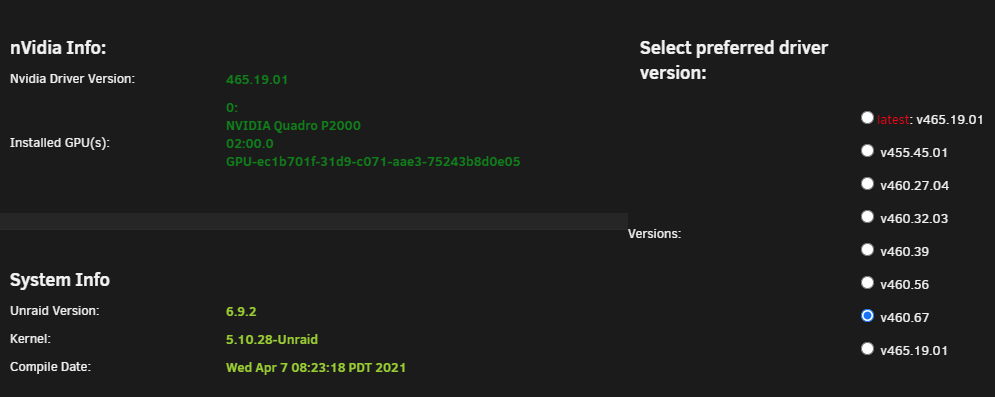
No stress man! Your work is greatly appreciated! We are back in business: --
-
Not to be the one to complain, but we need to turn from reactive to proactive. I genuinely appreciate the support here and the dev work put in here, but couldn't this be anticipated and communicated out to the developer ahead of time? If we are trying to bridge the gap between core product devs and community devs, this could be avoided In either case, no harm no foul. The system is running and we can wait for the fix.
-
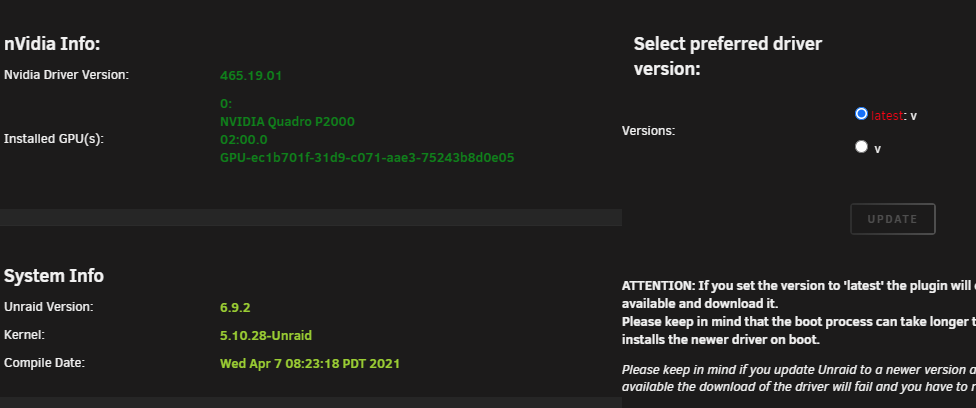
Updated without any major issues except for nvidia plugin: I only see version "v" available. Any way to bring back the 'STABLE' drivers over 'BETA'? Although I do respect having an option for 'bleeding edge', I appreciate stability over features.
-
I have 860's, no issues: root@u4:~# dmesg -T|grep -i 'lsi' [Sat Mar 13 12:48:52 2021] mpt2sas_cm0: LSISAS2308: FWVersion(16.00.00.00), ChipRevision(0x05), BiosVersion(07.31.00.00) root@u4:~# dmesg -T|grep -i 'samsung' [Sat Mar 13 12:48:52 2021] ata5.00: ATA-11: Samsung SSD 860 EVO 500GB, *, RVT03B6Q, max UDMA/133 [Sat Mar 13 12:48:52 2021] ata6.00: ATA-11: Samsung SSD 860 EVO 500GB, *, RVT03B6Q, max UDMA/133 [Sat Mar 13 12:48:52 2021] scsi 5:0:0:0: Direct-Access ATA Samsung SSD 860 3B6Q PQ: 0 ANSI: 5 [Sat Mar 13 12:48:52 2021] scsi 6:0:0:0: Direct-Access ATA Samsung SSD 860 3B6Q PQ: 0 ANSI: 5 root@u4:~# fstrim -v -a /etc/libvirt: 8 GiB (8588054528 bytes) trimmed on /dev/loop3 /var/lib/docker: 63.3 GiB (67954708480 bytes) trimmed on /dev/loop2 /mnt/cache: 874.8 GiB (939358191616 bytes) trimmed on /dev/mapper/sdf1




