





noja
Members
-
Joined
-
Last visited
Everything posted by noja
-
Hey @binhex, thanks again! Just wanted to note though, when using the "latest" tag, the container doesn't seem to work. Oddly though, "2.21.1-4-02" works perfectly. I've restarted the container with both tags twice just to be sure. Thanks again for all your efforts!
-
Thank you! I can confirm that it's downloading to the correct place now.
-
I'm having an issue with the YouTubeDL-Material. Everything setup super easy, but the download paths don't seem to work. Once I get a video downloaded, it shows up in the webui, but it does not show up in the folder path that has been specified. Its fairly small, so I'm wondering if it is somehow in the dockerfile where I can't find it?
-
https://status.plex.tv Plex authentication is down.
-
Ahh, thanks - jeeze, the external auth issues just keep coming.
-
EDIT - sorry, Plex auth api is down, because of course Yep - I'm getting weird update failures in the logs currently. I'm thinking it may be connected to some database corruption as my local users have all disappeared with the exception of the admin account Brought to you by linuxserver.io We gratefully accept donations at: https://www.linuxserver.io/donate/ ------------------------------------- GID/UID ------------------------------------- User uid: 99 User gid: 100 ------------------------------------- [cont-init.d] 10-adduser: exited 0. [cont-init.d] 40-chown-files: executing... [cont-init.d] 40-chown-files: exited 0. [cont-init.d] 45-plex-claim: executing... [cont-init.d] 45-plex-claim: exited 0. [cont-init.d] 50-gid-video: executing... [cont-init.d] 50-gid-video: exited 0. [cont-init.d] 60-plex-update: executing... Atempting to upgrade to: 1.18.5.2309 https://downloads.plex.tv/plex-media-server-new/1.18.5.2309/debian/plexmediaserver_1.18.5.2309_amd64.deb: 2020-02-06 15:27:58 ERROR 404: Not Found. ######################################################## # Upgrade attempt failed, this could be because either # # plex update site is down, local network issues, or # # you were trying to get a version that simply doesn't # # exist, check over the VERSION variable thoroughly & # # correct it or try again later. # ######################################################## [cont-init.d] 60-plex-update: exited 0. [cont-init.d] 99-custom-scripts: executing... [custom-init] no custom files found exiting... [cont-init.d] 99-custom-scripts: exited 0. [cont-init.d] done. [services.d] starting services Starting Plex Media Server. [services.d] done. Has plex screwed their downloads page (Narrator: "They did"), or is it potentially related to the container? Thanks
-
Sweet jeebus. THANK YOU! Naming it to UNRAID was exactly the issue. PS - successful disaster recovery from 6500km away is enormously difficult and that much more rewarding.
-
So I can confirm that the BIOS is seeing the new correct USB and that is the only media it is attempting to boot from. Again, here was my process to restore the USB, can someone tell me if I made a boneheaded mistake? 1. Insert new Kingston Datatraveller 32GB into Win 10 comp 2. Format USB as FAT32 3. Drag and drop all files from backup folder to USB 4. Right click make_bootable.bat on USB and run as admin (for the record when the popup comes up, I just hit space and then it immediately disappears - I'm not sure if it's actually done anything) 5. Put USB into server 6. No profit
-
Bah! This is what happens when I go on vacation. 3 days in and the USB (of course it’s the OS - why would it be anything else other than the whole mobo) craps out. Thanks!
-
Well now I’m questioning my sanity, will my supermicro bios not keep its settings from a few hours ago and boot from a USB in the same port as the old USB it’s used for the last few years? I’m only asking as I’m off site and having someone do the physical USB swapping on my behalf. They may be able to manipulate the bios but I’d rather not ask.
-
So I have to restore my USB, but I’m having some issues. I’ve formatted my new USB, then copied the files over, then I run the “make bootable.bat” file from the USB as an admin. When I add the USB back to my server, it is not being recognized as an OS. Is there something I’m missing? Thanks for any help!
-
That's interesting. So this entire time, I've had an NVMe SSD attached as my cache drive with a PCIe adapter which I don't think would be attached to the on board HP controller. I also have a SATA SSD sitting in the box as an unassigned drive but going through the controller. So, for the sake of "science," I'll try pulling the SATA drive and leaving the NVMe drive and then running TRIM again. Given that I don't know $h*t about how TRIM works, I have no idea if that will cause a crash again. But I'm willing to give it a go! You know - for "science"!
-
Fixed! Either disabling TRIM or fixing my error on the Syslinux file did the trick. The system finally had no issues yesterday. I may try setting TRIM to run later today to see if that was culprit. Thanks again @1812! **EDIT** - Yep - its TRIM. Time to figure out what the hell then.
-
Well, unfortunately, it has not worked. Of course when I was looking at the BIOS health in iLO, I didn't clue in that the issues happen every Sunday at 5:00pm est. The first week, I only isolated the Matrox component and I had a crash that day. The second week I did the other iLO components liek so: Is there any normal events in Unraid that would kick in every 7 days that I should look out for? I looked at my scheduler and the only thing I have that might be close is that SSD Trim is set to go on the same day as the issues, but it happens at 1AM while the server crashes every time that day (Sunday) at 5:00pm. The reason I mention that is that I added that NVMe SSD through the PCIe adapter - it may be around the same time as the crashes started happening. I also still have an old sata ssd attached as an unassigned device. Would that factor in? I think for now, I'll try disabling TRIM to see what happens.

-
Fair enough! I might as well add them both now. It'll probably be a long while before I notice whether or not the solution works as I usually go about 2 weeks between crashes. I'll give myself a reminder to update this post in like a month if I don't have any new crashes. Thanks again!
-
Thanks! Since I haven't isolated something on the host before, I just want to confirm: System Devices says this: [102b:0533] 01:00.1 VGA compatible controller: Matrox Electronics Systems Ltd. MGA G200EH Syslinux currently looks like this: New Version will look like this? Thanks again
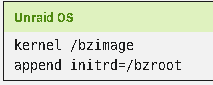
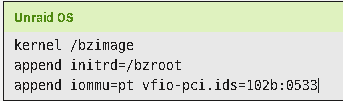
-
Hi! So I've been getting recurrent system crashes on a DL360e Gen8. 274 PCI Bus 10/20/2019 05:00 10/20/2019 05:00 1 Uncorrectable PCI Express Error (Embedded device, Bus 0, Device 0, Function 0, Error status 0x00100000) 273 System Error 10/20/2019 05:00 10/20/2019 05:00 1 Unrecoverable System Error (NMI) has occurred. System Firmware will log additional details in a separate IML entry if possible I'm on the most recent firmware (2019.05.24) and I've been motoring through the HPE forums and found this discussion which links the issue to a Matrox graphics driver in Windows. Since I'm clearly not running windows, I'm uncertain which direction to go in. For me, I'm also unable to remove the pcie riser as I run my cache through an NVME drive on a pcie adapter card. Any ideas where to look? I've also attached my diagnostics in case that helps. avasarala-diagnostics-20191021-1353.zip Thanks!
-
Hi, I hope I haven't missed this issue in my search on this topic - if I have, please point me at the comments and I'll make a go from there. My access log under the nginx folder is MASSIVE at 7GB. I have absolutely no idea how it got so big and due to the size, I can't find a program that will let me open it and see whats up. I've made a copy of the log and then deleted the original, which works fine. Do I need to be concerned? Is there a log rotation I need to implement? The error log is sitting at about 5MB, so I'm a little confused as to what I've done here. Thanks!
-
Just a note to anyone trying to implement DUO 2fa on this docker - I spent a long time failing to implement it as my browser kept saying https://api-xxxxxxx.duosecurity.com%20%20%20 was incorrect. It turns out that if you accidentally leave spaces behind the api url in the Guacamole.properties file, it will actually try to include those spaces and fail the api request (evidenced by the %20%20 in the browser console). Other than that, if anyone is trying to set it up, the entire process was straightforward according to the Guacamole docs and works just fine at the end. I even run this program behind the lsio/letsencrypt reverse proxy. Only difference from the official documentation is that the DUO secret key does not have to be 20 characters as noted, the supplied 40 characters works just fine.
-
Welp - this is definitely one of those "Just let it sit and mellow" kinda scenarios. Now, 5 hours later, the updates to both FCP and CA went through with no issues. Sorry for cluttering up the forum boards!
-
I'm actually currently connected to my LAN through Guacamole running on my server. But yes, I can also confirm that my server can ping github from the terminal window with no issues.
-
Runnin 6.6.6 - getting this error on trying to update FCP plugin: updating: fix.common.problems.plg plugin: downloading: https://raw.github.com/Squidly271/fix.common.problems/master/archive/fix.common.problems-2019.02.18-x86_64-1.txz ... failed (Invalid URL / Server error response) plugin: wget: https://raw.github.com/Squidly271/fix.common.problems/master/archive/fix.common.problems-2019.02.18-x86_64-1.txz download failure (Invalid URL / Server error response) Is this one of those updates that will only work on 6.7 RCxx or did I do something else wrong? Thanks!
-
So I just wanted to update anyone that is having the same issue as I just did. I've been confused for a long while as to why I could never seem to connect to this SAB container when I was connected over VPN. Turns out that I had a VPN server set through pfSense which gave me a tunnel network which was a different subnet. That of course pooched me when trying to connect to this SAB through my VPN as I had followed SpaceInvaderOne's video guide to set this up which included putting the lan network to my local one of 172.16.100.0/24. So if you're in the same bucket, I used the CIDR calculator noted above for my 172.16.100.0/24 network and now I'm connecting happily after setting my lan network to 128.0.0.0/1. EDIT - so this didn't work for me in the end. I didn't notice it very quickly, but the container didn't like my different LAN NETWORK address and eventually the container timed out. So I decided to try putting the second subnet that my VPN uses in there along with the local network that I'm on. Turns out that having the variable as "172.16.100.0/24, 172.16.50.0/24" seems to work at this moment. No time out on the container and I can access it from both local network and VPN. If I did that wrong, someone please correct me, but it seems to work so far. Thanks again @binhex
-
@binhex you nailed it. Thanks for the assist! That problem is solved.
-
Hey! I'm having a bit of trouble with the transcoder on here. I'm reverse proxying through the linuxserver letsencrypt container and everytime I play a flac song, it will play about 45 sec and then skip to the next song. If I play via dsub, I don't have issues as it doesn't need to transcode, but on Firefox it does. The log is showing: java.io.IOException: Cannot run program "/config/transcode/ffmpeg": error=13, Permission denied I took a look at the permissions in appdata and it shows: # ls -al /mnt/user/appdata/binhex-airsonic/transcode total 0 drwxrwxrwx 1 nobody users 12 Sep 11 17:08 ./ drwxrwxr-x 1 nobody users 294 Sep 20 03:27 ../ ---------- 1 root root 0 Sep 11 17:08 ffmpeg So the first thing I tried is matching up the owner to nobody:users and the issue persists. I then matched the proxy requirements from airsonic, but again same error. I then tried matching the ffmpeg owner statements from airsonic to: lrwxrwxrwx 1 user user 15 mai 4 19:57 ffmpeg -> /usr/bin/ffmpeg However, changing ownership of ffmpeg to anything other than 000 causes playback to cease completely. Am I missing something easy?


