





DZMM
Members
-
Joined
-
Last visited
Everything posted by DZMM
-
Not sure what's going wrong. Does your cleanup script look like this? (i use a teamdrive) ################### Clean-up UnionFS Folder ######################### echo "$(date "+%d.%m.%Y %T") INFO: starting unionfs cleanup." find /mnt/user/mount_unionfs/google_vfs/.unionfs -name '*_HIDDEN~' | while read line; do oldPath=${line#/mnt/user/mount_unionfs/google_vfs/.unionfs} newPath=/mnt/user/mount_rclone/tdrive_vfs${oldPath%_HIDDEN~} rm "$newPath" rm "$line" done find "/mnt/user/mount_unionfs/google_vfs/.unionfs" -mindepth 1 -type d -empty -delete rm /mnt/user/appdata/other/rclone/rclone_mount_cleanup exit
-
You only have to uninstall and reinstall the plug-in to update - no need to reboot. You can risk just doing this in isolation, but I'd recommend unmounting and stopping plex, sonarr etc i.e anything accessing the mounts first. I'm going to do this when I get home later this week to try the new memory switch
-
I'm still on 6.6.6 and it's rock solid for me - if it's ever dropped I haven't noticed
-
Are you sure your script is setup correctly? Here's mine: #!/bin/bash ####### Check if script already running ########## if [[ -f "/mnt/user/appdata/other/rclone/rclone_mount_cleanup" ]]; then echo "$(date "+%d.%m.%Y %T") INFO: Exiting as script already running." exit else touch /mnt/user/appdata/other/rclone/rclone_mount_cleanup fi ####### End Check if script already running ########## ################### Clean-up UnionFS Folder ######################### echo "$(date "+%d.%m.%Y %T") INFO: starting unionfs cleanup." find /mnt/user/mount_unionfs/google_vfs/.unionfs -name '*_HIDDEN~' | while read line; do oldPath=${line#/mnt/user/mount_unionfs/google_vfs/.unionfs} newPath=/mnt/user/mount_rclone/gdrive_vfs${oldPath%_HIDDEN~} rm "$newPath" rm "$line" done find "/mnt/user/mount_unionfs/google_vfs/.unionfs" -mindepth 1 -type d -empty -delete rm /mnt/user/appdata/other/rclone/rclone_mount_cleanup exit
-
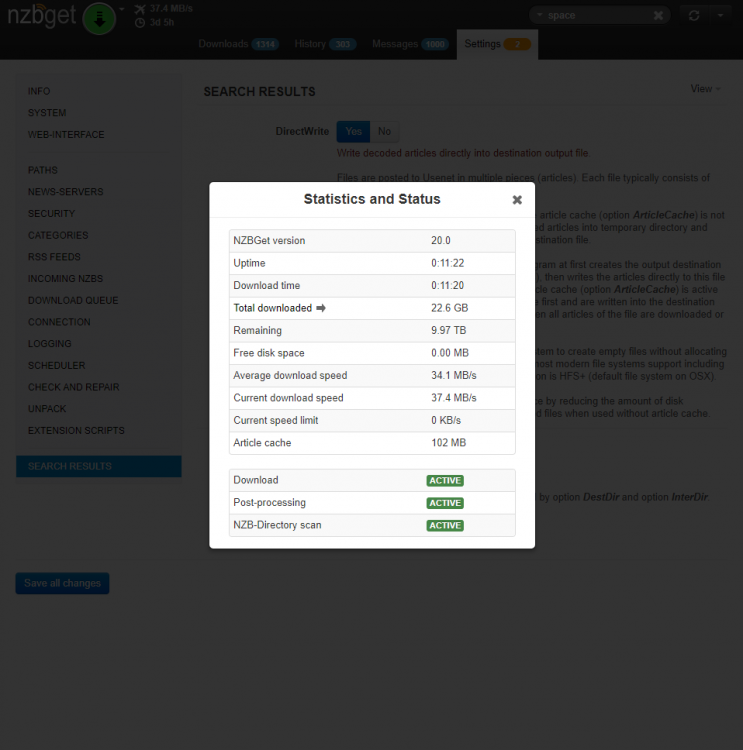
I've just noticed after realising that my downloads weren't pausing when DestDir dropped below my disk space setting ( InterDir is working fine), that my Free disk space in status is showing as 0.00MB. Is this something I can fix? Thanks in advance
-
Thanks I know how to get the size, but how do I do the if bigger than 100GB then.... bit?
-
Edit: Ignore - found a better way of tackling my problem Can I get some help from someone more knowledgeable than me please. What I want to do is check if a directory on my array is larger than 100GB e.g. check if /mnt/user0/downloads/nzbget is larger than 100GB. The reason I want to do this is if I can work out how to do the check, if positive I'll pause my downloads as I'm finding that if mover moves too many files to the array before they are added to the right directory I start suffering IO meltdown. Thanks in advance.
-
My setup is: Unassigned NVME - for my main VMs and all Plex appdata SSD Cache drive - docker and other appdata; and cache Unassigned SSD - low priority VMs and nzbget/transmission downloads
-
https://support.plex.tv/articles/200381023-naming-movie-files/ @francrouge here's a couple of other tips to speedup plex. Here's a good one @slimshizn shared with me last week - makes a big difference for me https://github.com/Cloudbox/Community/wiki/Speed-up-Plex I also found this one last night, which has made a big difference to my library browsing 'speed' as images load much quicker as the cache isn't flushed of images not accessed in the last month. It will mean my cache will get big overtime but for now that's not a problem https://support.plex.tv/articles/201553286-scheduled-tasks/
-
@francrouge that's got nothing to do with the rclone setup - plex's scanner sometimes does that. I find restarting Plex sometimes helps
-
Rdp-calibre. No modifications
-
Let me know how you get on with this as I've never conclusively seen any difference for my connection when I increase/decrease the buffer
-
wrong thread as this is for plex playback and mounting. But, I think you won't be able to solve your problem like that as I think exclude only works on files not folders https://rclone.org/filtering/
-
It definitely works. Probably a bit slower due to the need to download the file, but I do my syncs in the background so I never notice and the biggest delay for me is copying to my tablet. I've gone almost all in this month and I'm uploading all my non-4k content and a good chunk of the 4k as well. It's been working well for me for over six months and after seeing some absolutely massive plex libraries setup like this, I'm not worried.
-
Thanks for this, but I couldn't get this to work by just changing the two lines you suggested. Shouldn't the other lines referencing 'Collabora' also be changed? This is what I currently have: resolver 127.0.0.11 valid=30s; upstream collabora { server 192.168.50.74:9980; } server { listen 443 ssl; server_name office.*; include /config/nginx/ssl.conf; # static files location ^~ /loleaflet { proxy_pass https://192.168.50.74:9980; proxy_set_header Host $host; } # WOPI discovery URL location ^~ /hosting/discovery { proxy_pass https://192.168.50.74:9980; proxy_set_header Host $host; } # Capabilities location ^~ /hosting/capabilities { proxy_pass https://192.168.50.74:9980; proxy_set_header Host $http_host; } # main websocket location ~ ^/lool/(.*)/ws$ { proxy_pass https://192.168.50.74:9980; proxy_set_header Upgrade $http_upgrade; proxy_set_header Connection "Upgrade"; proxy_set_header Host $http_host; proxy_read_timeout 36000s; } # Admin Console websocket location ^~ /lool/adminws { proxy_buffering off; proxy_pass https://192.168.50.74:9980; proxy_set_header Upgrade $http_upgrade; proxy_set_header Connection "Upgrade"; proxy_set_header Host $host; proxy_read_timeout 36000s; } # download, presentation and image upload location ~ ^/lool { proxy_pass https://192.168.50.74:9980; proxy_set_header Host $http_host; } }
-
Assuming a 90min movie, you'll need about 50Mbps on average to play the movie and some bits might be higher e.g. 60-70Mbps. On your 120 connection if the line isn't available you'll have problems. You could possibly try increasing your chunk size to ask rclone to download more before starting playback - a chunk size of 256M might stop the buffering for this movie with the trade-off being the start time will be slower whilst waiting for that first chunk.
-
what's your broadband connection download speed?
-
good find. 1.4.6 will hopefully also include rclone union which should allow us to drop unionfs and have a all-in-one solution
-
rclone fixed delete-empty-src-dirs a few releases ago, so I put it back in. min-age 30 stops files younger than 30 mins being uploaded. I reduced my checkers and tpslimits to reduce the odds of API bans - they probably could be increased.
-
Ignore the one in the first post - the github is the up to date version. how soon do you run the script after an array start? Mine's on a 5 min cycle - does it work the second time automatically? Maybe it starts too close to the array starting I've ditched rc as the refresh was just a nice to have and rc and wasn't worth the hassle what's on line 85?
-
I just click 'empty trash' every day or so. IMO that's a much better solution than plex automatically removing all media if a mount fails and you loose all manual metadata corrections, manual artwork changes etc I don't think any script could do this fast enough 100% of the time before Plex decides a file is missing. As I stated I think my mount has only gone down once in 6 months, so if you hate the plex behaviour and want to take the chance then turn on auto remove.
-
I guess you could add that in, but if you set my mount script to run on a schedule it should remount automatically. I've been running my setup for over 6 months and I think my mount has only dropped once and that was probably my fault when I was figuring stuff out.
-
just the mount script - it's designed to remount if the mount drops automatically if run on a schedule e.g. every 5 mins
-
When I want to manually remount I create a temp script to run in the background: fusermount -uz /mnt/user/mount_rclone/google_vfs rclone mount --allow-other --buffer-size 512M --dir-cache-time 72h --drive-chunk-size 512M --fast-list --log-level INFO --vfs-read-chunk-size 128M --vfs-read-chunk-size-limit off tdrive1_vfs: /mnt/user/mount_rclone/google_vfs & exit I don't add any sleeps in and I've not had any problems as the mount is remounted before any dockers realise. Ongoing uploads are fine as they don't use the mount. The sleep in the main mount script is just to avoid any potential problems - it's probably not needed anymore, but I keep it there for insurance. Like @Kaizac I have my script running every 5 mins to check if the mount has dropped. I think this has only happened once before to me in the early days, but it's there if I have e.g. a network failure in the future
-
if you unmount and remount your log level will refresh


