






bubbl3
Members
-
Joined
-
Last visited
Everything posted by bubbl3
-
@dlandon can confirm the UI is fixed and reflects the disk being mounted, but the SMB share was not created at boot. See the diagnostics attached and the output of cat /proc/mounts , this time I didn't run the add-smb script manually. root@Tower:~# cat /proc/mounts rootfs / rootfs rw,size=65861692k,nr_inodes=16465423,inode64 0 0 proc /proc proc rw,relatime 0 0 sysfs /sys sysfs rw,relatime 0 0 tmpfs /run tmpfs rw,relatime,size=65536k,mode=755,inode64 0 0 /dev/sda1 /boot vfat rw,noatime,nodiratime,fmask=0177,dmask=0077,codepage=437,iocharset=iso8859-1,shortname=mixed,flush,errors=remount-ro 0 0 /dev/loop0 /lib squashfs ro,relatime,errors=continue 0 0 overlay /lib overlay rw,relatime,lowerdir=/lib,upperdir=/var/local/overlay/lib,workdir=/var/local/overlay-work/lib 0 0 /dev/loop1 /usr squashfs ro,relatime,errors=continue 0 0 overlay /usr overlay rw,relatime,lowerdir=/usr,upperdir=/var/local/overlay/usr,workdir=/var/local/overlay-work/usr 0 0 devtmpfs /dev devtmpfs rw,relatime,size=8192k,nr_inodes=16465424,mode=755,inode64 0 0 devpts /dev/pts devpts rw,relatime,gid=5,mode=620,ptmxmode=000 0 0 tmpfs /dev/shm tmpfs rw,relatime,inode64 0 0 fusectl /sys/fs/fuse/connections fusectl rw,relatime 0 0 hugetlbfs /hugetlbfs hugetlbfs rw,relatime,pagesize=2M 0 0 cgroup2 /sys/fs/cgroup cgroup2 rw,nosuid,nodev,noexec,relatime,nsdelegate,memory_recursiveprot 0 0 tmpfs /var/log tmpfs rw,relatime,size=131072k,mode=755,inode64 0 0 efivarfs /sys/firmware/efi/efivars efivarfs rw,nosuid,nodev,noexec,relatime 0 0 rootfs /mnt rootfs rw,size=65861692k,nr_inodes=16465423,inode64 0 0 tmpfs /mnt/disks tmpfs rw,relatime,size=1024k,inode64 0 0 tmpfs /mnt/remotes tmpfs rw,relatime,size=1024k,inode64 0 0 tmpfs /mnt/addons tmpfs rw,relatime,size=1024k,inode64 0 0 tmpfs /mnt/rootshare tmpfs rw,relatime,size=1024k,inode64 0 0 nfsd /proc/fs/nfs nfsd rw,relatime 0 0 nfsd /proc/fs/nfsd nfsd rw,relatime 0 0 /dev/md1p1 /mnt/disk1 xfs rw,noatime,nouuid,attr2,inode64,logbufs=8,logbsize=32k,noquota 0 0 /dev/md2p1 /mnt/disk2 xfs rw,noatime,nouuid,attr2,inode64,logbufs=8,logbsize=32k,noquota 0 0 /dev/md3p1 /mnt/disk3 xfs rw,noatime,nouuid,attr2,inode64,logbufs=8,logbsize=32k,noquota 0 0 /dev/md4p1 /mnt/disk4 xfs rw,noatime,nouuid,attr2,inode64,logbufs=8,logbsize=32k,noquota 0 0 /dev/md5p1 /mnt/disk5 xfs rw,noatime,nouuid,attr2,inode64,logbufs=8,logbsize=32k,noquota 0 0 /dev/md6p1 /mnt/disk6 xfs rw,noatime,nouuid,attr2,inode64,logbufs=8,logbsize=32k,noquota 0 0 /dev/md7p1 /mnt/disk7 xfs rw,noatime,nouuid,attr2,inode64,logbufs=8,logbsize=32k,noquota 0 0 /dev/nvme0n1p1 /mnt/cache btrfs rw,noatime,ssd,discard=async,space_cache=v2,subvolid=5,subvol=/ 0 0 shfs /mnt/user0 fuse.shfs rw,nosuid,nodev,noatime,user_id=0,group_id=0,default_permissions,allow_other 0 0 shfs /mnt/user fuse.shfs rw,nosuid,nodev,noatime,user_id=0,group_id=0,default_permissions,allow_other 0 0 /dev/sdg1 /mnt/disks/ZCH0859H xfs rw,relatime,attr2,inode64,logbufs=8,logbsize=32k,noquota 0 0 /dev/loop2 /var/lib/docker btrfs rw,noatime,ssd,space_cache=v2,subvolid=5,subvol=/ 0 0 /dev/loop2 /var/lib/docker/btrfs btrfs rw,noatime,ssd,space_cache=v2,subvolid=5,subvol=/ 0 0 /dev/loop3 /etc/libvirt btrfs rw,noatime,ssd,space_cache=v2,subvolid=5,subvol=/ 0 0 nsfs /run/docker/netns/133a2385364a nsfs rw 0 0 nsfs /run/docker/netns/5e2c60229e3f nsfs rw 0 0 nsfs /run/docker/netns/86b05786ef76 nsfs rw 0 0 nsfs /run/docker/netns/54188258c33f nsfs rw 0 0 nsfs /run/docker/netns/1429a1c211de nsfs rw 0 0 nsfs /run/docker/netns/b06ebc25f551 nsfs rw 0 0 nsfs /run/docker/netns/dcefdc5d840d nsfs rw 0 0 nsfs /run/docker/netns/50061aaae80d nsfs rw 0 0 nsfs /run/docker/netns/58f45d9663bf nsfs rw 0 0 nsfs /run/docker/netns/f1c5a05c5df4 nsfs rw 0 0 nsfs /run/docker/netns/8227e3776579 nsfs rw 0 0 nsfs /run/docker/netns/4583b25e57bb nsfs rw 0 0 nsfs /run/docker/netns/a27582ff11e7 nsfs rw 0 0 /dev/sdg1 /mnt/disks/ZCH0859H/incomplete xfs rw,relatime,attr2,inode64,logbufs=8,logbsize=32k,noquota 0 0 nsfs /run/docker/netns/4ef83a37736d nsfs rw 0 0 nsfs /run/docker/netns/eaf7b8eddd9e nsfs rw 0 0 tmpfs /run/user/0 tmpfs rw,nosuid,nodev,relatime,size=13175704k,nr_inodes=3293926,mode=700,inode64 0 0 tower-diagnostics-20240217-1455.zip
-
root@Tower:~# cat /proc/mounts rootfs / rootfs rw,size=65861692k,nr_inodes=16465423,inode64 0 0 proc /proc proc rw,relatime 0 0 sysfs /sys sysfs rw,relatime 0 0 tmpfs /run tmpfs rw,relatime,size=65536k,mode=755,inode64 0 0 /dev/sda1 /boot vfat rw,noatime,nodiratime,fmask=0177,dmask=0077,codepage=437,iocharset=iso8859-1,shortname=mixed,flush,errors=remount-ro 0 0 /dev/loop0 /lib squashfs ro,relatime,errors=continue 0 0 overlay /lib overlay rw,relatime,lowerdir=/lib,upperdir=/var/local/overlay/lib,workdir=/var/local/overlay-work/lib 0 0 /dev/loop1 /usr squashfs ro,relatime,errors=continue 0 0 overlay /usr overlay rw,relatime,lowerdir=/usr,upperdir=/var/local/overlay/usr,workdir=/var/local/overlay-work/usr 0 0 devtmpfs /dev devtmpfs rw,relatime,size=8192k,nr_inodes=16465424,mode=755,inode64 0 0 devpts /dev/pts devpts rw,relatime,gid=5,mode=620,ptmxmode=000 0 0 tmpfs /dev/shm tmpfs rw,relatime,inode64 0 0 fusectl /sys/fs/fuse/connections fusectl rw,relatime 0 0 hugetlbfs /hugetlbfs hugetlbfs rw,relatime,pagesize=2M 0 0 cgroup2 /sys/fs/cgroup cgroup2 rw,nosuid,nodev,noexec,relatime,nsdelegate,memory_recursiveprot 0 0 tmpfs /var/log tmpfs rw,relatime,size=131072k,mode=755,inode64 0 0 efivarfs /sys/firmware/efi/efivars efivarfs rw,nosuid,nodev,noexec,relatime 0 0 rootfs /mnt rootfs rw,size=65861692k,nr_inodes=16465423,inode64 0 0 tmpfs /mnt/disks tmpfs rw,relatime,size=1024k,inode64 0 0 tmpfs /mnt/remotes tmpfs rw,relatime,size=1024k,inode64 0 0 tmpfs /mnt/addons tmpfs rw,relatime,size=1024k,inode64 0 0 tmpfs /mnt/rootshare tmpfs rw,relatime,size=1024k,inode64 0 0 nfsd /proc/fs/nfs nfsd rw,relatime 0 0 nfsd /proc/fs/nfsd nfsd rw,relatime 0 0 /dev/sdg1 /mnt/disks/ZCH0859H xfs rw,relatime,attr2,inode64,logbufs=8,logbsize=32k,noquota 0 0 /dev/md1p1 /mnt/disk1 xfs rw,noatime,nouuid,attr2,inode64,logbufs=8,logbsize=32k,noquota 0 0 /dev/md2p1 /mnt/disk2 xfs rw,noatime,nouuid,attr2,inode64,logbufs=8,logbsize=32k,noquota 0 0 /dev/md3p1 /mnt/disk3 xfs rw,noatime,nouuid,attr2,inode64,logbufs=8,logbsize=32k,noquota 0 0 /dev/md4p1 /mnt/disk4 xfs rw,noatime,nouuid,attr2,inode64,logbufs=8,logbsize=32k,noquota 0 0 /dev/md5p1 /mnt/disk5 xfs rw,noatime,nouuid,attr2,inode64,logbufs=8,logbsize=32k,noquota 0 0 /dev/md6p1 /mnt/disk6 xfs rw,noatime,nouuid,attr2,inode64,logbufs=8,logbsize=32k,noquota 0 0 /dev/md7p1 /mnt/disk7 xfs rw,noatime,nouuid,attr2,inode64,logbufs=8,logbsize=32k,noquota 0 0 /dev/nvme0n1p1 /mnt/cache btrfs rw,noatime,ssd,discard=async,space_cache=v2,subvolid=5,subvol=/ 0 0 shfs /mnt/user0 fuse.shfs rw,nosuid,nodev,noatime,user_id=0,group_id=0,default_permissions,allow_other 0 0 shfs /mnt/user fuse.shfs rw,nosuid,nodev,noatime,user_id=0,group_id=0,default_permissions,allow_other 0 0 /dev/loop2 /var/lib/docker btrfs rw,noatime,ssd,space_cache=v2,subvolid=5,subvol=/ 0 0 /dev/loop2 /var/lib/docker/btrfs btrfs rw,noatime,ssd,space_cache=v2,subvolid=5,subvol=/ 0 0 /dev/loop3 /etc/libvirt btrfs rw,noatime,ssd,space_cache=v2,subvolid=5,subvol=/ 0 0 nsfs /run/docker/netns/d4f21cba8555 nsfs rw 0 0 nsfs /run/docker/netns/99301db2a02f nsfs rw 0 0 nsfs /run/docker/netns/e2f446f6a4a5 nsfs rw 0 0 nsfs /run/docker/netns/4671951dc6db nsfs rw 0 0 nsfs /run/docker/netns/ea6dae047f70 nsfs rw 0 0 nsfs /run/docker/netns/dcd0116882af nsfs rw 0 0 nsfs /run/docker/netns/3141f5f422ad nsfs rw 0 0 nsfs /run/docker/netns/9130782b52fb nsfs rw 0 0 nsfs /run/docker/netns/7dab268b47f0 nsfs rw 0 0 nsfs /run/docker/netns/6e12348ec98d nsfs rw 0 0 nsfs /run/docker/netns/1b7c59eaca16 nsfs rw 0 0 nsfs /run/docker/netns/86b1c75956dc nsfs rw 0 0 nsfs /run/docker/netns/0f8eedf38d1b nsfs rw 0 0 /dev/sdg1 /mnt/disks/ZCH0859H/incomplete xfs rw,relatime,attr2,inode64,logbufs=8,logbsize=32k,noquota 0 0 nsfs /run/docker/netns/225a436b9432 nsfs rw 0 0 nsfs /run/docker/netns/5210094db0a7 nsfs rw 0 0 tmpfs /run/user/0 tmpfs rw,nosuid,nodev,relatime,size=13175704k,nr_inodes=3293926,mode=700,inode64 0 0 Of course this is after i manually executed the smbshare script
-
@dlandon diagnostics here tower-diagnostics-20240217-1149.zip
-
Diagnostic file attached here. tower-diagnostics-20240217-1149.zip
-
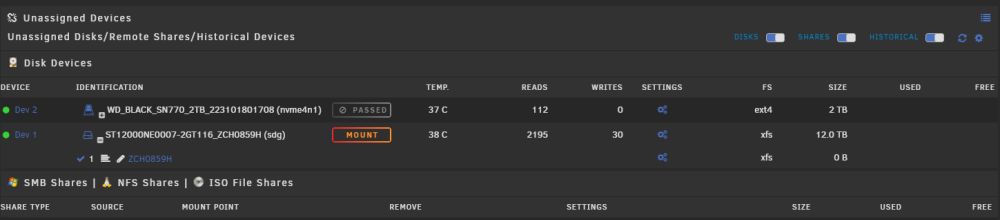
Unassigned devices is not working correctly for me after upgrading to 6.12.8, device is set for automount and it does mount but is not reflected in the UI: If i click MOUNT. the button just goes back to the same state Additionally the SMB share is not created even if it says so in the syslog: Feb 17 11:36:23 Tower unassigned.devices: Mounting partition 'sdg1' at mountpoint '/mnt/disks/ZCH0859H'... Feb 17 11:36:23 Tower unassigned.devices: Mount cmd: /sbin/mount -t 'xfs' -o rw,relatime '/dev/sdg1' '/mnt/disks/ZCH0859H' Feb 17 11:36:23 Tower unassigned.devices: Successfully mounted '/dev/sdg1' on '/mnt/disks/ZCH0859H'. Feb 17 11:36:23 Tower unassigned.devices: Adding SMB share 'ZCH0859H'. Feb 17 11:36:23 Tower unassigned.devices: Warning: Unassigned Devices are not set to be shared with NFS. UPDATE: SMB share is created if I execute the script manually: /tmp/unassigned.devices/add-smb
-
Adding these lines to the go file seems to be working and no services complaining about dbus: #increase /run size /bin/mount -t tmpfs tmpfs /run -o remount,size=64M #start dbus /usr/bin/dbus-uuidgen --ensure /usr/bin/dbus-daemon --system #start elogind /etc/rc.d/rc.elogind start Still don't think this is a great solution, ideally the size of /run should be increased at the first mount before any service starts.
-
Added this to the go file and mostly solved the issue: #increase /run size /bin/mount -t tmpfs tmpfs /run -o remount,size=64M But dbus and elogind still fail since they run before the go file: Feb 17 09:24:14 Tower dbus-daemon[3719]: Failed to start message bus: Failed to close "/var/run/dbus/dbus.pid": No space left on device Feb 17 09:24:14 Tower elogind-daemon[3731]: Failed to write PID file /run/elogind.pid: No space left on device Anywhere else the size of the /run mount can be changed so that it applies before anything else?

-
What's the best way to increase the size of /run at boot?
-
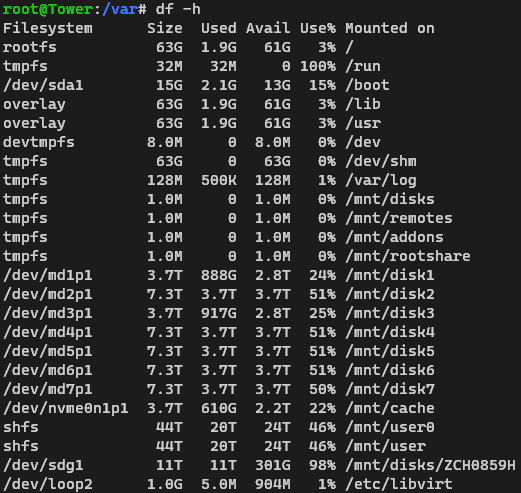
But it does look like tmpfs is not large enough:
-
In case you were going to ask /var/run is writable: lrwxrwxrwx 1 root root 4 Feb 16 01:14 run -> /run/
-
Rebooted after upgrade from 6.12.6, seems services cannot create pid files for lack of space on the device, not sure on which storage they are created, the USB is only 13% used. Of course since nothing starts I guess rolling back will be a pita. Feb 17 08:46:24 Tower emhttpd: shcmd (35): /etc/rc.d/rc.avahidaemon start Feb 17 08:46:24 Tower root: Starting Avahi mDNS/DNS-SD Daemon: /usr/sbin/avahi-daemon -D Feb 17 08:46:24 Tower avahi-daemon[13749]: Found user 'avahi' (UID 61) and group 'avahi' (GID 214). Feb 17 08:46:25 Tower winbindd[13609]: [2024/02/17 08:46:25.024111, 0] ../../source3/winbindd/winbindd_samr.c:71(open_internal_samr_conn) Feb 17 08:46:25 Tower winbindd[13609]: open_internal_samr_conn: Could not connect to samr pipe: NT_STATUS_CONNECTION_DISCONNECTED Feb 17 08:46:25 Tower avahi-daemon[13749]: Successfully dropped root privileges. Feb 17 08:46:25 Tower avahi-daemon[13749]: write(): No space left on device Feb 17 08:46:25 Tower avahi-daemon[13749]: Failed to create PID file: No space left on device Feb 17 08:46:25 Tower emhttpd: shcmd (35): exit status: 1 Feb 17 08:46:25 Tower emhttpd: shcmd (36): /etc/rc.d/rc.avahidnsconfd start Feb 17 08:46:25 Tower root: Starting Avahi mDNS/DNS-SD DNS Server Configuration Daemon: /usr/sbin/avahi-dnsconfd -D Feb 17 08:46:25 Tower avahi-dnsconfd[13766]: write(): No space left on device Feb 17 08:46:25 Tower avahi-dnsconfd[13766]: Failed to create PID file: No space left on device Feb 17 08:46:25 Tower emhttpd: shcmd (36): exit status: 1 Feb 17 08:46:25 Tower emhttpd: Autostart enabled Feb 17 08:46:27 Tower emhttpd: shcmd (41): /etc/rc.d/rc.php-fpm start Feb 17 08:46:27 Tower php-fpm[13795]: [ERROR] Unable to write to the PID file.: No space left on device (28) Feb 17 08:46:27 Tower php-fpm[13795]: [ERROR] FPM initialization failed Feb 17 08:46:27 Tower root: Starting php-fpm [ERROR] Unable to write to the PID file.: No space left on device (28) Feb 17 08:46:27 Tower root: [ERROR] FPM initialization failed Feb 17 08:46:27 Tower root: failed Feb 17 08:46:27 Tower emhttpd: shcmd (41): exit status: 1 Feb 17 08:46:27 Tower emhttpd: shcmd (42): /etc/rc.d/rc.unraid-api install Feb 17 08:46:28 Tower root: unraid-api installed Feb 17 08:46:28 Tower emhttpd: shcmd (43): /etc/rc.d/rc.nginx start Feb 17 08:46:29 Tower root: Starting Nginx server daemon... Feb 17 08:46:29 Tower nginx: 2024/02/17 08:46:29 [crit] 13925#13925: pwrite() "/var/run/nginx.pid" failed (28: No space left on device)
-
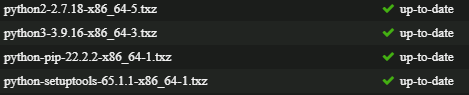
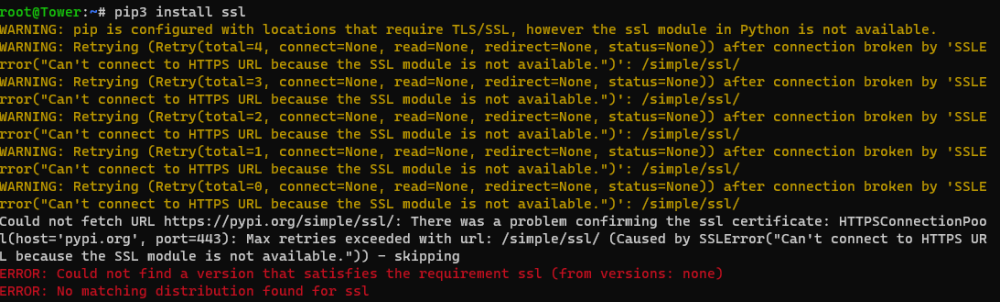
Running 6.12.0-rc5, I have these packages installed: But when trying to use pip3 to install features i get this: Any idea what the issue could be?
-
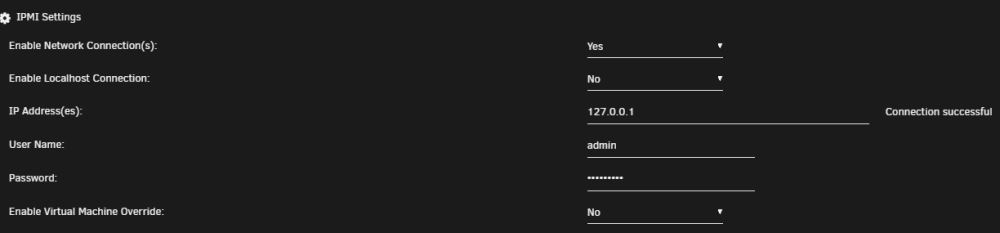
So to recap, after all the testing this is how i made it work (enabling localhost connection wasn't working):
-
Oh well, turns out this works: /usr/sbin/ipmi-sensors -h "127.0.0.1" -u "admin" -p "xxxxxxxx"
-
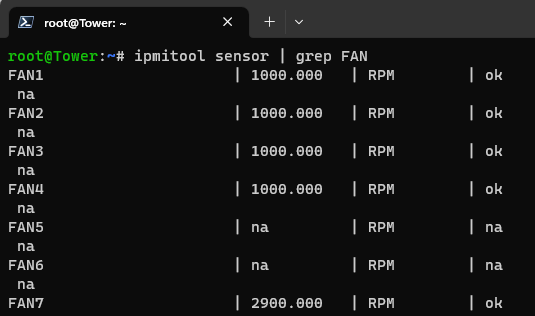
funny enough impitool on localhost works fine
-
This is the actual error i get: /usr/sbin/ipmi-sensors: authentication type unavailable for attempted privilege level
-
Any chance to get it to work with the newer ASRock boards? I have an ASRock Rack ROMED8-2T and getting network connection failed. Happy to help testing possible solutions.
-
Can confirm @DeadDevil6210 method works for me as well with the ASRock A380 on 6.12 RC2


-
I believe the proper disclaimer to people buying unraid should be: do not make business decisions based on roadmaps.
-
I did fix it, but seems like reboot wasn't enough, had to uninstall and install the packages again in Nerdtools UI.
-
@jsavargas the issue with libffi is not fixed: https://github.com/UnRAIDES/unRAID-NerdTools/issues/37#issuecomment-1455062335
-
Alex, il syslog che hai allegato e' del reboot, non include eventi avvenuti prima del nuovo boot. Per poter diagnosticare problemi di come questo devi abilitare persistent logs come descritto qui: https://wiki.unraid.net/Manual/Troubleshooting#Persistent_Logs_.28Syslog_server.29
-
Still getting the same error even after latest update: 2022-10-21 09:50:46.118 BST [289] LOG: could not link file "pg_wal/xlogtemp.289" to "pg_wal/000000010000000000000001": Function not implemented 2022-10-21 09:50:46.120 BST [289] FATAL: could not open file "pg_wal/000000010000000000000001": No such file or directory Any chance to get an answer here?
-
@derneuere Still same issue for me after last container update, I bet this is having issues with the latest version of unraid.
-
Any clues on that? from research could be a bug with postgres paths in docker.







