






ich777
Community Developer
-
Joined
Everything posted by ich777
-
On plugin installation the plugin will always automatically install driver version 590.x This is not good test, since you have to run a full memory test not only partially. However, please do the steps as recommended above, exactly like that, and the plugin will always default to the latest driver which is the 590.x one. Maybe also pull diagnostics after each reboot so that I can see what's going on.
-
-
Did you do that like: Remove the plugin Reboot Install the plugin (don't yet set the new driver) Reboot Go to your syslog and search for "NVRM" and see if the driver issue still persists Change the driver in the plugin to a 580.x version Reboot Go to your syslog and search for "NVRM" and see if the driver issue still persists
-
I'll take a look at this but this will definitely take some time.
-
It seems a bit strange what's going on on your system. I see that Unraid installs the 580.x driver and then the plugin installs the 590.x driver, not sure how this is even possible since first this is done: Jan 26 18:05:03 HOTFUZZ kernel: NVRM: loading NVIDIA UNIX x86_64 Kernel Module 580.126.09 Wed Jan 7 22:59:56 UTC 2026 Jan 26 18:05:03 HOTFUZZ kernel: nvidia-modeset: Loading NVIDIA Kernel Mode Setting Driver for UNIX platforms 580.126.09 Wed Jan 7 22:32:52 UTC 2026 Jan 26 18:05:03 HOTFUZZ kernel: [drm] [nvidia-drm] [GPU ID 0x00000400] Loading driver Jan 26 18:05:03 HOTFUZZ kernel: [drm] Initialized nvidia-drm 0.0.0 for 0000:04:00.0 on minor 1 and then the plugin does: Jan 26 18:05:59 HOTFUZZ rc.local: --------------------Nvidia driver v590.48.01 found locally--------------------- Jan 26 18:05:59 HOTFUZZ rc.local: --------------Installation of Nvidia driver v590.48.01 successful-------------- however I only see this package on your boot drive: /boot/config/plugins/nvidia-driver/packages/6.12.54/: total 410040 -rw------- 1 root root 419869688 Dec 19 05:18 nvidia-590.48.01-6.12.54-Unraid-1.txz -rw------- 1 root root 33 Dec 19 05:18 nvidia-590.48.01-6.12.54-Unraid-1.txz.md5 I also see this in your installed packages: -rw-r--r-- 1 root root 12777 Jan 26 18:04 nvidia-580.126.09-6.12.54-Unraid-1 -rw-r--r-- 1 root root 12878 Jan 26 18:04 nvidia-590.48.01-6.12.54-Unraid-1 Which I can't explain since this shouldn't be possible at all. Are you sure that your USB Boot drive is known good? Do you have any php errors on your Nvidia Driver Settings page, if yes do that: https://forums.unraid.net/topic/98978-plugin-nvidia-driver/page/178/#findComment-1487747 If you have none of these issues also make sure to run a memtest.
-
Just deploy the container and forward the ports in your firewall, done. You then can connect to your RustDeskServer by using your Domain name, so to speak: yourdomain.org No subdomain needed or anything since only the IP address is resolved and then the connection is securely established with your public key (you see them in the container logs).
-
First of all, this is not a recommended setup. However if you are passing it through to a VM you shouldn't have any issues at all. Please make sure that you are on the latest BIOS version, have 4G Decoding Enabled and Resizable BAR Support Enabled. This is usually a driver/hardware issue but I can't do much about that since this only means that the card can't assign Hardware resources. I assume that's because of this error, maybe @Squid can make an exception for this kind of OOM error since this is not a real OOM error.
-
I don't think that the Nvidia driver is the culprit since it seems that lsof is the cause of the issue. Did you maybe install some other Docker/LXC/VM that could be the culprit? The message lists just the modules which are linked in the Kernel and therefore it's listed first or at least somewhere at the beginning and the Kernel is always tainted because usually ZFS is there on Unraid and of course the Nvidia driver. However I removed the Diagnostics since it seems SpaceEngineers is able to the write into the system log and there was some token included.
-
Download failed for some reason, can't tell what went wrong when the download failes, maybe a short disconnect, GitHub not responding or something else happened, download errors are really hard to track down. The plugin has a lot of fail-safes built in so that it is really hard to mess up, even if the driver is not found on boot, the plugin tries to download it on boot time, of course the boot time will take a bit longer depending how much bandwidth do you have and how fast or slow GitHub is. So to speak, if you the plugin tells you that driver version 580.126.09 is already downloaded and the Checksum is OK, then it is safe to reboot, since when the Checksum fails it will try to re-download the driver.
-
This is your issue, 50 series cards need the Open Source driver version on Linux.
-
I don't have such a container because I simply don't see a reason for Proton for a dedicated server, however that's not relevant here... :) That folder is safe to delete and will always trigger a re-verification from the files that are currently installed, this is a known issue and even asked often times on GitHub. You also can't always delete, I mean you could, but this is basically even more than if you enable verification.
-
True but keep in mind that a container with 50 GB is something else and this for each version, I also think that DockerHub wouldn't be happy and don't forget about the copyright violations you are getting into. I think you are mistaken, the normal version is where I helped. :) I did never understand why anyone wanted the Proton version because Proton has usually just fixes for Desktops and so on. When it doesn't update the game do the following: Stop the container Delete the steamapps folder from the game directory Start the container Wait for the update to finish This is a common issue with SteamCMD, nothing @Nodiaque or anyone else than Valve could do about that.
-
What was the error message? If it tells you that it's already downloaded then it should be fine, you can try to select the driver version manually and click Update & Download, this will verify that the driver is installed.
-
I compile the Open Source drivers when a new Unraid version is released. So to speak, when the next Unraid version is released you should see the Open Source 590.x series driver.
-
I don't understand? Go into the settings from the plugin, select the Open Source driver, click on Update & Download, wait for the dialog to say it's okay to reboot, reboot your Server, done.
-
Unraid is handling the permissions on boot and Intel GPU TOP too.
-
This is not necessary on Unraid. This indicates that something is wrong with your transcoding settings or the passthrough to the container. You have to understand that intel_gpu_top is just a binary which can display the utilization from your iGPU/dGPU and has nothing to do with transcoding nor the driver itself. The drivers ship with the Kernel and therefore Unraid. It's most likely that something in terms of the system upgrade causes that since as said, the plugin is just a binary to display the utilization. Since this seems not related to the Intel-GPU-TOP plugin, please create a post in the TVHeadend Container support thread.
-
Oh sorry I've overlooked your comment... :/ Yes, but this has nothing to do with the plugin, you have to either add an entry to your syslinux.config or you have to add a modprobe.d file to Unraid, please issue this command from a Unraid terminal and reboot afterwards: mkdir -p /boot/config/modprobe.d echo "options nvidia-drm modeset=1" > /boot/config/modprobe.d/nvidia-drm.conf After the reboot you should be able to do this from an Unraid terminal to verify it was applied correctly: cat /sys/module/nvidia_drm/parameters/modeset and it should either revert Y IIRC.
-
Sorry but compilation is not topic and out of scope from this thread. This is only the plugin support thread if something isn't working with the plugin.
-
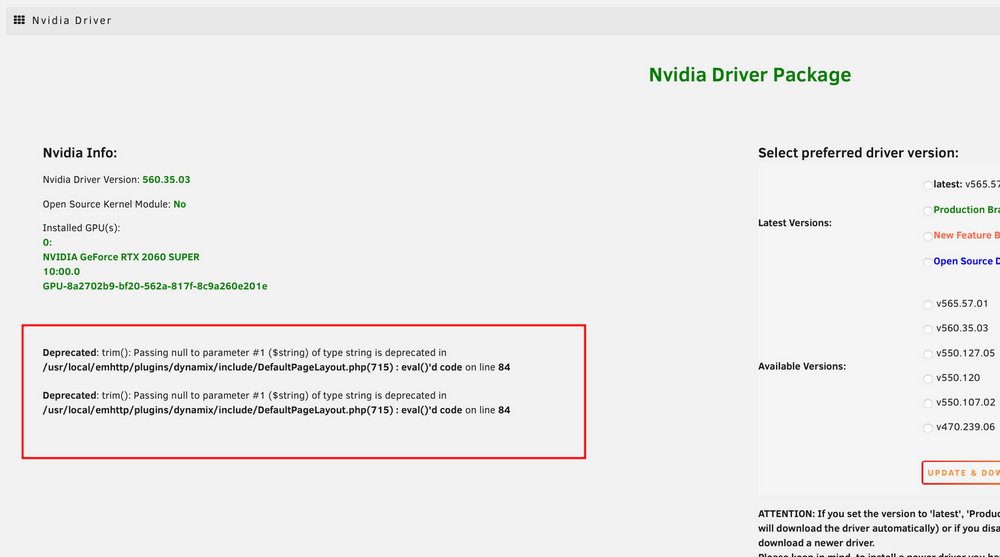
Do you also have these messages on the plugin page: If yes, then this basically means the plugins is broken and you have to uninstall it. If the plugin is still there after you uninstalled it and rebooted then something else is wrong with your system which I can't tell what it be, please make a post in the General Support subforums. I see from your syslog that the initialization from the GPU was done early, but failed obviously because it's a 590.x version driver, so this means the removal from the plugin was not successful, which isn't an issue from the plugin itself usually since the plugin doesn't handle the removal, this is outside of the scope from the plugin. However I would recommend that you do the following: Remove the Plugin Reboot Check if the Plugin is still there, if yes create a post in the General Support subforums, if not continue Install the Plugin again Select a 580.x driver version Click Update & Download and wait until the Dialog windows says it's finished Reboot After that the correct Nvidia driver should be installed.
-
Sorry, such old versions aren't supported anymore and the Open Source Driver won't be recompiled for such an old Unraid version (released about a year ago). However you can compile your own driver package and have to make sure that it's correctly load at boot, please see this container: https://github.com/ich777/unraid_kernel and the build script for the Nvidia Drivers is here: https://github.com/unraid/unraid-nvidia-driver/tree/master/source Please do note that in my opinion it's not worth to go through all the effort and just upgrade to 7.2.3, I haven't heard anything bad about 7.2.3, I would strongly recommend to upgrade.
-
Sorry, but this plugin doesn't support vGPU's and you even don't have the plugin installed from what I can see: Jan 19 16:29:26 StarOne plugin-manager: executing inline script: /bin/bash '/tmp/inline1-nvidia-vgpu-driver.sh' Jan 19 16:29:26 StarOne plugin-manager: creating: /boot/config/plugins/nvidia-vgpu-driver/nvidia-vgpu-driver-2023.06.28.txz - downloading from URL https://github.com/stl88083365/unraid-nvidia-vgpu-driver/raw/master/packages/nvidia-vgpu-driver-2023.06.28.txz Jan 19 16:29:26 StarOne plugin-manager: checking: /boot/config/plugins/nvidia-vgpu-driver/nvidia-vgpu-driver-2023.06.28.txz - MD5 Jan 19 16:29:26 StarOne plugin-manager: running: upgradepkg --install-new /boot/config/plugins/nvidia-vgpu-driver/nvidia-vgpu-driver-2023.06.28.txz Jan 19 16:29:27 StarOne plugin-manager: creating: /usr/local/emhttp/plugins/nvidia-vgpu-driver/README.md - from INLINE content Jan 19 16:29:27 StarOne plugin-manager: executing inline script: /bin/bash '/tmp/inline4-nvidia-vgpu-driver.sh' Jan 19 16:30:59 StarOne plugin-manager: executing inline script: /bin/bash '/tmp/inline1-nvidia-vgpu-driver.sh' Jan 19 16:30:59 StarOne plugin-manager: creating: /boot/config/plugins/nvidia-vgpu-driver/nvidia-vgpu-driver-2023.06.28.txz - downloading from URL https://github.com/stl88083365/unraid-nvidia-vgpu-driver/raw/master/packages/nvidia-vgpu-driver-2023.06.28.txz Jan 19 16:31:00 StarOne plugin-manager: checking: /boot/config/plugins/nvidia-vgpu-driver/nvidia-vgpu-driver-2023.06.28.txz - MD5 Jan 19 16:31:00 StarOne plugin-manager: running: upgradepkg --install-new /boot/config/plugins/nvidia-vgpu-driver/nvidia-vgpu-driver-2023.06.28.txz Jan 19 16:31:00 StarOne plugin-manager: creating: /usr/local/emhttp/plugins/nvidia-vgpu-driver/README.md - from INLINE content Jan 19 16:31:00 StarOne plugin-manager: executing inline script: /bin/bash '/tmp/inline4-nvidia-vgpu-driver.sh' Just a script which isn't supported.
-
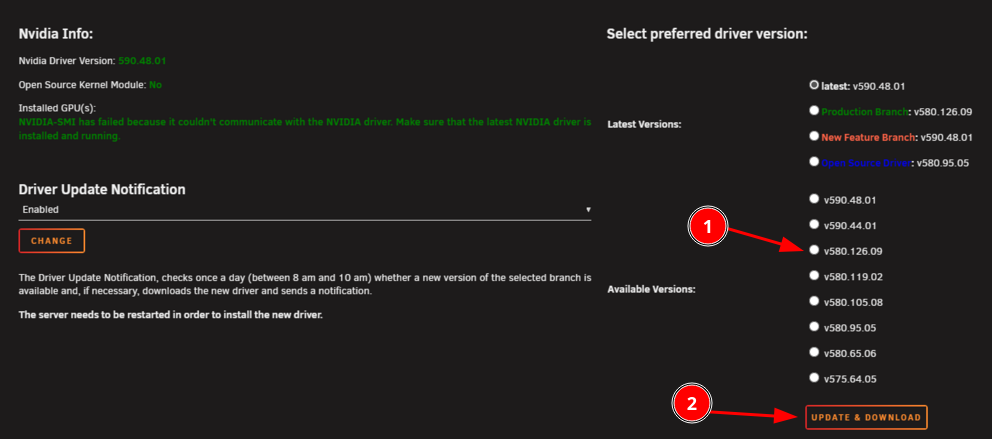
Please post your Diagnostics. Have you yet tried to select for example v580.126.09 from the list here: and then clicking Update & Download? Since this is what I already said above, if you just leave it at v590.48.01 and you've click Update & Download it will just verify the Checksum. However if the plugin reappears something is wrong on your system since this should not happen and possibly the plugin cannot be uninstalled for some reason.
-
Can you please post a screenshot from which message you are presented with? I really can't imagine that other folks can downgrade the driver and it won't work on your system. Select a static 580.x driver version and click Update & Download <- this will take some time. Your Pascal card is now basically deprecated by Nvidia and it's now in the legacy branch which means you have to stay on the driver versions 580, so just a heads up that you have to buy a new card in the next few years.
-
It's a bit more complicated. With 30 series you can use both, only 50 series requires Open Source.




