






ich777
Community Developer
-
Joined
Everything posted by ich777
-
This was always the behavior, the GPU, at least after booting Unraid will always stay at P0 and will only go int P8 when something was using the GPU before is now idle again. However you can circumvent that by putting that line into your go file: nvidia-persistenced
-
I see nothing wrong on the driver side, with what Container are you trying to find channels? Both Tuners are detected correctly and they should also work just fine. Please do note that Windows isn't Linux, are you using TVHeadend on both platforms or any other kind of software? My suspicion is that it has more to do with the application that you are trying to scan or some kind of miss configuration. What dirvers did you try yet? Only TBS ones or did you try the LibreELEC too already?
-
Did you enter a Steam Username/Password in the template? If yes please remove it and start over by deleting the container and the folder for the container in your appdata directory. Did you yet try the LAN only flag that is mentioned in the description from the container for testing purposes?
-
Atlas was deprecated a while ago since it was reported as not working. I don't own the game so I had no way to test it and the user doesn't reported back after a week or two.
-
Can you explain a bit further what you mean by that? What do you mean by a local file? What version do you want to deploy?
-
This is not necessary because the driver is load on boot. Again, please don't use this commands, this is the old way of enabling persistenced and pretty much outdated, please use this command instead: nvidia-persistenced that's all you need in your go file.
-
And what driver do you need? https://www.nvidia.com/en-us/drivers/unix/
-
Please join @Spectral Force's Discord server, he helps me out with 7DtD: https://discord.gg/VwwYA5h
-
Please update the RUNTIME_NAME (should be in the Show more...) section in the template to: jre22
-
Please try the following: Shut down the server Pull the power cord from wall Press the power and reset button for a few times (to empty the caps) Wait 15 seconds after that Plug the power cord back into the wall Start your server Sometimes the cards are in a hanging state and not recognized at all, with this method you can reset it.
-
Without more information it is really hard to troublehoot, how do you connect to the server, did you do any port mapping, can you post a screenshot from your container template, du you have special characters in your password, how long is the password?
-
I would have loved to have this post in the proper support thread, so to speak here, or at least a summary what your issue was. Issue with that is that such information should be in the support thread and other plugin related issues like a driver not working otherwise it will be harder for other people to solve their issues when plugin related issues are spread accross the forums. Just saying.
-
You can either way join through your LAN yes. Please also see that recommended post: https://forums.unraid.net/topic/79530-support-ich777-gameserver-dockers/page/107/#comment-945785
-
This is not an error, the server is running and waiting for connections. If you read the log, it says that Loaded local 'steamclient.so' OK.
-
I don't see a Tuner in your system, is the tuner connect via USB or PCIe, but as said, I don't see any device that could be a Tuner.
-
Nein hab ich nicht, ich hab die PCIe variante.
-
On what Unraid version are you? Do you know when the update was pushed exactly, the last version was pushed about three weeks ago: https://github.com/ich777/unraid-nct6687-driver/releases/tag/6.12.54-Unraid
-
This plugin is not designed for iGPUs, also the Vendor reset plugin solves antoher issue with selected GPUs when shutting down the VM not starting it. Please create a post in the VM support subforums.
-
The OpenSource driver is only compiled when a new Unraid version is released. May I ask for what you are using the GPU for and on what Unraid version you are on?
-
Please always share your Diagnostics when reporting such a technical issue. However a GK106, as you can see from the ouptut from lspci, is a Kepler based card: Click You probably bought a counterfeit card, this wouldn't be the first time that I see that here in the support thread, however please by something more recent like a Nvidia T400 since Pascal (10 series) is also already pretty "old" at this point.
-
Please reinstall the new driver and it will work, there was an issue with the package and I've already pushed a fix and a new driver package. Yes, you can do that as long as you are not using the GPU in a VM.
-
Sorry, but this is the wrong support thread since this is GPU Statistics related. However I link @SimonF here, he will be most certainly be able to fix that.
-
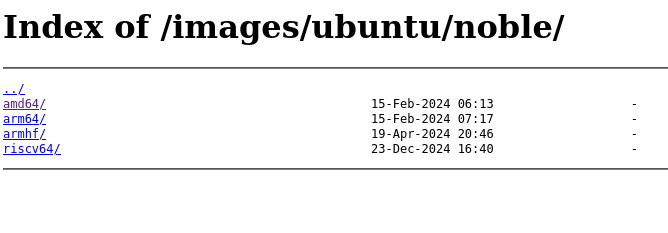
Over here in Austria it seems to work fine, I tried a Ubuntu Noble image. Does this page open for you? This should only list the distributions: https://fra1lxdmirror01.do.letsbuildthe.cloud/images/ubuntu/noble/
-
If multiple people reporting issues I suspect that the CDN or a mirror is having issues or the LXC container registry is down, may I ask where you are located in the world? Are you sure that it isn't using the cache, LXC is designed in that way if you deploy a image it is cached for a few days and if you redeploy images then it's coming from the local cache.
-
A bit more information would be very helpful, do you get the timeout while playing the game or when you try to connect? Did you yet look into the container logs if anything useful is in there? Sorry but you are giving very little information about your issue and it's really hard to help. To the container? The container will consume your whole RAM and even cause OOM errors if the application inside the container supports it, but I don't think that Satisfactory can use infinity memory, however this is not a container issue, this is a game or better speaking dedicated server issue and you have to ask on the support Forums from Satisfactory. Again the container can and will use all your resources available by default if you didn't limit it already as long if the application inside the container supports it.


