




Tomahawk51
Members
-
Joined
-
Last visited
Everything posted by Tomahawk51
-
I love Binhex releases, and prioritize using these so, it's with a bit of reservation that I share: The hotio seerr container works with tailscale, and this one doesn't. Well, I was able to get this one working by building a sidecar docker, but if you want to use the builtin checkbox features for a container, I just did that and it took no time at all and was much simpler.
-
I've been trying to setup tailscale on this for ages, trying every permutation gemini can come up with. I can access it local just fine, but it lands on a white screen with the Tailscale address. Anyone get this setup? I'd love the sanity to know it's even possible. Right now, it shows in my tailscale machines list. I'm using tailscale defaults, and "Tailscale Serve: Serve" I noticed some settings inside the app around proxy, but assume I should not touch those just to get tailscale access. This container is working great, and was easy to setup. I didn't succesfully migrate from overseer, but I was happy to just reconfigure. If I had a complaint, it's how long the "[info] Executing usermod for PUID '99'..." task takes since i've had to restart a bunch. sigh...
-
Thanks, I'll look into upgrading my skills and will try this as you indicate. FYI - the container I recommend, icloudpd-web, is different from icloudpd, which is a CLI. I use the latter now, but this alternative looks much easier (e.g. with changing tokens from Apple, etc.). I appreciate your comment. UPDATE: yes - I was able to learn Docker Compose and get this going. Never did that before! Here's a snippet in case it ever helps someone, albeit slight modification vs. GitHub. services: icloudpd-web: image: spicadust/icloudpd-web:latest container_name: icloudpd-web restart: always ports: - "5000:5000" environment: - HOST=0.0.0.0 - PORT=5000 - TZ=XXXXXX<update this per your needs!!!> - PUID=99 - PGID=100 volumes: - /mnt/user/appdata/icloudpd-web:/app/config - /mnt/user/iCloud/icloudpd-web:/app/downloads
-
I would request and suggest iCloudPD-Web, a really elegant UI tool to allow for downloading or backing up iCloud Photos from Apple. This seems like a much nicer evolution on the iCloudPD solution, replacing config files with a web page. https://github.com/AirswitchAsa/icloudpd-web
-
Just a note of thanks: Just installed AirConnect, and it's perfect. Having it in the Community Apps is much appreciated.
-
I've been chipping away at this for sometime and just optimized my setup. I thought I'd share: Goal: Make a network laser printer accessible for printing from iOS / Chromebook / etc, using a network laser printer that only has Windows drivers. I'm just interested in printing on wifi, but this approach lets you do off site printing too. Context: -I used to use Google Cloud Print to share a printer with a variety of family members. Worked amazingly, but Google killed it. I needed a new solution. I used to do this with a Windows VM on Unraid running Papercut Mobility Print. It worked fantastic. I just moved it over from the VM to the Docker Windows OS approach, which seems better on resources and easier to manage. -The laser printer I use only has Mac/Windows drivers and none of the linux approaches would work. That means I couldn't get CUPS to work, nor use lighter VMs. Lesson learned for the next Printer I buy. -So, if your printer works with Linux drivers, maybe you can just find a CUPS solution for AirPrint, etc. Please do share if you have this working. My Setup: -Unraid: I had to change docker settings to use macvlan for this approach. I believe it was necessary to enable "Host access to custom networks" as well. -Docker for Windows: I installed the "binhex official windows" docker. I installed Win11 LTSC to keep it light and simple. It seems to be running with less resource impact than my VM approach, and seems easier to administrate for my use. --Network type = custom : br0 --Fixed IP Address provided, as I wanted to reserve/static this on my router --Variable DHCP = Y -Windows OS setup: --Installed Win 11 LTSC --installed printer driver --Installed and configured PaperCut Mobility Print Outcome: Yep - wifi printing from all devices going well!
-
Just adding a positive outcome: Updated yesterday from 7.0.0 (after backup, plugin/docker updates) and it went smoothly. I especially appreciate how snappy my Docker page loads now. I also switched back from ipvlan to macvlan, and that's working totally fine. I was worried about doing this from v6 issue reports. Thanks Unraid Devs
-
I'm going to re-emphasize a prior point:, so as to beat the drum: This functionality should be rolled into the native Unraid product. It's a perfect compliment and progression. And, I'll also add my thanks to @VladoPortos for re-establishing the functionality!
-
Late reply @questionbot, but I use Papercut Mobility , installed in a Windows VM. This replaced Google CloudPrint for me some time ago and I'd recommend it. I wish there was a community docker container for ease of install, but after experimenting I think I need to stay in a Windows VM...because my Dell printer doesn't have any Linux drivers. For that reason, CUPS also is out for me I believe. Back to the VM approach, as a tangent, I did try running this Windows in a Docker container approach (binhex-official-windows), but could not figure out how to get network connections working beyond a specified folder to share. The notion being that admin of a VM meant for this purpose might have been preferable to a traditional VM.
-
Hello, I'm looking for some input or help: I'm finding that if I enter a Password, it doesn't stick after a docker update. What I find is that admin/admin is once again made available (making access to the service trivial). This seems like a pretty big show stopper. Here's what I've done: Delete everything, fresh install. Install and use Docker defaults, add path to a test folder. Login, change password (test with logout and it works). Restart container - works. Choose to "force update (of docker)" in Unraid, go back to login - it's been reset. Admin/Admin works, but my changed password is not working. Is anyone else able to confirm this, or that they don't see this issue? This makes me very uncomfortable trusting this moving forward without understanding this better.
-
I just configured the "icloudpd" docker to pull down my Apple iCloud Photos content to an Unraid folder - very cool and liberates my macbook from having to facilitate this. Question: is there any similar docker or workaround for Apple Music (formerly iTunes) - that would allow for a download from iCloud to my array? What I currently do: I store my Music Library locally on my Mac, sync it one-way to a folder with a SyncThing docker, (map that to Plex), and back it up (Duplicacy). I'd like to get the Mac out of the equation and get a solution setup to run within Unraid. I'm open to VM based solutions if needed as well, but it seems to me that running a MacOS VM is not reliable.
-
<Unpackerr> My goal is to use Unpackerr as a watch folder for occasional unpacking needs; I have NO need for *Arr unpacking. I plan to manually drop files in on occasions (really big files typically like those from backups). I setup everything, docker: mapped in a "watch" folder I'd like to use to the "data" container path config file in App data folder: un-commented the [[folder]] config and mapped to "/data" The logs seem to show things look OK for the folder config, and it regularly is sweeping but it never finds or acts on those files. I put a few .zip and other compressed files in this location - nothing happens. I copied new ones in, and more nothing. I tried permutations of making new container paths (/downloads, /downloads_test), with no change. Is what I'm trying to do feasible? Do others have this working?
-
LOL - I know, that's a good way to answer my question. Thanks. I was thinking the Reads might be asymmetric. I get the data will be written symmetrically. Anyway, I set it up and it's running great. I am very happy with the ZFS pool approach for cache on 6.12. The ability for drives to be removed gracefully seems much better than the BTRFS approach.
-
I now have a ZFS mirror Cache pool with 2 2TB SSD drives. One is a WD Red, one a WD Blue. I understand the Red is more NAS oriented and I assume has better durability. Is there a difference in setting up 1 drive first in the pool and then adding the second in terms of the wear it will endure? I ask because I currently have the Blue as primary and will add the Red (following a Crucial MX500 failure - one of many for me). I wonder if I should re-intiatilze the pool to put the Red first vs. just add it as #2. Hope that made sense. Also, I'm wondering if I'm overthinking this since there is a mirror in place. Thanks!
-
I imagine this is an easy answer (and I didn't find it in searching): When I choose to compress the image (vdisk.img), the original file remains in addition to the compressed one (vdisk.img, vdisk.img.zst). I'm getting about a 50gb savings in compression, and I'm OK with the headaches mentioned in other posts. Is there a way for me to exclude/remove that original .img file after the compression (or prevent it in the first place)? To restate: I'd like to keep a compressed VM image, not both the original and a compressed one.
-
Hi, I'm still on my journey to get this (or any VPN-) docker enabled. After getting a new OVPN config file, I've resolved one error message and now get this: Is this something I can overcome? Is there a config file somewhere associated with the docker I can update the "--data-ciphers"- I couldn't find it. Thanks for any input.
-
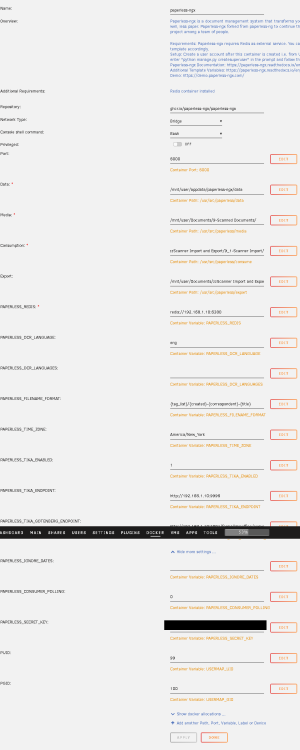
What do I have misconfigured? My docker config is blowing up my Docker Image file (see Writable below). Is this a common/known issue I can fix? attached pic for docker config Thank you for any input!
-
I’d love some input on my thinking and advice on approach on backup: I am, thinking of buying 2 big HDDs and swapping them in rotation. I’m considering these 18tb ones + enclosures, despite concerns. Context: my wimpy isp connection has low download and much lower upload. I imagine it would be impractical to restore via a cloud backup solution, and months/years to backup my tbs (to be decided). I have some experience on this from backblaze and crahplan usage years ago. I have family nearby that visit, so I figure I can swap backup hds on a regular basis when they come over. Setting up a backup server at their home is not practical, and we both have poor isp bandwidth anyway. I would presume to leave one HDD plugged in to my server by USB, and would pull it out when they visit to swap for the other one. Let’s assume monthly at worst. Ideally, I could hot swap these usb drives, and see the backup process automate somehow. Question: Is this doable? if so, what is the best way to automate backups, including this scheme of having 2 HDDs in rotation? I’ve read that the UD script is an option, I have used dockers like Duplicati, and I also have a Win VM available. Any suggestions? thanks!
-
I am considering buying these for an external backup option: is it known if unraid has any impact? I am guessing no, and that it doesn’t look at WDDA and instead only at SMART.
-
Hi, hoping to get some VPN help. I use OctaneVPN, working on the deprecated rTorrentVPN docker and trying to move to either DelugeVPN or QBittorrentVPN. My VPN provider's OVPN file wasn't working, so I asked them to help and they gave me an update that include "tls-cipher "DEFAULT:@SECLEVEL=0". I get this in teh logs though: Is there something I can do to edit "--data-ciphers" to get things going? Again, this is working on the old rTorrent docker...just trying to migrate. Thanks!
-
That was it - I changed the ports back to defaults and all is well now. Thanks so much! I only changed the ports as I had other services setup on 3000, but I’ll shift that side instead. Thanks again for all the support and for Mealiev1 :)
-
Sorry for the delay - yes, it loads with my local IP and the 9925 port. I tried various permutations of using the BASE_URL: field in the docker config, but to no avail. It's not the end of the world if I can resolve this, but I sure would love to. Is there any guidance on how I should use that field?
-
Thx for this docker - loving the progress in the app! I'm having trouble connecting with a Reverse Proxy, and could use help. I am using duckdns subdomains, and the setup is working with a few other apps and works with the "old" version of Mealie. ex: xxxMealiev1xxx.duckns.org. Does the field above relate to my situation, or is it only for those that own a top level domain? Not sure if helpful, but here's my Swag config data as well Thanks if anyone has any input to help!
-
Thanks for the reply. Yes, I have started using an Inbox tag as well, and I understand how this can help in the workflow. I still don't see how I can do what I ideally want, in the context of going through a substantial backlog of docs that might already be organized. As a workaround, I think I'll try: cleaning out all my inbox items to get to a baseline creating subfolders aligned to tags outside of the import folder scan directly to these staging folders manually drag each subfolder's contents in 1 by 1, and then mass tag them in the UI I think this will add some efficiency for me. I think I'll go add a feature request as well for what I really want: >1 import folder that can be assigned to tags/metadata or an alternative solution.
-
Basic question, couldn't find answers on the project page: Is it possible to import and assign tag at the same time? This is instead of the 2 step process of 1) Import, 2) go into the UX to click and assign tags For instance, if I scan a whole big pile of docs that should have the same tag, it seems inefficient to go and manually tag them vs. assign them more automatically at time of import. ex: setup >1 import folders for each tag? Is this possible or are there other approaches I should use?


