






killeriq
Members
-
Joined
-
Last visited
Everything posted by killeriq
-
Will try , if is there any difference... But I thought such simple process just works and it's few mins task , very naive from me ➗ EDIT: Tried even 7.1.4 zip unpacked to USB, then make bootable and not booting again. Even different setting in Bios, no luck. Very strange
-
Ok, so i should just migrate to the 16GB USB2.0 which was working and don't bother with getting new USB3.0 different brand? As I was like postponing it for some time, but now I need to always erase PREVIOUS folder to have space to do update (its old USB 2.GB :D ) So i said to my self lets update to latest, faster USB3.0 to have peace for next few years ...
-
Yesterday i've spend like 2h running up and down to get server working with new USB 3.0 from Backup (my current is only 2gb USB2.0) Thought via app Unraid USB Creator 1.0.1 will be few min tasks. Tried: Sandisk Ultra Fit 32GB ADATA UV128 / 32GB Both are not able to boot into unRAID even in Bios they are the 1st ones, but strangely original USB2.0 have 2 boot options Normal and UEFI After reading boards , guides...seems like I'm not the 1st one having this issue People were suggesting running Unraid USB Creator as admin and then also "make_bootable.bat" also as admin, non of it was working :( Changing USB ports 3.0 to 2.0 and such...no luck Then i've found some older Wintec 16GB USB2.0 and was working right away, even with 2 boot options Normal and UEFI Based on the USB 2.0 vs 3.0 notes, does 3.0 even worth to try (different brand) to get faster read/write speeds? As price for 16-32GB is around 4-7e, no real price difference USB2 vs 3 Boot Issues | Unraid DocsBoot Issues | Unraid DocsPreparing the flash device Where they state: Boot failureThe following are some actions that can be taken to try and identify the cause of a boot failure: If possible use a USB 2.0 port in preference to a USB 3.0 one as they seem to be more reliable for booting purposes. In addition USB 2.0 drives also seem less prone to failure than USB 3.0 ones. Many modern motherboards no longer have USB 2.0 ports directly exposed but there is normally a USB 2.0 header on the motherboard that can be used via an appropriate adapter. USB 3.0 does work with no problems for many people After initial load Unraid runs from RAM so gains no significant performance advantage from using USB 3.0. USB 2.0 drives tend to run cooler than USB 3.0 ones which probably explains why they tend to last longer. USB 2.0 drives are typically cheaper than USB 3.0 ones- so why pay more if not needed
-
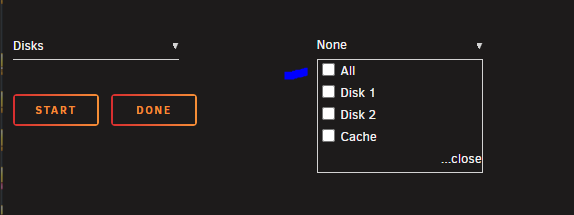
Thanks...changed UMASK to 000, was 022 (or similar...). Will see if helps. I picked ALL in here Thanks for quick help!
-
Hello, I would like to check how to fix following issue: Each time when the Torrent download (Transmission Docker) is finished (new folder created in Shared folder) seems like the folder do NOT have right permission, so if I want to do something via Windows / SMB , I get error that unable to move/create folder. So I need to go into: Tools - New Permissions and select either all or the affected Disk1 or 2 After is fine again. But it just drives me nuts , that i need to do it manually each time. Please is there any way how to fix it? Thanks! Processing: /mnt/disk1 ... chown -R nobody:users ... chmod -R go-rwx,u-x,go+u ... find -type d -exec chmod 777 {} \; ... sync Processing: /mnt/disk2 ... chown -R nobody:users ... chmod -R go-rwx,u-x,go+u ... find -type d -exec chmod 777 {} \;
-
Ahh got it working, there needs to be the MQTT server which gets the data, i thought it should be the Zigbee Adapter Then also user / pass had to be added. version: 4 homeassistant: enabled: false frontend: enabled: true mqtt: base_topic: zigbee2mqtt server: mqtt://192.168.10.102:1883 user: XXX password: XXX serial: # Location of SLZB-06Mg24 port: tcp://192.168.10.103:6638 baudrate: 115200 adapter: ember # Disable green led? disable_led: false # Set output power to max 20 advanced: transmit_power: 20 network_key: - 119 - 193 - 155 - 54 - 113 - 239 - 241 - 185 - 191 - 133 - 219 - 138 - 118 - 114 - 49 - 29 pan_id: 44735 ext_pan_id: - 0 - 105 - 120 - 49 - 88 - 159 - 172 - 36
-
I tried 2 options today When I set: 1. - more errors mqtt: base_topic: zigbee2mqtt server: mqtt://192.168.10.103 Starting Zigbee2MQTT without watchdog. [2025-03-31 14:13:53] info: z2m: Logging to console, file (filename: log.log) [2025-03-31 14:13:53] info: z2m: Starting Zigbee2MQTT version 2.1.3 (commit #ba337bd329aeb4ca17735c0cf09b31293c8cff06) [2025-03-31 14:13:53] info: z2m: Starting zigbee-herdsman (3.2.7) [2025-03-31 14:13:53] info: zh:ember: Using default stack config. [2025-03-31 14:13:53] info: zh:ember: ======== Ember Adapter Starting ======== [2025-03-31 14:13:53] info: zh:ember:ezsp: ======== EZSP starting ======== [2025-03-31 14:13:53] info: zh:ember:uart:ash: ======== ASH Adapter reset ======== [2025-03-31 14:13:53] info: zh:ember:uart:ash: Socket ready [2025-03-31 14:13:53] info: zh:ember:uart:ash: ======== ASH starting ======== [2025-03-31 14:13:55] info: zh:ember:uart:ash: ======== ASH Adapter reset ======== [2025-03-31 14:13:55] info: zh:ember:uart:ash: ======== ASH starting ======== [2025-03-31 14:13:55] info: zh:ember:uart:ash: ======== ASH connected ======== [2025-03-31 14:13:55] info: zh:ember:uart:ash: ======== ASH started ======== [2025-03-31 14:13:55] info: zh:ember:ezsp: ======== EZSP started ======== [2025-03-31 14:13:57] warning: zh:ember:uart:ash: Frame(s) in progress cancelled in [1ac1020b0a527e] [2025-03-31 14:13:57] error: zh:ember:uart:ash: Received unexpected reset from adapter, with reason=RESET_SOFTWARE. [2025-03-31 14:13:57] error: zh:ember:uart:ash: ASH disconnected: ASH_ERROR_NCP_RESET | Adapter status: ASH_NCP_FATAL_ERROR [2025-03-31 14:13:57] error: zh:ember:uart:ash: Error while parsing received frame, status=HOST_FATAL_ERROR. [2025-03-31 14:13:57] error: zh:ember: Adapter fatal error: HOST_FATAL_ERROR [2025-03-31 14:14:10] error: zh:ember:ezsp: ERROR Transaction failure; status=ASH_ERROR_TIMEOUTS. Last Frame: [FRAME: ID=0:"VERSION" Seq=0 Len=0]. [2025-03-31 14:14:10] error: z2m: Error while starting zigbee-herdsman [2025-03-31 14:14:10] error: z2m: Failed to start zigbee-herdsman [2025-03-31 14:14:10] error: z2m: Check https://www.zigbee2mqtt.io/guide/installation/20_zigbee2mqtt-fails-to-start_crashes-runtime.html for possible solutions [2025-03-31 14:14:10] error: z2m: Exiting... [2025-03-31 14:14:10] error: z2m: Error: ASH_ERROR_TIMEOUTS at Ezsp.ezspVersion (/app/node_modules/.pnpm/[email protected]/node_modules/zigbee-herdsman/src/adapter/ember/ezsp/ezsp.ts:1426:19) at EmberAdapter.emberVersion (/app/node_modules/.pnpm/[email protected]/node_modules/zigbee-herdsman/src/adapter/ember/adapter/emberAdapter.ts:1392:63) at EmberAdapter.initEzsp (/app/node_modules/.pnpm/[email protected]/node_modules/zigbee-herdsman/src/adapter/ember/adapter/emberAdapter.ts:674:9) at EmberAdapter.start (/app/node_modules/.pnpm/[email protected]/node_modules/zigbee-herdsman/src/adapter/ember/adapter/emberAdapter.ts:1536:24) at Controller.start (/app/node_modules/.pnpm/[email protected]/node_modules/zigbee-herdsman/src/controller/controller.ts:136:29) at Zigbee.start (/app/lib/zigbee.ts:69:27) at Controller.start (/app/lib/controller.ts:142:13) at start (/app/index.js:161:5) ** Press ANY KEY to close this window ** 2. Only 1 error mqtt: base_topic: zigbee2mqtt server: mqtt://192.168.10.103:6638 Starting Zigbee2MQTT without watchdog. [2025-03-31 14:17:03] info: z2m: Logging to console, file (filename: log.log) [2025-03-31 14:17:03] info: z2m: Starting Zigbee2MQTT version 2.1.3 (commit #ba337bd329aeb4ca17735c0cf09b31293c8cff06) [2025-03-31 14:17:03] info: z2m: Starting zigbee-herdsman (3.2.7) [2025-03-31 14:17:03] info: zh:ember: Using default stack config. [2025-03-31 14:17:03] info: zh:ember: ======== Ember Adapter Starting ======== [2025-03-31 14:17:03] info: zh:ember:ezsp: ======== EZSP starting ======== [2025-03-31 14:17:03] info: zh:ember:uart:ash: ======== ASH Adapter reset ======== [2025-03-31 14:17:03] info: zh:ember:uart:ash: Socket ready [2025-03-31 14:17:03] info: zh:ember:uart:ash: ======== ASH starting ======== [2025-03-31 14:17:05] info: zh:ember:uart:ash: ======== ASH connected ======== [2025-03-31 14:17:05] info: zh:ember:uart:ash: ======== ASH started ======== [2025-03-31 14:17:05] info: zh:ember:ezsp: ======== EZSP started ======== [2025-03-31 14:17:05] info: zh:ember: Adapter EZSP protocol version (14) lower than Host. Switched. [2025-03-31 14:17:05] info: zh:ember: Adapter version info: {"ezsp":14,"revision":"8.0.2 [GA]","build":397,"major":8,"minor":0,"patch":2,"special":0,"type":170} [2025-03-31 14:17:05] info: zh:ember: [STACK STATUS] Network up. [2025-03-31 14:17:05] info: zh:ember: [INIT TC] Adapter network matches config. [2025-03-31 14:17:05] info: zh:ember: [CONCENTRATOR] Started source route discovery. 1246ms until next broadcast. [2025-03-31 14:17:05] info: z2m: zigbee-herdsman started (resumed) [2025-03-31 14:17:05] info: z2m: Coordinator firmware version: '{"meta":{"build":397,"ezsp":14,"major":8,"minor":0,"patch":2,"revision":"8.0.2 [GA]","special":0,"type":170},"type":"EmberZNet"}' [2025-03-31 14:17:05] info: z2m: Currently 0 devices are joined. [2025-03-31 14:17:05] info: z2m: Connecting to MQTT server at mqtt://192.168.10.103:6638 [2025-03-31 14:17:07] error: z2m: MQTT failed to connect, exiting... (read ECONNRESET) [2025-03-31 14:17:07] info: z2m: Stopping zigbee-herdsman... [2025-03-31 14:17:07] info: zh:controller: Wrote coordinator backup to '/app/data/coordinator_backup.json' [2025-03-31 14:17:07] info: zh:ember:uart:ash: ASH COUNTERS since last clear: [2025-03-31 14:17:07] info: zh:ember:uart:ash: Total frames: RX=47, TX=92 [2025-03-31 14:17:07] info: zh:ember:uart:ash: Cancelled : RX=0, TX=0 [2025-03-31 14:17:07] info: zh:ember:uart:ash: DATA frames : RX=46, TX=44 [2025-03-31 14:17:07] info: zh:ember:uart:ash: DATA bytes : RX=638, TX=481 [2025-03-31 14:17:07] info: zh:ember:uart:ash: Retry frames: RX=0, TX=0 [2025-03-31 14:17:07] info: zh:ember:uart:ash: ACK frames : RX=0, TX=47 [2025-03-31 14:17:07] info: zh:ember:uart:ash: NAK frames : RX=0, TX=0 [2025-03-31 14:17:07] info: zh:ember:uart:ash: nRdy frames : RX=0, TX=0 [2025-03-31 14:17:07] info: zh:ember:uart:ash: CRC errors : RX=0 [2025-03-31 14:17:07] info: zh:ember:uart:ash: Comm errors : RX=0 [2025-03-31 14:17:07] info: zh:ember:uart:ash: Length < minimum: RX=0 [2025-03-31 14:17:07] info: zh:ember:uart:ash: Length > maximum: RX=0 [2025-03-31 14:17:07] info: zh:ember:uart:ash: Bad controls : RX=0 [2025-03-31 14:17:07] info: zh:ember:uart:ash: Bad lengths : RX=0 [2025-03-31 14:17:07] info: zh:ember:uart:ash: Bad ACK numbers : RX=0 [2025-03-31 14:17:07] info: zh:ember:uart:ash: Out of buffers : RX=0 [2025-03-31 14:17:07] info: zh:ember:uart:ash: Retry dupes : RX=0 [2025-03-31 14:17:07] info: zh:ember:uart:ash: Out of sequence : RX=0 [2025-03-31 14:17:07] info: zh:ember:uart:ash: ACK timeouts : RX=0 [2025-03-31 14:17:07] info: zh:ember:uart:ash: ======== ASH stopped ======== [2025-03-31 14:17:07] info: zh:ember:ezsp: ======== EZSP stopped ======== [2025-03-31 14:17:07] info: zh:ember: ======== Ember Adapter Stopped ======== [2025-03-31 14:17:07] info: z2m: Stopped zigbee-herdsman ** Press ANY KEY to close this window ** configuration.yaml version: 4 homeassistant: enabled: false frontend: enabled: true mqtt: base_topic: zigbee2mqtt server: mqtt://192.168.10.103:6638 serial: # Location of SLZB-06Mg24 port: tcp://192.168.10.103:6638 baudrate: 115200 adapter: ember # Disable green led? disable_led: false # Set output power to max 20 advanced: transmit_power: 20 network_key: - 119 - 193 - 155 - 54 - 113 - 239 - 241 - 185 - 191 - 133 - 219 - 138 - 118 - 114 - 49 - 29 pan_id: 44735 ext_pan_id: - 0 - 105 - 120 - 49 - 88 - 159 - 172 - 36
-
yeah, but you have 8GB. Need to do the same to be in "set and forget" mode for some years again
-
Did this do i need to change something also here? mqtt: base_topic: zigbee2mqtt server: mqtt://localhost version: 4 homeassistant: enabled: false frontend: enabled: true mqtt: base_topic: zigbee2mqtt server: mqtt://localhost serial: # Location of SLZB-06Mg24 port: tcp://192.168.10.103:6638 baudrate: 115200 adapter: ember # Disable green led? disable_led: false # Set output power to max 20 advanced: transmit_power: 20 network_key: - 119 - 193 - 155 - 54 - 113 - 239 - 241 - 185 - 191 - 133 - 219 - 138 - 118 - 114 - 49 - 29 pan_id: 44735 ext_pan_id: - 0 - 105 - 120 - 49 - 88 - 159 - 172 - 36 Getting this in LOG and not starting yet: Using '/app/data' as data directory Starting Zigbee2MQTT without watchdog. [2025-03-28 14:24:45] info: z2m: Logging to console, file (filename: log.log) [2025-03-28 14:24:45] info: z2m: Starting Zigbee2MQTT version 2.1.3 (commit #ba337bd329aeb4ca17735c0cf09b31293c8cff06) [2025-03-28 14:24:45] info: z2m: Starting zigbee-herdsman (3.2.7) [2025-03-28 14:24:45] info: zh:ember: Using default stack config. [2025-03-28 14:24:45] info: zh:ember: ======== Ember Adapter Starting ======== [2025-03-28 14:24:45] info: zh:ember:ezsp: ======== EZSP starting ======== [2025-03-28 14:24:45] info: zh:ember:uart:ash: ======== ASH Adapter reset ======== [2025-03-28 14:24:45] info: zh:ember:uart:ash: Socket ready [2025-03-28 14:24:45] info: zh:ember:uart:ash: ======== ASH starting ======== [2025-03-28 14:24:47] info: zh:ember:uart:ash: ======== ASH connected ======== [2025-03-28 14:24:47] info: zh:ember:uart:ash: ======== ASH started ======== [2025-03-28 14:24:47] info: zh:ember:ezsp: ======== EZSP started ======== [2025-03-28 14:24:47] info: zh:ember: Adapter EZSP protocol version (14) lower than Host. Switched. [2025-03-28 14:24:47] info: zh:ember: Adapter version info: {"ezsp":14,"revision":"8.0.2 [GA]","build":397,"major":8,"minor":0,"patch":2,"special":0,"type":170} [2025-03-28 14:24:47] info: zh:ember: [STACK STATUS] Network up. [2025-03-28 14:24:48] info: zh:ember: [INIT TC] Adapter network matches config. [2025-03-28 14:24:48] info: zh:ember: [CONCENTRATOR] Started source route discovery. 1246ms until next broadcast. [2025-03-28 14:24:48] info: z2m: zigbee-herdsman started (resumed) [2025-03-28 14:24:48] info: z2m: Coordinator firmware version: '{"meta":{"build":397,"ezsp":14,"major":8,"minor":0,"patch":2,"revision":"8.0.2 [GA]","special":0,"type":170},"type":"EmberZNet"}' [2025-03-28 14:24:48] info: z2m: Currently 0 devices are joined. [2025-03-28 14:24:48] info: z2m: Connecting to MQTT server at mqtt://localhost [2025-03-28 14:24:48] error: z2m: MQTT failed to connect, exiting... () [2025-03-28 14:24:48] info: z2m: Stopping zigbee-herdsman... [2025-03-28 14:24:48] info: zh:controller: Wrote coordinator backup to '/app/data/coordinator_backup.json' [2025-03-28 14:24:48] info: zh:ember:uart:ash: ASH COUNTERS since last clear: [2025-03-28 14:24:48] info: zh:ember:uart:ash: Total frames: RX=47, TX=92 [2025-03-28 14:24:48] info: zh:ember:uart:ash: Cancelled : RX=0, TX=0 [2025-03-28 14:24:48] info: zh:ember:uart:ash: DATA frames : RX=46, TX=44 [2025-03-28 14:24:48] info: zh:ember:uart:ash: DATA bytes : RX=638, TX=481 [2025-03-28 14:24:48] info: zh:ember:uart:ash: Retry frames: RX=0, TX=0 [2025-03-28 14:24:48] info: zh:ember:uart:ash: ACK frames : RX=0, TX=47 [2025-03-28 14:24:48] info: zh:ember:uart:ash: NAK frames : RX=0, TX=0 [2025-03-28 14:24:48] info: zh:ember:uart:ash: nRdy frames : RX=0, TX=0 [2025-03-28 14:24:48] info: zh:ember:uart:ash: CRC errors : RX=0 [2025-03-28 14:24:48] info: zh:ember:uart:ash: Comm errors : RX=0 [2025-03-28 14:24:48] info: zh:ember:uart:ash: Length < minimum: RX=0 [2025-03-28 14:24:48] info: zh:ember:uart:ash: Length > maximum: RX=0 [2025-03-28 14:24:48] info: zh:ember:uart:ash: Bad controls : RX=0 [2025-03-28 14:24:48] info: zh:ember:uart:ash: Bad lengths : RX=0 [2025-03-28 14:24:48] info: zh:ember:uart:ash: Bad ACK numbers : RX=0 [2025-03-28 14:24:48] info: zh:ember:uart:ash: Out of buffers : RX=0 [2025-03-28 14:24:48] info: zh:ember:uart:ash: Retry dupes : RX=0 [2025-03-28 14:24:48] info: zh:ember:uart:ash: Out of sequence : RX=0 [2025-03-28 14:24:48] info: zh:ember:uart:ash: ACK timeouts : RX=0 [2025-03-28 14:24:48] info: zh:ember:uart:ash: ======== ASH stopped ======== [2025-03-28 14:24:48] info: zh:ember:ezsp: ======== EZSP stopped ======== [2025-03-28 14:24:48] info: zh:ember: ======== Ember Adapter Stopped ======== [2025-03-28 14:24:48] info: z2m: Stopped zigbee-herdsman ** Press ANY KEY to close this window **
-
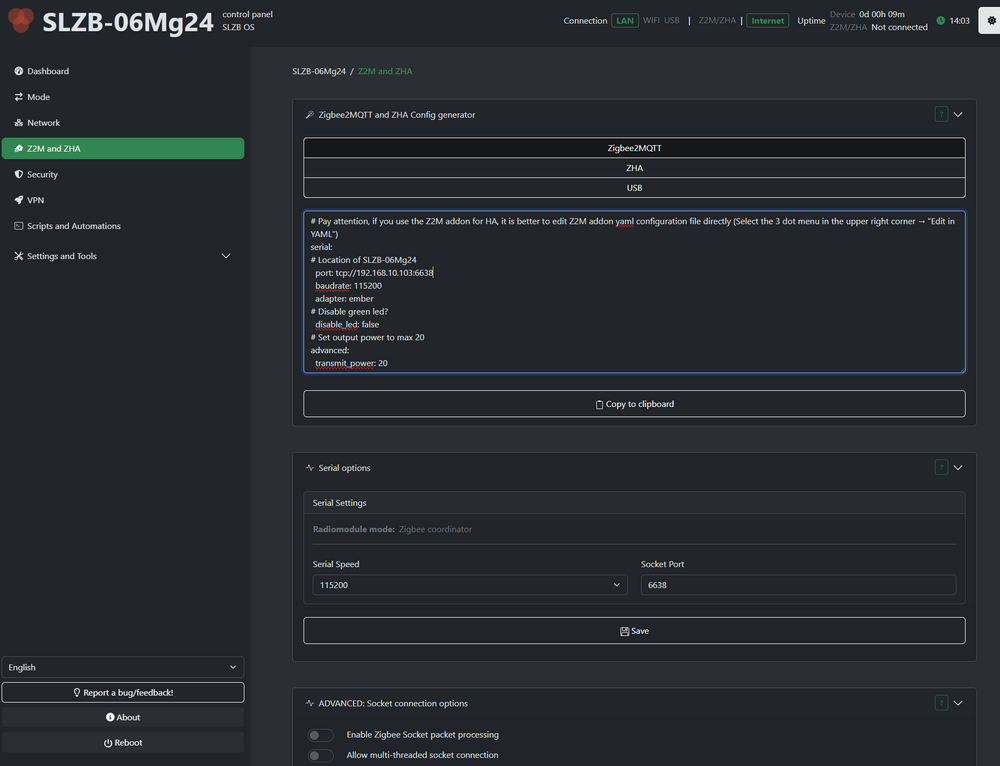
I left all as default. sorry for Noob questions, doing it 1st time Ahh so not "inside docker" it self, but in here : \\UNRAIDTOWER\appdata\zigbee2mqtt\configuration.yaml This is the configuration.yaml content version: 4 homeassistant: enabled: false frontend: enabled: true mqtt: base_topic: zigbee2mqtt server: mqtt://localhost advanced: network_key: - 119 - 193 - 155 - 54 - 113 - 239 - 241 - 185 - 191 - 133 - 219 - 138 - 118 - 114 - 49 - 29 pan_id: 44735 ext_pan_id: - 0 - 105 - 120 - 49 - 88 - 159 - 172 - 36 This is what I found in WebUI, where should i put it configuration.yaml? In the top? or doesn't matter? # Pay attention, if you use the Z2M addon for HA, it is better to edit Z2M addon yaml configuration file directly (Select the 3 dot menu in the upper right corner → "Edit in YAML") serial: # Location of SLZB-06Mg24 port: tcp://192.168.10.103:6638 baudrate: 115200 adapter: ember # Disable green led? disable_led: false # Set output power to max 20 advanced: transmit_power: 20
-
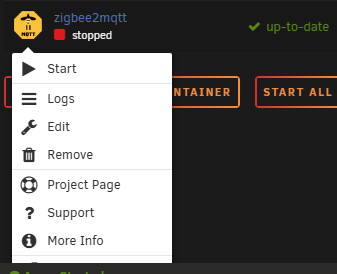
any guide somewhere how / where is the config in docker? thanks
-
Hi, Seems like i'm having similar issue as above, but i'm using "SLZB-06Mg24" which is an "network server" not a USB device. https://www.zigbee2mqtt.io/guide/adapters/emberznet.html I should add: "adapter: ember" But not sure where / how to enter the config file Starting Zigbee2MQTT without watchdog. [2025-03-27 13:23:41] info: z2m: Logging to console, file (filename: log.log) [2025-03-27 13:23:41] info: z2m: Starting Zigbee2MQTT version 2.1.3 (commit #ba337bd329aeb4ca17735c0cf09b31293c8cff06) [2025-03-27 13:23:41] info: z2m: Starting zigbee-herdsman (3.2.7) [2025-03-27 13:23:42] error: z2m: Error while starting zigbee-herdsman [2025-03-27 13:23:42] error: z2m: Failed to start zigbee-herdsman [2025-03-27 13:23:42] error: z2m: Check https://www.zigbee2mqtt.io/guide/installation/20_zigbee2mqtt-fails-to-start_crashes-runtime.html for possible solutions [2025-03-27 13:23:42] error: z2m: Exiting... [2025-03-27 13:23:42] error: z2m: Error: USB adapter discovery error (No valid USB adapter found). Specify valid 'adapter' and 'port' in your configuration. at discoverAdapter (/app/node_modules/.pnpm/[email protected]/node_modules/zigbee-herdsman/src/adapter/adapterDiscovery.ts:523:15) at processTicksAndRejections (node:internal/process/task_queues:105:5) at Function.create (/app/node_modules/.pnpm/[email protected]/node_modules/zigbee-herdsman/src/adapter/adapter.ts:68:33) at Controller.start (/app/node_modules/.pnpm/[email protected]/node_modules/zigbee-herdsman/src/controller/controller.ts:132:24) at Zigbee.start (/app/lib/zigbee.ts:69:27) at Controller.start (/app/lib/controller.ts:142:13) at start (/app/index.js:161:5) [2025-03-27 13:23:42] error: z2m: If this happens after updating to Zigbee2MQTT 2.0.0, see https://github.com/Koenkk/zigbee2mqtt/discussions/24364 Using '/app/data' as data directory Starting Zigbee2MQTT without watchdog. [2025-03-27 15:59:12] info: z2m: Logging to console, file (filename: log.log) [2025-03-27 15:59:12] info: z2m: Starting Zigbee2MQTT version 2.1.3 (commit #ba337bd329aeb4ca17735c0cf09b31293c8cff06) [2025-03-27 15:59:12] info: z2m: Starting zigbee-herdsman (3.2.7) [2025-03-27 15:59:13] error: z2m: Error while starting zigbee-herdsman [2025-03-27 15:59:13] error: z2m: Failed to start zigbee-herdsman [2025-03-27 15:59:13] error: z2m: Check https://www.zigbee2mqtt.io/guide/installation/20_zigbee2mqtt-fails-to-start_crashes-runtime.html for possible solutions [2025-03-27 15:59:13] error: z2m: Exiting... [2025-03-27 15:59:13] error: z2m: Error: USB adapter discovery error (No valid USB adapter found). Specify valid 'adapter' and 'port' in your configuration. at discoverAdapter (/app/node_modules/.pnpm/[email protected]/node_modules/zigbee-herdsman/src/adapter/adapterDiscovery.ts:523:15) at processTicksAndRejections (node:internal/process/task_queues:105:5) at Function.create (/app/node_modules/.pnpm/[email protected]/node_modules/zigbee-herdsman/src/adapter/adapter.ts:68:33) at Controller.start (/app/node_modules/.pnpm/[email protected]/node_modules/zigbee-herdsman/src/controller/controller.ts:132:24) at Zigbee.start (/app/lib/zigbee.ts:69:27) at Controller.start (/app/lib/controller.ts:142:13) at start (/app/index.js:161:5) [2025-03-27 15:59:13] error: z2m: If this happens after updating to Zigbee2MQTT 2.0.0, see https://github.com/Koenkk/zigbee2mqtt/discussions/24364 ** Press ANY KEY to close this window **
-
thanks for tip, I've removed "previous" and it went fine. Let's see what next update brings, but I would need to find some 8GB USB drive to be ready for size upgrade. Just need to check about the "license key" details, how to attach it to new drive.
-
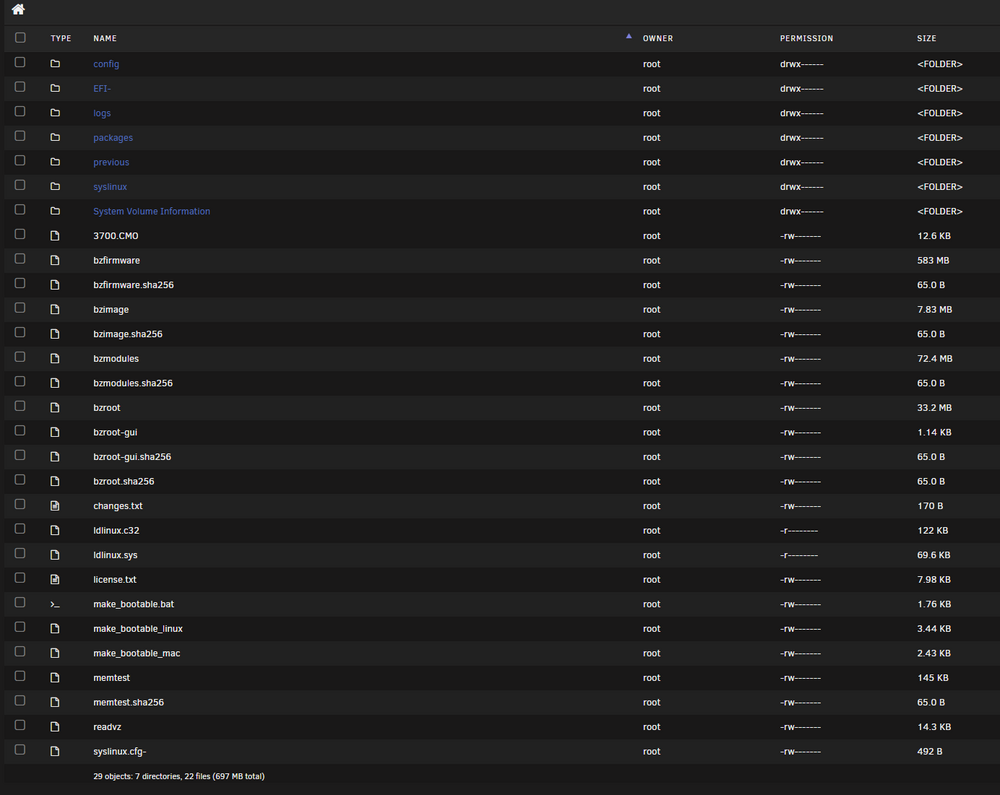
cleaned some logs ~100mb, now i have around 320mb free space only big is "previous" folder
-
If I recall right I do not use it for anything else then unraid OS, is there some "cleanup" tool or such? As no clue what can be removed
-
Hello, today I wanted to upgrade, but is not possible due to space issues. I use 2gb since years (as back then was some lock to the HW) and currently i have 1.80 GB used. Is there something I can freeup space or USB needs to be replaced for bigger/faster drive? Thanks plugin: installing: unRAIDServer.plg Executing hook script: pre_plugin_checks plugin: downloading: unRAIDServer.plg ... done plugin: downloading: unRAIDServer-7.0.1-x86_64.zip ... done plugin: downloading: unRAIDServer-7.0.1-x86_64.md5 ... done boot device shows 217481216 free but upgrade needs 720810792 plugin: run failed: '/bin/bash' returned 1 Executing hook script: post_plugin_checks

-
Hi, Thanks for your input. NC is for me just another tool, which should make my life easier. So I expect if I do simple setup, DB connects etc...it will just work Unfortunately 1 update works 2nd mess it up and like this it goes for years since i'm using the NC 6-7y+. Then when you are totally upset you need to go via command line and investigate what / where went wrong again. I do not recall such issues with other tools. ForceSync/upload on Nextcloud Android client is just an wet dream for years as mentioned alternative Client could be an option eg. Folder Sync Pro Anyway i found the Nextcloud AIO - tried to install based on spaceinvader guide. Then had to do something else. So i wanted to start over (erase everything, like I would do with any other docker), but no is NOT possible as it remembers/stores the previous config somewhere...again 2h wasted till i found where is that. What file/restovers I have to remove via command line ... After so many years of development to be in such state, is just pitty...when i did seach for resolution of my issues and seen comments from others, its about the same story. I believe if someone runs multiple instances and is in those issues "like at home" it will became easy eventually. In my case i have other thigs to do rather than waste hours on NC in most unexpected moment. ---- Thanks for your tips about alternatives. What i'm looking for is simple File Cloud for files and photos (direct upload from mobile, native or alternate client) Did also research where to go: PhotoPrism - fine Immich - maybe even better But those are only for pics and I need also file cloud, so I rather manage 1 tool vs 2 tools So AIO options i've found so far: OwnCloud - NC is a fork so I expect similar problems FileRun - seems fine, but became paid tool FileCloud - also seems paid only Pydio - not sure SeaFile - looks fine a clean Syncthing - also simple / easy filebrowser.org - seems also interesting Anyone has Anything preferred to start with and good experience? Even could be when I try those other cloud options I will say OMG good old NextCloud Thanks
-
Yeah , each version some NEW random error...this is ongoing for years Dont think is the reason of NOT syncing as the ERROR was even some TAGs/versions ago where it was working fine... @alturismo I'm aware of TAGs now, but in the end of the day...how do i know which version is GOOD or NOT...which TAG sub-sub version is the Stable one (just assuming on naming) always a surprise with NC 1. If i use no TAG and set the "latest" or what ever is the Word - WebUI upgrade is still "disabled? I must admit it was worse, after year of using NC, is getting somewhere , but very buggy product 1 version is fine, then upgrade and issues with nonsense errors. Learned to ignore them (in case functionality stays) and they disappear eventually.... 2. Is there a magic FORCE Sync button then my Photos get synced (google drive had such feature 10y ago )? not only those from Now On....? Or only some cache, config harakiri style? Otherwise to get it working again and don't spend ages to investigate , is just faster to start with clean Container , as no clue what they messed up since 1st Container and numerous updates WebUI then TAGs. 3. Is there similar NAS / Cloud option to replace Nextcloud and get basic sync functions Stable + including Android app?
-
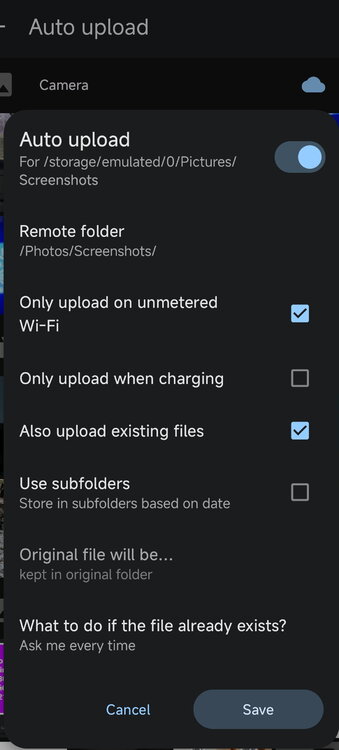
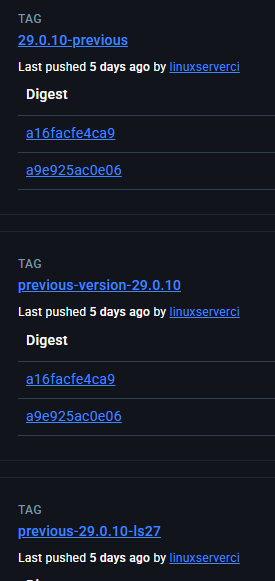
Thanks for quick reply. Well i'm really feed up with this tool, many times it runs into issues with upload/sync like this. So no clue if is Nextcloud Docker issue or Nextcloud mobile app issue or again some Android permission crap. There is no "force sync/upload" button , just need to wait for magic when some background process wakes up, if even... No real logs to the mobile app, so no clue what is happening there and why it wont start sync. Now good old cable to be able post pics and show that is ticked, haven't really changed anything - TAG yeah i get your point, but each version has like 5 "versions" I like more Nextcloud WebUI update...if it would just works. Unfortunately was most of the time failing anyway - *.APKs sync were also blocked some time ago, so I cant decide what I sync/download from OWN Cloud to Mobile, need to rename them APK->APX Last chance I'm willing to do is to wipe it and Start "FRESH" If no success - Isn't there just some "Working" Home Cloud alternative? Set and forget? like "Google Drive" style?
-
NextCloud drives me nuts... After the update crap, where now i need to change each time docker TAG version to get some update (https://hub.docker.com/r/linuxserver/nextcloud/tags) I came from Vacation, away from home and no Internet connection to my local Nextcloud (i just dont have public IP and never manage to get it working....). So Photos sync from mobile works only at Home network. Was about to check my pics and they are not uploaded to Nextcloud, tried different stuff on Mobile Nextcloud app ...restarts...and nothing. then i tried to take New Photo and this was uploaded right away. Other 300-400 Photos are just ignored, like if they are older then X days it ignores them, no clue why. As I use this "great" cloud product only for photos and have no will/energy to change TAGs everytime or spend hours to find out why the *** is not uploading them. + some other bonuses Version Nextcloud Hub 9 (30.0.4) Will simply remove the docker, erase all NC crap and start over. Which Docker should I take to have the automatic updates working from the Docker is self, without changing TAG every time ? Thanks

-
Here is the output Well , as you mentioned....NC docker is probably only one Docker with constant issues I use NC mainly for storing pics from Mobile and PC Docs backup. So those issues , if they are not easy to fix = starting from scratch wouldn't be that time consuming, but I forgot how i did the MariaDB part (can google it...;) ) root@unRAIDTower:~# docker exec -it nextcloud occ check root@unRAIDTower:~# docker exec -it nextcloud occ setupcheck dav: ✓ DAV system address book: No outstanding DAV system address book sync. network: ✓ WebDAV endpoint: Your web server is properly set up to allow file synchronization over WebDAV. ✓ Data directory protected ✓ Internet connectivity ✓ JavaScript source map support ✓ JavaScript modules support ✓ OCS provider resolving ✓ .well-known URLs: Your server is correctly configured to serve `.well-known` URLs. ✓ Font file loading system: ✓ Errors in the log: No errors in the logs since October 21, 2024, 7:49:48 PM ✓ Allowed admin IP ranges: Admin IP filtering isn’t applied. ℹ Brute-force Throttle: Your remote address could not be determined. ✓ Cron errors: The last cron job ran without errors. ✓ Cron last run: Last background job execution ran 4 minutes ago. ✓ Debug mode: Debug mode is disabled. ✓ File locking ⚠ Maintenance window start: Server has no maintenance window start time configured. This means resource intensive daily background jobs will also be executed during your main usage time. We recommend to set it to a time of low usage, so users are less impacted by the load caused from these heavy tasks. ✓ Memcache: Configured ⚠ Mimetype migrations available: One or more mimetype migrations are available. Occasionally new mimetypes are added to better handle certain file types. Migrating the mimetypes take a long time on larger instances so this is not done automatically during upgrades. Use the command `occ maintenance:repair --include-expensive` to perform the migrations. ✓ Architecture: 64-bit ✓ Temporary space available: Temporary directory is correctly configured: - 3.6 GiB available in /tmp (PHP temporary directory) ✓ Push service: Free push service notifications: ✓ Push notifications - Fair use policy security: ✓ App directories owner: App directories have the correct owner "abc" ✓ Old administration imported certificates ✓ Code integrity: No altered files ℹ Forwarded for headers: Your remote address could not be determined. ✓ HTTPS access and URLs: You are accessing your instance over a secure connection, and your instance is generating secure URLs. ✓ Old server-side-encryption: Disabled ✓ PHP version: You are currently running PHP 8.3.12. ✓ Random generator: Secure ⚠ HTTP headers: Some headers are not set correctly on your instance - The `X-Robots-Tag` HTTP header is not set to `noindex,nofollow`. This is a potential security or privacy risk, as it is recommended to adjust this setting accordingly. - The `Strict-Transport-Security` HTTP header is not set (should be at least `15552000` seconds). For enhanced security, it is recommended to enable HSTS. database: ✓ Database missing columns: None ⚠ Database missing indices: Detected some missing optional indices. Occasionally new indices are added (by Nextcloud or installed applications) to improve database performance. Adding indices can sometimes take awhile and temporarily hurt performance so this is not done automatically during upgrades. Once the indices are added, queries to those tables should be faster. Use the command `occ db:add-missing-indices` to add them. Missing indices: "fs_name_hash" in table "filecache". ✓ Database missing primary keys: None ℹ Database pending bigint migrations: Some columns in the database are missing a conversion to big int. Due to the fact that changing column types on big tables could take some time they were not changed automatically. By running "occ db:convert-filecache-bigint" those pending changes could be applied manually. This operation needs to be made while the instance is offline. file_metadata.id ✓ MySQL Unicode support: MySQL is used as database and does support 4-byte characters ✓ Scheduling objects table size: Scheduling objects table size is within acceptable range. ⚠ Database version: MariaDB version "11.5.2-MariaDB-ubu2404" detected. MariaDB >=10.6 and <=11.4 is suggested for best performance, stability and functionality with this version of Nextcloud. ✓ Database transaction isolation level: Read committed config: ℹ Default phone region: Your installation has no default phone region set. This is required to validate phone numbers in the profile settings without a country code. To allow numbers without a country code, please add "default_phone_region" with the respective ISO 3166-1 code of the region to your config file. ℹ Email test: You have not set or verified your email server configuration, yet. Please head over to the "Basic settings" in order to set them. Afterwards, use the "Send email" button below the form to verify your settings. ✓ Overwrite CLI URL: The "overwrite.cli.url" option in your config.php is set to "https://killeriq.duckdns.org:9080" which is a correct URL. Suggested URL is "https://localhost". ✓ Configuration file access rights: Nextcloud configuration file is writable php: ✓ PHP default charset: UTF-8 ✓ PHP set_time_limit: The function is available. ✓ Freetype: Supported ✓ PHP getenv ✓ PHP memory limit: 512 MB ✓ PHP modules ✓ PHP opcache: Checking from CLI, OPcache checks have been skipped. ✓ PHP "output_buffering" option: Disabled ✓ PHP Imagick module
-
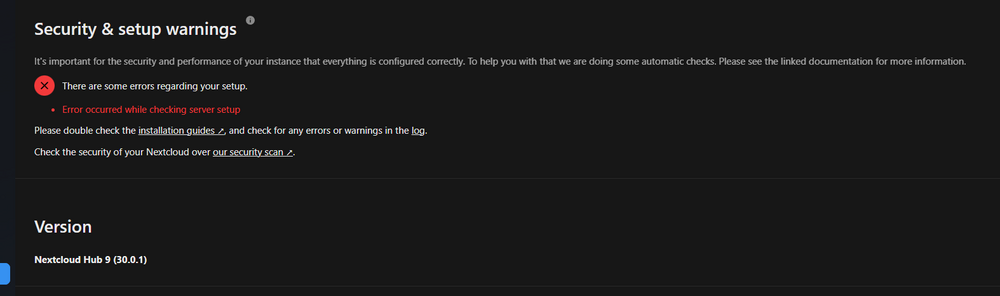
@dreadu 2nd issue - same here, no clue what to do with that
-
Are you able to connect to that DB from another client? some DB viewer?
-
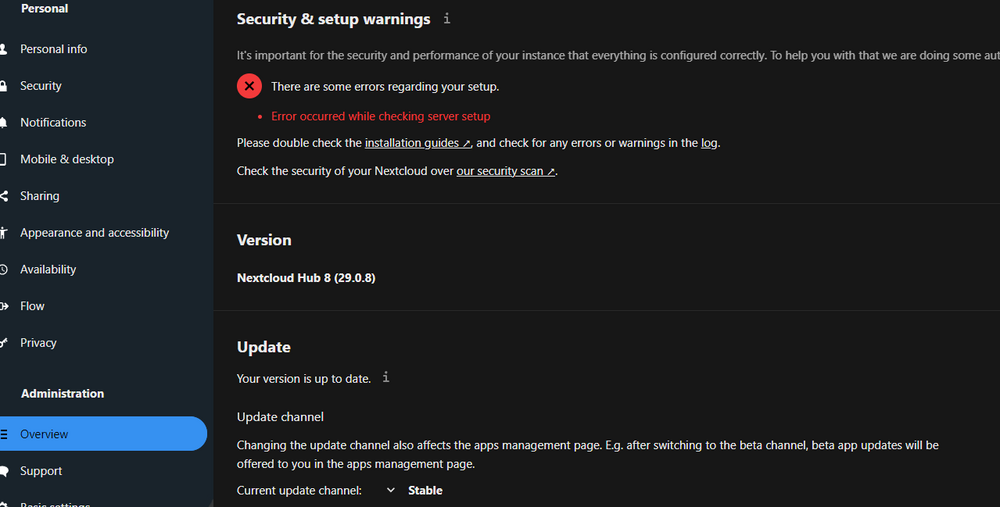
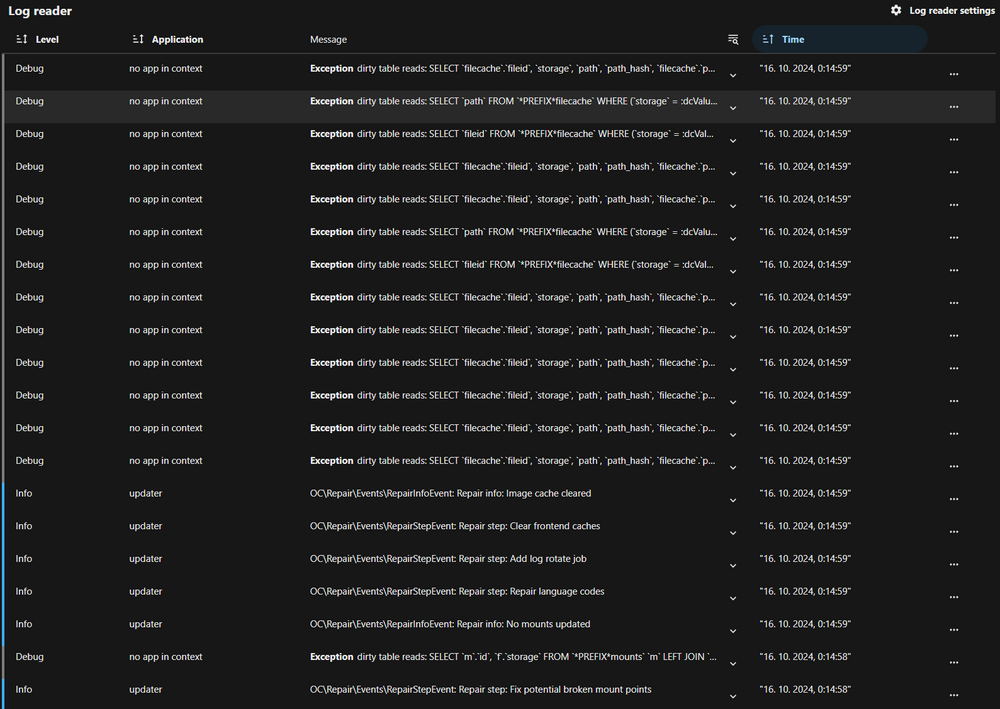
Ok now im on 29.0.8-previous , update went well. But in UI i see this error, nothing specific in logs... Will leave it for next day...1am here
-
Ahh i didnt knew that the Docker upgrade , updates also the Nextcloud server... As formerly Docker was on 25.0.4 and NC on 28.x.x Ok my bad, will try as u say...thanks (another hour wasted


