





J.Nerdy
Members
-
Joined
-
Last visited
Everything posted by J.Nerdy
-
hmmm it was configure to yes.... odd. I am manually configuring DNS to see if that makes a difference (though it shouldn't) and will report back. Thanks! Edit: I am a knob... I configured the DNS client-side, but did not make the edits to already configured peers. FIXED
-
Derp! Thank you!
-
Nothing special, its a pretty simple setup. The thunderbay (6 disk external raid array) is connected and mounted to the Mac through thunderbolt3. I then connect to the MAC (only the thunderbay is shared) through SMB utilizing UD. Prior to 6.8, this worked with no issues. Only after updating did it start logging credential errors. I did (per your suggestion, which is better security hygiene anyway- thank you) create a limited role user with an alphanumeric password. I was hoping the password complexity of the admin account was the issue - but it persists across the new user as well. Oddly, I can access and manipulate the data on the SMB disk just fine - its just filling up my log (an inconvenience, but not a shop stopper). As you noted, it is only when accessing the disk with active read|writes that is begins to spam.
-
I know that I missing something simple: when using remote tunneled access, I can hit my server and LAN without an issue, but the client can not browse to addresses outside the LAN (internet). I thought maybe it was DNS resolotion, but, entering IP addresses for sites still timeout. (I assume the server is routing all traffic when using tunneled access and sending back to client) Is there a configuration besides setting remote tunneled access that I will need to change?
-
Remove the share. Added it back. Error persists. The share is accessible (both read and write) to the array and services - it just spams the log multiple times per second when being accessed. Question, how often is the system log purged? Thank you for taking the time to investigate.
-
@dlandon so it spamming even worse now. I think it is related to a docker. When you refer to credentials, you mean the user credentials for samba mount, correct? EDIT: so I have narrowed it down to this: whenever the docker containers (Plex | CP | qbit) access the data on the remote mounted array (a thunderbay mounted on a Mac mini) it starts to spam the log. I created another user "unRAID" and the passphrase is alphanumeric without any spaces and use that to mount via UD. Is it possible that the samba.conf is still registering the previous credentials as well? They remain valid. Also, it only started after upgrading to 6.8, so is it the new smb2 protocol?
-
I tried un-mounting and the error persists. I am going to un-mount, turn-off auto mount and reboot server to see if that makes a difference. The credentials DO have special characters. EDIT: rebooting and removing auto mount killed the error. Creating user with alphanumeric and will circle back EDIT 2: Created new user with long alphanumeric chain - mounted, accessible and no more error spamming. Thanks @dlandon EDIT 3: As soon as docker service started, it began spamming again. I wonder why?
-
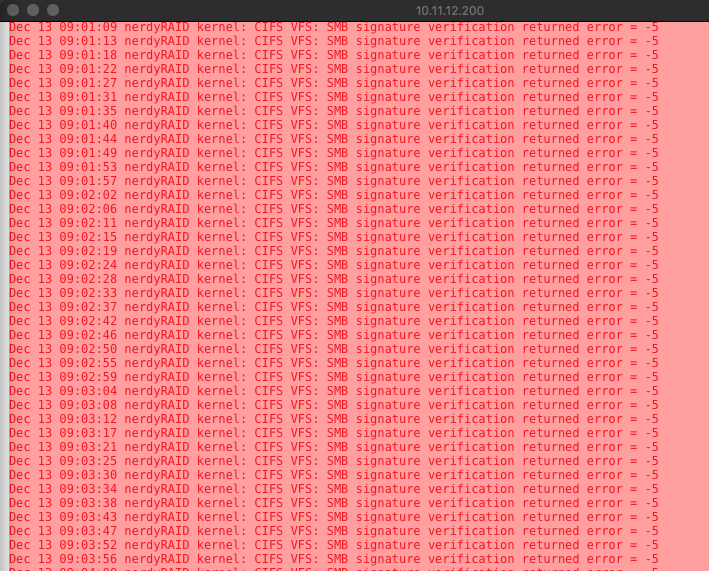
@dlandon Syslog is getting crushed with CIFS SMB verification error. (Network mount via UD). This started with upgrade to 6.8 The network mount is credentialed as it is a device attached to a Mac on the network. Diag Attached. nerdyraid-diagnostics-20191213-0848.zip
-
Will do, thank you
-
My log is getting crushed with: CIFS VFS: SMB signature verification returned error = - 5 Does this have to do with new SMB protocol? Edit: Diag attached nerdyraid-diagnostics-20191213-0017.zip
-
Excellent guide and it worked flawlessly, thank you. My knowledge base is thin, so sorry if this question is naive: when active on a client (iPhone) is all traffic routed through wireguard to home LAN, thus encrypted and serving as VPN for safe browsing on unsecured wifi? Or is it just a point to point tunnel that allows for encrypted access to addresses on the servers LAN? Thanks!
-
If the webgui is corrupted (have an open thread) is there a way to manual start the array that does not invoke the GUI?
-
I am sorry... this is probably pretty simple, and, I have searched and can't find an answer: I am trying to add a my Google Drive (set as shareable in system prefs>sharing) folder via my Mac as an SMB share to UD: I click add: set host: smb://xx.xx.xx.xxx (Mac ip) enter credentials enter folder name click add it populates to SMB shares but is not mountable. What am I missing? Thank you!
-
My suggestion... go with the biggest drive you can afford for your parity. If you can afford a 12TB or 14TB than do it, it will allow you to do upgrade your data disks in the future without having to replace with a bigger parity drive. Thats what I did. Prime day had a solid deal on 12TB reds, but not great. So I got 1 and now I can upgrade by 10 TBs in the future when the price/GB ratio is a little more palatable. Good luck!
-
I just had a 12TB wed fail on second cycle of preclear and had to RMA the drive. I had 4 x 10TB pass 3 cycles with no issue. Truly up to you and your fault tolerance.
-
recommended device?
-
same sound issue passing through an rx570
-
This is what I did, since I could not get a Mojave machine to boot... worked a charm Will do... Cheers mate! EDIT 2: NO dice - multibeast did not help. Still just showing sound flower for audio output. Such a bummer. EDIT: sorry for the party foul (double post).
-
If you don't normally use macOS... experiment! I was a life long windows user (win 3.1 and up) and found macOS to be a very interesting and well thought out platform.
-
All of the above. (I have used clover to do that - are there further steps to make sure that I need to undertake?)
-
Successfully passed through an rx570 to VM, running 4k glass smooth. However, can not for the life of me get HDMI audio passed through. maxOS only recognizes soundflower emulated devices which won't output to monitor speakers. Been trying for a month, so any advice greatly appreciated. Thanks!
-
I am banging my head against the wall: I am running 10.14.6 with an rx570 passed through and handling the graphics. Everything works smooth as glass, but, for the life of me I can not get hdmi audio passed through. The only sound output devices recognized are sound flower (64 and 2 ch), apple emulated devices. Does anyone have any solutions for passing through HDMI audio? Its cuckoo because the card is handling graphics (on a 4k display) with zero lag. Thanks!
-
Has anyone had any issues using the plugin on multiple drives concurrently? I had a 4TB fail as soon as Post Read began. I shutdown ran mem-test for 24 hrs and eliminated RAM as an issue. I did some googling and found anecdotal evidence on a reddit thread that concurrency was an issue. I happened to be running preclear on an 8TB red at same time. Spun the array back up, ran extended smart (no suggestions of disk health issues) and no am running the plugin on the 4TB again. It is currently 65% through post-read. Running 6.7.2 and using an external usb 3.0 dock to run preclear (don't have any free sata ports or pci lanes for card atm). I only ask, because I am upgrading my array from 5 x 4 TB, to 1 x 12tb + 4 x 10tb... and that is a lot of bits to preclear. I would love to be able to run concurrently. Does the script have any issues with multiple drives if I were to just use user scripts?
-
@dlandon I am getting the following error in UD: Warning: Illegal string offset 'DEVTYPE' in /usr/local/emhttp/plugins/unassigned.devices/include/lib.php on line 1347 This is for a passed through nvme drive. The device is using a modified clover to boot a win10 vm. I had this same configuration previously with no issues (UD listed device and partition tables without issue when VM powered down). I am way out of my depth when it comes to functions and setting arrays in php. What I am wondering is since this is the getting partition info function... could have something to do with the partition map created in windows? Here is the disk log info: Jul 16 12:29:02 nerdyRAID kernel: nvme1n1: p1 p2 p3 p4 Jul 16 12:29:15 nerdyRAID emhttpd: Samsung_SSD_970_PRO_512GB_S463NF0K713728K (nvme1n1) 512 1000215216 Jul 16 13:11:56 nerdyRAID unassigned.devices: Adding disk '/dev/nvme1n1p3'... Jul 16 13:11:56 nerdyRAID unassigned.devices: Mount drive command: /sbin/mount -t ntfs -o auto,async,noatime,nodiratime,nodev,nosuid,umask=000 '/dev/nvme1n1p3' '/mnt/disks/GAMES' Jul 16 13:11:56 nerdyRAID ntfs-3g[1459]: Mounted /dev/nvme1n1p3 (Read-Write, label "GAMES", NTFS 3.1) Jul 16 13:11:56 nerdyRAID ntfs-3g[1459]: Mount options: rw,nodiratime,nodev,nosuid,allow_other,nonempty,noatime,default_permissions,fsname=/dev/nvme1n1p3,blkdev,blksize=4096 Jul 16 13:11:56 nerdyRAID unassigned.devices: Successfully mounted '/dev/nvme1n1p3' on '/mnt/disks/GAMES'. Jul 16 13:11:56 nerdyRAID unassigned.devices: Adding disk '/dev/nvme1n1p4'... Jul 16 13:11:56 nerdyRAID unassigned.devices: No filesystem detected on '/dev/nvme1n1p4'. I clearly see 2 of the 4 partitions: the unformatted raw partition (that I want to use as a XFS partition for array when machine is not running and the primary partition created for storage of 'games' in NTFS) I do not see the 'efi' partition nor the windows [C:\] drive. Clearly this is some type of user error on my part... but just not sure how or why it got borked when previous steps worked flawlessly in past. If it would help I could post 1347 - 1403 of lib.php and see if something got corrupted? Any suggestions would be greatly appreciated. Thank you! EDIT: I did not mention, the VM works flawlessly. It is simply I can not pull accurate partition map in UD. Sorry.
-
Come to think of it... I did at one point have it stubbed. However, then I copied my winVM to it, and partitioned the remaining drive in xfs to share some high throughput storage to the array. It did not manifest this issue at the time. However, after nuking the VM and passing through the controller again with a new VM. The performance on the VM is spot on... my only issue is that though UD can see the drive, it can not see the partitions - so I can not format the unused space and share back to the array. i might stub it out. Reboot. Then reboot and pass through. See if that makes a difference.

