





Captive8200
Members
-
Joined
-
Last visited
-
It seems that I am able to bypass the WebUI authentication with any kind of inputs. Video is attached. Screen Recording 2025-06-05 at 9.31.22 AM.mov
-
Hey all, I am attempting to set up a Opnsense VM on Unraid. I seem to be having trouble getting the four port NIC to be accessible by the VM itself. Every attempt results in Opnsense saying "No interfaces found!". Here is my VM config, and I have bound the NIC to vfio using the option on the system device page. <?xml version='1.0' encoding='UTF-8'?> <domain type='kvm' id='5'> <name>opnsense-02</name> <uuid>61575056-4b27-9894-75bd-010e2cb2cc3b</uuid> <metadata> <vmtemplate xmlns="unraid" name="FreeBSD" icon="freebsd.png" os="freebsd" webui="" storage="default"/> </metadata> <memory unit='KiB'>2097152</memory> <currentMemory unit='KiB'>2097152</currentMemory> <memoryBacking> <nosharepages/> </memoryBacking> <vcpu placement='static'>2</vcpu> <cputune> <vcpupin vcpu='0' cpuset='6'/> <vcpupin vcpu='1' cpuset='7'/> </cputune> <resource> <partition>/machine</partition> </resource> <os> <type arch='x86_64' machine='pc-i440fx-4.2'>hvm</type> </os> <features> <acpi/> <apic/> </features> <cpu mode='host-passthrough' check='none' migratable='on'> <topology sockets='1' dies='1' clusters='1' cores='1' threads='2'/> <cache mode='passthrough'/> <feature policy='require' name='topoext'/> </cpu> <clock offset='utc'> <timer name='hpet' present='no'/> <timer name='hypervclock' present='no'/> <timer name='pit' tickpolicy='delay'/> <timer name='rtc' tickpolicy='catchup'/> </clock> <on_poweroff>destroy</on_poweroff> <on_reboot>restart</on_reboot> <on_crash>restart</on_crash> <devices> <emulator>/usr/local/sbin/qemu</emulator> <disk type='file' device='disk'> <driver name='qemu' type='qcow2' cache='writeback' discard='unmap'/> <source file='/mnt/user/domains/opnsense-02/vdisk1.qcow2' index='2'/> <backingStore/> <target dev='hdc' bus='virtio'/> <serial>vdisk1</serial> <boot order='1'/> <alias name='virtio-disk2'/> <address type='pci' domain='0x0000' bus='0x00' slot='0x02' function='0x0'/> </disk> <disk type='file' device='cdrom'> <driver name='qemu' type='raw'/> <source file='/mnt/user/isos/Linux/OPNsense-24.7-dvd-amd64 (1).iso' index='1'/> <backingStore/> <target dev='hda' bus='ide'/> <readonly/> <boot order='2'/> <alias name='ide0-0-0'/> <address type='drive' controller='0' bus='0' target='0' unit='0'/> </disk> <controller type='pci' index='0' model='pci-root'> <alias name='pci.0'/> </controller> <controller type='ide' index='0'> <alias name='ide'/> <address type='pci' domain='0x0000' bus='0x00' slot='0x01' function='0x1'/> </controller> <controller type='virtio-serial' index='0'> <alias name='virtio-serial0'/> <address type='pci' domain='0x0000' bus='0x00' slot='0x03' function='0x0'/> </controller> <controller type='usb' index='0' model='ich9-ehci1'> <alias name='usb'/> <address type='pci' domain='0x0000' bus='0x00' slot='0x07' function='0x7'/> </controller> <controller type='usb' index='0' model='ich9-uhci1'> <alias name='usb'/> <master startport='0'/> <address type='pci' domain='0x0000' bus='0x00' slot='0x07' function='0x0' multifunction='on'/> </controller> <controller type='usb' index='0' model='ich9-uhci2'> <alias name='usb'/> <master startport='2'/> <address type='pci' domain='0x0000' bus='0x00' slot='0x07' function='0x1'/> </controller> <controller type='usb' index='0' model='ich9-uhci3'> <alias name='usb'/> <master startport='4'/> <address type='pci' domain='0x0000' bus='0x00' slot='0x07' function='0x2'/> </controller> <serial type='pty'> <source path='/dev/pts/2'/> <target type='isa-serial' port='0'> <model name='isa-serial'/> </target> <alias name='serial0'/> </serial> <console type='pty' tty='/dev/pts/2'> <source path='/dev/pts/2'/> <target type='serial' port='0'/> <alias name='serial0'/> </console> <channel type='unix'> <source mode='bind' path='/run/libvirt/qemu/channel/5-opnsense-02/org.qemu.guest_agent.0'/> <target type='virtio' name='org.qemu.guest_agent.0' state='disconnected'/> <alias name='channel0'/> <address type='virtio-serial' controller='0' bus='0' port='1'/> </channel> <input type='tablet' bus='usb'> <alias name='input0'/> <address type='usb' bus='0' port='1'/> </input> <input type='mouse' bus='ps2'> <alias name='input1'/> </input> <input type='keyboard' bus='ps2'> <alias name='input2'/> </input> <graphics type='vnc' port='5902' autoport='yes' websocket='5702' listen='0.0.0.0' sharePolicy='ignore'> <listen type='address' address='0.0.0.0'/> </graphics> <audio id='1' type='none'/> <video> <model type='qxl' ram='65536' vram='65536' vgamem='16384' heads='1' primary='yes'/> <alias name='video0'/> <address type='pci' domain='0x0000' bus='0x00' slot='0x1e' function='0x0'/> </video> <hostdev mode='subsystem' type='pci' managed='yes'> <driver name='vfio'/> <source> <address domain='0x0000' bus='0x0a' slot='0x00' function='0x0'/> </source> <alias name='hostdev0'/> <address type='pci' domain='0x0000' bus='0x00' slot='0x04' function='0x0'/> </hostdev> <hostdev mode='subsystem' type='pci' managed='yes'> <driver name='vfio'/> <source> <address domain='0x0000' bus='0x0b' slot='0x00' function='0x0'/> </source> <alias name='hostdev1'/> <address type='pci' domain='0x0000' bus='0x00' slot='0x05' function='0x0'/> </hostdev> <hostdev mode='subsystem' type='pci' managed='yes'> <driver name='vfio'/> <source> <address domain='0x0000' bus='0x0c' slot='0x00' function='0x0'/> </source> <alias name='hostdev2'/> <address type='pci' domain='0x0000' bus='0x00' slot='0x06' function='0x0'/> </hostdev> <hostdev mode='subsystem' type='pci' managed='yes'> <driver name='vfio'/> <source> <address domain='0x0000' bus='0x0d' slot='0x00' function='0x0'/> </source> <alias name='hostdev3'/> <address type='pci' domain='0x0000' bus='0x00' slot='0x08' function='0x0'/> </hostdev> <memballoon model='none'/> </devices> <seclabel type='dynamic' model='dac' relabel='yes'> <label>+0:+100</label> <imagelabel>+0:+100</imagelabel> </seclabel> </domain> I have attempted to use OVMF and SeaBIOS with no luck. Any help would be appreciated!

-
Hey all, Just an update. My docker containers were all stopped and when I attempted to start it would throw an error 403. I grabbed the Diagnostics and rebooted, but now it's doing the same exact thing, posting to a colored screen and it's unavailable on the network. tower-diagnostics-20230710-1409.zip
-
Hey @JorgeB I performed those steps and was able to get things up and running. The array is starting now and It looks like all my shares and applications are coming back (I was able to move the entire config folder to the USB). When I created a new USB, I used the latest UNRAID version as well, so I am not sure if the new system files were the fix or if it was the upgraded version.
-
This worked, I am able to boot it up and get the Unraid GUI. What should my next steps be?
-
Doing this now!
-
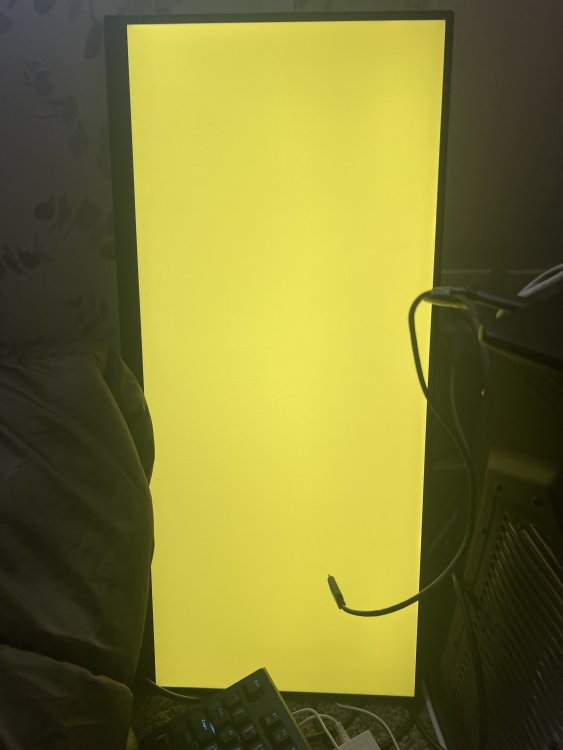
Hey all, my server has been super stable for some time now. However yesterday it was unresponsive and I wasn’t able to SSH into it or anything. I unfortunately had to do a hard reset and now when I boot up Unraid, I get this colored screen (the color changed based on the boot option I select). I’m unable to access the web console or SSH. I have ruled out memory as the memtest passed last night. My GPU is fine? Since the bios and memtest work just fine. So I’m not really sure when to to do here. Would love some advice though. Thanks!
-
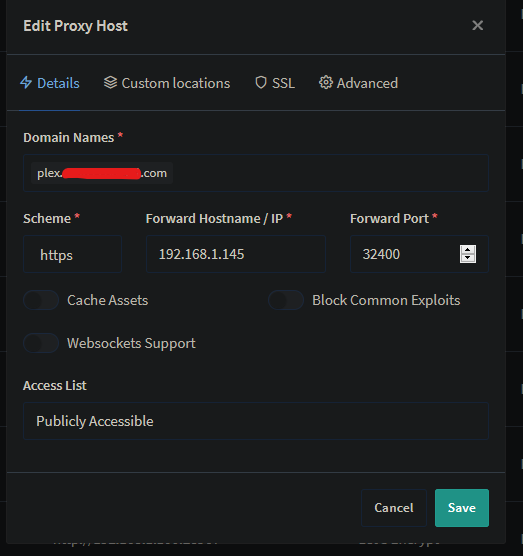
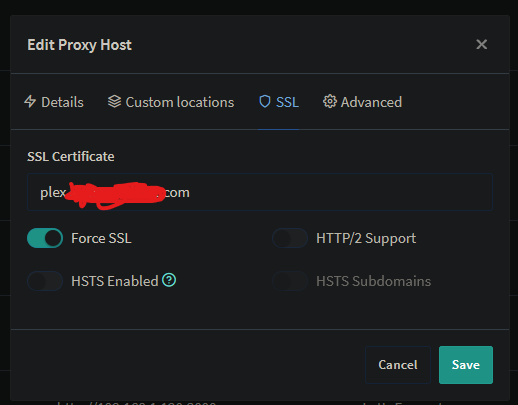
Anyone having luck with Plex? I have the below settings. And I am getting 502 bad gateway error.

-
Hey Squid. I am having a hard time finding troubleshoot mode on the plugin settings page. I could of sworn it was there last update. Where did it go?
-
Just an update. I was able to finally get this to work. The workaround was to setup the VM as normal and exclude the GPU and use VNC. Once Windows was installed, I DID NOT install any drivers from the virtual CD-ROM. Instead, enabled RDP, shutdown the VM, edited the config to remove VNC and replace it with AMD GPU. I then started the VM and used remote desktop to get into Windows. After remoting in, I installed the AMD driver and everything went smoothly. So far about 24 hours or so. The VM is stable and working, however I can't use the UNRAID VNC to access the VM, if I assign it and move the AMD GPU to #2 slot. The VM crashes. Is there an explanation at all for this? I have never had this issue before, I was always able to use the VNC and the GPU options together with my Windows VM. Did this change in an update?
-
I just tried SeaBIOS and it didn't work neither did bumping down i440fx-3.0 to i440fx-2.11 which I know for sure was what I was running on when I did this pass through successfully last time.
-
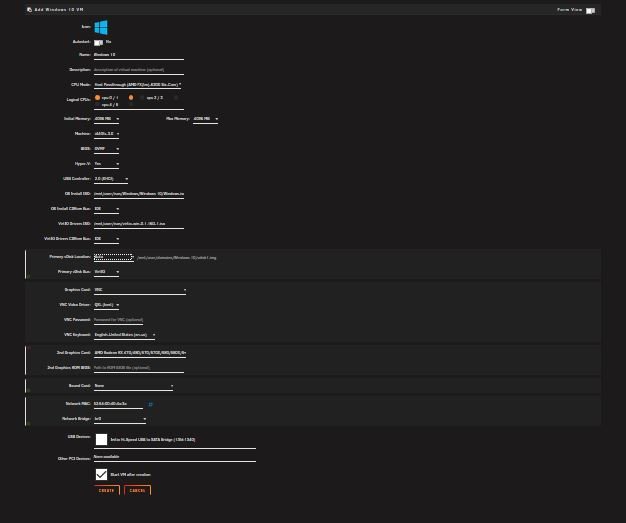
Hey guys, I am having some issues with passing through an AMD GPU. It's strange, because I was able to pass through this same GPU about 6 months ago to a Windows 10 VM. Basically what is happening is that I will setup a Windows 10 VM with VNC as the main GPU and the RX480 as my secondary. I will go through the windows setup and get to the desktop. I will then install all the missing drivers and then install the GPU driver. Once the driver is installed for the GPU my entire VNC session goes black. I try to RDP into the VM and I get to the desktop, but everything is black and I can only see the cursor. If I force stop the VM and start it back up it freezes on the loading bar and then it goes into windows recovery mode. I have tried these attempts, but without any change. Switched Machine from i440fx-3.0 to Q35-3.0 Turned Hyper-v Off Tried install with different CPU cores selected Tried not installing redhat display driver and just installing AMD Driver in device manager Tried VM install with just VNC as GPU and setup Windows and then shut the Windows 10 VM down and passed through the AMD GPU and it still shows a black screen I am trying an install right at this moment as a SeaBIOS, I will update this thread if that is successful. I've been at this all week, I have followed a bunch of other different guides (spaceinvaders) and still no luck. I have attached logs to this thread as well. Any ideas would be super helpful. Thanks! tower-diagnostics-20190113-1056.zip
-
Yeah, I know where the data is however. My issue right now is that I was using the PassMan plugin and I have lost a good deal of passwords. Do you know of a way to restore that data? I was assuming it was in the database.
-
Hey guys, so I lost connection with the database and it seems that the database docker I was using is having some issues. It lost all my data in the database. I was using the owncloud backup app on nextcloud to backup the database for NextCloud and I was wondering. How do I access those backup files? Especially when nextcloud isn't even loading the web gui due to not being able to connect to the database. Any ideas?
-
Have you updated the config of storj in the storj share? If you open the config there is good documentation where your public/DDNS should be entered.



