





jaybee
Members
-
Joined
-
Last visited
Everything posted by jaybee
-
Just realised that for some reason since the last update, when I went into the dynamix sleep plugin page on my server, it had a status in the top right hand corner to say that the plugin's status was "STOPPED". (90% sure it was stopped, off the top of my head but it may have said something else. It was orange in colour). I don't know why this was. I made a change to something in the options, clicked apply, then changed it back and clicked apply again and the status changed to "STARTED". My server then shut down as before last night and normal service resumed. So it seems for me the latest update did something where the plugin was left in a stopped state for whatever reason. Might be worth checking this.
-
Same for me. Using dynamix S3 sleep for a long time and since updating the other day it stopped shutting down my server at night like it used to. Going to have to debug this more I think.
-
Thanks very much for the info. So it appears possible to pin unraid OS operations to the E cores and get 36w idle. That is quite good. My current 5900x system idles much higher at around 100w. This is with 2 x GPUs idling, a HBA card, 2 x nvme drives and 8 fans and a fan controller. This probably accounts for 40w extra. So perhaps my 5900x whilst idling consumes maybe 60w at the wall if it were bare bones. A way to improve consumption would be to obviously remove the GPU/s and move to a CPU with quicksync to aid transcoding, and try to move to less disks all running from the on board sata instead of a HBA card.
-
Very interesting to me. Is that measured at the wall using a power meter? So total power consumption of the system? What power supply? Can you confirm that is with no gpu or any pci-e cards? I see you say it was barebones with just the M2 1TB in. Is that with unraid running and assigned to the e cores? How many? I'd be interested to see if you are still able to get those numbers when running a windows Vm assigned also to the e cores, and then again with one assigned to power cores to see how it varies. I was looking at the 12th gen i7 12700 series which seem to offer ones like the 12700T (there are also E, H, F various) and I think one of them may be an economy series type OEM spec one which has a TDP of around 35w. It seems a bit confusing right now and I can't find any good performance indication outside of the K series which is reviewed the most being the most popular. Where did you read of the 12600 series going "well below" 10watt idle? That's can't be accurate? Do you mean just the CPU rather than total system at the wall watts? Even if just the CPU, that seems still very low.
-
What about gaming on Windows 11 VMs with the AMD performance hit? A user already found they were not able to install the chipset driver fix to prevent the performance issue. Am I understanding correctly that this will not be possible to be resolved due to the emulation causing the chipset driver not to not recognize the hardware as legitimate? Or is this all resolved since Microsoft fixed the issue with Windows hotfix?
-
So are we saying that the AMD performance hit in games is here forever, if you run a Windows 11 VM with AMD processor? It is not solvable?
-
I just had a similar issue and thought I would post here for anyone else that encounters similar behaviour with black screen (or no output) from the GPU where everything else looks like it should work. My Nvidia 3060ti also got detected as an "NVIDIA Corporation Device 2489" but this is not an indicator of any problem in itself. Some Nvidia GPUs do get detected as strange names, especially the newer RTX 30XX series. Symptoms I got: VM when started with GPU passed though correctly in terms of config on unraid, goes green in the UI and everything looks as though it would work fine. But no output occurs to a monitor on HDMI or Display port. When used with pure VNC as graphics card it functions fine. When the server boots a display output can be seen during post and BIOS so you know it works normally. What I changed which caused this issue to occur: Upgraded the GPU in my system from an Nvidia 3060 to an Nvidia 3060ti Actual issue: Nvidia drivers in windows VM itself. I believe that because I did not unintall the old nvidia driver before I did the upgrade, Windows kept trying to use the existing driver to work with the card. The problem I think, was that the driver I had installed was a specific one which only works with non LHR 3060 cards as this was the leaked dev driver which unlocks 3060s so they can be mined with. I should have uninstalled this driver first whilst the card was in the server still and whilst inside the VM and used a generic windows auto one, or just installed the latest nvidia drivers first for the 3060. They would probably be similar enough to the 3060ti that it may have initiated it and worked. I don't think you can simply use VNC connection to go in and remove the driver because then the GPU is not listed in device manager to be able to uninstalled if you see what I mean. Although... How you might be able to fix it: A. It may be possible to use something like DDU free software to force to remove all references of the nvidia drivers. Then it may be possible to start the VM with GPU passed through and it may become auto detected and initiated with a basic found driver by Windows. B. Create a new VM from scratch would probably solve the issue and initiate the GPU fresh. How I fixed it: In my case since I already had the new GPU installed in the server and didn't want to put the old one back in or try either of the above two things yet, I decided to: (If remote desktop is already possible on your VM then skip to step 6) 1. Configure the VM to only use VNC as GPU. 2. Start the VM in unraid GUI 3. Using VNC, access the VM and go to remote desktop settings inside windows. Ensure remote desktop connections are allowed and that you can connect with a valid user. 4. Exit remote desktop and VNC. 5. Stop/shutdown the VM from unraid GUI 6. Configure the VM to now use the GPU passed through as per other instructions in various other threads/youtube videos (out of scope for this explanation as too long) 7. Start the VM form the unraid GUI 8. Remote desktop into the VM 9. In device manager you should now see the nvidia GPU as a device which can be right clicked and then uninstalled. This should remove the problematic and non functional/compatible nvidia driver which is not able to work with the currently installed and passed through GPU. In this case my new 3060ti is the GPU existing, and the driver uninstalled was the old 3060 dev mining driver. 10. Go to nvidia website and download and install the latest driver for your GPU as you normally would. I would recommend with nvidia that you select "CUSTOM" install and then do a "CLEAN" install to properly clear out any remains of older drivers. The VM will reboot to complete installation. Just remote desktop back in once done to verify it completes and exit installation. 11. Disconnect remote desktop and test direct GPU connectivity to a monitor now. You should find you have output as normal on your screen.
-
Did you ever get the bottom of this? Sometimes testing with larger file sisze in crystal disk mark like 4gb gives results showing sequential write of around only 1000MB/s which may be more realistic given the bare metal performance should be around 3000MB/s. It definitely seems like a caching issue which makes it hard to truly compare passed through nvme performance vs vdisk. Vdisk has the nice portability aspect of it and ease of backup, but nvme has the advantage of supposedly supporting proper trim and wear levelling stuff when passed through to windows properly I have read.
-
Hey guys, I want to setup an nvme drive as pass though in my VM to get close to bare metal performance for gaming. Before I do this, I took some benchmarks of the existing vdisk performance before I did it for comparison. I noticed that the numbers for usual benchmarking tools are claiming very unrealistic performance stating numbers that are simply too fast and impossible. I gather that this is due to the way vdisk works with caching? Is there a way to turn this off and test more easily to get a baseline? I tried i/o zone but could not understand how to use it easily as it is cmd based and does not give easy to read results. I tried i/o meter and the control panel for the software looks ancient and again not sure how to use. The results I got on a vdisk running on a sata cache disk which would normally have read speed of approx 500MB/s and write of around 350 MB/s are below: Crystal disk mark: Sequential - Read = 10,803MB/s, Write = 4,812MB/s 4KiB Q8T8 - Read = 192MB/s, Write = 112MB/s 4KiB Q32T1 - Read = 396MB/s, Write = 94MB/s 4KiB Q1T1 - Read = 46MB/s, Write = 36MB/s ASSSD: Sequential - Read = 6,582MB/s, Write = 2,142MB/s 4K - Read = 47MB/s, Write = 33MB/s 4K 64 Thrd - Read = 292MB/s, Write = 72MB/s Acc. Time - Read = 0.193ms, Write = 0.106ms
-
What has changed then? Why are hacks occurring more now?
-
Thanks for the support with this. I've had a pay around with my 3070 and got it passed through to a VM where it does indeed hash at 61mh/s with the memory overclocked. In this docker it sits at 51/52mh/s. I have been successful in adjusting the power limit using nvidia-smi as you proposed above. This worked perfectly and halved my power usage. I was also able to set the core GPU clock also using nvidia-smi with no issues. I did have to set persistance mode on. For the memory however, I can only see a command mentioned as like this: nvidia-smi -i 0 -ac 2000,1000 But when I do that I get the following error: Setting applications clocks is not supported for GPU 00000000:06:00.0. Treating as warning and moving on. All done. So it seems adjusting memory clocks is not possible? I googled and also saw that if you have "N/A" in the output for "nvidia-smi -q" in a lot of places, this means that your GPU does not support that feature. I can see N/A against the application clocks part as per below output. Maybe this is why the above error occurs. Clocks Graphics : 1005 MHz SM : 1005 MHz Memory : 6800 MHz Video : 900 MHz Applications Clocks Graphics : N/A Memory : N/A Default Applications Clocks Graphics : N/A Memory : N/A Max Clocks Graphics : 2100 MHz SM : 2100 MHz Memory : 7001 MHz Video : 1950 MHz Max Customer Boost Clocks I can see mention of using "nvidia-settings" or xconfig or powermizer to adjust things like memory, but I think this is only possible on more feature rich Linux distros like ubuntu possibly. Have you any other ideas how we can overclock memory somehow? This would be a killer feature to have it set and running inside a docket as you say, since then it is not bound to a VM and is accessible as a shared resource for both mining at its full potential, as well as for plex transcoding duties.
-
Interesting, on the contrary, I have an AMD RX 590 which is a toasty, loud beast in another PC I have. When mining it gets up to 80-85c on stock clocks. I understand that the 590 is actually somewhat different to the 580 despite that it seems they would be very similar. I believe there was an architecture change between them. It mines in the UK here at approximately £2.50 profit a day at the time of writing this. My 3070 when I have monitored it in the trex webgui during mining, never seems to go above 33% fan speed and a temp of 61c. This is running in my loft currently though which is cold. Perhaps I may try plex streams at the same time to see what happens.
-
Yes I understand. I have not experimented with using plex on the same GPU at the same time as mining. I wonder if the 3070 would be handle a couple of streams and still mine at the same time. I guess I will have to do some testing.
-
Thanks! Tried that and all working now. I take it there is no option to adjust clocks or power anyway? I find tht the mh/s for me is 52mh/s when mining ethereum on a 3070. Apparently my card should do 60mh/s. Is using it in this way via a docker pretty much the same as bare metal performance? I take it there would be no benefit of running this inside a Windows VM with the GPU passed through instead? I know this defeats the purpose of the docker but I'm just hypothesizing purely on performance hash rate. Nice work.
-
Well I simply downloaded the latest trex version that shows in CA listed and it claims on docker status to be running "latest" version. See below logs. Should I be trying to source a newer docker version of trex from elsewhere then? My unraid server is running version 6.9.0rc2 and nvidia-smi shows this: NVIDIA-SMI 455.45.01 Driver Version: 455.45.01 CUDA Version: 11.1 But when I start trex it shows: 20210218 23:58:10 T-Rex NVIDIA GPU miner v0.19.11 - [CUDA v10.0 | Linux]
-
I tried this trex docker on a new Nvidia 3070 card and it gave the following error: Can't start miner, Geforce RTX 3070 (CC 8.6) is not supported by CUDA v10 build, use T-Rex compiled with CUDA v11.1 or newer
-
What did you find happened when plex tries to use the card to hardware transcode when it was already in use with mining? Did it refuse to use GPU at all or did it crash or lag? What about multiple stream attempts?
-
Did you make any progress with this? I also have a 1050ti I just tried this trex docker out on to mine ethereum and found the hash rate to be less than 1mH/s. This could be normal though now. If you google for "ethereum DAG 4GB mining" you will see that the size of memory required to efficiently (or even at all?) mine ethereum now surpassed 4GB so it seems such cards may be relegated to mining alt coins like ravern or veil whilst still just about being profitable.
-
I had been using the Dynamix S3 Sleep plugin for a while and all worked well for me, but recently having upgraded Unraid I am finding that when watching Plex, the plugin does not detect this and still shuts down. I have tried turning on to wait for network inactivity now as well as array inactivity to make it more strict, but before I did not need this and just had it set to check for array inactivity. Has anything changed with recent unraid versions affecting functionality? I basically want it to only shutdown from midnight onwards if it detects nothing is being watched. EDIT: Adjusted settings and seems to be working ok now. I turned on the option for waiting for network inactivity, but had to set it to more than zero, for it to work. i.e. I think it was around 10Kb (the smallest amount not zero) and then things worked ok.
-
Just thought I would respond to this topic to clarify some things after I found the exact same issues as the OP. Many people will want to automatically shutdown their server late at night, and then have it power on early in the morning to save power, noise and light. The shutdown part is easy using unraid plugins and is out of scope for discussion here. The startup can be done in really only two main ways which cover unattended power on. Wake on LAN (WOL) and power on by Real time Clock (RTC - computers BIOS clock on the motherboard). For most people in home server environments, WOL is not an option since they will not have any other network equipment online either of which could send the magic packet. This is possible to do over WAN but let's not get into that discussion here since this is to discuss using RTC to power on from full shutdown. Let it be understood firstly that this is not a motherboard or BIOS issue. This is expected behaviour from Linux Operating Systems during shutdown, that the reset of the BIOS Real Time Clock (RTC) to UTC standard time occurs. Assuming that the OP is trying to shutdown his server at midnight Australian Eastern Time (AET), then this is 14:00hrs UTC. What he is saying is that when the server shuts down at midnight AET, it sets the BIOS RTC back to UTC, and at the same time, the date shifts back a day since the reset takes it back accross midnight during the reset. It then comes to 07:00hrs AET and the server does not start up because the RTC is now at 21:00hrs with a date of the day before (since UTC has not passed midnight yet for that day). As a result the server to get back in sync requires both the time and the date resetting. Depending on the time of day that the OP performs any shutdown or reboot, this could happen again where the date also shifts. i.e. if it occurs during 00:00:00 AET to 09:59:59 AET. In any case, even if the OP sets shutdown to be 23:59:59 and avoids the date shifting issue, the BIOS RTC will still be set back to UTC which will cause issues with the BIOS RTC timings to start it back up. So how do we fix the issue? As already suggested above, you simply set your BIOS RTC to the exact current time in UTC. Then you set the startup time in the power on by RTC options to be 21:00 hrs. The only "issue" as such is that yes, your BIOS clock and date will sometimes read an alien time/date to you. But really this is a set and forget option. Once you have this set, unraid will always show your correct local time for everything, including logs. We face a similar issue in the UK since for 6 months of every year we have daylight saving time where we have either BST (British Summer Time) which is UTC +1, or GMT (Greenwich Mean Time) which is a timezone that is basically the same as UTC, UTC +0. So right now I have to set my server to turn on at 06:00 hours for it to come on at 07:00 hrs. When the clocks change again in October, I will have to set it back to 07:00 hrs. I hope this clarifies the situation.
-
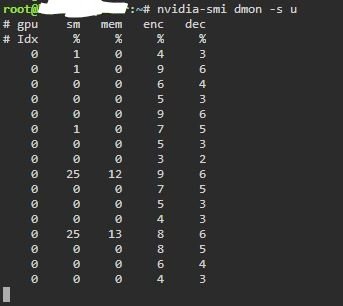
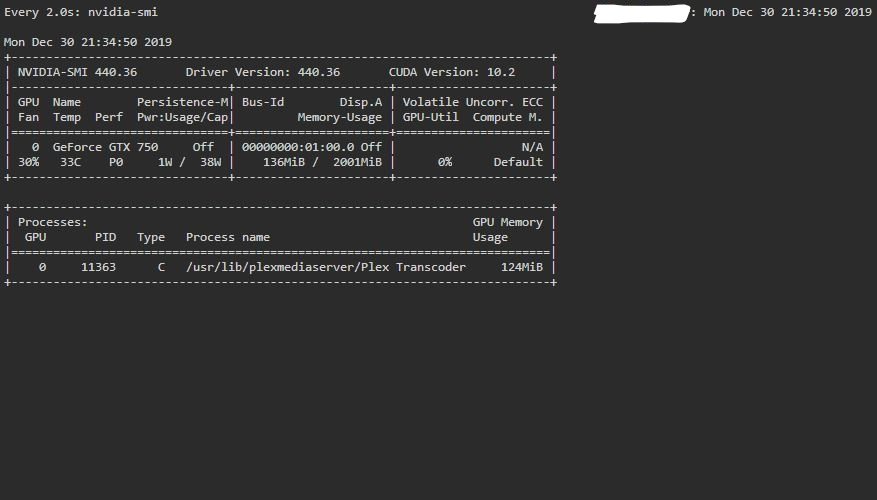
I assume Nvidia hardware decoding/encoding are both working for me based on below images?

-
Hi all, Recently installed plex LSIO and nvidia unraid both on latest versions. I've been reading up the best I can on all the info and was wondering if someone can confirm that I'm correct on the below right now at time of writing: 1: The official plex apps/dockers did not support Nvidia Hardware decode specifically (hardware encode was enabled and had been working for some time) up until it was recently officially added around June 2019. 2: Before the above happened, there was a workaround which mainly involved a "hack" or wrapper script of some kind which altered ffmpeg included with plex to flag that it can do Nvidia hardware decoding. (I'm yet to find this separate thread where this is supposedly discussed and often referred to in this very thread so have only been able to take snippets from various places). 3: Soon after (1) occurred above, the docker plex images were updated (including this one) to also include the ability to Nvidia hardware decode as well as encode. 4: Therefore simply installing the latest version of LSIO plex does indeed work out of the box with Nvidia Hardware decoding and encoding, so long as it is bundled with nvidia unraid to allow pass through of nvidia gpu to the plex container. (I'm assuming the bolded part is required and it would not work with official unraid). 5: Nvidia hardware decode and encode has worked for ages on windows and hence people have previously worked around the linux issues with using windows VMs. 6: Updating to the latest official unraid new releases could break nvidia hardware decoding since nvidia unraid could break underneath, so best to wait for this to also be updated first. Sorry if I got any of the above wrong.
-
Can you tell me what this does as opposed to just clearing? Is it a more secure method of erasing a disk because it firstly overwrites all the sectors before setting all bits to zero?
-
Frank, it's the same in UK. Amazon returns are very good.
-
These drives are currently on offer for £109.99 on amazon UK. I'm immune to the general Seagate bashing as I know it's completely false, but with regard to this thread it seems there are fairly specific accusations about this particular product, and from what I can see it's all coming from one guy who's post is on various internet sites, and quoted (as above) but I cannot see where it originated from. So the statements are: 1: The firmware is "crippled" 2: The drive will not run in AHCI mode 3: It runs hot 4: It parks "too aggressively" [too often] 5: It does not work internally 5 is simply not true. Many people have this drive working inside NAS appliances and so on. 2, 3 and 4, I can't comment as don't own the drive. I suspect 2 is a symptom of the originator not being able to get it running as an internal? 1 is a little generic and not very specific. I think this is speculation. Seagate would not intentionally cripple a drive for it to fail just outside of warranty period. For them to intentionally add things into the firmware to stop the drive being used as an internal.... well.... it does work as an internal so.... ? My suggestion to the OP (of this thread here on unraid forums I mean) is that you simply have a bad drive if the performance appears to be eratic and sometimes slow? Anyone else care to comment? The £109.99 price is rumoured to stop at midnight tonight according to HUKD website.

