





ksignorini
Members
-
Joined
-
Last visited
Everything posted by ksignorini
-
With CrashPlan moving to "Small Business/Pro" only (no Home plans after today, August 22, 2017) will this client continue to work with the Small Business/Pro version of CrashPlan?
-
Think you could add dnsmasq?
-
Try doing this: https://support.code42.com/CrashPlan/4/Troubleshooting/Adjusting_CrashPlan_Settings_For_Memory_Usage_With_Large_Backups It worked for me.
-
MyCrashPlan has been starting to fail backups. If I watch it in VNC, I see a message box pop up that says: I also see this in my log: Does anyone know what's causing this? It looks similar to the problem cyriouslydylan is having. Thank you!
-
Thanks!
-
jonp, think you could add "tmux" to the pack?
-
Is it possible to add a bootable ISO to an existing Ubuntu VM? I think I might have adjusted this VM's image size but I can't remember. I was hoping I could boot the VM from a GParted bootable ISO and see what the partition structure in the image looked like. Is this possible? Even a good idea?
-
I've installed CA User Scripts and understand that there are supposed to be some default scripts that come pre-installed. In my installation, there aren't any. /config/plugins/user.scripts/scripts exists, but has nothing in it. Am I missing something? (Both personally, and on the flash drive?!)
-
I just wanted to say, great plugin! This should be included with the standard distribution, in my opinion. Keep up the great work!
-
I was wondering why you have this step for new installs in post #1 when you already have /mnt/user mapping in by default as the "Backup Source" | "unRAID Share Path"? Map /data (or /mnt) on the container side to /mnt on the host side. Note that whatever path you input on the container side will be the path you access from within the CrashPlan app. If /mnt mapping in to the container should always be included, why don't you simply have this as another default mapping just like you do for "Backup Source" | "unRAID Share Path"? I was a bit confused why I would need to map /data (container) or /mnt (container) to /mnt (host) and how that would work. I see now that if I map /mnt (container) to /mnt (host) I simply get the entire directory tree for /mnt (host) available under /mnt (container) instead of just /mnt/user (host) mapped in to the container side. Is there any danger to adding /mnt to the container and mapping it to /mnt (host) as I've explained above or should I always map /data (container) to /mnt (host)?
-
That's just it, there is no code that turns anything off, it just doesn't start the app unless the VPN has started properly. Ahhh. Gotcha. Well, if this was documented somewhere, hours of searching didn't find it. Maybe just an edit to post #1 here or the FAQ.
-
Maybe just have whatever code turns the web server off replace the index.html file (or whatever is used) with a warning page, instead.
-
I think that's it. That's a bit of a misleading way of informing the user about the VPN. I wish I had known. Thanks!
-
Does anyone know if Q1 of the FAQ here: http://lime-technology.com/forum/index.php?topic=45811.msg437673#msg437674 would solve this? I'm not outside my LAN so I'm really not sure if this is the same problem. I don't want to reboot my server right now if I don't have to.
-
When the docker is running in Host mode I cannot access the UI. If I switch it to Bridge mode (which I don't want, right?) I can get to the login prompt. Why is this happening? Does anyone know how I can fix this?
-
I cannot get the WebUI for sab to launch. I've tried changing ports for the WebUI and that won't work, either. Ideas?
-
I added Lynx text based browser. I tried a couple others but they would require a bunch of other packages. Thanks!
-
Great plugin--beats having to install all these slackpacks myself! Say, any chance you could include the Lynx text-based browser? Talk about a nerd-only package. Thanks again!
-
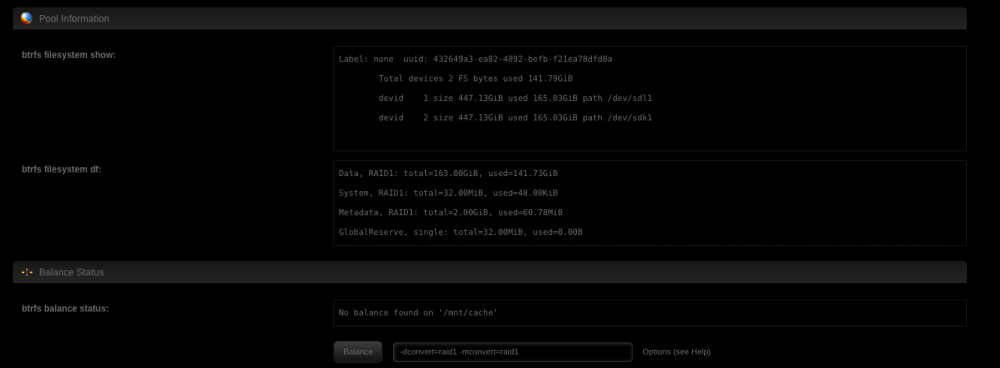
Also does this look right? Should the 2nd cache drive not show a FS format, size, or anything? (If this is correct, the screen is misleading and could give better information--like put the word "pooled" or something in each field showing that it's not just empty.)

-
What does "No balance found on /mnt/cache" mean in regards to having just added a 2nd SSD to my cache pool? (Was just one SSD until now.) When I added it and looked at the original, it was saying that balance was running and was showing some data in the balance info box. Now it just says "No balance found on /mnt/cache". Is that normal? Do I need to manually run the balance? If not, then why/when do you manually hit that button? Thanks!
-
You should be able to connect even with hostname. and your complete LAN shall be available as well. Did you modified much of the default settings? //Peter It's not and I didn't modify any of the defaults. Peter, It turns out I can access the shares via IP address, but not NETBIOS name. Perhaps there's no internal DNS or NETBIOS naming being passed through the VPN. (I'm not terribly familiar with how this is done.) Is there anything with OpenVPN that would be causing this or is this some other thing related to my network? Thanks.
-
You should be able to connect even with hostname. and your complete LAN shall be available as well. Did you modified much of the default settings? //Peter It's not and I didn't modify any of the defaults.
-
Peter - So one thing that isn't working when I connect to my unRAID box with OpenVPN from my Mac is access to shares. I seem to have a great connection otherwise and can access computers via local IP, just no shares. Thoughts?
-
One more question regarding OpenVPN client (not server this time) which I may also use for another purpose. My VPN provider only gives me a cert file--it does not give me a .ovpn file. Can I still configure the OpenVPN client you packaged for unRAID to connect to them? Thanks again. Great work. What I know a ovpn or config file needs for all vpn. //Peter After trying a different VPN service, it all works now. One final question: Am I able to keep the OpenVPN client connected but still keep the OpenVPN server also open for incoming connections? Thanks again.
-
Now that I know where to look, I just used FTP to grab the file and voila. I can't wait to test it from a coffee shop with my Mac. One more question regarding OpenVPN client (not server this time) which I may also use for another purpose. My VPN provider only gives me a cert file--it does not give me a .ovpn file. Can I still configure the OpenVPN client you packaged for unRAID to connect to them? Thanks again. Great work.



