





severanced
Members
-
Joined
-
Last visited
Everything posted by severanced
-
After installing 6.12 I started getting these errors on boot up in the GUI. It will show a red alert error with: VM Autostart disabled vfio-pci-errors VM Autostart disabled due to vfio--bind error I have two VMs one of which auto starts and I bound a sound card and I believe a core or two to it in Tools --> System devices. I am able to start it once I get the system up and booted but seeing this errors makes me wonder if I should be handling this a different way?
-
So something I'm finding is that after about a month of functioning the GUI will start to slow down, slowly start to stop displaying information and the system will require a reboot. This is starting to get annoying and I hope that we will be able to find a fix for this issue. It's been consistently around 30-35 days of operation and it starts again.
-
So this started happening to me again, knowing that a reboot fixed it I did that and it did get fixed however this is annoying since it's seems to be happening around once a month or so when my GUI is messing up.
-
So I shut down my system, took out my drive, ran a scandisk on it and restarted my server and it looks like my GUI is back to normal. It looks like it my have needed a reboot of some sort.
-
So I shut my system down, took out the USB drive, ran a chkdsk on it and started it back up and it looks like things are working again, maybe it needed a good reboot?
-
When I log on to my WebGUI I just get a page with these error messages Warning: session_write_close(): write failed: No space left on device (28) in /usr/local/emhttp/plugins/dynamix/include/.login.php on line 218 Warning: session_write_close(): Failed to write session data (files). Please verify that the current setting of session.save_path is correct (/var/lib/php) in /usr/local/emhttp/plugins/dynamix/include/.login.php on line 218 Warning: Cannot modify header information - headers already sent by (output started at /usr/local/emhttp/plugins/dynamix/include/.login.php:218) in /usr/local/emhttp/plugins/dynamix/include/.login.php on line 222 Any idea on what I can possibly do?
-
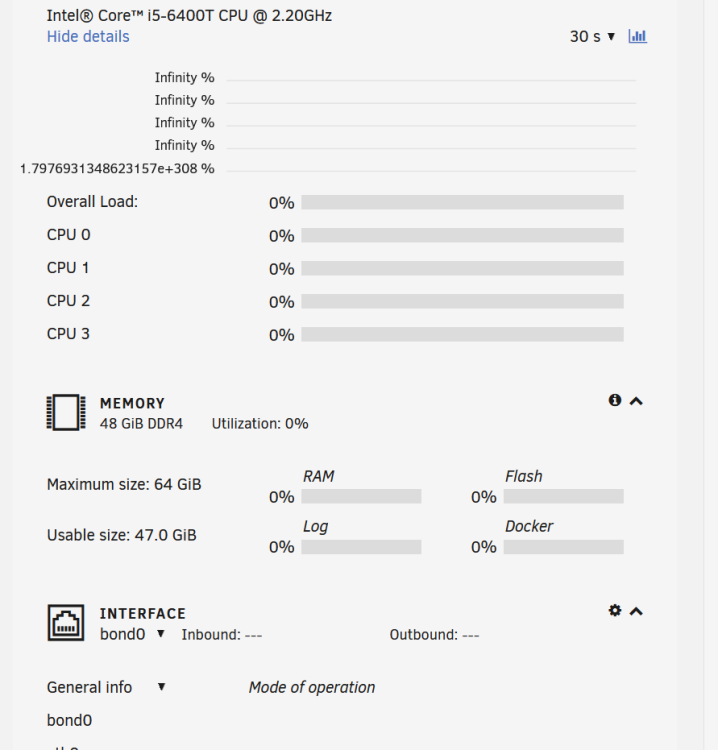
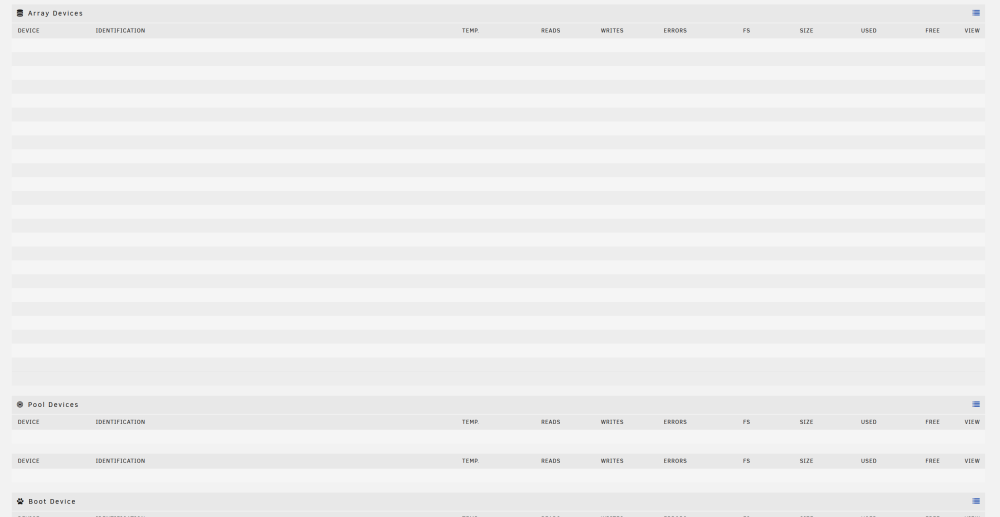
This is with MyServers uninstalled. Browser is Firefox latest version. This happens in both regular firefox and in incognito window with nothing enabled also Chrome and Edge which I have no addons/extensions installed I get the same results. Main is just a bunch of blank lines and Dashboard does not fully populate.
-
Has anyone found anything more about this? My dashboard and Main page are still non-functional.
-
My Servers seems to have something to do with it since I did uninstall it and some issues went away but not all.
-
I just tried that and unfortunately that didn't work, those pages are still blank. I tried it in an incognito window too to see if it was a plugin and also didn't work. This seems to be a bigger problem.
-
So I found a laptop that has not had their browsers updated and I was able to uninstall the My Server's app, this has fixed a few problems, the Docker and Plugins tab now appear to populate, but the Main tab is not populating at all still and the Dashboard is also not populating. This is total speculation on my part but maybe some update to Chronimum broke some of the elements of the GUI?
-
Thanks, I will keep that in mind, I'm not sure if that is the issue and I'm waiting for someone to chime in with what might be the cause of all of this.
-
I'm also noticing that the Unraid Server plugin is acting strange and not able to connect, but I'm not able to delete it since I can't load the Plugins page.
-
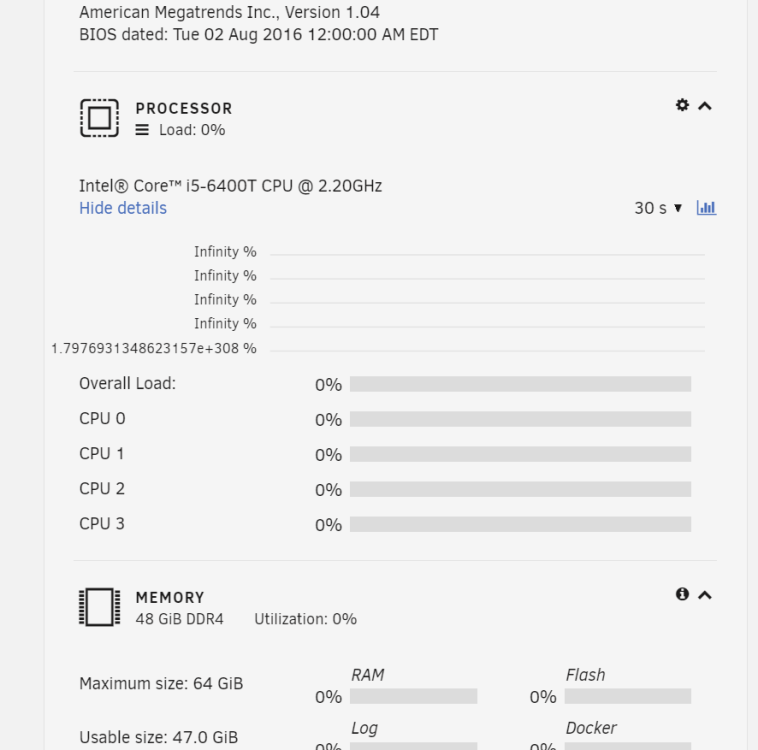
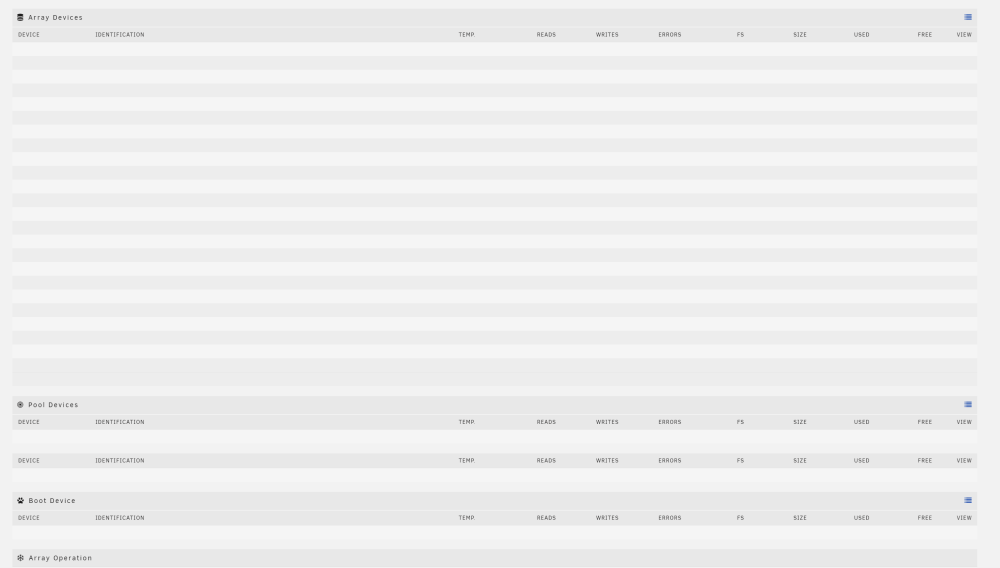
I'm having the same issue which also just started. I've tried it in Firefox, Edge and Chrome and they all have similar behaviors. I can't see anything in the "Main" tab, Dashboard shows incomplete information and plugin's and docker never load. EDIT: Using 6.11.5 Unraid
-
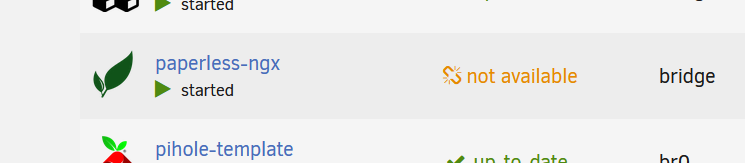
I upgraded to Paperless-NGX and I'm really happy with how it looks! Does anyone have an idea on if I did something wrong to get "not available" whenever I do a check for a new version?
-
Perhaps I need something explained to me about how Paperless-NGX works but I feel like I'm missing something. When I scan a document I would like to have the newest documents I've added appear on my front page. my assumption is this is under the "Added" filter under documents, however I'll scan and add a document and have the filter set to "Last 7 Days" and documents I scan today won't show up. Is that filter set to the previous day and back 7 days from that?
-
From the looks of it that made the difference! It seems to connect and, from the looks of it, my other dockers can connect. Thanks a ton that seems to have worked.
-
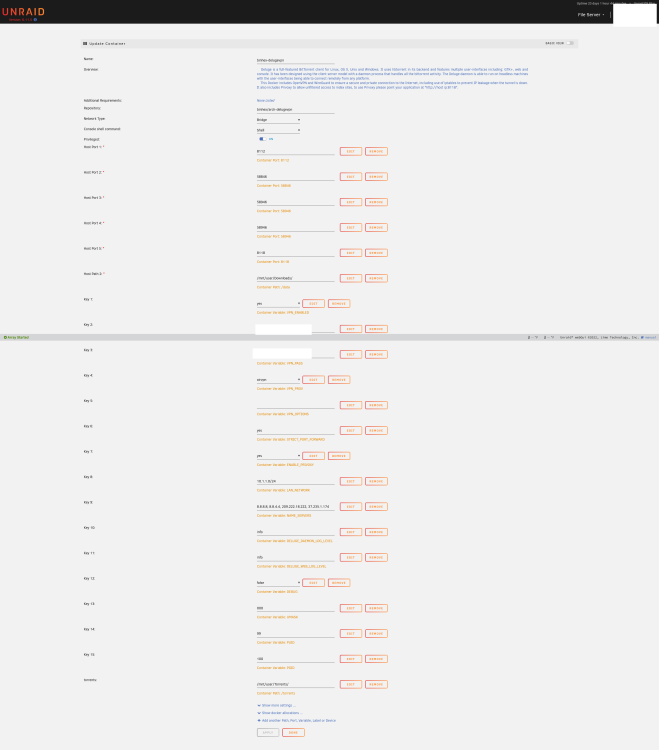
Hi, here are my settings from the container, I enabled Debuging logs after I took this screenshot, and the debug logs too. And yes, I'm able to connect to AirVPN and log in to the WebGUI fine. DelugeVPN.txt
-
Thanks, it looks like that was my problem, DelugeVPN start up now, however I'm getting the same problems with getting Privoxy to start that I was having with PIA. Does anyone have any thoughts? I thought AIRVPN would be a bit more reliable.
-
I did put it in the container settings since the container won't start unless there are some ports added, am I just supposed to put some random numbers in there and then add the real ports in the Deluge UI?
-
Hi, I'm wondering if I can get some help, I'm trying to get Privoxy to work and in reading the forum I saw that PIA (what I was using) is being flaky so I replaced it with AirVPN. I set up a forwarded port and generated .crt/.key/.key and /.ovpn files and put them in openvpn (removing the PIA files) and when I change the ports to the ones I specified in AirVPN I get this error when I try to save the docker container: docker: Error response from daemon: driver failed programming external connectivity on endpoint binhex-delugevpn (0ce07624958ca487d10d58fa71eadc16fe5c26b4d69ab7cbcb26546bcc3a61c9): Bind for 0.0.0.0:28312 failed: port is already allocated. Goes without saying but I also can't start the container. Any ideas what I'm doing wrong?
-
Looks like the new update fixed it!
-
I just tried doing this, my permissions were already set to "read/write" throughout but I repushed the permissions for the jdownloader2 folder in appdata and no change, still ends with: [cont-init ] 15-install-pkgs.sh: executing... [cont-init ] 15-install-pkgs.sh: terminated successfully. [cont-init ] 55-jdownloader2.sh: executing... [cont-init ] 55-jdownloader2.sh: terminated with error 1.
-
I just updated Jdownloader and now I'm getting this error when I try to start it up, is this happening with anyone else? [cont-init ] 10-certs.sh: terminated successfully. [cont-init ] 10-check-app-niceness.sh: executing... [cont-init ] 10-check-app-niceness.sh: terminated successfully. [cont-init ] 10-cjk-font.sh: executing... [cont-init ] 10-cjk-font.sh: terminated successfully. [cont-init ] 10-clean-logmonitor-states.sh: executing... [cont-init ] 10-clean-logmonitor-states.sh: terminated successfully. [cont-init ] 10-clean-tmp-dir.sh: executing... [cont-init ] 10-clean-tmp-dir.sh: terminated successfully. [cont-init ] 10-fontconfig-cache-dir.sh: executing... [cont-init ] 10-fontconfig-cache-dir.sh: terminated successfully. [cont-init ] 10-init-users.sh: executing... [cont-init ] 10-init-users.sh: terminated successfully. [cont-init ] 10-jwm.sh: executing... [cont-init ] 10-jwm.sh: terminated successfully. [cont-init ] 10-nginx.sh: executing... [cont-init ] 10-nginx.sh: terminated successfully. [cont-init ] 10-set-tmp-dir-perms.sh: executing... [cont-init ] 10-set-tmp-dir-perms.sh: terminated successfully. [cont-init ] 10-vnc-password.sh: executing... [cont-init ] 10-vnc-password.sh: terminated successfully. [cont-init ] 10-web-data.sh: executing... [cont-init ] 10-web-data.sh: terminated successfully. [cont-init ] 10-x11-unix.sh: executing... [cont-init ] 10-x11-unix.sh: terminated successfully. [cont-init ] 10-xdg-runtime-dir.sh: executing... [cont-init ] 10-xdg-runtime-dir.sh: terminated successfully. [cont-init ] 15-install-pkgs.sh: executing... [cont-init ] 15-install-pkgs.sh: terminated successfully. [cont-init ] 55-jdownloader2.sh: executing... [cont-init ] 55-jdownloader2.sh: terminated with error 1. [init ] container is starting... [cont-env ] loading container environment variables... [cont-env ] APP_NAME: loading... [cont-env ] DISPLAY: executing... [cont-env ] DISPLAY: terminated successfully. [cont-env ] DISPLAY: loading... [cont-env ] DOCKER_IMAGE_PLATFORM: loading... [cont-env ] DOCKER_IMAGE_VERSION: loading... [cont-env ] GTK_THEME: executing... [cont-env ] GTK_THEME: terminated successfully. [cont-env ] GTK_THEME: loading... [cont-env ] HOME: loading... [cont-env ] INSTALL_PACKAGES_INTERNAL: executing... [cont-env ] INSTALL_PACKAGES_INTERNAL: terminated successfully. [cont-env ] INSTALL_PACKAGES_INTERNAL: loading... [cont-env ] QT_STYLE_OVERRIDE: executing... [cont-env ] QT_STYLE_OVERRIDE: terminated successfully. [cont-env ] QT_STYLE_OVERRIDE: loading... [cont-env ] TAKE_CONFIG_OWNERSHIP: loading... [cont-env ] XDG_CACHE_HOME: loading... [cont-env ] XDG_CONFIG_HOME: loading... [cont-env ] XDG_DATA_HOME: loading... [cont-env ] XDG_RUNTIME_DIR: loading... [cont-env ] container environment variables initialized. [cont-secrets] loading container secrets... [cont-secrets] container secrets loaded. [cont-init ] executing container initialization scripts... [cont-init ] 10-certs.sh: executing... [cont-init ] 10-certs.sh: terminated successfully. [cont-init ] 10-check-app-niceness.sh: executing... [cont-init ] 10-check-app-niceness.sh: terminated successfully. [cont-init ] 10-cjk-font.sh: executing... [cont-init ] 10-cjk-font.sh: terminated successfully. [cont-init ] 10-clean-logmonitor-states.sh: executing... [cont-init ] 10-clean-logmonitor-states.sh: terminated successfully. [cont-init ] 10-clean-tmp-dir.sh: executing... [cont-init ] 10-clean-tmp-dir.sh: terminated successfully. [cont-init ] 10-fontconfig-cache-dir.sh: executing... [cont-init ] 10-fontconfig-cache-dir.sh: terminated successfully. [cont-init ] 10-init-users.sh: executing... [cont-init ] 10-init-users.sh: terminated successfully. [cont-init ] 10-jwm.sh: executing... [cont-init ] 10-jwm.sh: terminated successfully. [cont-init ] 10-nginx.sh: executing... [cont-init ] 10-nginx.sh: terminated successfully. [cont-init ] 10-set-tmp-dir-perms.sh: executing... [cont-init ] 10-set-tmp-dir-perms.sh: terminated successfully. [cont-init ] 10-vnc-password.sh: executing... [cont-init ] 10-vnc-password.sh: terminated successfully. [cont-init ] 10-web-data.sh: executing... [cont-init ] 10-web-data.sh: terminated successfully. [cont-init ] 10-x11-unix.sh: executing... [cont-init ] 10-x11-unix.sh: terminated successfully. [cont-init ] 10-xdg-runtime-dir.sh: executing... [cont-init ] 10-xdg-runtime-dir.sh: terminated successfully. [cont-init ] 15-install-pkgs.sh: executing... [cont-init ] 15-install-pkgs.sh: terminated successfully. [cont-init ] 55-jdownloader2.sh: executing... [cont-init ] 55-jdownloader2.sh: terminated with error 1.
-
Hello, some time ago I was having huge issues with SMB slowness (I still am so I'm hoping the new upgrade will help). As per some recommendations I changed my SMB settings and added: "case sensitive = yes". With the new upgrade, I'm trying to get SMB back to a default state so I can see if I can get some better throughput out of it, but I'm worried about removing that setting. Any idea what might happen if I have any folders that have identical names but different cases in a directory? I've run "Fix common problems" and tried to clear out as many as possible, but I'm worried if one sneaks in there what it might do to the server once I remove that.




