





Jobine
Members
-
Joined
-
Last visited
Everything posted by Jobine
-
Hi, My server has an i7-7700k CPU, with 32gb of DDR4, 1 SSD for the cache, and WDC_WD40E for the array. I also added a sata III controller card for my hard drives. I use several applications including Krusader and JDownloader. My problems are mainly... - When this downloads, I lose access to Krusader. - When I download, copying from array to array is very slow. Is there a way to speed it all up ? or do I have settings to improve ? Thank, serveur-diagnostics-20220309-1249.zip
-
How can we update the unraid version to Hoobs 4 ?
-
Same thing for me.
-
When I open the Trash bin, I see nothing... How I configure that ? Thank,
-
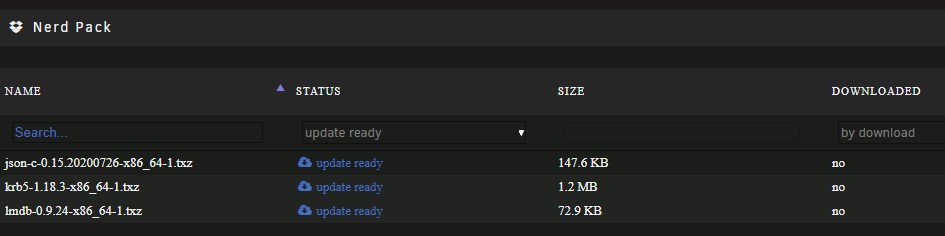
Hi, I have 3 updates available, but they are not updating. Anyone know why? Thank,
-
Often I lose connection with my Hoobs. When I open the application, the devices don't appear. Is there a server setting to change? Thank,
-
Hi, I have a little problem with the last update. I use the Update Assistant to be sure... I updated from 6.8.3 to 6.9 and my server was restarting in a loop /bzimage...ok /bzroot...ok and reboot non stop. Any idea ? Thank,
-
It's OK now... 😯 Thank,
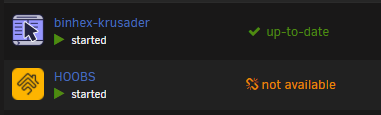 This afternoon, the docker version appear "Not available" in my Unraid server... How I can correct this ?I have been using Krusader for a long time. With the old version the movements were super fast, now, I see the progress when I move file ... but I don't know why./media to /mediaI run Krusader on Unraid. With the previous version, when I moved a file it was almost instantaneous, now it's like a copy, we see the progress. It's not normal.The speed of moving files was much faster with the previous version. But no solution for the moment.You need to fix the moving speed...Hi, How I can uncompress a rar file directly in Krusader. I try the "Browse Archive" and Copy to other panel, but I can complete the action. Thank,Clear your browser cacheIt seems to me that the file movements are much longer than before.Chrome on Mac... Just clear the Chrome cache and everything works. Thank,Samething on MacSince the last update, Krusader won't start or don't work. The problem seems to come from chrome. It works well in Safari.
 My problem is that it stops the dockers, but does not restart it.Jun 30 03:00:01 Serveur CA Backup/Restore: ####################################### Jun 30 03:00:01 Serveur CA Backup/Restore: Community Applications appData Backup Jun 30 03:00:01 Serveur CA Backup/Restore: Applications will be unavailable during Jun 30 03:00:01 Serveur CA Backup/Restore: this process. They will automatically Jun 30 03:00:01 Serveur CA Backup/Restore: be restarted upon completion. Jun 30 03:00:01 Serveur CA Backup/Restore: ####################################### Jun 30 03:00:01 Serveur CA Backup/Restore: Stopping HOOBS Jun 30 03:00:05 Serveur kernel: device br0 left promiscuous mode Jun 30 03:00:05 Serveur kernel: vethfc4da38: renamed from eth0 Jun 30 03:00:07 Serveur CA Backup/Restore: docker stop -t 60 HOOBS Jun 30 03:00:07 Serveur CA Backup/Restore: Stopping JDownloader2 Jun 30 03:00:10 Serveur kernel: vethf5936b2: renamed from eth0 Jun 30 03:00:10 Serveur kernel: docker0: port 1(veth26c6a53) entered disabled state Jun 30 03:00:11 Serveur avahi-daemon[6153]: Interface veth26c6a53.IPv6 no longer relevant for mDNS. Jun 30 03:00:11 Serveur avahi-daemon[6153]: Leaving mDNS multicast group on interface veth26c6a53.IPv6 with address xxxx::xxxx:xxxx:xxxx:xxxx. Jun 30 03:00:11 Serveur kernel: docker0: port 1(veth26c6a53) entered disabled state Jun 30 03:00:11 Serveur kernel: device veth26c6a53 left promiscuous mode Jun 30 03:00:11 Serveur kernel: docker0: port 1(veth26c6a53) entered disabled state Jun 30 03:00:11 Serveur avahi-daemon[6153]: Withdrawing address record for xxxx::xxxx:xxxx:xxxx:xxxx on veth26c6a53. Jun 30 03:00:13 Serveur CA Backup/Restore: docker stop -t 60 JDownloader2 Jun 30 03:00:13 Serveur CA Backup/Restore: Stopping plex Jun 30 03:00:19 Serveur CA Backup/Restore: docker stop -t 60 plex Jun 30 03:00:19 Serveur CA Backup/Restore: Stopping tautulli Jun 30 03:00:26 Serveur kernel: veth878532d: renamed from eth0 Jun 30 03:00:26 Serveur kernel: docker0: port 2(veth49badad) entered disabled state Jun 30 03:00:26 Serveur avahi-daemon[6153]: Interface veth49badad.IPv6 no longer relevant for mDNS. Jun 30 03:00:26 Serveur avahi-daemon[6153]: Leaving mDNS multicast group on interface veth49badad.IPv6 with address xxxx::xxxx:xxxx:xxxx:xxxx. Jun 30 03:00:26 Serveur kernel: docker0: port 2(veth49badad) entered disabled state Jun 30 03:00:26 Serveur kernel: device veth49badad left promiscuous mode Jun 30 03:00:26 Serveur kernel: docker0: port 2(veth49badad) entered disabled state Jun 30 03:00:26 Serveur avahi-daemon[6153]: Withdrawing address record for xxxx::xxxx:xxxx:xxxx:xxxx on veth49badad. Jun 30 03:00:28 Serveur CA Backup/Restore: docker stop -t 60 tautulli Jun 30 03:00:28 Serveur CA Backup/Restore: Stopping transmission Jun 30 03:00:29 Serveur kernel: transmission-da[14147]: segfault at a04 ip 000055da45d5f2db sp 00001483f62ffa10 error 4 in transmission-daemon[55da45d2f000+57000] Jun 30 03:00:29 Serveur kernel: Code: 56 fe ff 41 56 41 55 41 54 55 53 4c 8b 2f 31 db 48 85 db 74 09 48 8b 9b b8 06 00 00 eb 07 49 8b 9d 58 01 00 00 48 85 db 74 28 <48> 8b 83 00 0a 00 00 31 ed 44 8b 70 48 4c 8d 60 40 44 39 f5 7d d0 Jun 30 03:00:33 Serveur kernel: vethaa4b0a1: renamed from eth0 Jun 30 03:00:33 Serveur kernel: docker0: port 3(vethb11f370) entered disabled state Jun 30 03:00:34 Serveur avahi-daemon[6153]: Interface vethb11f370.IPv6 no longer relevant for mDNS. Jun 30 03:00:34 Serveur avahi-daemon[6153]: Leaving mDNS multicast group on interface vethb11f370.IPv6 with address xxxx::xxxx:xxxx:xxxx:xxxx. Jun 30 03:00:34 Serveur kernel: docker0: port 3(vethb11f370) entered disabled state Jun 30 03:00:34 Serveur kernel: device vethb11f370 left promiscuous mode Jun 30 03:00:34 Serveur kernel: docker0: port 3(vethb11f370) entered disabled state Jun 30 03:00:34 Serveur avahi-daemon[6153]: Withdrawing address record for fe80::3409:9ff:fe54:acb8 on vethb11f370. Jun 30 03:00:35 Serveur CA Backup/Restore: docker stop -t 60 transmission Jun 30 03:00:35 Serveur CA Backup/Restore: Stopping xtevedocker Jun 30 03:00:38 Serveur CA Backup/Restore: docker stop -t 60 xtevedocker Jun 30 03:00:38 Serveur CA Backup/Restore: Backing up USB Flash drive config folder to Jun 30 03:00:38 Serveur CA Backup/Restore: Using command: /usr/bin/rsync -avXHq --delete --log-file="/var/lib/docker/unraid/ca.backup2.datastore/appdata_backup.log" /boot/ "/mnt/disks/Sauvegarde/" > /dev/null 2>&1 Jun 30 03:14:55 Serveur CA Backup/Restore: Changing permissions on backup Jun 30 03:14:55 Serveur CA Backup/Restore: Backing Up appData from /mnt/user/appdata/ to /mnt/disks/Sauvegarde/Appdata/[email protected] Jun 30 03:14:55 Serveur CA Backup/Restore: Using command: cd '/mnt/user/appdata/' && /usr/bin/tar -cvaf '/mnt/disks/Sauvegarde/Appdata/[email protected]/CA_backup.tar' --exclude ".AppleDB" --exclude 'docker.img' * >> /var/lib/docker/unraid/ca.backup2.datastore/appdata_backup.log 2>&1 & echo $! > /tmp/ca.backup2/tempFiles/backupInProgress Jun 30 03:40:01 Serveur crond[1920]: exit status 1 from user root /usr/local/sbin/mover &> /dev/null Jun 30 04:55:11 Serveur CA Backup/Restore: Backup Complete Jun 30 04:55:11 Serveur CA Backup/Restore: Verifying backup Jun 30 04:55:11 Serveur CA Backup/Restore: Using command: cd '/mnt/user/appdata/' && /usr/bin/tar --diff -C '/mnt/user/appdata/' -af '/mnt/disks/Sauvegarde/Appdata/[email protected]/CA_backup.tar' > /var/lib/docker/unraid/ca.backup2.datastore/appdata_backup.log & echo $! > /tmp/ca.backup2/tempFiles/verifyInProgress Here's are my log.Hi, I have a problem. My dockers stop, my backup is done, but the dockers don't restart after... Any idea ?Toggle basic view to advanced view WebUI: http://[IP] Network Type: Custom:br0 Fixed IP address (optional): 192.168.1.254 Console shell command: Shell Homebridge Port - Container Port: 51826 - Host Port: 51826 Server Port - Container Port: 80 - Host Port: 8080 (same port, at 1st line) Like that, I have access to WebUi with http://192.168.1.254 directly

