





lordbob75
Members
-
Joined
-
Last visited
Everything posted by lordbob75
-
Hello, I've started getting a machine check error on my server. Instructions say to post it to support, so my diagnostics are attached. Based on the post in the more information, it looks like it's happening well after the startup, so I think it's an actual issue. Hopefully it's a cheap/easy fix if so. Thanks for the help. skynet-diagnostics-20241027-0839.zip
-
Oh, duh, I see now. I totally assumed that was something else. Looks like this has worked perfectly and I'm back up and running again. Thanks very much, that was an easy fix in the end.
-
Ok, I set both cache pool devices to "no device", but it won't let me start the array because cache drives are missing. Did you mean something else by "unassign all pool devices"?
-
Ok great, that sounds like an easy fix then. I'll give that a shot this evening after work and report back.
-
That won't delete or erase the cache drive? I'd guess not since you're recommending it, but I want to make sure I understand first. It would be a nice easy fix though, so I hope it'll work. I won't be able to try until after work today anyways so I've got some time.
-
Ah, well it says the cache drive is emulated and when I mounted the array it started containers. Uh, it's been a while and I don't remember exactly. I followed directions from the documentation on changing the cache drives. I believe it was these instructions: https://wiki.unraid.net/Replace_A_Cache_Drive Everything had been working for quite a while and the server had rebooted multiple times. Attached. skynet-diagnostics-20230607-0543.zip
-
I just replaced my unraid USB drive. The array itself is good, but my cache drive isn't. For some reason the config thinks that I'm still using an old cache configuration with 2 drives, whereas I have moved to using just 1 drive well over a year ago. However, the new USB config is looking for my 2 old cache drives not my single new one. The cache drive is successfully emulated by the array. How can I fix this? Can I just correct the cachepool.cfg file? Do I need do something else? Let me know what, if any, information you need. Thanks
-
I'm using NUT with my Xtreme power p80 series UPS. NUT seems to detect it, though I have to manually set the battery size. As far as I can tell everything is working correctly, except that it seems to shut my server and client down immediately upon AC power loss instead of depleting the battery. I believe I have it setup correctly, it's set to power the server down at 10 minutes on the battery.
-
All of a sudden this container won't load. When trying to bring up the WebGUI all I get is "Cannot Connect". There are no errors in the logs and I haven't even logged into the GUI in months because everything worked. Tried reinstalling it, changing branches, changing to bridge/host/br0, deleted all appdata and copied it back over. What's going on? How do I fix this?
-
Great, just wanted to double check. Thanks!
-
Ok cool, easy fix then. This won't delete the world right?
-
@ich777 thanks for the great containers. I'm running 2 Valheim containers and both are working just fine except for one issue. Almost every time that the CA Appdata backup runs, the first server doesn't come back up because the original ports are added back to the 2nd server and it won't let the other one start. I deleted the original port and game port on the 2nd server, but it's coming back. Any idea how to stop it from doing this?
-
Yes you have to delete it. I tried force update first but it doesn't do anything.
-
Since the GitHub post didn't specify anything for UnRAID specifically, I'll post it here to confirm it for anyone who's unsure. Simply delete your current container (and image). Reinstall the container, and choose the Default (or Latest). I just did this in less than 15 minutes and it was extremely painless and saved all my settings. You can search for the container easily enough but if you're unsure which one you had installed you can always check Previous Apps in the left menu.
-
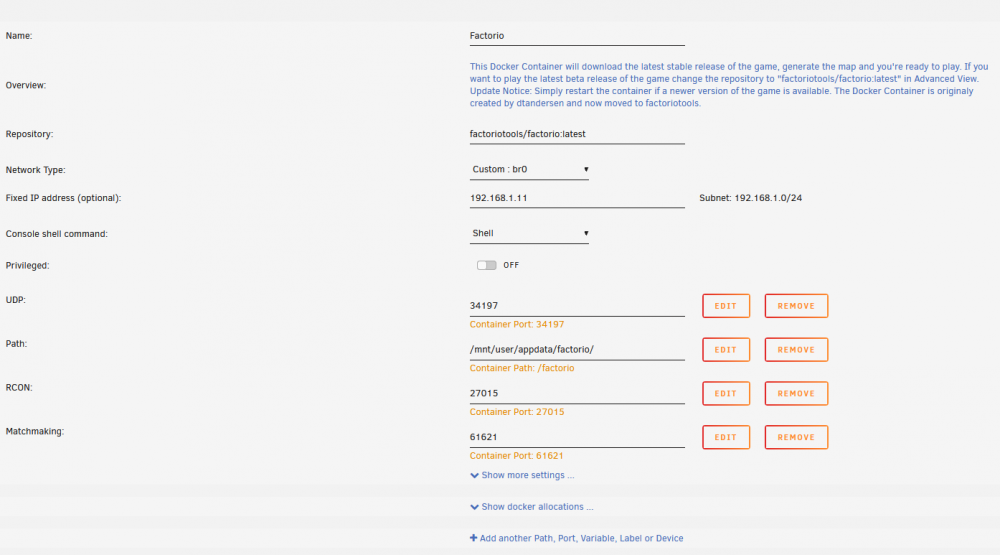
Oh I'm sure it's my fault somehow, I just dunno how. Screenshot of settings: @ich777 Alrighty I think I have it figured out. I believe the server was continually rebooting itself (taking about a minute to do so) and throwing an error when it tried to start, causing the reboot. Error seems to have been caused by an out-dated map-settings file, which has now been corrected. Server is stable, and the log is no longer being spammed. Problem solved! Confirmed I can connect to it as well. Not sure what exactly happened with the map file, but I'm sure it was because of updates.
-
@ich777 I'm using your Factorio container (thanks for setting that up by the way) It works fine, except that it's spamming my server log with network device renaming: Dec 26 22:40:41 SkyNet kernel: eth0: renamed from veth8b51caa Dec 26 22:40:44 SkyNet kernel: veth8b51caa: renamed from eth0 Dec 26 22:41:45 SkyNet kernel: eth0: renamed from veth21fc8e6 Dec 26 22:41:48 SkyNet kernel: veth21fc8e6: renamed from eth0 Dec 26 22:42:52 SkyNet kernel: veth3e0c201: renamed from eth0 Dec 26 22:44:57 SkyNet kernel: eth0: renamed from veth1eb2f47 Dec 26 22:44:59 SkyNet kernel: veth1eb2f47: renamed from eth0 Dec 26 22:46:00 SkyNet kernel: eth0: renamed from veth9ec956c Dec 26 22:46:03 SkyNet kernel: veth9ec956c: renamed from eth0 Dec 26 22:47:04 SkyNet kernel: eth0: renamed from veth7c9b7a0 Dec 26 22:47:07 SkyNet kernel: veth7c9b7a0: renamed from eth0 Dec 26 22:48:10 SkyNet kernel: veth55156c5: renamed from eth0 Dec 26 22:49:11 SkyNet kernel: eth0: renamed from vethea63aa1 Dec 26 22:49:14 SkyNet kernel: vethea63aa1: renamed from eth0 Dec 26 22:51:20 SkyNet kernel: veth495550d: renamed from eth0 Dec 26 22:53:41 SkyNet kernel: eth0: renamed from vethf9f63eb Dec 26 22:53:44 SkyNet kernel: vethf9f63eb: renamed from eth0 Dec 26 22:53:46 SkyNet kernel: eth0: renamed from vethfc8a62b Dec 26 22:53:49 SkyNet kernel: vethfc8a62b: renamed from eth0 Dec 26 22:53:51 SkyNet kernel: eth0: renamed from veth75ee072 Dec 26 22:53:53 SkyNet kernel: veth75ee072: renamed from eth0 Dec 26 22:53:55 SkyNet kernel: eth0: renamed from veth87a2bb1 Dec 26 22:54:00 SkyNet kernel: eth0: renamed from veth1f27aac Do you have any idea why it's doing that? I'm assuming I set something up wrong, but have no clue as to what.
-
Awesome, thanks.
-
I did find the solution to this actually. Posting it here for anyone else that needs it: https://forums.plex.tv/t/error-transcoder-ac3_eae-0x2fd4f40-eae-timeout-eae-not-running-or-wrong-folder/189917/33 Basically one of the Codec folders (/mnt/user/appdata/PlexMediaServer/Library/Application Support/Plex Media Server/Codecs/EasyAudioEncoder-141-linux-ubuntu-x86_64/EasyAudioEncoder) doesn't have executable permissions. Running 'chmod 777 EasyAudioEncoder' gives it executable permissions and lets the file play.
-
I added that to my last post in the edits. It is set to /transcode and it works fine for every other file except whatever this type is. I posted the permissions in the last post as well.
-
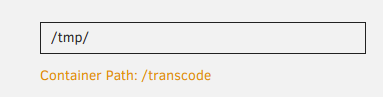
It's my RAM (64GB), space isn't an issue there. root@SkyNet:/# ls -la /tmp total 16 drwxrwxrwt 16 nobody users 420 Oct 2 23:20 ./ drwxr-xr-x 18 root root 400 Sep 28 18:15 ../ drwxrwxrwt 2 nobody users 40 Sep 20 22:55 .ICE-unix/ -r--r--r-- 1 nobody users 11 Sep 20 22:55 .X0-lock drwxrwxrwt 2 nobody users 60 Sep 20 22:55 .X11-unix/ drwxrwxrwx 2 nobody users 40 Sep 20 22:55 .preclear/ drwxr-xr-x 3 nobody users 60 Sep 20 23:46 Transcode/ -rw-rw-rw- 1 nobody users 21 Oct 2 23:20 blah drwxrwxrwx 3 nobody users 60 Sep 20 22:55 ca.backup2/ drwxrwxrwx 3 nobody users 100 Sep 20 23:27 ca.turbo/ drwxrwxrwx 3 nobody users 60 Oct 2 01:00 community.applications/ drwxrwxrwx 2 nobody users 60 Sep 20 22:55 emhttp/ -rw-rw-rw- 1 nobody users 0 Sep 20 23:27 error-output.txt drwxrwxrwx 2 nobody users 120 Oct 2 04:40 fix.common.problems/ drwxr-xr-x 4 nobody users 80 Sep 20 22:55 notifications/ -rwxrwxrwx 1 nobody users 40 Sep 20 23:27 php.reload* drwxr-xr-x 2 nobody users 760 Sep 24 17:34 plugins/ -rw-rw-rw- 1 nobody users 7 Sep 20 23:28 test drwx------ 2 nobody users 40 Sep 20 22:56 tmux-0/ drwxrwxrwx 2 nobody users 40 Sep 20 22:55 unassigned.devices/ drwxrwxrwx 5 nobody users 140 Sep 20 23:27 user.scripts/ edit: I should add this I think: transcode folder in plex is set to /transcode Edit2: Plex was playing something that works while I grabbed that permissions. No PMS folder there.
-
Will do, thanks.
-
I do not appear to be able to play certain files in Plex. I believe it's to do with this error message: ERROR - [Transcoder] [truehd_eae @ 0x1541440] EAE timeout! EAE not running, or wrong folder? Could not read '/tmp/pms... However, there does not appear to be any sort of fix for this. Could anyone assist in figuring it out? I did try deleting my codecs folder, which made no difference. I have also optimized the database, cleaned bundles and trash. From what I could tell, it's like a year old bug with Plex? Almost forgot, attached logs. Plex Media Server Logs_2018-10-02_17-42-54.zip
-
I successfully got this running on my server, but noticed that running it as the DNS server for the network introduced latency issues so bad I was unable to play online games on the network. Any idea if this is normal? Is there a way to pass through a network interface to the container directly to remove the latency of going through the server (assuming that was even what was causing it)?
-
@gfjardim can you provide any assistance with this?
-
It seems that I need to clear Cookies and other data rather than the cache, before I am able to see it again.


