





Roxedus
Community Developer
-
Joined
-
Last visited
Everything posted by Roxedus
-
I have never used traccar, does it actually serve on /traccar? Does it support that base path?
-
Yea, that's a wierd one, we discussed this over at our Discord, and I am clueless
-
The xml is linked in the description in the template, but here it is https://raw.githubusercontent.com/traccar/traccar/master/setup/traccar.xml The screenshot assumes you placed the xml inside the traccar appdata folder

-
You need to download the xml linked in the description, place it somewhere on your array, and add the path for the xml to the `traccar.xml` volume mapping
-
Then use this post. Right. As a non-unraid user would need to do.
-
Yes. Its one of the features listed. https://github.com/dani-garcia/bitwarden_rs#features
-
There was a issue raised about this on the bitwarden_rs repository. Its due to the fact that your `domain` variable dont include scheme.
-
For this container, that wont happen with that variable in mind. You can create an account by using the variable for allowing sing ups. For the lsio container i brought up, it means that it wont create the user automatically on startup, you can still create it with the containers shell with the same commands you would use to create user 3 currently. You do inn fact bring up an interesting point, and see where the template maintainer may be able to mess it up. This whole discussion will probably fit another thread (please point me to it), but it would also be nice to be able to have variables connected to the branch tag. For this container its not needed, as its sql based counterpart is another image, and introduces some variables.
-
Exactly. There is multiple scenarios i can see where it would be handy. Like linuxservers mariadb which only uses some variables at first run.
-
Interesting. Would be nice to be able to specify if a variable would be synced like that. I agree, and this one doesn't. I have made a request for allowing it to be empty, but i don't see it going into fruition.
-
it comes back when a user deletes a variable.
-
you can do that on the reverse proxy. in your bitwarden.subdomain.conf you can add the following location just before the last curly bracket location /admin { return 404; } Ideally one should be able to remove the token variable all together, but it gets synced back. ( If one could select what variables CA syncs, that would be great winks at @Squid)
-
Its really not. Bitwarden_rs doesn't have a way to generate a self-signed certificate, hence why it cant be delivered with one. The project has its own wiki page on enabling SLL, and another page on how to use self-signed certs with it. What you are asking is extending the containers functionality. I can help with that, if you hop on over to the discord linked in my signature.
-
Orphaned image only means that the image is not currently is used. Did you get an error after adding that parameter? Regardless, go to the docker page on unraid, scroll down to "Add container", in the dropdown choose bitwarden, and edit the template to its previously working state.
-
easily? reverse proxy
-
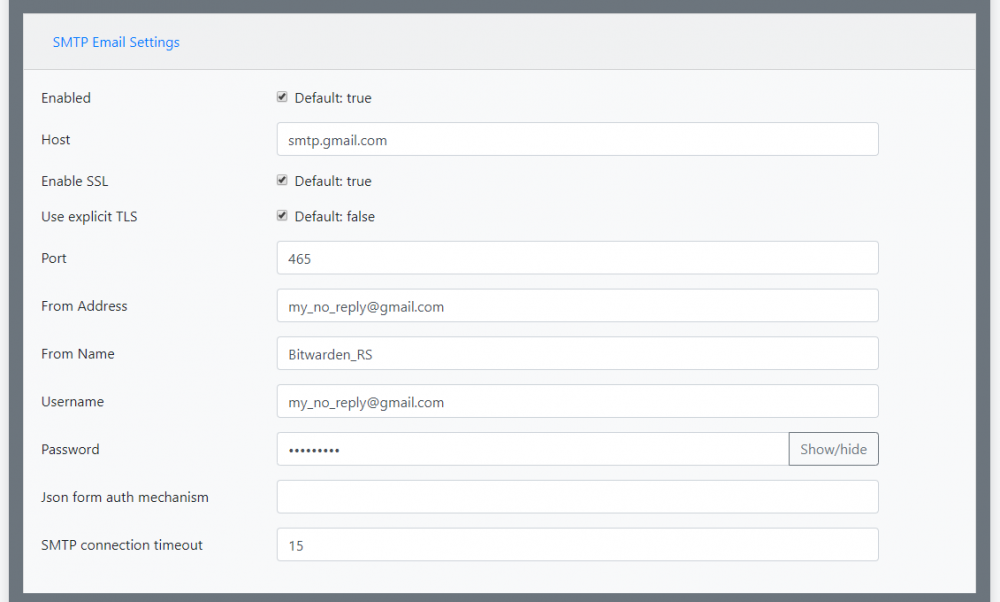
@Gabriel_B I just managed to setup smtp with a gmail account. This account is set to allow insecure connections I used the settings showed in the screenshot, but with my email
-
Sounds like a DNS issue, is this your own email server?
-
It has the important bits which I was looking for, if you want to try another one you can try the one from Linuxserver. To eliminate the possibility of it being the reverse proxy, you should connect the extension to your local address on the homecomputer.
-
Ok, so it sounds like a reverse proxy issue. Can you post yours?
-
I have neither of those now. Post some new container logs.
-
But the appdata is still present, right? point this one to the existing appdata
-
@RockDawgDid you not have an existing install?
-
So bitwardenrs:server is drop-in replaceable with mprasil's container. The same environment variables and so on. ADMIN_TOKEN is unrelated to the admin password, it's a string you create yourself. Either generate a random one (preferred), or just button smash on your keyboard. You don't really need to remember it, as you can change it if you really need to go into the admin panel.
-
Having a plain webhook notifier would be nice, one that can be very customised (preferably being able to create a json payload). A plain webhook method allows a user to use pretty much their push notification service of choice. This may, or may not be a tangent of my wish to send notifications to discord without using the "slack hack", as expressed on the 2020 poll
-
The one from their wiki works perfectly for me. mounting the logs from the bitwarden container to the letsencrypt container. f2b is doing both iptables and firewall actions on triggers




