






Fiservedpi
Members
-
Joined
-
Last visited
-
Fiservedpi changed their profile photo
-
Hmmm I’ve never had this before 7.2 I can’t get the scroll bar on the right to move the whole page up n down. Probably related to my set up. Thanks for showing me this.
-
The left bar isn’t the issue it’s the data in the middle that doesn’t scroll, they scroll like individuals cards which is to cumbersome Array scrollable card left and right Pool scrollable card left and right So on n so forth As opposed the page scrolling as one unit like usual
-
No that left hand bar stays static on chrome and safari mobile.
-
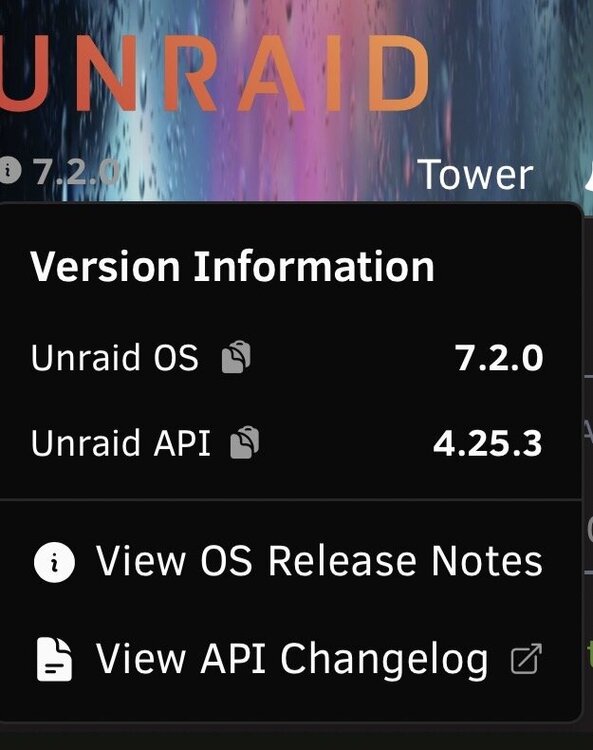
Just upgraded to 7.2.0 and the UI on mobile edge browser is off, the side bar stays static and the center of the page it’s scrollable but not completely. This is a new issue I’ve never had an issue before with the way the page moves. Tried clearing cache etc. but still same result. On mobile only. It’s as if the webpage is being treated like each is a separate section with the static left menu. ScreenRecording_11-04-2025 14-08-41_1.mov
-
ahhh yes this makes much more sense now, thank you.
-
Reboot from CLI: powerdown -r Safe/clean shutdown and system restart from the command line - General Support - Unraid
-
I dealt with this for a whole year. I tried everything smb 1 2 3 etc, Windows features on and off, user perms till I was blue in the face. The only thing that worked was a fresh install of Windows. Sometimes windows just is borked and have to admit defeat; you should of seen my face the first time it worked on the first try.
-
I've been banging my head against the wall for 12 hours trying to get these 2 to talk to each other, but nothing I try works. This was the closest I've gotten so far their actually talking albeit not correctly. Has anyone successfully connected SSO with MS Online? Unraid api output redacted in places if it looks weird to you. TIA OIDC Provider Setup | Unraid Docs [20:10:06 INFO OidcValidationService]: Discovery response metadata: {"apiVersion":"4.25.2+50d8331","logger":"OidcValidationService","context":"OidcValidationService"} [20:10:06 INFO OidcValidationService]: - issuer: https://sts.windows.net/ecccccccccccc1/ {"apiVersion":"4.25.2+50d8331","logger":"OidcValidationService","context":"OidcValidationService"} [20:10:06 INFO OidcValidationService]: - authorization_endpoint: https://login.microsoftonline.com/vvvvvvvvvvvv/oauth2/authorize {"apiVersion":"4.25.2+50d8331","logger":"OidcValidationService","context":"OidcValidationService"} [20:10:06 INFO OidcValidationService]: - token_endpoint: https://login.microsoftonline.com/cxxxxxxxxxxxxxx/oauth2/token {"apiVersion":"4.25.2+50d8331","logger":"OidcValidationService","context":"OidcValidationService"} [20:10:06 INFO OidcValidationService]: - userinfo_endpoint: https://login.microsoftonline.com/xxxxxxxxxxxx/openid/userinfo {"apiVersion":"4.25.2+50d8331","logger":"OidcValidationService","context":"OidcValidationService"} [20:10:06 INFO OidcValidationService]: - jwks_uri: https://login.microsoftonline.com/common/discovery/keys {"apiVersion":"4.25.2+50d8331","logger":"OidcValidationService","context":"OidcValidationService"} [20:10:06 INFO OidcValidationService]: - response_types_supported: code, id_token, code id_token, token id_token, token {"apiVersion":"4.25.2+50d8331","logger":"OidcValidationService","context":"OidcValidationService"} [20:10:06 INFO OidcValidationService]: - scopes_supported: openid {"apiVersion":"4.25.2+50d8331","logger":"OidcValidationService","context":"OidcValidationService"} [20:10:33 INFO OidcValidationService]: Starting discovery for provider utraraid {"apiVersion":"4.25.2+50d8331","logger":"OidcValidationService","context":"OidcValidationService"} [20:10:33 INFO OidcValidationService]: Discovery URL: https://login.microsoftonline.com/xxxxxxxxxxxxxxx1/.well-known/openid-configuration {"apiVersion":"4.25.2+50d8331","logger":"OidcValidationService","context":"OidcValidationService"} [20:10:33 INFO OidcValidationService]: Client ID: xxxxxxxxxxxxx {"apiVersion":"4.25.2+50d8331","logger":"OidcValidationService","context":"OidcValidationService"} [20:10:33 INFO OidcValidationService]: Client secret configured: Yes {"apiVersion":"4.25.2+50d8331","logger":"OidcValidationService","context":"OidcValidationService"} [20:10:34 INFO OidcValidationService]: Discovery successful for utraraid {"apiVersion":"4.25.2+50d8331","logger":"OidcValidationService","context":"OidcValidationService"} [20:10:34 INFO OidcValidationService]: Discovery response metadata: {"apiVersion":"4.25.2+50d8331","logger":"OidcValidationService","context":"OidcValidationService"} [20:10:34 INFO OidcValidationService]: - issuer: https://sts.windows.net/xxxxxxxxxxxx/ {"apiVersion":"4.25.2+50d8331","logger":"OidcValidationService","context":"OidcValidationService"} [20:10:34 INFO OidcValidationService]: - authorization_endpoint: https://login.microsoftonline.com/xxxxxxxx/oauth2/authorize {"apiVersion":"4.25.2+50d8331","logger":"OidcValidationService","context":"OidcValidationService"} [20:10:34 INFO OidcValidationService]: - token_endpoint: https://login.microsoftonline.com/efde6b80-adec-47bc-a43d-d40a8e5d5d51/oauth2/token {"apiVersion":"4.25.2+50d8331","logger":"OidcValidationService","context":"OidcValidationService"} [20:10:34 INFO OidcValidationService]: - userinfo_endpoint: https://login.microsoftonline.com/xxxxxxxopenid/userinfo {"apiVersion":"4.25.2+50d8331","logger":"OidcValidationService","context":"OidcValidationService"} [20:10:34 INFO OidcValidationService]: - jwks_uri: https://login.microsoftonline.com/common/discovery/keys {"apiVersion":"4.25.2+50d8331","logger":"OidcValidationService","context":"OidcValidationService"} [20:10:34 INFO OidcValidationService]: - response_types_supported: code, id_token, code id_token, token id_token, token {"apiVersion":"4.25.2+50d8331","logger":"OidcValidationService","context":"OidcValidationService"} [20:10:34 INFO OidcValidationService]: - scopes_supported: openid {"apiVersion":"4.25.2+50d8331","logger":"OidcValidationService","context":"OidcValidationService"} [20:10:34 INFO OidcService]: Built authorization URL via discovery for provider utraraid {"apiVersion":"4.25.2+50d8331","logger":"OidcService","context":"OidcService"} [20:10:34 INFO OidcService]: Authorization parameters: {"redirect_uri":"https:/xxxxxxxxxxxmyunraid.net/graphql/api/auth/oidc/callback","scope":"openid profile email","state":"utraraid:xxxxxxxxxxxxxxxxx","response_type":"code"} {"apiVersion":"4.25.2+50d8331","logger":"OidcService","context":"OidcService"} [20:10:34 INFO OidcRestController]: Redirecting to OIDC provider: https://login.microsoftonline.com/xxxxxxxxxx1/oauth2/authorize?redirect_uri=https%3A%2F%2Fxxxxxxxxxxt%2Fgraphql%2Fapi%2Fauth%2Foidc%2Fcallback&scope=openid+profile+email&state=utraraid%3Aed41ffb3e7ad55a83b11683477c8e05e.1760819013786.1075cb472943e4063393ea6bdcee824363ce89367a6f896d194441479295c490&response_type=code&client_id=715de9d8-7f97-4e75-bf9a-939fc2fa60{"apiVersion":"4.25.2+50d8331","logger":"OidcRestController","context":"OidcRestController"} [20:10:47 ERROR OidcTokenExchangeService]: Token exchange failed {"apiVersion":"4.25.2+50d8331","logger":"OidcTokenExchangeService","context":"OidcTokenExchangeService"} [20:10:47 ERROR OidcTokenExchangeService]: Error type: ClientError {"apiVersion":"4.25.2+50d8331","logger":"OidcTokenExchangeService","context":"OidcTokenExchangeService"} [20:10:47 ERROR OidcTokenExchangeService]: Error message: invalid response encountered {"apiVersion":"4.25.2+50d8331","logger":"OidcTokenExchangeService","context":"OidcTokenExchangeService"} [20:10:47 ERROR OidcTokenExchangeService]: Error code: OAUTH_INVALID_RESPONSE {"apiVersion":"4.25.2+50d8331","logger":"OidcTokenExchangeService","context":"OidcTokenExchangeService"} [20:10:47 ERROR OidcTokenExchangeService]: Error cause chain: {"apiVersion":"4.25.2+50d8331","logger":"OidcTokenExchangeService","context":"OidcTokenExchangeService"} [20:10:47 ERROR OidcTokenExchangeService]: [Cause 1] OperationProcessingError: unexpected "iss" (issuer) response parameter value {"apiVersion":"4.25.2+50d8331","logger":"OidcTokenExchangeService","context":"OidcTokenExchangeService"} [20:10:47 ERROR OidcTokenExchangeService]: [Cause 1] Code: OAUTH_INVALID_RESPONSE {"apiVersion":"4.25.2+50d8331","logger":"OidcTokenExchangeService","context":"OidcTokenExchangeService"} [20:10:47 ERROR OidcTokenExchangeService]: [Cause 2] object: [object Object] {"apiVersion":"4.25.2+50d8331","logger":"OidcTokenExchangeService","context":"OidcTokenExchangeService"} [20:10:47 ERROR OidcService]: OAuth callback error: invalid response encountered {"apiVersion":"4.25.2+50d8331","logger":"OidcService","context":"OidcService"} [20:10:47 ERROR OidcRestController]: OIDC callback error: UnauthorizedException: Authentication failed {"apiVersion":"4.25.2+50d8331","logger":"OidcRestController","context":"OidcRestController"}
-
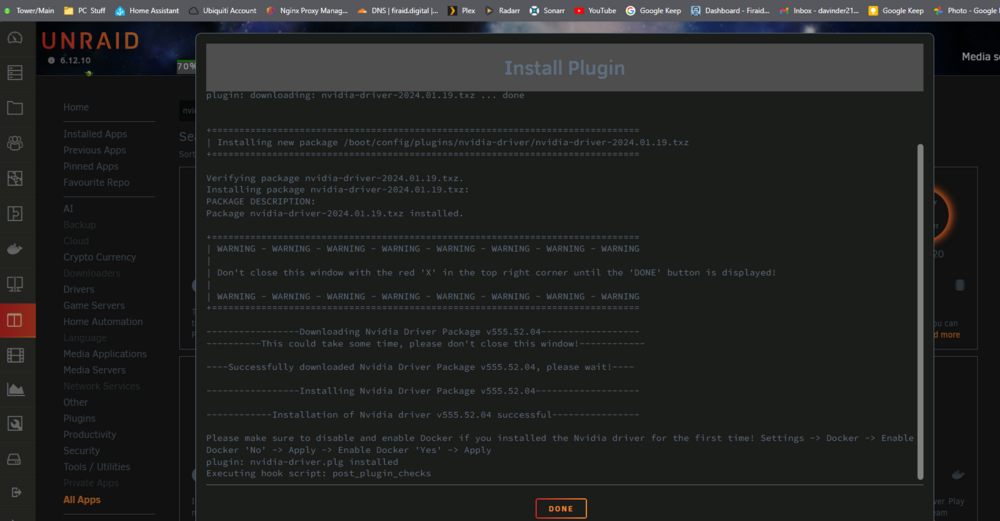
Perfect TYVM Looks good now thank you for the swift response
-
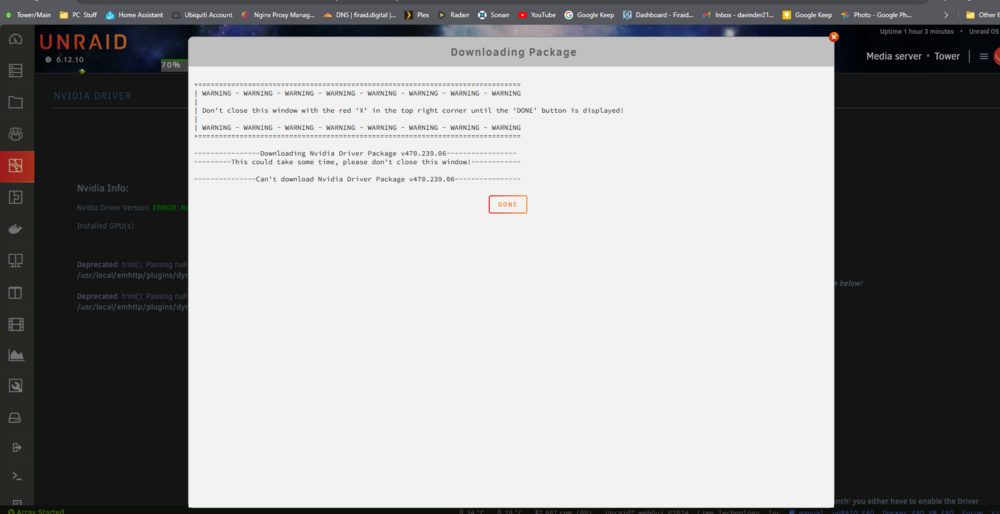
Unable to download stable release. Im getting this error when trying to dl the latest or any release. All was working fine until last week nothing has changed. Should I manually delete the plg and try again? TIA tower-diagnostics-20240626-0850.zip
-
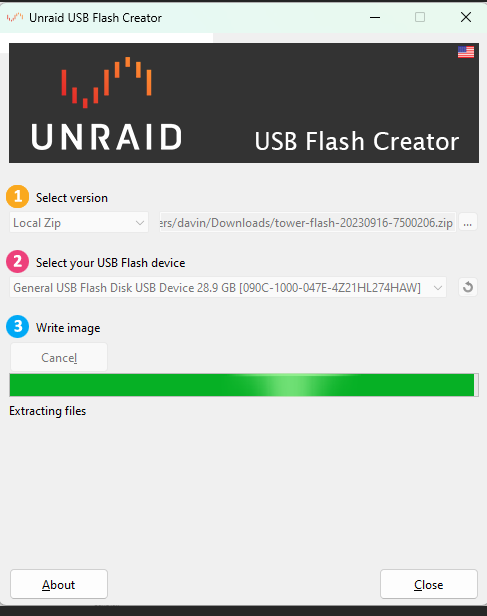
WELP it finally happened. Boot Drive failed suddenly and I didn't panic, pulled up the article grabbed my backup from 3days ago (thanks Unraid Connect) flashed it with USB creator Tool and back up in minutes. Total down time 15 min!!! You guys' Rock
-
Should I upgrade my cache drive or my parity drive? Currently: cache 256GB NVME 74gb free parity 4TB, all array drives are 4TB as well
-
Thanks for the swift response I would have never thought of that
-
upgraded to RC 6 but I can't figure out how to re-arrange my containers before you could just grab them and move up/down but that doesn't seem to work anymore.
-
Im seeing the same thing out of nowhere after RC6 overall lag cant really pinpoint it to one thing. Diag attached tower-diagnostics-20230522-1806.zip




