





yanksno1
Members
-
Joined
-
Last visited
Everything posted by yanksno1
-
Did test the same DVD movie on my iMac using a external drive and Handbrake, that loaded there fine there. Is the encryption on this docker stronger or something? I did manage to rip the blu-ray version of this movie using MakeMKV and used this docker to compress it and that worked great.
-
Hi, so testing this docker out on unRaid Version: 6.8.0 and can't seem to get my optical drive going. I was able to get it going with the MakeMKV-RDP docker using the --device=/dev/sg1 code. I do see it in dev, but when I select it trying to open a source (first tried a blu-ray, then a DVD) and kept getting back title not found. Anything I should try?
-
Hi, I'm on Unraid Version: 6.8.0-rc8. Yesterday I added a new cache drive, moved everything over to it and needed to re-add the dockers. In doing so I haven't been able to get my VPN torrent going. I first tried to add flexget's version and couldn't get that up. So then I turned back to this. Using Spaceinvader One updated video I followed the instructions to a T and still can't get the VPN running. If I disable it, it does run. I placed the PIA credentials in the appdata folder where I was supposed to and the credentials file was created. Not sure what else do to. Any thoughts?
-
Okay thanks, it was Master. I'll try Dev when I get home.
-
Hi, so yesterday I added a cache drive and moved everything over. Had to reset up the docker apps since they weren't there and a notice saying I needed to do it since I updated from v6 or something like that. Thought I did everything right in just pointing to the app folder and everything else but for some reason got an Error on a torrent I'd try to download. So I deleted that docker and image and tried resetting it up again. Now I can't get it to load using PIA. If I disable the VPN, it will load. Anything I should try to get it going again?
-
Looks like it's fixed! Mine's pulling now.
-
Also just tried connecting to the Plex app on my LG OLED55C6 TV. Looking over on the Plex forums looks like a lot of 2017 models are experiencing it, but I'm one of the first 2016 model to. A user there suggested I downgrade a few previous server versions. Can we do that using this docker app? Looking at the different docker settings didn't see anything. Also, still experiencing the metadata issue. Added a new show and it's not showing the metadata.
-
So a few days it seems ago when ever I add in a new episode it's stopped pulling the metadata for it. I've checked my library setup and for some reason the folder structure was gone, but was still pulling in new episodes that I add. I've since re-added the folder structure, then checked the db agent and re-ran "Refresh Metadata" and that didn't do anything. File names are exactly the same as before, and it adds in the episode just not the metadata. Any one else encountering this issue? Anything else I should try?
-
Pretty sure that's what it was. I deleted those there too (on the 720p/1080p one), which would make sense. I'll report back later. Thanks for pointing out the obvious (I'm an idiot) haha.
-
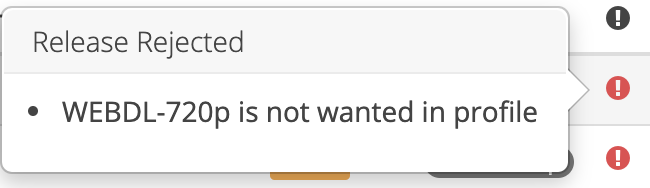
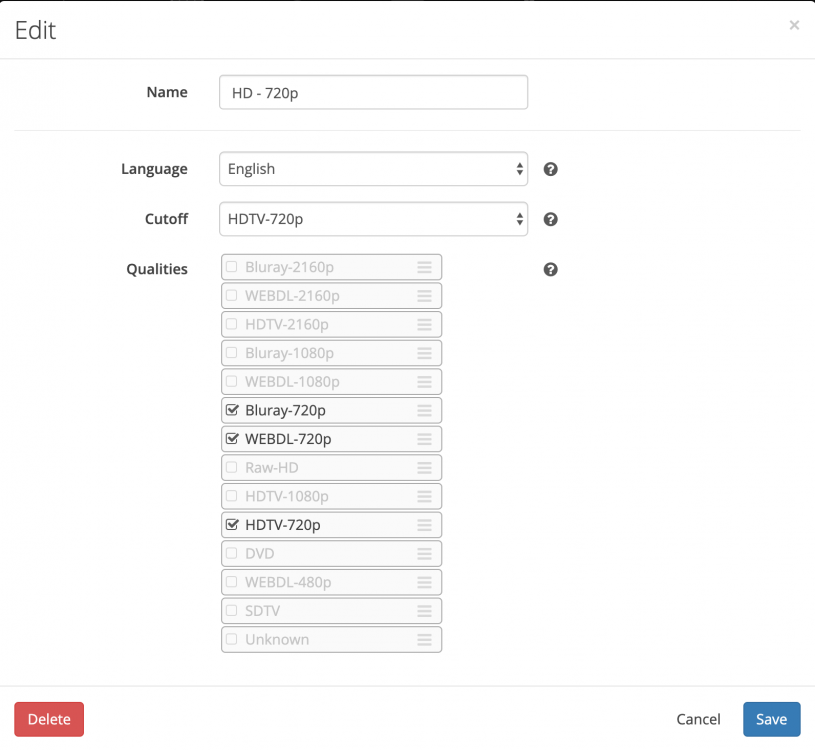
So ran into a issue with what it looks like a "release rejected", "... is not wanted in profile" error. A little bit ago I deleted "WEBDL-720p" and "WEBDL-1080p" from those respective profiles. I then decided I wanted them back, so I checked and saved again. For certain shows that only have WEBDL releases, I now get that error. I tried deleting the whole profile and adding it again but that didn't help. I've attached screenshots of what's happening. The second one is the new profile I added after deleting the original one. Everything else still working great. If I manually search the ep and add it in that way it downloads. Any ideas?
-
Okay, deleted the supervisord.log in my /config folder but didn't see it "finish installing" as described there. I restarted the docker and that didn't seem to do anything, and don't see the new supervisord.log file in the /config folder. What should I try next? Did enable debugging in the docker if that helps now. EDIT: Just tried another docker, seemed to get that going *knocks on wood*. Anyone know what that Error I was getting when this issue first came up?
-
Updated to Version: 6.8.0-rc5 this morning, and now all of the sudden when I try to download a torrent it starts, then gives me an Error notice. Anything I should be looking for here? Re-copied the open-vpn files back in. Was working fine prior to updating. EDIT: So removed the docker, started again and after a few tries looks like it's going now. Well I spoke too soon, looks like I had it going with the VPN disabled. If I enable it, I can't get it to connect. If I disable it, it loads. Anything I should try that I'm missing?
-
Okay thanks guys. A couple times when re-building it, I pointed to the old app directory in hopes it'd copy everything over into it but that didn't work both times. So I'm guessing it was the Plex DB corruption issue like you said. Don't have my stuff on my cache drive yet, but asked a couple questions here. I ended up updating to 6.8.0-rc5, so hopefully that'll solve this issue in the meantime before setting up my cache drive. Thanks for the help, much appreciated!
-
Okay, just switched to another Docker and setting it up again. I'll update tomorrow (fingers crossed), hopefully everything will go smooth there. So is this a known problem with 6.7.2?
-
So since updating to Version 6.7.2 I've had issues with different plex dockers where it'd just "crash" and become unreachable. I've tried rebooting it, restarting, pausing, stopping the dockers and have never been able to get them back going again. I've "solved" this by switching back and forth between different dockers and setting them up again, but it just happened again and want to see if there's anything else I should try. Do you guys have any suggestions? No idea what's causing it or how to solve it. Other dockers apps seem fine (not experiencing this issue). No idea what to do, any help would be much appreciated.
-
Hi, so I recently updated my unRaid server from 6.6.6 to 6.7.2 and had a few different issues with various dockers it seems. Now with this Plex one, I'm having issues with my TV library. It seems it's not reading my library right and I'm stuck and don't know what to do. Shows that have episodes in them are now showing under there that there's 0 seasons (but the folder still shows up). Other ones I just added a 3rd season is now only showing 1. If I go to my Recently Added TV everything shows up correctly and plays fine there, well except for one episode that I deleted through Plex and verified it's no longer there on my directory. Anybody have any idea what's going on? I'm really at al loss right now and don't know what I should try doing. I'v tried scanning the library files which usually does the trick but that's not doing nothing right now. Any help would be much appreciated. EDIT: Should say my other library's look like they're working fine, it's just the TV one that's off.
-
So doing that setting looks like it just stops the torrent from seeding. Still gotta go in and remove it manually. I do see a Recycling Bin path under File Management. Should that be set some where for that? If so, where?
-
Thanks! That was definitely it. Once set right it worked. When it's moved, can I set Sonarr to delete the file from my torrent direcotry and the torrent in Deluge? I've tried looking around but didn't find anything. It looked like it was still there when I went and looked later after it was moved.
-
Trying to setup Sonarr tonight and ran into this issue with the first show I downloaded. Don't I have the paths setup right? Is there something else I'm obviously missing that's not moving it over?


-
Just wanted to double check, the version in the settings for this should be set to "docker" right to get the latest?

-
Is there a way to create a torrent ourselves to use to share files with other people with this client? Can't seem to find a way, but I'm probably missing something knowing me haha.
-
There we go! It was Firefox. Prob should have tried that haha, just never thought of it. Much thanks!
-
So think my problem is different from what I was describing before. So If I type in "deluge" into the webui password field it just flashes and brings it up again. If I type in a wrong password, it then gives me Login Failed notice. So something else is going on there right? Anything I should try?
-
Where should that be? Not seeing a config folder in the binhex-delugevpn folder there. Sorry, pretty new to unRaid still.
-
Still can't log into the webui with any password I try (including "deluge"). What should I do?


