





mishmash-
Members
-
Joined
-
Last visited
-
Amazing, thanks!
-
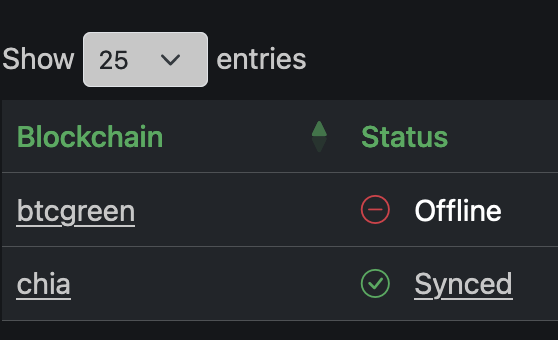
Hello all, I've searched the docs and the config files but cannot find it - how can we remove old forks from the machinaris list? I have an old btcgreen fork in my list I'd like to remove...
-
I never managed to trace the issue. I ended up modifying the container slightly to implement in proxmox - I now virtualise unraid and give the iGPU to a plex container in proxmox. The iGPU is monitored from inside the proxmox plex container. You can see the files here - maybe some mods on your side will help your implementation: https://sorrento-lab.github.io/9_1_PlexLXC.html
-
This is really cool! I can understand the motivation behind it. I can try submit some changes later for some other sites via github, it looks like the details of each site are neatly housed in tracker_config.json, so I'll use an identical definition for the sites I have access to for testing..
-
I think this can be closed - it is not an unraid issue. The issue is with how a mac keeps open its authentication over long periods of time/sleep/disconnect/reconnect etc. A reboot (of the mac) solved the issue immediately. This thread suggested it: https://community.spiceworks.com/topic/133059-files-in-smb-share-on-server-invisible-to-my-mac Thankyou Squid for checking in!
-
Here you go: root@sorrentoshare:~# ls -ail /mnt/user total 16 648799821318062208 drwxrwxrwx 1 nobody users 176 May 20 01:25 ./ 2952 drwxr-xr-x 11 root root 0 May 20 09:19 ../ 648799821480511617 -rw-rw-rw- 1 nobody users 4096 Jul 7 2018 ._.DS_Store 649081296294772867 drwxrwxrwx 1 nobody users 28 Feb 13 2018 Family/ 648799821476992389 drwxrwxrwx 1 nobody users 104 Mar 28 2021 MM-TM/ 648799821318062211 drwxrwxrwx 1 nobody users 94 May 7 06:25 MM-common/ 648799821480320334 drwxrwxrwx 1 nobody users 38 Mar 23 2021 Mary/ 648799821476992390 drwxrwxrwx 1 nobody users 94 Mar 4 09:04 Media/ 648799824900794244 drwxrwxrwx 1 nobody users 49 Nov 21 07:21 MP-TM/ 648799821479492834 drwxrwxrwx 1 nobody users 47 Mar 17 03:19 MP-common/ 14073748835533057 drwxrwxrwx 1 nobody users 260 Mar 13 10:20 appdata/ 648799821332361902 drwxrwxrwx 1 nobody users 153 Oct 17 2021 cachebk/ 14073748835551986 drwxrwxrwx 1 nobody users 0 Nov 7 2021 domains/ 648799822560932645 drwxrwxrwx 1 nobody users 6 Nov 7 2021 isos/ 14073748835551987 drwxrwxrwx 1 nobody users 26 Nov 7 2021 system/ 648799821359679830 drwxrwxrwx 1 nobody users 23 May 10 2021 windows10array/
-
This one is a bit of a different one to all the results I'm finding with search. I have a private unraid share that I am accessing via SMB from a mac. Credentials seem to be ok. The issue I am finding is that I can browse the full share, go into folders, see lists of folders and files, but I cannot open any files (or even preview them, it just shows a file icon) and I cannot copy to the server either. It seems to be applicable for all shares that I try to access, but interestingly, time machine can still successfully backup to the time machine share. I've posted diagnostics below...any ideas? I'm looking into how to reset permissions...but I have not received any permission errors. The error I receive during an attempted copy to server is "The operation can’t be completed because one or more required items can’t be found." Edit1: running docker safe perms did not help sorrentoshare-diagnostics-20220520-0923.zip
-
getting a strange error when trying this container: 2022-01-01T14:21:20Z E! [inputs.exec] Error in plugin: invalid character '}' looking for beginning of value To try and trace it I decided to map both the telegraf.conf and shell file separately into unraid's folders, this way I can modify both accordingly. Unfortunately I can't work out the cause of the error. All the {} brackets seem to be correctly paired, there are no strays. Any idea on this one? The conf and shell file are in @TheBrian's github above...
-
I'm looking at virtualising my unraid and opnsense under proxmox also. My aim is to pass through the onboard sata controller with my drives to unraid (it sits in its own IOMMU group). But then for cache, I would like to partition my NVMe drive for the proxmox partition, opnsense, unraid cache, other guests etc. Is this possible to do? I.e. give unraid a nvme partition to play with as the cache, instead of doing direct passthrough? Edit: answered with google I understand that things like SMART etc won't be available for this partition. Also how does fan control work for array drives? Is it possible to give unraid access to the fan headers, or is temperature management done in proxmox? Edit: some google-fu tells me that fan control will need to happen on proxmox side either via a fancontrol plugin or directly from BIOS.
-
My unraid box has a bit of a custom arrangement, where the GPU has 2x oversized fans - one blows on the GPU directly, and the other on the array drives and the GPU. The GPU controls one of the fans, and unraid controls the array fan. I am trying to set up the ability to calculate and compare a required PWM value for the array drives and the GPU, and then decide which is higher and apply it to the array fan. In my windows VM I use nvidia-smi with a timeout -t 5 loop running on a schedule to constantly update a txt file on the cache drive which unraid can read. This part seems to work ok, windows updates the txt file with the fan % value. I have included in the array fan script (which I found on these forums) an arrangement which takes the percentage and converts it to PWM. The issue is - it does not work with the file that is being dynamically updated by windows, but it does work with a static test file which was created by me in windows and is sitting in the exact same location! I'm pulling my hair out on this, I can't work out why it is not working...any thoughts? #!/bin/bash # unraid_array_fan.sh v0.4 # v0.1 First try at it. # v0.2: Made a small change so the fan speed on low doesn't fluctuate every time the script is run. # v0.3: It will now enable fan speed change before trying to change it. I missed # it at first because pwmconfig was doing it for me while I was testing the fan. # v0.4: Corrected temp reading to "Temperature_Celsius" as my new Seagate drive # was returning two numbers with just "Temperature". # A simple script to check for the highest hard disk temperatures in an array # or backplane and then set the fan to an apropriate speed. Fan needs to be connected # to motherboard with pwm support, not array. # DEPENDS ON:grep,awk,smartctl,hdparm ### VARIABLES FOR USER TO SET ### # Amount of drives in the array. Make sure it matches the amount you filled out below. NUM_OF_DRIVES=2 # unRAID drives that are in the array/backplane of the fan we need to control HD[1]=/dev/sdd HD[2]=/dev/sde #HD[3]=/dev/nvme0n1 #HD[4]=/dev/sdc #HD[5]=/dev/sdf #HD[6]=/dev/sdg # Temperatures to change fan speed at # Any temp between OFF and HIGH will cause fan to run on low speed setting FAN_OFF_TEMP=47 # Anything this number and below - fan is off FAN_HIGH_TEMP=60 # Anything this number or above - fan is high speed # Fan speed settings. Run pwmconfig (part of the lm_sensors package) to determine # what numbers you want to use for your fan pwm settings. Should not need to # change the OFF variable, only the LOW and maybe also HIGH to what you desire. # Any real number between 0 and 255. FAN_OFF_PWM=55 FAN_LOW_PWM=55 FAN_HIGH_PWM=255 # Calculate size of increments. FAN_TEMP_INCREMENTS=$(($FAN_HIGH_TEMP-$FAN_OFF_TEMP)) FAN_PWM_INCREMENTS=$(($(($FAN_HIGH_PWM-$FAN_LOW_PWM))/$FAN_TEMP_INCREMENTS)) # Fan device. Depends on your system. pwmconfig can help with finding this out. # pwm1 is usually the cpu fan. You can "cat /sys/class/hwmon/hwmon0/device/fan1_input" # or fan2_input and so on to see the current rpm of the fan. If 0 then fan is off or # there is no fan connected or motherboard can't read rpm of fan. ARRAY_FAN=/sys/devices/platform/nct6775.656/hwmon/hwmon2/pwm7 ### END USER SET VARIABLES ### #GPU1=1 #GPUFAN=1 GPU1=$(cat /mnt/cache/windows10scratch/w10system/nvidiafan/gpufan.txt) #echo $GPU1 #if [[ "$GPU1" == "" ]]; then # GPU1=1 #elif [[ "$GPU1" == 0 ]]; then # GPU1=1 #fi GPU1=$((GPU1 + 1)) GPUFAN=$(($((GPU1 * 255)) / 100)) echo "GPU1 is "$GPU1 echo "GPUFAN is "$GPUFAN # Program variables - do not modify HIGHEST_TEMP=0 CURRENT_DRIVE=1 CURRENT_TEMP=0 # while loop to get the highest temperature of active drives. # If all are spun down then high temp will be set to 0. while [ "$CURRENT_DRIVE" -le "$NUM_OF_DRIVES" ] do SLEEPING=`hdparm -C ${HD[$CURRENT_DRIVE]} | grep -c standby` if [ "$SLEEPING" == "0" ]; then CURRENT_TEMP=`smartctl -d ata -A ${HD[$CURRENT_DRIVE]} | grep -m 1 -i Temperature_Celsius | awk '{print $10}'` if [ "$HIGHEST_TEMP" -le "$CURRENT_TEMP" ]; then HIGHEST_TEMP=$CURRENT_TEMP fi fi #echo $CURRENT_TEMP let "CURRENT_DRIVE+=1" done echo "Highest temp is: "$HIGHEST_TEMP # Calculate new fan values based on highest drive temperature if [[ $HIGHEST_TEMP -le $FAN_OFF_TEMP ]]; then ADJUSTED_FAN_SPEED=$FAN_OFF_PWM ADJUSTED_PERCENT_SPEED=0 ADJUSTED_OUTPUT="OFF" else if [[ $HIGHEST_TEMP -ge $FAN_HIGH_TEMP ]]; then ADJUSTED_FAN_SPEED=$FAN_HIGH_PWM ADJUSTED_PERCENT_SPEED=100 ADJUSTED_OUTPUT="FULL" else ADJUSTED_FAN_SPEED=$(($(($(($HIGHEST_TEMP-$FAN_OFF_TEMP))*$FAN_PWM_INCREMENTS))+$FAN_LOW_PWM)) ADJUSTED_PERCENT_SPEED=$(($(($ADJUSTED_FAN_SPEED*100))/$FAN_HIGH_PWM)) ADJUSTED_OUTPUT=$ADJUSTED_FAN_SPEED fi fi # Adjust fan to GPU output, if GPU is higher set GPU PWM to adjusted output if [[ $ADJUSTED_FAN_SPEED -le $GPUFAN ]]; then ADJUSTED_FAN_SPEED=$GPUFAN ADJUSTED_OUTPUT=$ADJUSTED_FAN_SPEED fi #echo "Adjusted output is "$ADJUSTED_FAN_SPEED echo "Adjusted output is "$ADJUSTED_OUTPUT # Implemenent fan speed change if neeeded CURRENT_FAN_SPEED=`cat $ARRAY_FAN` if [[ $CURRENT_FAN_SPEED -ne $ADJUSTED_FAN_SPEED ]]; then # Enable speed change on this fan if not already if [ "$ARRAY_FAN" != "1" ]; then echo 1 > "${ARRAY_FAN}_enable" fi # set fan to new value` echo $ADJUSTED_FAN_SPEED > $ARRAY_FAN echo "Setting pwm to: "$ADJUSTED_FAN_SPEED fi Output with the "test.txt" file - works as intended: Script location: /tmp/user.scripts/tmpScripts/Case fan control/script Note that closing this window will abort the execution of this script GPU1 is 51 GPUFAN is 130 Highest temp is: 39 Adjusted output is 130 Setting pwm to: 130 Output with the dynamic "gpufan.txt" file - fails to read gpufan.txt... Script location: /tmp/user.scripts/tmpScripts/Case fan control/script Note that closing this window will abort the execution of this script ") ") GPUFAN is Highest temp is: 39 Adjusted output is OFF Setting pwm to: 55
-
So everything works well with Authelia and password based redirection. Only issue is when I try to login via webgui it just redirects me to my domain. I don't have the chance at all to setup other methods as per the tutorial. I have totp enabled in the config file and still nothing...I'm pulling my hair out trying to get totp to work! Any suggestions?
-
I'm stuck on the first setup - mainly logging in via local network to setup 2FA. I can get to the authelia login page locally, but then when I try to login nothing happens. The docker log says "validation attempt made, credentials OK" but then nothing else. Anyone seen this issue before? Edit: all good, changed config to one factor, and it redirects properly after auth. now to work out how to get two factor to work...
-
I found some replies here with users using cloudflare domains - and they are unproxied. Is this less secure than other methods? I guess the only thing happening is exposing your public IP via a sub domain. Are there other methods to get wireguard to work with a cloudflare proxy or otherwise? Apologies for my ignorance, I'm not super well versed in the world of networking.
-
Another grave-dig: I haven't done any consistent temperature or AIDA 64 testing - that will come in a couple of months after work and holidays calm down, but, I have a -100mV undervolt set just to see what happens. No crashes so far. It appears that there is an overall temperature reduction of 2C, but it is hard to tell. So, further testing for later: Boot unraid with all dockers stopped, find an aida64 tester docker Benchmark with a stable ambient temperature and 0mV offset. Begin applying offsets in BIOS (if possible, haven't checked), if not, back to intel-undervolt Re-apply benchmark test, rinse and repeat until instability in AIDA 64 I'd also like to test idle power, specifically if this type of undervolting will interfere with any automatic power stepping in the Haswell CPUs (I'm running a 4770). This is an interesting script, because with user scripts you could in theory apply your own power stepping (say reset offsets to zero when spinning up a VM and then reduce them when the server is unloaded). From what I have read changing offsets disables intel power states, but I am not sure if that happens with this script too. temperature target: -0 (100C) core: -99.61 mV gpu: -75.2 mV cache: -99.61 mV uncore: -99.61 mV analogio: -99.61 mV powerlimit: 105.0W (short: 0.00244140625s - enabled) / 84.0W (long: 8.0s - enabled)
-
Thread gravedigging... Managed to get into an interface of some sort using CLI and python3 for undervolting. I haven't tested it yet though. I used this python script, pulled it with git (pip3 did not work for me) and then ran it with python3. https://github.com/georgewhewell/undervolt root@sorrentoshare:~/undervolt# python3 undervolt.py --read temperature target: -0 (100C) core: 0.0 mV gpu: 0.0 mV cache: 0.0 mV uncore: 0.0 mV analogio: 0.0 mV powerlimit: 105.0W (short: 0.00244140625s - enabled) / 84.0W (long: 8.0s - enabled)
