




.jpg.49a04757d3cb6a9dedc86161c0de5016.jpg)
Viperkc
Members
-
Joined
-
Last visited
Everything posted by Viperkc
-
I just noticed that in the GPU plugin it does show processes and some transcoding - so maybe the only thing that is broken is the SMI just not showing the processes I just had noticed high CPU usage once upgrading to 7.2.5 and just panicked thinking transcoding was not being done by my GPU and the CPU was doing it. I know there are processes ATM. Thanks for all your help on this. Now to figure out why my CPU usage is so high with 7.2.5 - pretty sure its not related to the Nvidia driver.
-
I still don't see any processes found when i run smi on the plex docker. Will test more later today and report back
-
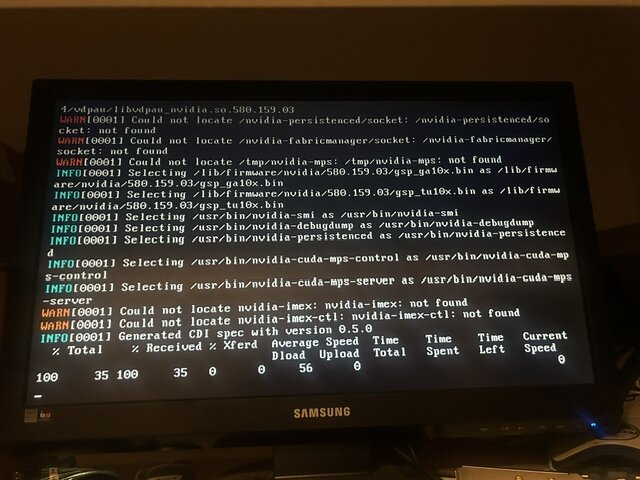
I am getting those same errors. Mine are with the 580.159.03 driver. SMI not reporting any transcoding processes when i force transcode from Plex. Rolled back to 7.2.4 and get same errors on boot. asura-diagnostics-20260506-1509.zip
-
I wanted to say thank you for this, I have had the same issue from 6.10 RC1 to any of the higher RC builds, I added those lines to my mount script and it works great now. I am on RC6 atm. Thanks again!
-
Hello All, I have been running RC1 for sometime now and versions prior to it. Having an issue when upgrading to any RC higher than RC1 including RC5. I have Sonarr and Radarr dockers and do use Rclone/MergerFS to store files on GDrive. Everything has worked perfectly for 2+ years. But when I try to upgrade to anything above RC1 Sonarr and Radarr get permission denied errors when moving the files to the proper place. I have checked permissions and played with settings inside the dockers to no avail. If manually create the folders the ARRs will move the files perfectly. As I have upgrade to each RC release after 1 and up to 5 I see this issue. When I downgrade back to RC1 then all is working perfectly. So I guess my questions is, did something change regarding permissions from RC1 to RC2-5? If logs are needed I can upgrade to RC5 and get logs for a deeper dive. Any advise would be appreciated. Thanks
-
all good here thanks for the quick fix
-
same here plugin: bad file MD5: /boot/config/plugins/community.applications/community.applications-2020.02.06-x86_64-1.txz
-
Everything seems to work fine for me ATM, but i am having the same issue as Kaizac. When Sonarr grabs an upgraded show if a previous version exists (which it does since its an upgrade) Sonarr wont move it, i get failed to import episode. If i manually delete the file from gdrive then Sonarr will process it fine.
-
sounds like a win win! thanks for all your work on this project
-
Hardlink support: Unionfs didn't support hardlinks so any torrents had to be copied to rclone_upload and then uploaded. Mergerfs supports hardlinks so no wasted transfer. I've added an upload exclusion to /mnt/user/local/downloads so that download files (intermediate, pending sonarr/raddarr import, or seeds) are not uploaded. For hardlinks to work, transmission/torrent clients HAVE to be mapped to the same disk 'storage' so files need to be in /mnt/user/mount_unionfs or for newer users /mnt/user/mount_mergerfs...hope this makes sense = MUCH BETTER FILE HANDLING AND LESS TRANSFER AND FILES NOT STORED TWICE Thanks for this update, i plan to change very soon. Regarding your above instructions, i am still unclear how torrents will work the new way. Will they still get uploaded to tdrive? Is it automated? Do they get seeded from tdrive? Or do they stay local until ratio is met? Can you please elaborate on how this part will work now? Thanks
-
The one provided in the UI. But mine is still doing the initial scan so maybe need to let it finish before adding to Radarr?
-
I cannot seem to get the RSS to work in Radarr. I get this message: Unable to connect to indexer. Indexer responded with html content. Site is likely blocked or unavailable.
-
are you putting in your plex token?
-
yes confirmed working. I did have question though. For the past month or so my Radarr and Sonarr have been really slow to do the daily refresh. At times the dockers will actually lockup and only a reboot will fix. Anyone else had this issue? I had read elsewhere of it happening because of something google is doing to throttle scans. Thanks
-
Thanks! I will try this shortly. I hope it works i am excited to test 6.8.
-
ok went back to 6.8 and it seems fusermount is missing all together which: no fusermount in (.:/usr/local/sbin:/usr/sbin:/sbin:/usr/local/bin:/usr/bin:/bin) That is for sure the problem. When i ran it in 6.7 i got this: /bin/fusermount How to fix this?
-
I was just looking forward to the new IOWAIT fixes.
-
i have mount script run at start of array and unmount run at stop. the only log that showed was on the startup one. sorry i set this up with the help of a friend and it has always worked. I am not a pro at how it all works TBH. I think its safe to assume it has something to do with a change in 6.8 as it works fine again after rollback
-
i got it when i ran mount script. im sorry i did not run unmount as it never mounted. i can go back to 6.8 and try that if you like
-
here is my unmount script if it will help: #!/bin/bash # unmount to be safe fusermount -uz /mnt/user/mount_unionfs/Tdrive_Media fusermount -uz /mnt/user/mount_rclone/Tdrive_Media # Remove other dummy files if [[ -f "/mnt/user/appdata/other/rclone/rclone_upload" ]]; then echo "upload file present - removing dummy file" rm /mnt/user/appdata/other/rclone/rclone_upload else echo "rclone upload already exited properly" fi if [[ -f "/mnt/user/appdata/other/rclone/rclone_cleanup" ]]; then echo "cleanup file present - removing dummy file" rm /mnt/user/appdata/other/rclone/rclone_cleanup else echo "cleanup already exited properly" fi exit
-
it shows up when mount script runs works great in 6.7 and has for a very long time
-
rclone v1.49.5-205-g65a82fe7-beta #!/bin/bash ####### Start rclone gdrive mount ########## # check if gdrive mount already created if [[ -f "/mnt/user/mount_rclone/Tdrive_Media/mountcheck" ]]; then echo "$(date "+%d.%m.%Y %T") INFO: Check rclone vfs already mounted." else echo "$(date "+%d.%m.%Y %T") INFO: mounting rclone vfs." # create directories for rclone mount and unionfs mount mkdir -p /mnt/user/appdata/other/rclone mkdir -p /mnt/user/mount_unionfs/Tdrive_Media mkdir -p /mnt/user/rclone_upload/Tdrive_Media rclone mount --allow-other --buffer-size 256M --dir-cache-time 72h --drive-chunk-size 512M --fast-list --log-level INFO --vfs-read-chunk-size 128M --vfs-read-chunk-size-limit off tdrive1_archive_crypt: /mnt/user/mount_rclone/Tdrive_Media & #sleep 30 # check if mount successful # slight pause to give mount time to finalise sleep 5 if [[ -f "/mnt/user/mount_rclone/Tdrive_Media/mountcheck" ]]; then echo "$(date "+%d.%m.%Y %T") INFO: Check rclone gdrive vfs mount success." else echo "$(date "+%d.%m.%Y %T") CRITICAL: rclone gdrive vfs mount failed - please check for problems." rm /mnt/user/appdata/other/rclone/rclone_mount_running exit fi fi ####### End rclone gdrive mount ########## ####### Start unionfs mount ########## if [[ -f "/mnt/user/mount_unionfs/Tdrive_Media/mountcheck" ]]; then echo "$(date "+%d.%m.%Y %T") INFO: Check successful, unionfs already mounted." else unionfs -o cow,allow_other,direct_io,auto_cache,sync_read /mnt/user/rclone_upload/Tdrive_Media=RW:/mnt/user/mount_rclone/Tdrive_Media=RO:/mnt/user/Media=RO /mnt/user/mount_unionfs/Tdrive_Media if [[ -f "/mnt/user/mount_unionfs/Tdrive_Media/mountcheck" ]]; then echo "$(date "+%d.%m.%Y %T") INFO: Check successful, unionfs mounted." else echo "$(date "+%d.%m.%Y %T") CRITICAL: unionfs Remount failed." rm /mnt/user/appdata/other/rclone/rclone_mount_running exit fi fi ####### End Mount unionfs ########## exit
-
i did try to uninstall and reinstall plugin. Just rolled back to 6.7 and all working fine again. I see 6.8 has fuse 3.0 could that be the issue?
-
upgraded to 6.8rc1 tonight and am getting this error when script runs. 2019/10/11 20:32:46 Fatal error: failed to mount FUSE fs: fusermount: exec: "fusermount": executable file not found in $PATH any help would be appreciated thanks
-
Getting this error after upgrade: Fatal error: failed to mount FUSE fs: fusermount: exec: "fusermount": executable file not found in $PATH Any idea how i can fix? thanks
.thumb.jpg.03172c0cba27adb158f156ee02ceb8f5.jpg)
