





docbrown
Members
-
Joined
-
Last visited
-
Looks like there was an update overnight which the container was auto updated to. Now none of my torrents can get a connection. Not sure if its related to the update, or if PIA is down. EDIT: I rolled back to rtorrent-ps-1.1.r54.ga787dd9-1-29 and my problems went away 2021-03-04 07:47:14,731 DEBG 'start-script' stdout output: [info] Trying to connect to the PIA WireGuard API on 'au-sydney.privacy.network'... 2021-03-04 07:47:14,957 DEBG 'start-script' stdout output: [info] Default route for container is 172.18.0.1 2021-03-04 07:47:14,976 DEBG 'start-script' stdout output: [info] Docker network defined as 172.18.0.0/16 2021-03-04 07:47:14,981 DEBG 'start-script' stdout output: [info] Adding 192.168.1.0/24 as route via docker eth0 2021-03-04 07:47:14,983 DEBG 'start-script' stdout output: [info] ip route defined as follows... -------------------- 2021-03-04 07:47:14,984 DEBG 'start-script' stdout output: default via 172.18.0.1 dev eth0 172.18.0.0/16 dev eth0 proto kernel scope link src 172.18.0.6 192.168.1.0/24 via 172.18.0.1 dev eth0 2021-03-04 07:47:14,985 DEBG 'start-script' stdout output: broadcast 127.0.0.0 dev lo table local proto kernel scope link src 127.0.0.1 local 127.0.0.0/8 dev lo table local proto kernel scope host src 127.0.0.1 local 127.0.0.1 dev lo table local proto kernel scope host src 127.0.0.1 broadcast 127.255.255.255 dev lo table local proto kernel scope link src 127.0.0.1 broadcast 172.18.0.0 dev eth0 table local proto kernel scope link src 172.18.0.6 local 172.18.0.6 dev eth0 table local proto kernel scope host src 172.18.0.6 broadcast 172.18.255.255 dev eth0 table local proto kernel scope link src 172.18.0.6 2021-03-04 07:47:14,985 DEBG 'start-script' stdout output: -------------------- 2021-03-04 07:47:14,990 DEBG 'start-script' stdout output: iptable_mangle 16384 1 ip_tables 28672 4 iptable_filter,iptable_raw,iptable_nat,iptable_mangle 2021-03-04 07:47:14,990 DEBG 'start-script' stdout output: [info] iptable_mangle support detected, adding fwmark for tables 2021-03-04 07:47:15,604 DEBG 'start-script' stdout output: [info] iptables defined as follows... -------------------- 2021-03-04 07:47:15,607 DEBG 'start-script' stdout output: -P INPUT DROP -P FORWARD DROP -P OUTPUT DROP -A INPUT -s 172.18.0.0/16 -d 172.18.0.0/16 -j ACCEPT -A INPUT -s 103.2.196.162/32 -i eth0 -j ACCEPT -A INPUT -s 103.2.196.172/32 -i eth0 -j ACCEPT -A INPUT -s 103.2.196.171/32 -i eth0 -j ACCEPT -A INPUT -i eth0 -p tcp -m tcp --dport 9080 -j ACCEPT -A INPUT -i eth0 -p udp -m udp --dport 9080 -j ACCEPT -A INPUT -i eth0 -p tcp -m tcp --dport 9443 -j ACCEPT -A INPUT -i eth0 -p udp -m udp --dport 9443 -j ACCEPT -A INPUT -s 192.168.1.0/24 -d 172.18.0.0/16 -i eth0 -p tcp -m tcp --dport 5000 -j ACCEPT -A INPUT -p icmp -m icmp --icmp-type 0 -j ACCEPT -A INPUT -i lo -j ACCEPT -A INPUT -i wg0 -j ACCEPT -A OUTPUT -s 172.18.0.0/16 -d 172.18.0.0/16 -j ACCEPT -A OUTPUT -d 103.2.196.162/32 -o eth0 -j ACCEPT -A OUTPUT -d 103.2.196.172/32 -o eth0 -j ACCEPT -A OUTPUT -d 103.2.196.171/32 -o eth0 -j ACCEPT -A OUTPUT -o eth0 -p tcp -m tcp --sport 9080 -j ACCEPT -A OUTPUT -o eth0 -p udp -m udp --sport 9080 -j ACCEPT -A OUTPUT -o eth0 -p tcp -m tcp --sport 9443 -j ACCEPT -A OUTPUT -o eth0 -p udp -m udp --sport 9443 -j ACCEPT -A OUTPUT -s 172.18.0.0/16 -d 192.168.1.0/24 -o eth0 -p tcp -m tcp --sport 5000 -j ACCEPT -A OUTPUT -p icmp -m icmp --icmp-type 8 -j ACCEPT -A OUTPUT -o lo -j ACCEPT -A OUTPUT -o wg0 -j ACCEPT 2021-03-04 07:47:15,609 DEBG 'start-script' stdout output: -------------------- 2021-03-04 07:47:15,613 DEBG 'start-script' stdout output: [info] Attempting to bring WireGuard interface 'up'... 2021-03-04 07:47:15,630 DEBG 'start-script' stderr output: Warning: `/config/wireguard/wg0.conf' is world accessible 2021-03-04 07:47:15,641 DEBG 'start-script' stderr output: [#] ip link add wg0 type wireguard 2021-03-04 07:47:15,644 DEBG 'start-script' stderr output: [#] wg setconf wg0 /dev/fd/63 2021-03-04 07:47:15,658 DEBG 'start-script' stderr output: [#] ip -4 address add 10.13.246.156 dev wg0 2021-03-04 07:47:15,668 DEBG 'start-script' stderr output: [#] ip link set mtu 1420 up dev wg0 2021-03-04 07:47:15,695 DEBG 'start-script' stderr output: [#] ip -4 route add 10.0.0.0/8 dev wg0 2021-03-04 07:47:15,697 DEBG 'start-script' stderr output: [#] '/root/wireguardup.sh' 2021-03-04 07:48:11,811 DEBG 'start-script' stdout output: [info] DNS failure, creating file '/tmp/dnsfailure' to indicate failure... 2021-03-04 07:48:11,817 DEBG 'start-script' stdout output: [info] Attempting to get external IP using 'http://checkip.amazonaws.com'... 2021-03-04 07:48:11,831 DEBG 'start-script' stdout output: [info] Failed on last attempt, attempting to get external IP using 'http://whatismyip.akamai.com'... 2021-03-04 07:48:11,844 DEBG 'start-script' stdout output: [info] Failed on last attempt, attempting to get external IP using 'https://ifconfig.co/ip'... 2021-03-04 07:48:11,861 DEBG 'start-script' stdout output: [info] Failed on last attempt, attempting to get external IP using 'https://showextip.azurewebsites.net'... 2021-03-04 07:48:11,875 DEBG 'start-script' stdout output: [warn] Cannot determine external IP address, performing tests before setting to '127.0.0.1'... [info] Show name servers defined for container 2021-03-04 07:48:11,876 DEBG 'start-script' stdout output: nameserver 209.222.18.222 nameserver 84.200.69.80 nameserver 37.235.1.174 nameserver 1.1.1.1 nameserver 209.222.18.218 nameserver 37.235.1.177 nameserver 84.200.70.40 nameserver 1.0.0.1 2021-03-04 07:48:11,876 DEBG 'start-script' stdout output: [info] Show contents of hosts file 2021-03-04 07:48:11,876 DEBG 'start-script' stdout output: 127.0.0.1 localhost ::1 localhost ip6-localhost ip6-loopback fe00::0 ip6-localnet ff00::0 ip6-mcastprefix ff02::1 ip6-allnodes ff02::2 ip6-allrouters 172.18.0.6 dbe3ded8d535 103.2.196.162 au-sydney.privacy.network 2021-03-04 07:48:11,880 DEBG 'start-script' stdout output: [info] WireGuard interface 'up' 2021-03-04 07:48:11,880 DEBG 'start-script' stdout output: [info] Script started to assign incoming port 2021-03-04 07:48:11,881 DEBG 'start-script' stdout output: [info] Port forwarding is enabled [info] Checking endpoint 'au-sydney.privacy.network' is port forward enabled... 2021-03-04 07:48:11,888 DEBG 'start-script' stdout output: [warn] PIA VPN info API currently down, skipping endpoint port forward check 2021-03-04 07:48:13,768 DEBG 'start-script' stdout output: [info] Successfully assigned and bound incoming port '34854' 2021-03-04 07:48:41,882 DEBG 'start-script' stdout output: [info] Sending 'down' command to WireGuard due to dns failure... 2021-03-04 07:48:41,884 DEBG 'start-script' stdout output: [info] Attempting to bring WireGuard interface 'down'... 2021-03-04 07:48:41,897 DEBG 'start-script' stderr output: Warning: `/config/wireguard/wg0.conf' is world accessible 2021-03-04 07:48:41,903 DEBG 'start-script' stderr output: [#] ip link delete dev wg0 2021-03-04 07:48:41,991 DEBG 'start-script' stderr output: [#] '/root/wireguarddown.sh' 2021-03-04 07:48:41,996 DEBG 'start-script' stdout output: [info] Script finished to assign incoming port 2021-03-04 07:48:41,997 DEBG 'start-script' stdout output: [info] WireGuard interface 'down' 2021-03-04 07:48:41,998 DEBG 'start-script' stderr output: /root/prerunget.sh: line 1: break: only meaningful in a `for', `while', or `until' loop 2021-03-04 07:48:41,999 DEBG 'start-script' stderr output: kill: usage: kill [-s sigspec | -n signum | -sigspec] pid | jobspec ... or kill -l [sigspec] 2021-03-04 07:48:41,999 DEBG 'start-script' stderr output: /root/getvpnport.sh: line 1: break: only meaningful in a `for', `while', or `until' loop 2021-03-04 07:48:42,001 DEBG 'start-script' stdout output: [info] Attempting to bring WireGuard interface 'up'... 2021-03-04 07:48:42,014 DEBG 'start-script' stderr output: Warning: `/config/wireguard/wg0.conf' is world accessible 2021-03-04 07:48:42,023 DEBG 'start-script' stderr output: [#] ip link add wg0 type wireguard 2021-03-04 07:48:42,026 DEBG 'start-script' stderr output: [#] wg setconf wg0 /dev/fd/63 2021-03-04 07:48:42,041 DEBG 'start-script' stderr output: [#] ip -4 address add 10.13.246.156 dev wg0 2021-03-04 07:48:42,052 DEBG 'start-script' stderr output: [#] ip link set mtu 1420 up dev wg0 2021-03-04 07:48:42,080 DEBG 'start-script' stderr output: [#] ip -4 route add 10.0.0.0/8 dev wg0 2021-03-04 07:48:42,081 DEBG 'start-script' stderr output:
-
I cannot even do this, the container shuts down almost straight away. Not sure how I can do the demo/restore without the container running.
-
Hey @DZMM, did you end up having any luck with this? I can see there's now a RadarrSync app in Community Applications but I cannot get that to work either. Thanks.
-
Well I'm glad no one replied as I would have been wasting everyone's time. Not only did I realise I'm not using Linuxservers repository, I also discovered the Time zone variable in the container settings 🙈
-
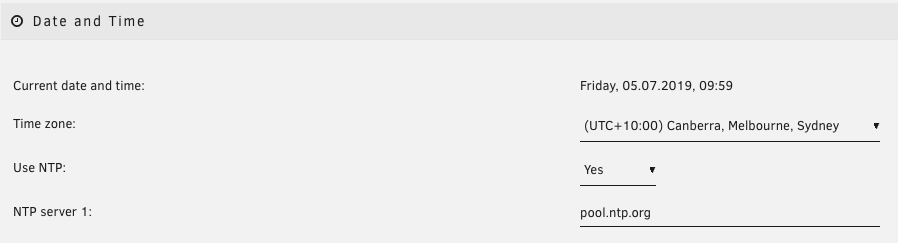
A few weeks back I noticed my newsletters sending at 3:30am instead of 5:30pm. Tautulli seems to think my timezone is UTC, which it claims is the system timezone, but the system timezone is UTC+10 Platform: Linux 4.19.56-Unraid (#1 SMP Tue Jun 25 10:19:34 PDT 2019) System Timezone: UTC (UTC+0000) Any idea why this has changed all of a sudden? Edit: I should mention the history tab appears to have the correct play start/stop times Thank you.
-
I removed it and the re-installed and it's working again.
-
Thank you for your reply. Unfortunately doing those steps it still won’t start.
-
Not sure when it started, but Unbalance will no longer run for me, just says 'stopped'. I noticed on 6.7.0-rc3 so I upgraded to 6.7.0-rc4 and still the same. Am I missing something?

-
Much appreciated, thank you.
-
EDIT: Weird, Safari and Firefox delivered me a blank page but they downloaded fine in Chrome! I just noticed the PIA change, but I can't seem get the OpenVPN files from https://www.privateinternetaccess.com/openvpn/openvpn.zip. Is the link working for anyone else?
-
Following the instructions listed earlier, all my stats moved across perfectly so maybe check that post to see if you missed a step?
-
As I am fairly new to everything Unraid and this plugin (installed today), I'm having the same earlier issue with easy-rsa not generating the files. I know to use an earlier version but I'm confused on how to install it in the environment. Any help will be appreciated.
-
I'm very new to docker so I apologise if this is a stupid question. Where are the image files located? I like to change them up a bit. I've recently moved from a MacOS install and they were located in PlexPy/data/images. Now in the docker inside the PlexPy folder there is just the folders backups, cache, and logs. Any help is appreciated. Thank you.
-
docbrown changed their profile photo
-
I'm having the same issue and if I change the port 53 to something else the docker fails.

