





Everything posted by echocabinet
-
1 week later: [03.02.2026 05:31:20][][unifi-controller-reborn] Starting unifi-controller-reborn... (try #1) done! [03.02.2026 05:31:23][][Main] Backing up the flash drive. [03.02.2026 05:32:35][debug][Main] flash backup returned: tower-v7.2.3-flash-backup-20260203-0531.zip [03.02.2026 05:32:39][debug][Main] PHP-ERROR occured! 8 / copy(): Write of 32702464 bytes failed with errno=28 No space left on device /usr/local/emhttp/plugins/appdata.backup/scripts/backup.php:191 [03.02.2026 05:32:40][][Main] Copying flash backup to destination failed![03.02.2026 05:32:40][][Main] Checking retention... [03.02.2026 05:32:40][debug][Main] toKeep after slicing: root@tower:~# free -h total used free shared buff/cache available Mem: 15Gi 10Gi 597Mi 3.3Gi 7.6Gi 4.6Gi Swap: 0B 0B 0B root@tower:~# df -h Filesystem Size Used Avail Use% Mounted on rootfs 7.8G 3.2G 4.7G 41% / devtmpfs 7.8G 0 7.8G 0% /dev Still having this issue and not sure of the root cause. The appdata backup appears to have saved correctly otherwise. Manual flash backup is: 1.2GB In the backup location today, it did attempt to save the flash, but it is corrupted at 480.8MiB.
-
16GB RAM. # free -h total used free shared buff/cache available Mem: 15Gi 11Gi 490Mi 2.1Gi 6.5Gi 4.5Gi Swap: 0B 0B 0B # df -h Filesystem Size Used Avail Use% Mounted on rootfs 7.8G 2.0G 5.8G 26% /
-
[27.01.2026 05:32:08][][Main] Backing up the flash drive. [27.01.2026 05:33:19][debug][Main] flash backup returned: tower-v7.2.3-flash-backup-20260127-0532.zip [27.01.2026 05:35:02][debug][Main] PHP-ERROR occured! 8 / copy(): Write of 18874368 bytes failed with errno=28 No space left on device /usr/local/emhttp/plugins/appdata.backup/scripts/backup.php:191 [27.01.2026 05:35:02][][Main] Copying flash backup to destination failed! When I manually backed up the flashdrive, the size was about 1.6GB. It has backed up previously with similar sizes.
-
Observed a strange error today during the scheduled backup. I looked through the thread and didnt see anything similar right off the bat. [27.01.2026 05:35:02][debug][Main] PHP-ERROR occured! 8 / copy(): Write of 18874368 bytes failed with errno=28 No space left on device /usr/local/emhttp/plugins/appdata.backup/scripts/backup.php:191 Both my flashdrive and destination have an excess of 10GB, so I am not sure exactly which space it is talking about. root@tower:/tmp/appdata.backup# df -h /usr/local/emhttp/ Filesystem Size Used Avail Use% Mounted on overlay 7.8G 2.0G 5.8G 26% /usrAny ideas? Thanks!
-
@adoucette fwiw, I ordered two Swissbit drives at the same time. Each drive has a unique serial number printed on the outer drive body, but that number does not match what win11 has for the SerialNumber value using: Get-CimInstance -ClassName Win32_Volume | Where-Object { $_.DriveLetter -eq "F:" } | Format-List * For Unraid, the GUID appears to match the class ID_SERIAL_SHORT from: udevadm info --query=all --name=/dev/sda | grep ID_SERIAL This value partially matched my unraid key registration, in the "Flash Vendor ID + Product ID + Serial Number" format. See: https://forums.unraid.net/topic/675-argh-how-to-get-flash-guid-from-windows For clarification, the ID_SERIAL_SHORT value did not match the printed Swissbit Serial Number on the outside of the device. Comparing the two drives, the ID_SERIAL_SHORT values are different, but only by 2 digits of the 16 digit value. I hope it is unique enough.
-
I got this working with the swissbit SFU34096E1AE1TO-C-MS-1B1-STD. Unfortunately the unraid media creation tool did not recognize the usb flash GUID, so I had to build it manually. Luckily the license key transferred successfully with the swissbit guid. This worked. I used this process to get it booting from UEFI: https://forums.unraid.net/topic/117868-solved-trouble-getting-started-cant-boot-to-unraid-usb/#findComment-1079115 This process did NOT work: Rufus fat32 with the no-boot option, then running the make-bootable.bat (after copying the manual install unraid files to the flashdrive) did not work.
-
Another thought. This blacklist without an appeals process becomes a bit risky from a cost perspective, with an expensive drive.
-
I randomly had my Kingston DataTraveler Kyson 32GB USB 3.2 drive get blacklisted yesterday or the day before. I have been using it for: 2024.10.27 - installed 295 days can be converted to one of these units: 25,488,000 seconds 424,800 minutes 7080 hours 295 days 42 weeks and 1 day 80.82% of a common year (365 days) So this being a yearly thing is getting annoying enough that I am going to try the swissbit industrial SLC drive. https://www.mouser.com/c/embedded-solutions/memory-data-storage/storage/usb-flash-drives/?memory%20size=4%20GB&instock=y If I have trouble using it, my backup will be a Samsung BAR Plus 64GB USB 3.1, but I will have to work around the larger size. Smaller drives are impossible to find locally, so this makes locating compatible drives a big problem. Even Amazon is left with off brands or 3rd parties selling smaller drives. It seems like all of the smaller Samsung drives are off the market from official channels.
-
It was working fine, but then I went from some version to 2024.10.27 and now I have the blank Dashboard. * Found the support thread:
-
With Tunarr intel build, I am unable to add the plex server. It authenticates and i can see it listed on the plex side, but it never shows up or completes. Tried it with Brave and Edge. Any ideas or is there a way to add it manually?
-
I am still running 6.12.4, and prior to today my uptime was over 2 months, but unfortunately i have been working with the unraid server webpage open and forgot about checking logs. The system locked up within 5 hours and i had to hard reboot. Are people still seeing this issue on 6.12.6? *** NOTE: My uptime was only that stable because I change the server webpage tab to unraid.net when I am not actively using the web console.
-
The bug report for this issue is in this thread: 6.12.4 - Gets unresponsive (Have to Cut power & hard reboot) - Stable Releases - Unraid Luckily it has been reopened. Hopefully it will get some visibility.
-
After another week, I have determined a few things: Closing all tabs prevents the errors from building up/cascading. The browser type doesnt seem to matter. Crashes/logs growing happens with Edge, Chrome, and Firefox. My appdata backup (which runs on Monday mornings) has been one of the triggers for the nginx errors in the logs. When the tab is open, the log fills up with the errors while the scheduled job is running. I do not blame the plugin, because when the tab (all tabs) are closed, the errors are not generated. Closing the tab today prevented a hard crash like last week, which required a hard shutdown. This is a webserver based interface. If the primary mechanism for accessing the OS causes the OS to consistently crash, then it is a bug.
-
This is still happening about once every 12 hours, but it alternates between the nginx logs being full and just the syslog being full. Just blindly nuking them at this point. I am using Edge and noticed it is getting faster since the last update. No evidence for that though, just an observation. Still willing to help get this resolved.
-
@martial try stopping and then starting the service, instead of restarting. That kept me from needing to reboot previously.
-
Continued from the last crash/reboot: root@tower:/var/log# ls -lah syslog* -rw-r--r-- 1 root root 1.9K Oct 5 22:12 syslog -rw-r--r-- 1 root root 12M Oct 5 00:00 syslog.1 -rw-r--r-- 1 root root 59M Oct 4 03:00 syslog.2 0 /var/log/pwfail 0 /var/log/swtpm 484K /var/log/samba 0 /var/log/plugins 12K /var/log/pkgtools 11M /var/log/nginx 0 /var/log/nfsd 0 /var/log/libvirt 82M /var/log root@tower:/var/log# grep -o 'Increase nchan_max_reserved_memory' /var/log/syslog.2 | wc -l 81995 root@tower:/var/log# awk -v phrase="Increase nchan_max_reserved_memory" '{count += gsub(phrase, "")} END {print count}' /var/log/syslog.2 81995 root@tower:/var/log# grep -o '"/usr/local/emhttp/us" failed (2: No such file or directory)' /var/log/syslog.2 | wc -l 2 Performed: > /var/log/syslog &\ > /var/log/syslog.1 &\ > /var/log/syslog.2 /etc/rc.d/rc.syslog stop /etc/rc.d/rc.syslog start and that zeroed out the logs.
-
In todays drama, the log hit 100%. What I should have done was cleared them. Instead I restarted. That was a mistake. After about 5 mins waiting for the reboot, I realize my tower was booting into UEFI and not recognizing the USB. After repairing the USB in windows, it did boot successfully but failed to start the docker service. In fact, the docker config seemed to have been factory reset, creating a blank docker.img. Luckily, I am now keeping the docker image in an appdata folder, and after stopping the service and changing it to the right path, got the containers going again. BTRFS scrub did not find any errors. I would like to note this flashdrive is only 2 weeks old and I am certain the fs errors on it are related to the full logs. This really needs to be fixed and I appreciate any help I can get fixing it in the short term.
-
I dont see that plugin installed on my box. Good info though.
-
So is this a bug or user error? Struggle bus here, trying to figure out if its something on my side.
-
I thought it might have been related to nginx proxy manager, but I disabled the host prior to clearing the logs previously. But there are new error entries related to nginx in unraid itself, and memory. Here are the recent logs. Sep 23 13:33:22 tower nginx: 2023/09/23 13:33:22 [crit] 22809#22809: ngx_slab_alloc() failed: no memory Sep 23 13:33:22 tower nginx: 2023/09/23 13:33:22 [error] 22809#22809: shpool alloc failed Sep 23 13:33:22 tower nginx: 2023/09/23 13:33:22 [error] 22809#22809: nchan: Out of shared memory while allocating message of size 18014. Increase nchan_max_reserved_memory. Sep 23 13:33:22 tower nginx: 2023/09/23 13:33:22 [error] 22809#22809: *5776466 nchan: error publishing message (HTTP status code 500), client: unix:, server: , request: "POST /pub/devices?buffer_length=1 HTTP/1.1", host: "localhost" Sep 23 13:33:22 tower nginx: 2023/09/23 13:33:22 [error] 22809#22809: MEMSTORE:01: can't create shared message for channel /devices Sep 23 13:41:17 tower emhttpd: spinning down /dev/sdi Sep 23 14:12:13 tower kernel: veth249d8c8: renamed from eth0 Sep 23 14:12:14 tower kernel: eth0: renamed from veth87b2b92 Sep 23 14:18:06 tower nginx: 2023/09/23 14:18:06 [error] 22809#22809: *5805991 "/usr/local/emhttp/api/index.html" is not found (2: No such file or directory), client: 127.0.0.1, server: , request: "GET /api/ HTTP/1.1", host: "127.0.0.1" Sep 23 14:18:06 tower nginx: 2023/09/23 14:18:06 [error] 22809#22809: *5805998 open() "/usr/local/emhttp/status" failed (2: No such file or directory), client: 127.0.0.1, server: , request: "GET /status?full&json HTTP/1.1", host: "localhost" Sep 23 14:18:06 tower nginx: 2023/09/23 14:18:06 [error] 22809#22809: *5805999 open() "/usr/local/emhttp/status" failed (2: No such file or directory), client: 127.0.0.1, server: , request: "GET /status?full&json HTTP/1.1", host: "127.0.0.1" Sep 23 14:18:06 tower nginx: 2023/09/23 14:18:06 [error] 22809#22809: *5806000 open() "/usr/local/emhttp/server-status" failed (2: No such file or directory), client: 127.0.0.1, server: , request: "GET /server-status?auto HTTP/1.1", host: "localhost" Sep 23 14:18:06 tower nginx: 2023/09/23 14:18:06 [error] 22809#22809: *5806001 open() "/usr/local/emhttp/server-status" failed (2: No such file or directory), client: 127.0.0.1, server: , request: "GET /server-status?auto HTTP/1.1", host: "127.0.0.1" Sep 23 14:18:08 tower nginx: 2023/09/23 14:18:08 [error] 22809#22809: *5806027 open() "/usr/local/emhttp/server-status" failed (2: No such file or directory), client: 127.0.0.1, server: , request: "GET /server-status?auto HTTP/1.1", host: "localhost" Sep 23 14:18:08 tower nginx: 2023/09/23 14:18:08 [error] 22809#22809: *5806028 open() "/usr/local/emhttp/server-status" failed (2: No such file or directory), client: 127.0.0.1, server: , request: "GET /server-status?auto HTTP/1.1", host: "127.0.0.1" Sep 23 14:18:09 tower nginx: 2023/09/23 14:18:09 [error] 22809#22809: *5806035 FastCGI sent in stderr: "Primary script unknown" while reading response header from upstream, client: 127.0.0.1, server: , request: "GET /admin/api.php?auth=&version=true HTTP/1.1", upstream: "fastcgi://unix:/var/run/php5-fpm.sock:", host: "127.0.0.1" Sep 23 14:18:09 tower nginx: 2023/09/23 14:18:09 [error] 22809#22809: *5806037 FastCGI sent in stderr: "Primary script unknown" while reading response header from upstream, client: 127.0.0.1, server: , request: "GET /admin/api.php?auth=&version=true HTTP/1.1", upstream: "fastcgi://unix:/var/run/php5-fpm.sock:", host: "localhost" Sep 23 14:18:09 tower nginx: 2023/09/23 14:18:09 [error] 22809#22809: *5806039 open() "/usr/local/emhttp/status/format/json" failed (2: No such file or directory), client: 127.0.0.1, server: , request: "GET /status/format/json HTTP/1.1", host: "127.0.0.1" Sep 23 14:18:09 tower nginx: 2023/09/23 14:18:09 [error] 22809#22809: *5806045 open() "/usr/local/emhttp/basic_status" failed (2: No such file or directory), client: 127.0.0.1, server: , request: "GET /basic_status HTTP/1.1", host: "127.0.0.1" Sep 23 14:18:09 tower nginx: 2023/09/23 14:18:09 [error] 22809#22809: *5806046 open() "/usr/local/emhttp/stub_status" failed (2: No such file or directory), client: 127.0.0.1, server: , request: "GET /stub_status HTTP/1.1", host: "localhost" Sep 23 14:18:09 tower nginx: 2023/09/23 14:18:09 [error] 22809#22809: *5806047 open() "/usr/local/emhttp/stub_status" failed (2: No such file or directory), client: 127.0.0.1, server: , request: "GET /stub_status HTTP/1.1", host: "127.0.0.1" Sep 23 14:18:09 tower nginx: 2023/09/23 14:18:09 [error] 22809#22809: *5806048 open() "/usr/local/emhttp/nginx_status" failed (2: No such file or directory), client: 127.0.0.1, server: , request: "GET /nginx_status HTTP/1.1", host: "127.0.0.1" Sep 23 14:18:09 tower nginx: 2023/09/23 14:18:09 [error] 22809#22809: *5806049 open() "/usr/local/emhttp/status" failed (2: No such file or directory), client: 127.0.0.1, server: , request: "GET /status HTTP/1.1", host: "127.0.0.1" Sep 23 14:18:09 tower nginx: 2023/09/23 14:18:09 [error] 22809#22809: *5806050 open() "/usr/local/emhttp/us" failed (2: No such file or directory), client: 127.0.0.1, server: , request: "GET /us HTTP/1.1", host: "localhost" Sep 23 14:18:09 tower nginx: 2023/09/23 14:18:09 [error] 22809#22809: *5806051 open() "/usr/local/emhttp/us" failed (2: No such file or directory), client: 127.0.0.1, server: , request: "GET /us HTTP/1.1", host: "127.0.0.1"
-
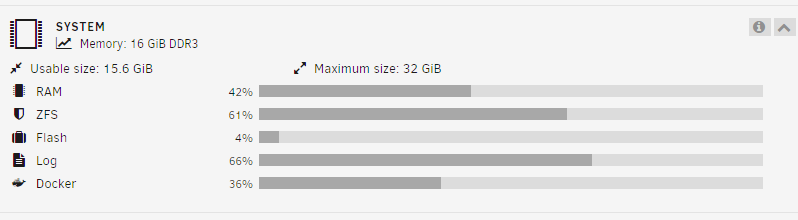
0 /var/log/pwfail 0 /var/log/swtpm 880K /var/log/samba 0 /var/log/plugins 12K /var/log/pkgtools 60M /var/log/nginx 0 /var/log/nfsd 0 /var/log/libvirt 67M /var/log At the same time as the results above: du -sh /var/log/* 4.0K /var/log/apcupsd.events 0 /var/log/btmp 0 /var/log/cron 0 /var/log/debug 4.0K /var/log/dhcplog 72K /var/log/dmesg 52K /var/log/docker.log 0 /var/log/faillog 4.0K /var/log/lastlog 0 /var/log/libvirt 0 /var/log/maillog 0 /var/log/mcelog 0 /var/log/messages 0 /var/log/nfsd 60M /var/log/nginx 0 /var/log/packages 12K /var/log/pkgtools 0 /var/log/plugins 0 /var/log/pwfail 0 /var/log/removed_packages 0 /var/log/removed_scripts 0 /var/log/removed_uninstall_scripts 880K /var/log/samba 0 /var/log/scripts 0 /var/log/secure 0 /var/log/setup 0 /var/log/spooler 0 /var/log/swtpm 5.8M /var/log/syslog 0 /var/log/vfio-pci 0 /var/log/vfio-pci-errors 16K /var/log/wtmp And: Thanks for your help!
-
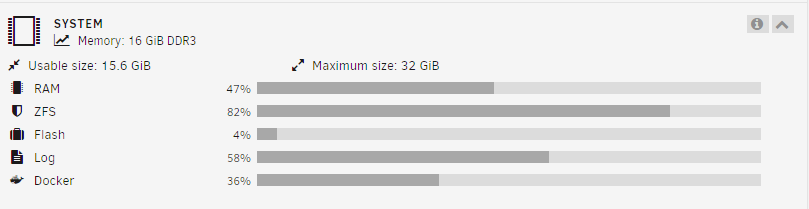
Seeing this problem now. Similar to the last post, I was also fine running 6.12.3 but updated to 6.12.4 a few weeks ago. Ran this: > /var/log/syslog /etc/rc.d/rc.syslog stop /etc/rc.d/rc.syslog start It cleared the log file and the web console log is working. But I noticed that the Log utilization bar on the Dashboard isnt reflecting the new empty syslog. uptime: 06:54:26 up 6 days, 18:53, 1 user, load average: 2.18, 2.11, 2.17
-
I would also find this interesting. Like putting a nvme nfs raid0 as primary and a raidz2 pool as secondary. Finally, adding the md array as tertiary. I dont know what the multiple zfs pool overhead would be, but I like this idea.
-
Just updated from 6.11.3 to 6.12.4 and so far so good! Previously plagued by crashing problems on 6.11.3, that always happened minutes after the appdata backup service would run successfully. When I heard news that it was related to macvlan, I changed over to ipvlan and it solved my crashing problem with an uptime of over 7 months after that. Now looking forward to learning ZFS. Keep up the good work unraid team!
-
Upgrade from 6.10.3 to 6.11.3 was successful without issues. I dont use VMs but have several macvlan dockers, fwiw.


