





Everything posted by echocabinet
-
What is the recommended workflow for upgrading the unraid template? I have been using one that I made long before the pi-hole official image and want to switch over to the supported one.
-
Ok this is not the exact link I was wanting to find from ChuckPa, but this is a recent comment from him: ^ https://forums.plex.tv/t/where-to-obtain-pms-build-4479/715338/6 Ah, I think I found the same info on the dockerhub readme: ^ https://hub.docker.com/r/plexinc/pms-docker#Tags As I understand that, the containers that launch with from the plexpass, public (and I speculate the :Beta tag also) will fetch/download the most current server binary in their channel and will update. Basically those tags are self patching compared to the static tagged images, to included the ":latest" tag, which are locked into a specific stable version.
-
Its worth noting that with plexinc/pms-docker:plexpass, I read on the plex forums that this image builds itself when the container is launched. So it will track with latest upon first launch of the container. If I find the source for this, I will edit this post.
-
I will also add I was able to get docker-compose installed with the following: pip3 install docker-compose But I have no idea how unraid stores these nor if it will persist between reboots. Also, I still cant seem to uninstall python-2.7.17-x86_64-2.txz from within the Nerd Pack.
-
On mine, its not letting me uninstall python2, and pip install docker-compose errors out on the same spot: subprocess32 I dont have anything using python myself. Any suggestions how to uninstall python2? (besides just turning the toggle to OFF and hitting apply)
-
You need setuptools Thank you. And done. Sensing the pattern, I searched for json after I saw the following: Traceback (most recent call last): File "/usr/bin/docker-compose", line 6, in <module> from pkg_resources import load_entry_point File "/usr/lib64/python3.8/site-packages/pkg_resources/__init__.py", line 3252, in <module> def _initialize_master_working_set(): File "/usr/lib64/python3.8/site-packages/pkg_resources/__init__.py", line 3235, in _call_aside f(*args, **kwargs) File "/usr/lib64/python3.8/site-packages/pkg_resources/__init__.py", line 3264, in _initialize_master_working_set working_set = WorkingSet._build_master() File "/usr/lib64/python3.8/site-packages/pkg_resources/__init__.py", line 583, in _build_master ws.require(__requires__) File "/usr/lib64/python3.8/site-packages/pkg_resources/__init__.py", line 900, in require needed = self.resolve(parse_requirements(requirements)) File "/usr/lib64/python3.8/site-packages/pkg_resources/__init__.py", line 786, in resolve raise DistributionNotFound(req, requirers) pkg_resources.DistributionNotFound: The 'jsonschema<4,>=2.5.1' distribution was not found and is required by docker-compose No dice. Have any advice how I can determine these dependencies and root them out? Thank you again.
-
Having trouble after I updated docker-compose. First it threw an error about needing python3, so i installed it next to 2.7. Now it is stating: Traceback (most recent call last): File "/usr/bin/docker-compose", line 6, in <module> from pkg_resources import load_entry_point ModuleNotFoundError: No module named 'pkg_resources' I did remove/reinstall without success. Not positive of my previous version but here is the package that is failing: docker-compose-1.25.4-x86_64-1cf.txz Any suggestions? Thank you!
-
I will join in on having this issue. 6x Axiom 120gb SSD in btrfs raid10 Performance has never been great, but I was able to confirm that docker sab extracting and downloading to the cache pool destroys performance and causes the server to lag horribly. Netdata pops with the warning: I am curious if this is any way related to this other issue, which is being worked on for 6.8rc: Btw, kudos to johnnie.black reporting and hounding that one to resolution. For this one though, I will keep watching and maybe this can get some attention in the future.

-
I am also having this same issue. Not sure when it started as I rarely restart unraid or the pihole container (pihole/pihole:latest btw). But for me, if I do restart unraid, the pihole docker stops with the "DNS resolution is currently unavailable" in the docker logs. This is with the "Autostart" set to On in the GUI, for the pihole container. Starting the failed pihole container does work though, and it stays working until I reboot.
-
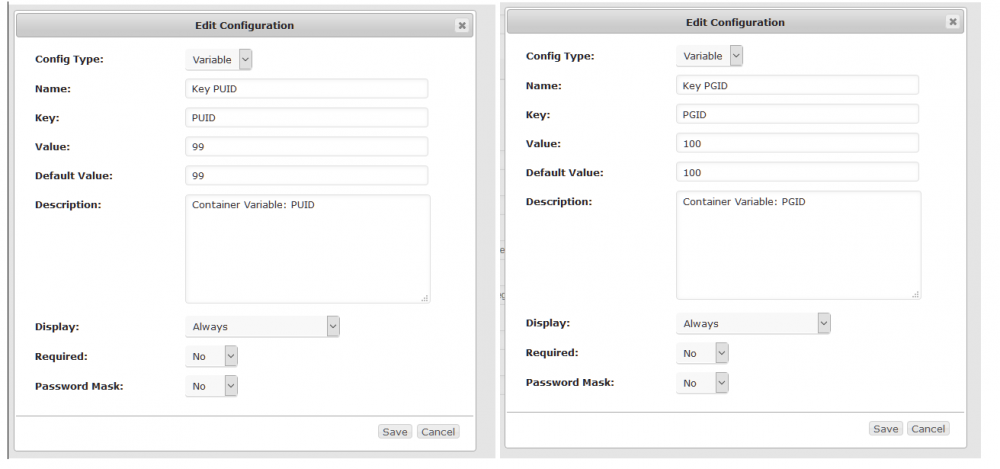
Ok, at the suggestion of @SteelzFinest i went back and reread the thread. This is day 5 of my deep dive and I have finally tracked down the combo to keep the container running. TL;DR: Unraid Template upgraded from 3.0 and was causing problems. Change template VARIABLE (Key 7) from: br0 to eth0 Add Container Variables: PUID=99 PGID=100 _________________________ Chief Complaint: After upgrading from Pihole 3.x to latest, the web service is inaccessible and the container stops without restarting. The container stays running for approx 90 seconds. Problem persist even after a fresh rebuild, not using the previous docker image or anything saved in a docker volume. Scope: unraid pihole container running DNS only. DHCP is handled by an asus router. Observed symptoms: - Permission issues from the container with the docker volume - Inside the container, br0 is missing. - expected behavior with same physical network config is drastically different with Pihole 4.x (latest). Specifically, the previous config would resolve same network hostnames, even though "Never forward non-FQDNs" and "Never forward reverse lookups for private IP ranges" were both check on the previous version. - web server not responding - container crashes and fails to restart Example crash log: Starting pihole-FTL (no-daemon) Starting crond Starting lighttpd [services.d] done. /opt/pihole/gravity.sh: line 637: /etc/pihole/list.preEventHorizon: No such file or directory Stopping pihole-FTL Starting pihole-FTL (no-daemon) Stopping pihole-FTL Starting pihole-FTL (no-daemon) /opt/pihole/gravity.sh: line 637: /etc/pihole/list.preEventHorizon: No such file or directory comm: /etc/pihole/list.preEventHorizon: No such file or directory Stopping pihole-FTL Starting pihole-FTL (no-daemon) Stopping pihole-FTL Starting pihole-FTL (no-daemon) comm: file 1 is not in sorted order comm: file 1 is not in sorted order Stopping pihole-FTL Starting pihole-FTL (no-daemon) Detailed Workaround: With the template interface set to br0, I managed to restart the webservice by entering the containers and running the following: docker exec -it pihole bash Then, changing the default resolver config away from the default of 127.0.0.11 by running the following: cd /etc \ && find ${BASIN_SPIDER_CONFIG_PATH} -type f -name "resolv.conf" | xargs -L1 bash -c 'sed "s/nameserver 127.0.0.11/nameserver 127.0.0.1/g" $1 > /tmp/.intermediate-file-2431; cp /tmp/.intermediate-file-2431 $1;' -- \ && cat /etc/resolv.conf Since the container doesn't have any editors and running sed by itself revealed a file lock of some variety, I scrapped the above together based on some stack exchange suggestions. The container now stayed alive long enough that I was able to dig into the networking issue. My unraid template was assigning br0, which I eventually found was missing from inside the container. Changing the template Key 7 (Container Variable: Interface) to eth0 revealed through testing that the need to rename the default resolver was no longer needed. But the container was still crashing. NOTE: The Network Type is still Custom: br0 for me. Adding the respective container variables to the template appears to have solved the trick. Add Container Variables: PUID=99 PGID=100 See attached screencap. If this works for anyone else, let me know and I will share it on github. - semtex
-
Fixed this today by switching the docker volumes to /mnt/cache/... instead of /mnt/user/..... I plan on researching/submitting a feature change to get this tribal knowledge worked out of the forms and into the OS/Docker Templates/Help somehow. But thanks again to the people who posted this solution earlier in the thread.


